
1. Inleiding
The AUTOOL BT360 is a 12V battery load tester designed to analyze the health status of automotive batteries. It performs battery tests, cranking tests, and charging system tests, providing accurate results for various battery types including regular flooded, AGM flat plate, AGM spiral, and Gel batteries. This manual provides detailed instructions for the proper use and maintenance of your BT360 tester.
2. Veiligheidsinligting
Always observe the following safety precautions when using the AUTOOL BT360 battery tester:
- Wear appropriate eye protection and protective clothing when working near batteries.
- Maak seker dat die voertuig in 'n goed geventileerde area is.
- Avoid sparks, flames, and smoking near the battery, as batteries can produce explosive gases.
- Do not touch hot engine parts or moving components.
- Keep the tester and cables away from water, oil, and grease.
- Maak seker dat die battery klamps are securely connected to the correct terminals (red to positive, black to negative).
- If battery acid comes into contact with skin or eyes, flush immediately with plenty of water and seek medical attention.
3. Produk verbyview
3.1 Komponente
The AUTOOL BT360 package typically includes:
- AUTOOL BT360 Main Unit
- Integrated Testing Cables with Alligator Clamps (Rooi vir Positief, Swart vir Negatief)
- Gebruikershandleiding (hierdie dokument)
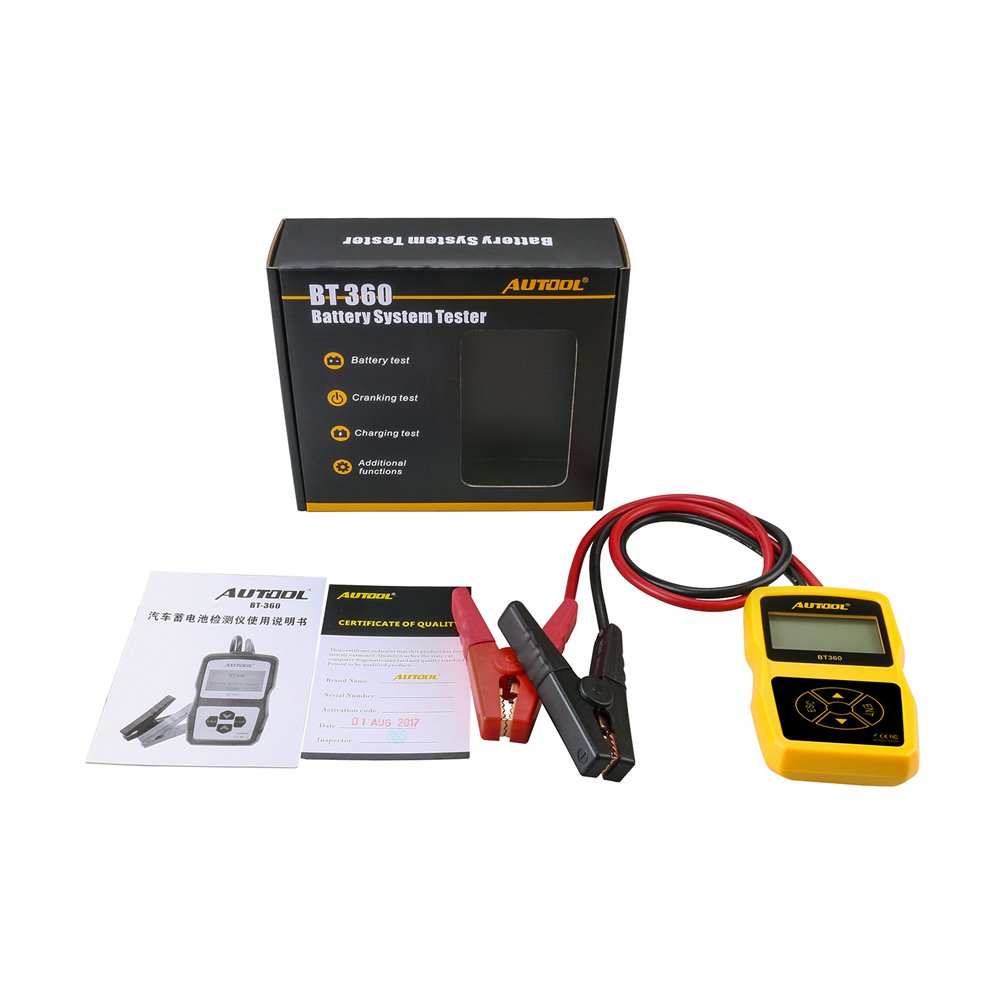
Image 3.1: AUTOOL BT360 Battery Tester and its included accessories.
3.2 Tester Unit
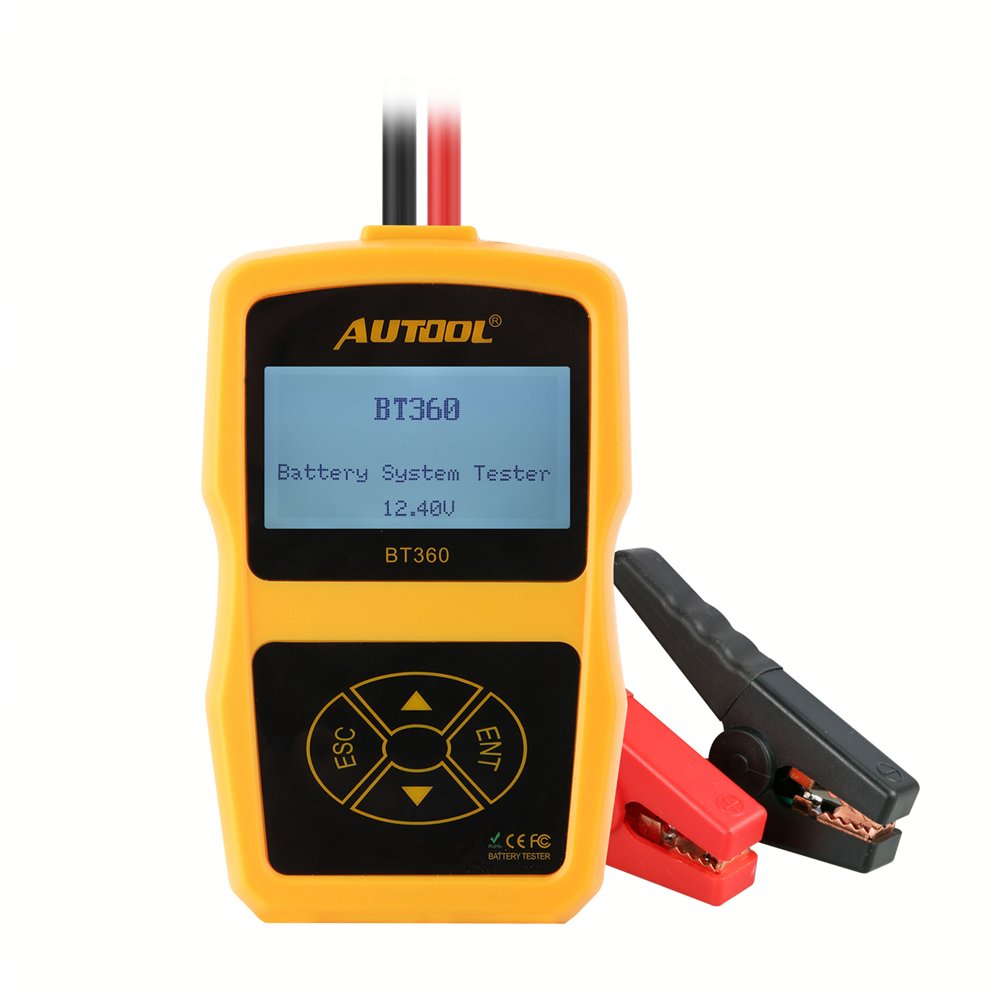
Beeld 3.2: Voorkant view of the AUTOOL BT360 Battery Tester, showing the display and control buttons.
The main unit features an LCD display and four control buttons:
- ESC: Escape/Back button.
- INT: Enter/Confirm button.
- Op/af pyle: Navigation buttons for menu selection.
3.3 Sleutelkenmerke
- Voer batterytoets, aanskakeltoets en laaitoets uit.
- Supports multiple battery types: Regular Flooded, AGM Flat Plate, AGM Spiral, and Gel.
- Wide CCA testing range: 100-2400 CCA.
- Multi-language support for user interface.

Image 3.3: The AUTOOL BT360 supports multiple languages for its user interface.
4. Spesifikasies

Image 4.1: Physical dimensions of the AUTOOL BT360 Battery Tester.
| Parameter | Waarde |
|---|---|
| Model | BT360 |
| Stelsel Voltage | 12 Volt |
| Invoer Voltage Reeks | 9V ~ 15V |
| CCA reeks | 100-2400 CCA |
| Bedryfstemperatuur | -20°C tot 50°C |
| Ondersteunde batterytipes | Regular Flooded, AGM Flat Plate, AGM Spiral, Gel |
| Afmetings (L x B x H) | 18.8 x 16.76 x 5.84 cm |
| Gewig | 320 g |
| UPC | 602860607704 |
4.1 Supported Starting Power Supply Standards

Image 4.2: Table showing various starting power supply standards supported by the BT360.
| Standaard | Reeks |
|---|---|
| CCA | 100-2400 |
| JIS | 26A17-245H52 |
| DIN | 100-2200 |
| OVK | 100-2200 |
| EN | 100-1400 |
| SAE | 100-2400 |
| GB | 30-220 Ah |
| BCI | 100-2400 |
| MCA | 100-2400 |
| CA | 100-2400 |
5. Opstelling
5.1 Uitpak
Carefully remove the AUTOOL BT360 tester and all accessories from the packaging. Inspect for any signs of damage. If any components are missing or damaged, contact customer support.
5.2 Connecting the Tester
The BT360 is powered directly by the vehicle's 12V battery. Follow these steps to connect the tester:
- Maak seker dat die voertuig se aansitter af is en alle bykomstighede afgeskakel is.
- Koppel die rooi positiewe (+) klamp to the positive (+) terminal of the 12V battery.
- Koppel die swart negatiewe (-) clamp to the negative (-) terminal of the 12V battery.
- Once connected, the tester will power on automatically.

Image 5.1: The AUTOOL BT360 tester with its integrated testing cables and clamps.

Image 5.2: The BT360 tester connected to a vehicle battery for testing.
6. Bedryfsinstruksies
After connecting the tester, the main menu will appear. Use the Up/Down arrow buttons to navigate through options and the ENT button to confirm selections. Use the ESC button to go back to the previous screen.

Image 6.1: Various display screens of the AUTOOL BT360, illustrating menu navigation and test result displays.
6.1 Battery toets
This function evaluates the overall health of the battery.
- Kies uit die hoofkieslys Battery toets and press ENT.
- Kies Battery ligging: Choose 'In-Vehicle' if the battery is installed in the car, or 'Out-of-Vehicle' if it's removed. Press ENT.
- Kies Battery Tipe: Choose the type that matches your battery (e.g., Regular Flooded, AGM Flat Plate, AGM Spiral, Gel). Press ENT.
- Kies Toets Standaard: Choose the standard specified on your battery (e.g., CCA, JIS, DIN). Press ENT.
- Stel Batterygradering: Input the CCA value (or equivalent rating) as indicated on your battery label. Use arrow buttons to adjust the value and ENT to confirm.
- Die toetser sal die analise uitvoer en resultate soos Gesondheidstoestand (SOH), Ladingtoestand (SOC), volume vertoon.tage, internal resistance, and a recommendation (e.g., 'Good Battery', 'Charge', 'Replace').
6.2 Slingertoets
This test analyzes the vehicle's starting system, including the starter motor.
- Kies uit die hoofkieslys Slingertoets and press ENT.
- Follow the on-screen prompts to start the vehicle. The tester will monitor the battery voltage tydens slinger.
- Once the test is complete, the display will show cranking voltage, cranking time, and a diagnosis of the starting system's performance.
6.3 Laaitoets
This test evaluates the vehicle's charging system, including the alternator and regulator.
- Kies uit die hoofkieslys Laai toets and press ENT.
- Follow the on-screen prompts to rev the engine to a specified RPM (e.g., 2500 RPM for 5 seconds).
- The tester will measure the charging voltage under load and no-load conditions.
- The results will indicate the charging system's output, ripple voltage, and overall health (e.g., 'Good', 'Low Output', 'High Output').
7. Onderhoud
To ensure the longevity and accuracy of your AUTOOL BT360 tester:
- Maak die toetser skoon met 'n sagte, droë lap. Moenie skuurmiddels of oplosmiddels gebruik nie.
- Hou die battery skoonampis skoon en vry van korrosie.
- Bêre die toetser op 'n droë, koel plek, weg van direkte sonlig en uiterste temperature.
- Vermy om die toestel te laat val of om dit aan sterk impakte te onderwerp.
8. Probleemoplossing
If you encounter issues with your AUTOOL BT360, refer to the following common problems and solutions:
| Probleem | Moontlike oorsaak | Oplossing |
|---|---|---|
| Toetser skakel nie aan nie. | Los verbinding; Batteryvolumetage too low; Faulty cables. | Verseker clamps are securely connected. Check battery voltage (must be above 9V). Inspect cables for damage. |
| Onakkurate lesings. | Incorrect battery type/standard/rating selected; Corroded battery terminals. | Verify selected parameters match the battery. Clean battery terminals. |
| Foutboodskap vertoon. | Spesifieke fouttoestand. | Refer to the specific error code (if any) or re-run the test ensuring all steps are followed correctly. |
| Die skerm is leeg of gevries. | Software glitch; Power interruption. | Disconnect and reconnect the tester to reset. If problem persists, contact support. |
9. Waarborg en Ondersteuning
For warranty information and technical support, please refer to the documentation provided with your purchase or visit the official AUTOOL webwebwerf. Bewaar u aankoopbewys as bewys van aankoop vir waarborgeise.
Vervaardiger: AUTOOL
Eerste datum beskikbaar: 27 Oktober 2017