
Inleiding
This manual provides comprehensive instructions for the proper setup, operation, and maintenance of your TRACEABLE 3127 Digital Tally Counter. This device is designed for reliable 5-digit counting in various applications, featuring a bench-mounting design for stable placement.
Produk verbyview
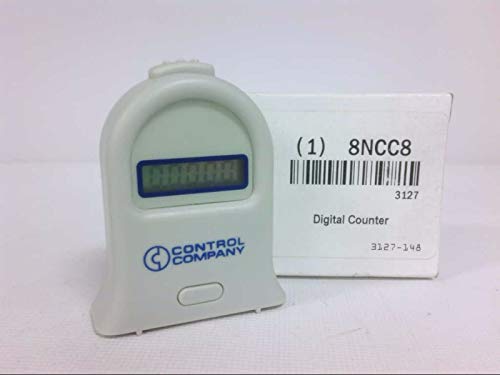
Figuur 1: The TRACEABLE 3127 Digital Tally Counter. This image displays the TRACEABLE 3127 Digital Tally Counter, a compact, light-colored device with a digital display and a single button. The device features the 'CONTROL COMPANY' logo. It is shown next to its product packaging, which indicates 'Digital Counter', model number '3127', and additional identifiers '1 8NCC8' and '3127-148'.
The TRACEABLE 3127 is a robust digital tally counter, ideal for applications requiring precise counting. Its 5-digit display ensures clear readability, and the bench-mounting design provides stability during use. The device is manufactured by TRACEABLE.
Opstelling
- Uitpak: Carefully remove the tally counter from its packaging. Inspect the device for any signs of damage.
- Plasing: Position the counter on a stable, flat surface suitable for bench mounting. Ensure the display is clearly visible and the operating button is easily accessible.
- Krag (indien van toepassing): While specific battery information is not provided, most digital counters of this type operate on small button-cell batteries. If the display is not active, check for a battery compartment and install new batteries according to polarity markings.
Bedryfsinstruksies
- Krag aan: The device typically powers on automatically when a button is pressed or when batteries are installed.
- Incrementing the Count: Press the large button located on the front of the device to increment the count by one. Each press will advance the 5-digit display.
- Resetting the Count: To reset the counter to zero, locate the smaller, recessed reset button (often on the side or bottom, or a long press of the main button). Use a pointed object (like a pen tip) if it is a recessed button, or follow specific instructions if a long press of the main button is required. The display will return to '00000'.
- Maximum Count: The counter can display up to 99999. After reaching this number, it will typically roll over to '00000' upon the next increment.
Onderhoud
- Skoonmaak: Wipe the counter with a soft, dry cloth. For stubborn dirt, a slightly damp 'n Lap kan gebruik word, gevolg deur onmiddellike droogmaak. Moenie skuurmiddels of oplosmiddels gebruik nie.
- Battery vervanging: If the display becomes dim or unresponsive, replace the batteries. Refer to the battery compartment for the correct battery type and polarity. Dispose of old batteries responsibly.
- Berging: Bêre die toestel op 'n koel, droë plek weg van direkte sonlig en uiterste temperature wanneer dit nie vir lang tye gebruik word nie.
Probleemoplossing
- Die vertoning is leeg: Kontroleer batteryinstallasie en maak seker dat batterye vars is.
- Counter not incrementing: Ensure the button is being pressed firmly and completely. If the issue persists, the internal mechanism may require service.
- Counter not resetting: Ensure the reset procedure (e.g., pressing the recessed button or long-pressing the main button) is followed correctly.
Spesifikasies
| Kenmerk | Spesifikasie |
|---|---|
| Modelnommer | 3127 |
| Handelsmerk | Naspoorbaar |
| Tik | Digital Tally Counter |
| Syferkapasiteit | 5 syfers |
| Montering | Bevestiging van die bank |
| Item gewig | 1.12 onse |
| Pakket afmetings | 1 x 1 x 1 duim |
| Vervaardiger | Naspoorbaar |
| ASIN | B076C8RWK7 |
Waarborg en Ondersteuning
For warranty information, please refer to the documentation included with your product or contact TRACEABLE customer support directly. Specific warranty terms may vary.
For technical assistance or further inquiries, please contact the manufacturer or your authorized dealer. Keep your model number (3127) and purchase date available when seeking support.