
Inleiding
The MICMOL Aqua Air AA-900 Planted Smart LED Aquarium Light is designed for freshwater planted tanks, offering a full-spectrum lighting solution with programmable features. This manual provides essential information for the proper installation, operation, and maintenance of your new aquarium light.
Pakketinhoud
Verifieer dat al die items wat hieronder gelys word, in u pakket teenwoordig is:
- 1 x G2 Aqua Air 900 Lighting Fixture (AA-900 / 72)
- 1 x Smart Controller
- 1 x Super Bracket Set
- 1 x US Standard Power Cord
- 1 x kragadapter
- 1 x Gereedskapstel
- 1 x Printed Instructions (this manual)
Produk Kenmerke
- Thin Unibody Design: Features an 11mm super thin, all-aluminum modeled body.
- Volle Spektrum LED's: Utilizes high-quality 0.5 watt SMD LEDs, providing a full spectrum suitable for planted tanks.
- Slim beheerder: Includes a controller with programmable timer, sunrise, sunset, and special effects.
- Verstelbare hakies: Equipped with adjustable super brackets suitable for rimmed and rimless aquariums.
- Waterbestand: Designed with a water-resistant cooling system.
- Sertifiserings: UL approval power supply ensures safety and efficiency.
Opstelling en installasie
Follow these steps to properly install your MICMOL Aqua Air AA-900 light:
1. Bracket Assembly and Mounting
The adjustable super brackets allow for flexible mounting on various tank sizes. The brackets are designed to fit tanks between 885mm (35 inches) and 1385mm (54 inches) in length.

Prent: Diagram illustrating the dimensions of the light fixture and its adjustable mounting brackets. The fixture measures 33.8 inches in length, with brackets extending to accommodate tanks from 35 to 46 inches. The fixture itself is 0.4 inches thick.
- Attach the super brackets to both ends of the lighting fixture using the provided tool set.
- Adjust the bracket length to match the width of your aquarium. Ensure the light fixture is centered over the tank.
- Carefully place the assembled light fixture onto the edges of your aquarium. Ensure it is stable and securely seated.

Prent: The MICMOL Aqua Air AA-900 light fixture mounted on top of a 48-inch aquarium, demonstrating its fit and placement.
2. Kragverbinding
- Connect the smart controller to the lighting fixture.
- Connect the power adapter to the smart controller.
- Plug the US standard power cord into the power adapter, then into a suitable electrical outlet.
- Maak seker dat alle verbindings veilig is voordat die toestel aangeskakel word.
Operating Instructions (Smart Controller)
The Aqua Air smart controller provides comprehensive control over your lighting system. It features a touch interface for easy navigation.
Beheerfunksies:
- Horlosie: Set the current time for accurate timer functions.
- Afteller: Program up to 6 timer points to adjust light intensity throughout the day.
- LED Channels: The light features 3 independent LED channels that can be set separately:
- Channel 1 (CN 1): Wit LED's
- Channel 2 (CN 2): White and Royal Blue LEDs
- Channel 3 (CN 3): Special LEDs (UV, Green, Red, Warm White, Blue)
- Spesiale effekte: Simulate natural phenomena such as sunrise, sunset, and thunderstorms.
- Demo-modus: Allows you to quickly preview all settings and effects in approximately 1 minute.
- Fabrieksinstelling: Resets all settings to their default factory configuration.
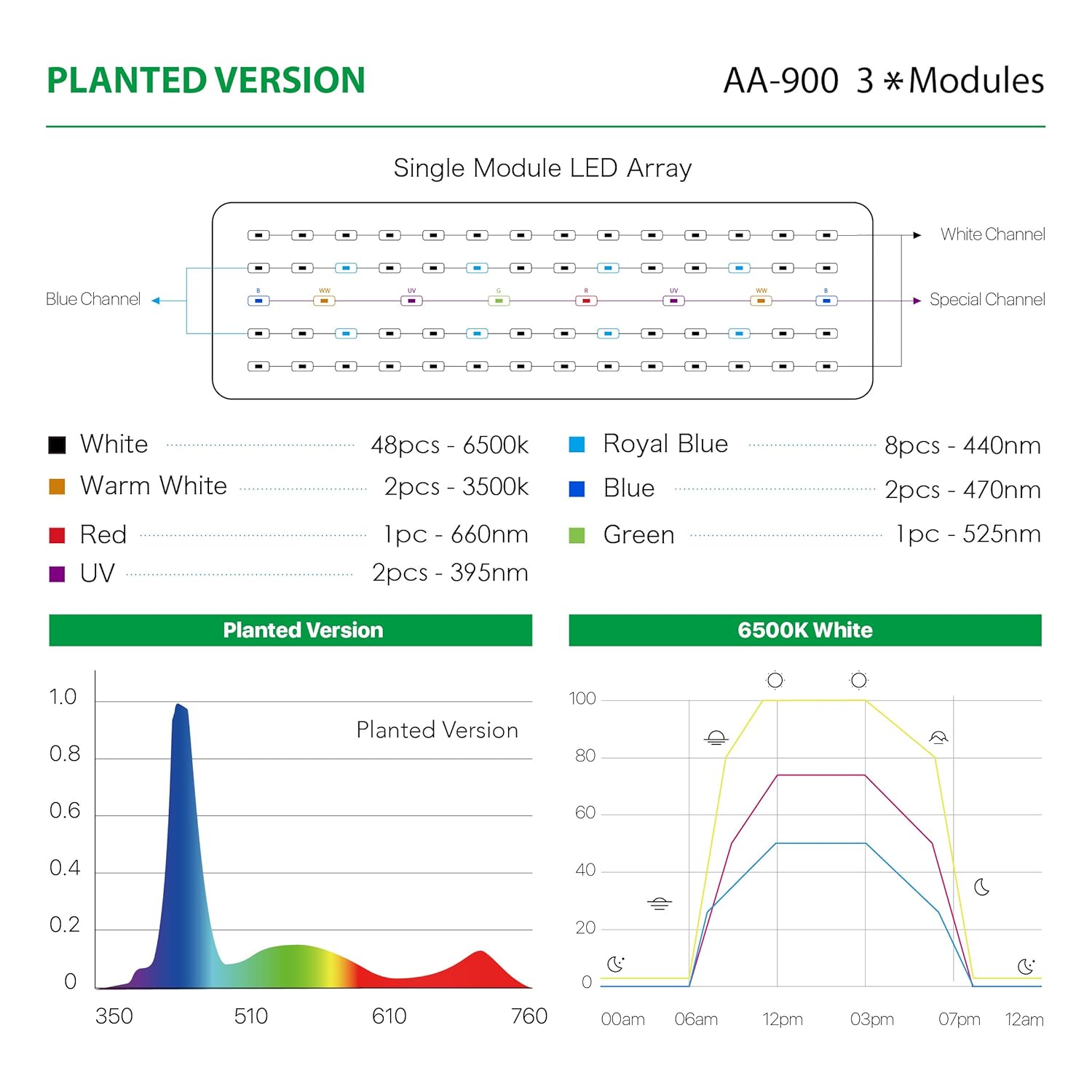
Prent: Detailed diagram illustrating the LED configuration for the Planted version of the AA-900, including the distribution of White, Warm White, Red, UV, Royal Blue, Blue, and Green LEDs across three channels. A spectral graph shows the light output, and a daily intensity graph demonstrates programmable sunrise/sunset cycles.
Onderhoud
The MICMOL Aqua Air AA-900 features a water-resistant cooling system, minimizing the need for extensive maintenance. To ensure optimal performance and longevity:
- Regularly wipe the exterior of the light fixture with a soft, damp cloth to remove dust and water spots.
- Ensure the cooling vents are not obstructed to allow for proper heat dissipation.
- Do not submerge the light fixture or smart controller in water.
- Disconnect power before performing any cleaning or maintenance.
Probleemoplossing
If you encounter issues with your MICMOL Aqua Air AA-900 light, consider the following:
- Lig gaan nie aan nie: Check all power connections, including the power cord, adapter, and controller. Ensure the outlet is functional.
- Incorrect time or program: Verify the clock setting on the smart controller. If issues persist, try using the "Factory Reset" option to restore default settings and then reprogram.
- Inconsistent light output: Ensure the LED channels are correctly programmed. Check for any physical obstructions on the LED surface.
For persistent issues not resolved by these steps, please refer to the Warranty and Support section for further assistance.
Spesifikasies
| Kenmerk | Detail |
|---|---|
| Modelnommer | AA-900 (G2-AA-900-P) |
| Krag | 72 W |
| Afmetings (Beslag) | 860 x 126 x 11mm (33.8 x XUMX x 4.96 duim) |
| Gewig | 2.5 kg (5.5 lbs) |
| Materiaal | Aluminium |
| LED Configuration (Planted Version) |
|
| Bracket Dimensions (Adjustable) | Min Tank: 885mm (35 inches), Max Tank: 1385mm (54 inches) |
| Beheer metode | Touch (Smart Controller) |
| Spesiale kenmerke | Full Spectrum, Programmable Timer, Sunrise/Sunset, Water-resistant cooling system |
| Kragtoevoer | UL Goedgekeur |
Waarborg en Ondersteuning
The MICMOL Aqua Air AA-900 LED Aquarium Light comes with a Twee jaar waarborg vanaf die aankoopdatum. Hierdie waarborg dek vervaardigingsdefekte en wanfunksies onder normale gebruik.
For warranty claims, technical support, or any inquiries regarding your product, please contact MICMOL customer service through their official webwebwerf of die kleinhandelaar waar die produk gekoop is. Bewaar asseblief u bewys van aankoop vir waarborgvalidering.