
Inleiding
Dankie vir die aankoopasing the POWERFLEX PF-AZ01-Z003 Portable Bluetooth Speaker. This device is designed to provide high-quality audio playback and hands-free calling capabilities. Please read this manual carefully before using the speaker to ensure proper operation and to maximize its performance.

Prent: The POWERFLEX PF-AZ01-Z003 Portable Bluetooth Speaker is shown from an angled perspective, highlighting its black finish, front grille, and the touch-sensitive control panel on its top surface, which features illuminated volume controls.
Pakketinhoud
Merk asseblief die blokkie vir die volgende items:
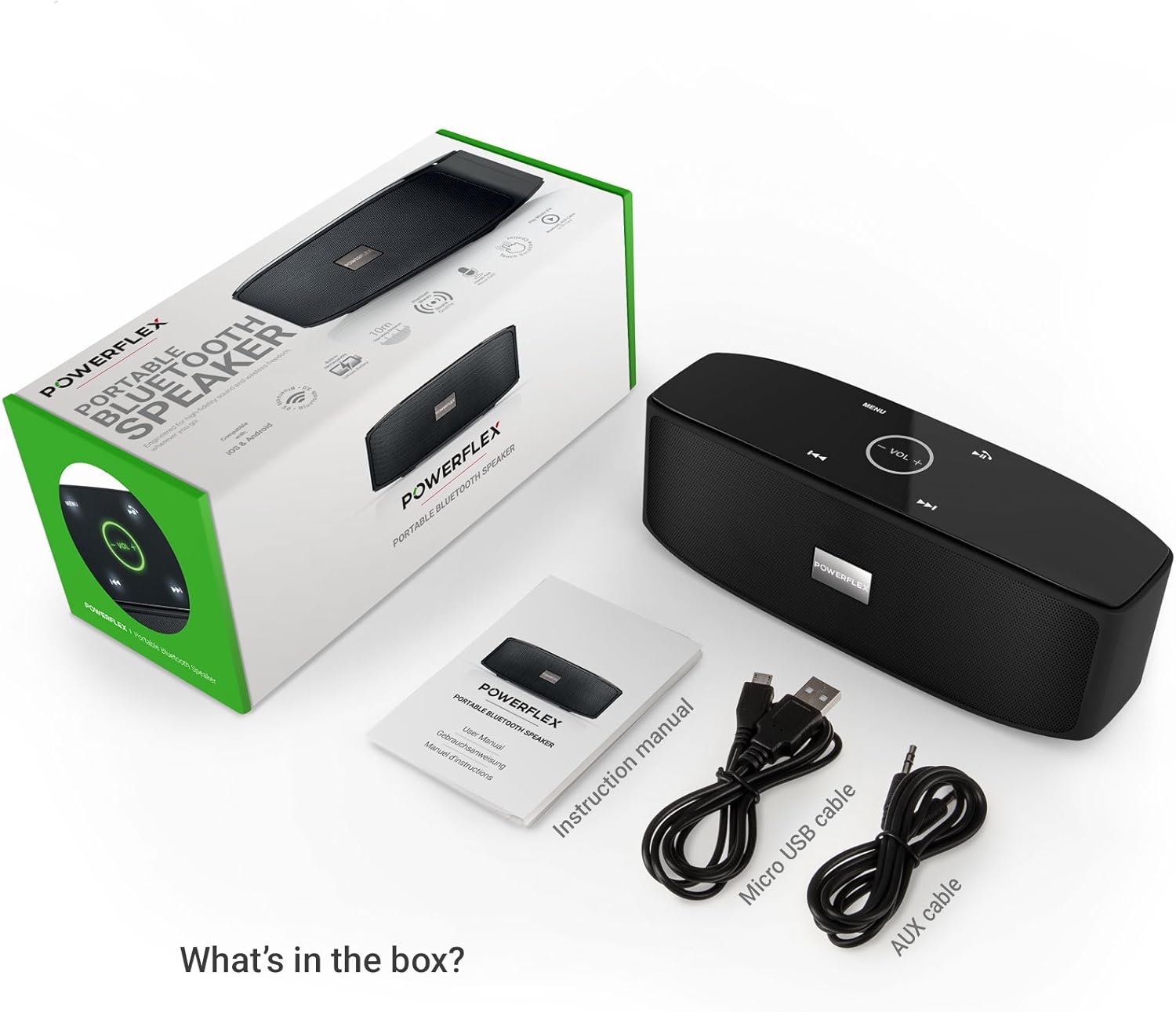
- POWERFLEX PF-AZ01-Z003 Portable Bluetooth Speaker
- Mikro USB-laaikabel
- AUX kabel
- Gebruikershandleiding

Prent: This image displays the POWERFLEX PF-AZ01-Z003 Portable Bluetooth Speaker alongside its accessories: a Micro USB charging cable, an AUX cable, and the instruction manual. These are the items typically found inside the product packaging.
Kenmerke verbyview
The POWERFLEX PF-AZ01-Z003 speaker offers several key features for an enhanced audio experience:
- Uitstekende oudio: Equipped with dual five-watt drivers for clear highs, detailed mid-ranges, and deep bass.
- Bluetooth 3.0-verbinding: Provides a stable wireless connection up to 10 meters (33 feet).
- Handvrye oproepe: Integrated microphone allows for clear phone calls.
- Veelvuldige afspeelopsies: Supports Bluetooth, AUX input, and TF (MicroSD) card playback.
- Raakkontroles: Intuitive touch-sensitive panel for easy music and call management.
- Draagbare ontwerp: Compact build for easy transport.

Prent: This image presents a cutaway view of the POWERFLEX PF-AZ01-Z003 speaker, revealing its internal components, specifically the dual five-watt drivers. The visual emphasizes the speaker's design for delivering vibrant highs, detailed mid-ranges, and deep bass for true stereo sound.

Prent: This image showcases the POWERFLEX PF-AZ01-Z003 speaker positioned in front of a collection of diverse iOS and Android Bluetooth-enabled devices, including smartphones and tablets. The arrangement visually confirms the speaker's broad compatibility with various mobile operating systems.

Prent: This image demonstrates the compact design of the POWERFLEX PF-AZ01-Z003 speaker, showing it being easily placed into a backpack. The accompanying text highlights its portability and specific dimensions (190 x 58 x 70mm), indicating it fits conveniently into bags.
Opstelling
1. Laai die luidspreker op
The speaker is powered by an internal 1800 mAh rechargeable battery. Before first use, fully charge the speaker.
- Connect the Micro USB charging cable to the DC5V port on the speaker.
- Koppel die ander kant van die USB-kabel aan 'n USB-kragadapter (nie ingesluit nie) of 'n rekenaar se USB-poort.
- The charging indicator light will illuminate. Once fully charged, the light will change color or turn off (refer to LED indicator section in the full manual for details).
2. Skakel aan/af
To power on the speaker, slide the ON/OFF switch to the 'ON' position. To power off, slide the switch to the 'OFF' position.
Prent: Hierdie beeld bied 'n gedetailleerde view of the speaker's rear panel, highlighting the physical ON/OFF switch, the DC5V port for charging, the AUX input jack for wired connections, and the TF (MicroSD) card slot for direct media playback.
Bedryfsinstruksies
1. Bluetooth-koppeling
- Ensure the speaker is powered on and within 10 meters (33 feet) of your Bluetooth-enabled device.
- The speaker will automatically enter Bluetooth pairing mode, indicated by a flashing LED light (refer to LED indicator section in the full manual).
- Gaan na Bluetooth-instellings op jou toestel (slimfoon, tablet, ens.) en soek vir beskikbare toestelle.
- Select "PF-AZ01-Z003" from the list.
- Once paired, the speaker will emit an audible confirmation, and the LED light will become solid.

Prent: This image demonstrates the speaker's Bluetooth connectivity, showing a smartphone wirelessly streaming music to the POWERFLEX PF-AZ01-Z003. Blue concentric circles emanate from the phone towards the speaker, symbolizing the wireless connection, and text indicates playback from up to 10 meters.
2. Musiek speel
Once connected via Bluetooth, you can play music from your device. The speaker also supports AUX cable and TF card playback.
- Bluetooth: Play music directly from your paired device.
- AUX-invoer: Koppel 'n oudiotoestel met die meegeleverde 3.5 mm AUX-kabel aan die AUX-poort. Die luidspreker sal outomaties na AUX-modus oorskakel.
- TF kaart: Plaas 'n TF (MicroSD) kaart met MP3 in files in die TF-kaartgleuf. Die luidspreker sal outomaties musiek vanaf die kaart begin speel.
3. Raak Kontroles
The speaker features touch-sensitive controls on its top panel for easy operation.
- Speel/pouse: Tap the Play/Pause button (usually indicated by a triangle or two vertical bars).
- Volume op/af: Tap the '+' or '-' buttons to adjust the volume.
- Volgende snit: Tap the '>>|' button.
- Vorige snit: Tap the '|<<' button.
- Modus/kieslys: Tap the 'MENU' button to switch between input modes (Bluetooth, AUX, TF).

Prent: This image shows a hand interacting with the touch-sensitive controls on the top surface of the POWERFLEX PF-AZ01-Z003 speaker. A finger is pressing the 'VOL +' button, which is illuminated in green, while a smartphone displaying music playback is visible in the foreground, emphasizing the ease of control.
4. Handvrye oproepe
The speaker includes a built-in microphone, allowing you to answer phone calls when connected via Bluetooth.
- Wanneer 'n oproep inkom, sal die musiek pouseer.
- Tap the Play/Pause button to answer the call.
- Praat in die luidspreker.
- Tap the Play/Pause button again to end the call.

Prent: This image depicts a smartphone displaying an incoming call, positioned next to the POWERFLEX PF-AZ01-Z003 speaker. The text "Make hands free calls with the built-in microphone" is prominently displayed, indicating the speaker's capability for hands-free communication.
Onderhoud
To ensure the longevity and optimal performance of your POWERFLEX PF-AZ01-Z003 speaker, follow these maintenance guidelines:
- Skoonmaak: Gebruik 'n sagte, droë lap om die luidspreker se oppervlak af te vee. Moenie skuurmiddels, alkohol of chemiese oplosmiddels gebruik nie.
- Berging: Bêre die luidspreker op 'n koel, droë plek weg van direkte sonlig en uiterste temperature.
- Waterblootstelling: Hierdie luidspreker is nie waterdig nie. Vermy blootstelling aan water of oormatige vog.
- Batterysorg: Om die batterylewe te behou, vermy om die battery gereeld heeltemal te ontlaai. Laai die luidspreker gereeld, selfs al word dit nie vir lang tye gebruik nie.
Probleemoplossing
If you encounter issues with your POWERFLEX PF-AZ01-Z003 speaker, refer to the following common problems and solutions:
| Probleem | Moontlike oorsaak | Oplossing |
|---|---|---|
| Luidspreker skakel nie aan nie. | Battery is leeg. | Laai die luidspreker met die mikro-USB-kabel. |
| Kan nie via Bluetooth koppel nie. | Speaker is not in pairing mode; device is too far; Bluetooth is off on device. | Ensure speaker is in pairing mode (flashing LED). Move device closer. Enable Bluetooth on your device. Forget previous pairings and try again. |
| Geen geluid of lae volume nie. | Volume too low on speaker or device; incorrect input mode; loose AUX cable. | Increase volume on both speaker and connected device. Press 'MENU' to select correct input mode. Ensure AUX cable is securely connected. |
| Klank vervorming. | Volume te hoog; toestel te ver van luidspreker. | Reduce volume on speaker and/or connected device. Move device closer to the speaker. |
Spesifikasies
| Kenmerk | Detail |
|---|---|
| Model Naam | PF-AZ01-Z003 |
| Handelsmerk | KRAGFLEKS |
| Verbindingstegnologie | Bluetooth, USB |
| Bluetooth weergawe | 3.0 |
| Spesiale kenmerk | Portable, Built-in Microphone |
| Versoenbare toestelle | Universal (iOS & Android Bluetooth enabled devices) |
| Montage tipe | Tafelblad |
| Kragbron | Battery |
| Battery kapasiteit | 1800 mAh |
| Battery Energie-inhoud | 6.66 Watt-ure |
| Lithium Ion Cells | 1 |
| Produk afmetings | 23 x 10.6 x 9.6 cm |
| Produk Gewig | 760 g |
| Kleur | Swart |
Waarborg en Ondersteuning
For warranty information and technical support, please refer to the documentation included with your purchase or contact POWERFLEX customer service. Keep your proof of purchase for warranty claims.
Vervaardiger: KRAGFLEKS
Produk ASIN: B074M8W712