
Casio 5150
Casio Edifice 5150 Chronograph Watch User Manual
Model: 5150
Inleiding
Thank you for choosing the Casio Edifice 5150 Chronograph Watch. This manual provides essential information for the proper use and care of your timepiece. Please read it thoroughly to ensure optimal performance and longevity of your watch.
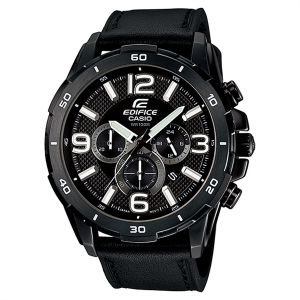
Image: Casio Edifice 5150 Chronograph Watch, featuring a black dial with three sub-dials and a black leather strap.
The Casio Edifice 5150 is a robust chronograph watch designed for precision and style. Key features include 100-meter water resistance, a 1-second chronograph with a measuring capacity of 29 minutes and 59 seconds, and a durable mineral glass crystal. The watch features a black face with three functional dials and a comfortable black leather band, making it a prominent accessory on your wrist.
Opstelling
1. Stel die tyd in
- Pull the crown out to the second click. The second hand will stop at the 12 o'clock position.
- Rotate the crown to set the hour and minute hands. Ensure the AM/PM is correctly set if your watch has a 24-hour indicator or date changes at midnight.
- Druk die kroon terug in die normale posisie. Die sekondewyser sal weer beweeg.
2. Datum vasstel
- Trek die kroon uit na die eerste klik.
- Rotate the crown to set the date. Avoid setting the date between 9 PM and 1 AM, as this may interfere with the automatic date change mechanism.
- Druk die kroon weer in die normale posisie.
3. Chronograph Reset (Zero Position Adjustment)
If the chronograph hands are not at their 12 o'clock zero positions when reset, they can be adjusted:
- Trek die kroon uit na die tweede klik.
- Press Button A (usually top right) to advance the chronograph second hand.
- Press Button B (usually bottom right) to advance the chronograph minute hand.
- Adjust until all chronograph hands are aligned at the 12 o'clock position.
- Druk die kroon weer in die normale posisie.
Bedryfsinstruksies
1. Basiese tydhouding
Your watch displays hours, minutes, and seconds, along with the date. Ensure the crown is fully pushed in for accurate timekeeping and water resistance.
2. Gebruik die Chronograaf
The 1-second chronograph measures elapsed time up to 29 minutes and 59 seconds.
- Begin: Druk Knoppie A om die chronograaf te begin.
- stop: Press Button A again to stop the chronograph.
- Herstel: After stopping, press Button B to reset the chronograph hands to their 12 o'clock zero positions.
- Splittyd: While the chronograph is running, press Button B to measure split times. Press Button B again to release the split time and display the current elapsed time. Press Button A to stop, then Button B to reset.
Onderhoud
1. Waterweerstand
This watch is water resistant to 100 meters (10 ATM). This means it is suitable for swimming and snorkeling, but not for scuba diving. Always ensure the crown is fully pushed in before exposing the watch to water. Do not operate the crown or buttons while the watch is wet or submerged.
2. Skoonmaak
- Vee die horlosiekas en kristal af met 'n sagte, droë lap.
- For the leather band, wipe gently with a slightly damp cloth and allow it to air dry completely. Avoid excessive moisture, direct sunlight, and harsh chemicals, which can damage the leather.
- If the watch has been exposed to saltwater, rinse it with fresh water and dry thoroughly.
3. Battery vervanging
The watch uses an SR621SW battery with an approximate life of 2 years. When the battery runs low, the second hand may start moving at two-second intervals. It is recommended to have the battery replaced by a qualified watch technician to ensure proper sealing and maintain water resistance.
4. Algemene Sorg
- Avoid exposing the watch to extreme temperatures, strong magnetic fields, or strong vibrations.
- Keep the watch away from solvents, detergents, perfumes, and cosmetics, as these can damage the case, band, or gaskets.
Probleemoplossing
| Probleem | Moontlike oorsaak | Oplossing |
|---|---|---|
| Watch has stopped or is running erratically. | Lae battery. | Vervang die battery (verwys na die Onderhoud-afdeling). |
| Tyd is verkeerd. | Crown is not fully pushed in; Time was not set correctly. | Push the crown fully in. Reset the time (refer to Setup section). |
| Datum is verkeerd. | Date was not set correctly; Date was set during restricted hours. | Reset the date (refer to Setup section). Avoid setting between 9 PM and 1 AM. |
| Chronograph hands do not reset to 12 o'clock. | Chronograph hands are misaligned. | Perform chronograph zero position adjustment (refer to Setup section). |
| Kondensasie binne die horlosie. | Exposure to extreme temperature changes; Crown not fully pushed in when exposed to water. | Seek professional service immediately to prevent damage. Ensure crown is always fully pushed in. |
Spesifikasies
- Modelnommer: 5150
- Handelsmerk: Casio
- Vertoon tipe: Multi-analog
- Beweging: Kwarts
- Waterweerstand: 100 meter (10 OTM)
- Chrono: 1-second, measuring capacity 29'59"
- Akkuraatheid: +/- 20 seconds per month
- Kristalmateriaal: Minerale glas
- Materiaal van die houer: Vlekvrye staal
- Kas deursnee: 45 mm
- Kas dikte: 13 mm
- Gevalvorm: Ronde
- Bandmateriaal: Leer
- Band Kleur: Swart
- Bandwydte: 1 duim
- Sluiting: Ontplooiingsgesp
- Dialkleur: Swart
- Battery tipe: SR621SW
- Geskatte batterylewe: 2 jaar
- UPC: 079767056537
Waarborg en Ondersteuning
Warranty information for your Casio Edifice 5150 watch is typically provided with your purchase documentation. Please refer to the warranty card or leaflet included in the original packaging for details regarding coverage, terms, and conditions.
For technical support, service, or inquiries not covered in this manual, please contact your authorized Casio dealer or visit the official Casio website for customer service contact information in your region. Keep your purchase receipt and warranty card handy when seeking support.