
Unknown Yu- TLXgo-2201
Wireless Bluetooth Headset User Manual
Model: Yu- TLXgo-2201 | Brand: Unknown
Inleiding
Dankie vir die aankoopasing the Wireless Bluetooth Headset. This manual provides essential information for the proper use, setup, and maintenance of your new headset. Please read it thoroughly before use to ensure optimal performance and longevity of the product.
Pakketinhoud
Verifieer asseblief dat al die items wat hieronder gelys word, in u pakket ingesluit is:
- Wireless Bluetooth Headset (2 units)
- USB Charging Cable (2 units)
- Gebruikershandleiding

Image: Contents of the headset package, showing one black headset and a white USB charging cable.
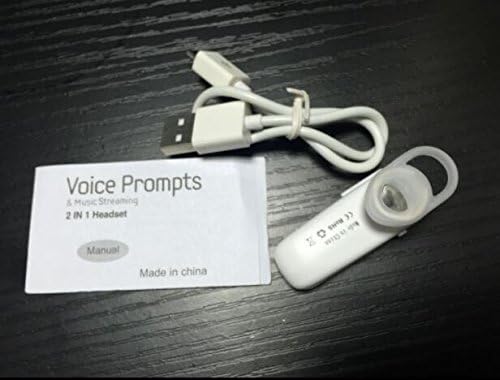
Image: Contents of the headset package, showing one white headset, a white USB charging cable, and the printed user manual.
Produk verbyview
The Wireless Bluetooth Headset is designed for convenience and portability, ideal for sports, driving, and daily use. It features a super mini design and supports voice prompts and music streaming.

Beeld: Voorkant view of the product packaging, displaying the black wireless Bluetooth headset inside its clear plastic casing.
Spesifikasies
| Kenmerk | Beskrywing |
|---|---|
| Bluetooth weergawe | V3.0 + EDR |
| Ondersteun Profiles | Headset, Handsfree, A2DP |
| Talk Time/Playing Time | Tot 5 uur |
| Bystandtyd | Tot 80 uur |
| Kragbron | Ingeboude herlaaibare Li-ion-battery |
| Verbindingstegnologie | Draadloos |
| Vormfaktor | In Oor |
| Item gewig | 15.8 onse (vir 2 eenhede) |
| Pakket afmetings | 1.97 x 1.57 x 1.18 duim |
| Modelnommer | Yu- TLXgo-2201 |

Image: Back of the product packaging, displaying a list of product specifications including Bluetooth version, talk time, and power source.
Opstelling
Laai die headset
- Koppel die klein punt van die USB-laaikabel aan die laaipoort op die headset.
- Koppel die groter punt van die USB-laaikabel aan 'n USB-kragbron (bv. rekenaar se USB-poort, USB-muuradapter).
- The indicator light on the headset will illuminate during charging. It will change color or turn off once fully charged.
- 'n Volle lading neem gewoonlik ongeveer 1-2 uur.
Bind saam met 'n Bluetooth-toestel
- Ensure the headset is fully charged before initial pairing.
- With the headset turned off, press and hold the Multi-function Button (MFB) for approximately 5-7 seconds until the indicator light flashes red and blue alternately. This indicates the headset is in pairing mode.
- On your Bluetooth-enabled device (smartphone, tablet, etc.), go to the Bluetooth settings and ensure Bluetooth is enabled.
- Soek vir available devices. The headset should appear in the list, typically named "MBT2013" or similar.
- Select the headset from the list to connect. If prompted for a password, enter "0000" (four zeros).
- Once successfully paired, the indicator light will stop flashing and may show a steady blue light, and you may hear a voice prompt confirming the connection.
- The headset will automatically connect to the last paired device when turned on, if the device's Bluetooth is active and within range.
Bedryfsinstruksies
Krag aan/af
- Krag aan: Press and hold the Multi-function Button (MFB) for about 3 seconds until the blue indicator light flashes and you hear a voice prompt.
- Skakel af: Press and hold the MFB for about 3-4 seconds until the red indicator light flashes and you hear a voice prompt.
Belbestuur
- Beantwoord oproep: Druk een keer op die MFB.
- Beëindig oproep: Press the MFB once during a call.
- Verwerp oproep: Press and hold the MFB for about 2 seconds during an incoming call.
- Herbel laaste nommer: Double-press the MFB when not on a call.
Musiek afspeel
- Speel/pouse: Press the MFB once during music playback.
Note: Volume control may be managed directly from your connected device.
Onderhoud
- Skoonmaak: Gebruik 'n sagte, droë lap om die oorfone skoon te maak. Moenie harde chemikalieë of skuurmiddels gebruik nie.
- Berging: Bêre die oorfone op 'n koel, droë plek weg van direkte sonlig en uiterste temperature.
- Batterysorg: To prolong battery life, charge the headset regularly, even if not in frequent use. Avoid fully discharging the battery for extended periods.
- Waterweerstand: Hierdie oorfone is nie waterdig nie. Vermy blootstelling aan water of oormatige vog.
Probleemoplossing
- Oorfone skakel nie aan nie:
- Ensure the headset is fully charged. Connect it to a power source and try again.
- Kan nie met toestel koppel nie:
- Ensure the headset is in pairing mode (red and blue lights flashing alternately). Make sure Bluetooth is enabled on your device and it is within range (typically 10 meters). Try restarting both the headset and your device.
- Geen klank of swak klankgehalte:
- Check the volume levels on both the headset and your connected device. Ensure the headset is properly connected to your device. Move closer to your device to avoid interference.
- Oorfone ontkoppel gereeld:
- Ensure the headset is within range of your device. Check for potential interference from other wireless devices. Try re-pairing the headset.
Veiligheidsinligting
- Do not disassemble, repair, or modify the headset. This may cause fire, electronic breakdown, or complete damage to the product.
- Keep the headset away from extreme temperatures, humidity, and corrosive substances.
- Vermy om die headset te laat val of aan harde impakte bloot te stel.
- Do not expose the headset to open flames or dispose of it in fire.
- Gooi die produk en sy battery verantwoordelik weg volgens plaaslike regulasies.
Waarborg en Ondersteuning
Vir waarborginligting of tegniese ondersteuning, verwys asseblief na die kontakbesonderhede wat deur u kleinhandelaar of die vervaardiger se amptelike diens verskaf is. webwebwerf. Bewaar asseblief u bewys van aankoop vir waarborgeise.
Ask a question about this manual
Ask about setup, troubleshooting, compatibility, parts, safety, or missing instructions. Manuals+ will review the question and use this page’s manual context to help answer it.