
Cambridge Soundworks SWOA3UBLK
OontZ Angle 3 Ultra Draagbare Bluetooth-luidspreker Gebruikershandleiding
Model: SWOA3UBLK
Inleiding
Dankie vir die aankoopasing the OontZ Angle 3 Ultra Portable Bluetooth Speaker by Cambridge Soundworks. This manual provides essential information for setting up, operating, maintaining, and troubleshooting your speaker. Designed for superior sound quality and durability, the OontZ Angle 3 Ultra features a 14-watt output, rich bass, IPX7 waterproofing, and an impressive 30-meter Bluetooth range. Enjoy up to 20 hours of playtime on a single charge.

Image: The OontZ Angle 3 Ultra Portable Bluetooth Speaker, showcasing its sleek black, triangular design with control buttons on one end.
Opstelling
1. Ingesluit Items
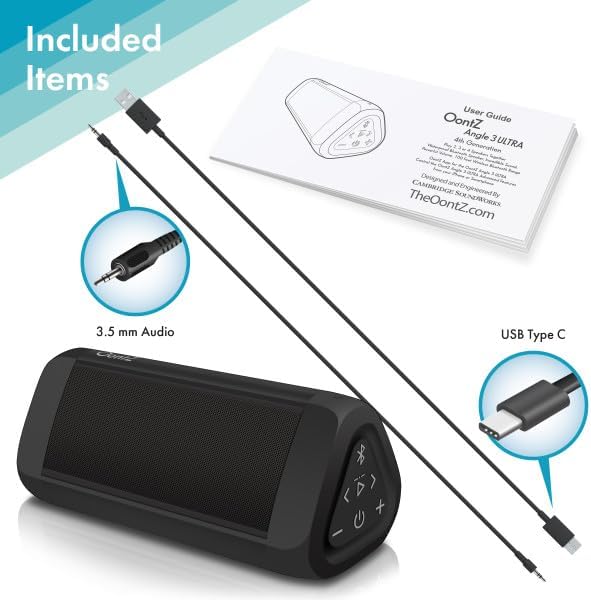
Image: The OontZ Angle 3 Ultra speaker along with its accessories: a Quick Start Guide, a 3.5mm audio cable, and a USB Type-C charging cable.
Maak seker dat alle komponente teenwoordig is voor die eerste gebruik:
- OontZ Angle 3 Ultra Bluetooth Speaker
- Quick Start Guide (Full manual available online)
- 3.5 mm oudio kabel
- USB Type-C laaikabel
2. Laai die luidspreker op
The speaker comes with a built-in rechargeable Lithium-ion battery. For optimal performance, fully charge the speaker before first use.
- Locate the charging port on the side of the speaker, protected by a rubber flap.
- Connect the supplied USB Type-C charging cable to the speaker's charging port.
- Connect the other end of the USB cable to a USB wall charger (not included) or a computer USB port.
- The charging indicator light will illuminate. A full charge takes approximately 20 hours for the first charge, and subsequent charges will be faster.

Beeld: 'n Nabyskoot view of the speaker's side, showing the 3.5mm AUX input and the USB-C charging port, typically protected by a waterproof flap.
3. Bluetooth-koppeling
Pair your OontZ Angle 3 Ultra with your Bluetooth-enabled device (smartphone, tablet, laptop).
- Skakel die luidspreker aan deur die Power-knoppie te druk en in te hou (⏻) until the indicator light flashes blue.
- Gaan na Bluetooth-instellings op jou toestel en maak seker dat Bluetooth geaktiveer is.
- Look for "OontZ Angle 3 Ultra" in the list of available devices and select it.
- Once paired, the speaker will emit a confirmation tone, and the indicator light will turn solid blue.
4. Verbinding via AUX-invoer
You can connect non-Bluetooth devices using the 3.5mm audio cable.
- Connect one end of the 3.5mm audio cable to the AUX IN port on the speaker.
- Koppel die ander kant aan die koptelefoonaansluiting of klankuitset van jou toestel.
- Die luidspreker sal outomaties na AUX-modus oorskakel.
5. Pairing Two Speakers for Stereo Sound (OontZ Dual Wireless Stereo)
Enhance your audio experience by wirelessly connecting two OontZ Angle 3 Ultra speakers for impressive stereo separation.

Image: Two OontZ Angle 3 Ultra speakers positioned to provide stereo sound, with two individuals enjoying music in an outdoor setting.
- Ensure both OontZ Angle 3 Ultra speakers are charged and powered on.
- Disconnect both speakers from any previously paired Bluetooth devices.
- On one speaker (this will be the Left Channel), press and hold the Bluetooth button (Ⓑ) for 3 seconds until you hear a tone.
- On the second speaker (this will be the Right Channel), press and hold the Bluetooth button (Ⓑ) for 3 seconds until you hear a tone.
- The speakers will automatically connect to each other. Once connected, you will hear a confirmation tone, and the indicator lights on both speakers will turn solid blue.
- Now, connect your audio device to the Left Channel speaker via Bluetooth as described in "Bluetooth Pairing" above.
- For video audio, connect your device or TV to the Left Channel speaker using the 3.5mm audio cable.
Bedryfsinstruksies
1. Beheer oorview
| Knoppie/aanwyser | Funksie |
|---|---|
| ⏻ (Krag) | Druk en hou in om aan/af te skakel. |
| + (Volume op) | Druk om die volume te verhoog. |
| - (Volume af) | Druk om die volume te verminder. |
| ▷ (Speel/Pause) | Druk om musiek te speel/onderbreek. |
| < (Previous Track) | Druk om na die vorige snit te gaan. |
| > (Next Track) | Druk om na die volgende snit te gaan. |
| Ⓑ (Bluetooth) | Press to disconnect current Bluetooth device and enter pairing mode. Press and hold for 3 seconds to initiate OontZ Dual Wireless Stereo pairing. |
| Aanwyser Lig | Flashes blue for pairing, solid blue for connected, red for charging. |
2. Handvrye oproepe
The OontZ Angle 3 Ultra has a built-in microphone for hands-free calls.
- When a call comes in, the music will pause. Press the ▷ knoppie om die oproep te beantwoord.
- Om 'n oproep te beëindig, druk die ▷ knoppie weer.
- Om die oproep te weier, hou die ▷ knoppie vir 2 sekondes.
- To activate Siri or Google Assistant, press and hold the ▷ button for 2 seconds when not on a call.
3. Waterproof Features (IPX7)
The OontZ Angle 3 Ultra is IPX7 certified, meaning it is fully waterproof and can be immersed in water up to 1 meter (3.3 feet) for up to 30 minutes.
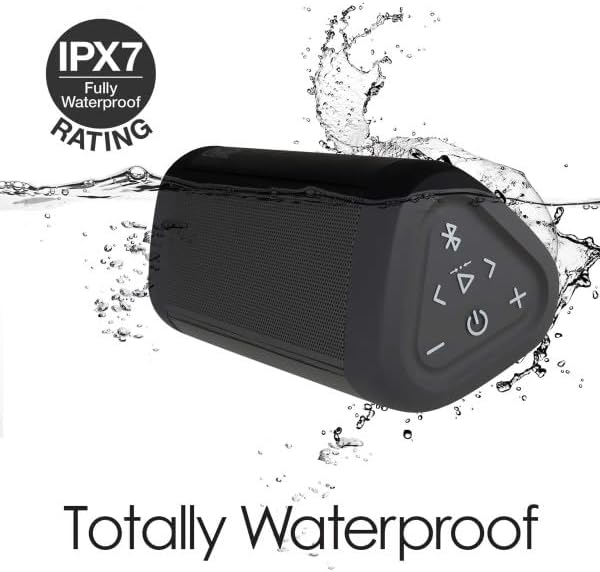
Image: The OontZ Angle 3 Ultra speaker shown partially submerged in water, illustrating its IPX7 waterproof capability.
- Ensure the rubber flap covering the charging and AUX ports is securely closed before exposing the speaker to water.
- Ideal for use by the pool, at the beach, or in the shower.
- Do not expose to salt water or chemicals. Rinse with fresh water after exposure to chlorinated water.
Onderhoud
1. Skoonmaak
Om jou luidspreker skoon te maak, gebruik 'n sagte, damp lap. Moenie skuur skoonmaakmiddels of oplosmiddels gebruik nie.
2. Berging
Bêre die luidspreker op 'n koel, droë plek weg van direkte sonlig en uiterste temperature.
3. Batteryversorging
Om die batterylewe te verleng:
- Vermy om die battery gereeld heeltemal te ontlaai.
- Laai die luidspreker gereeld, selfs al word dit nie gebruik nie, om die battery se gesondheid te handhaaf.
- Do not expose the speaker to temperatures above 60°C (140°F).
Probleemoplossing
| Probleem | Oplossing |
|---|---|
| Luidspreker sal nie aanskakel nie. | Maak seker dat die battery gelaai is. Koppel die luidspreker aan 'n kragbron met die USB-C-kabel. |
| Geen geluid of lae volume nie. | Check the volume level on both the speaker and your connected device. Ensure the speaker is properly paired via Bluetooth or connected via AUX. |
| Kan nie via Bluetooth koppel nie. | Ensure the speaker is in pairing mode (flashing blue light). Turn off and on Bluetooth on your device. Move the speaker closer to your device. Disconnect from other Bluetooth devices. |
| Klankvervorming teen hoë volume. | Reduce the volume on the speaker or your connected device. Ensure the audio source is not distorted. |
| OontZ Dual Wireless Stereo not connecting. | Ensure both speakers are disconnected from other Bluetooth devices. Follow the pairing steps carefully, ensuring both speakers are in pairing mode for stereo connection. |
Spesifikasies
Key technical specifications for the OontZ Angle 3 Ultra Portable Bluetooth Speaker:
- Modelnommer: SWOA3UBLK
- Afmetings (L x B x H): 16.26 x 7.11 x 7.11 cm (6.4 x 2.8 x 2.8 duim)
- Gewig: 480 gram (1.06 lbs)
- Luidspreker uitsetkrag: 14 Watt
- Bluetooth weergawe: 4.2
- Draadlose reeks: Up to 30 meters (100 feet) unobstructed
- Batterylewe: Tot 20 uur (teen 2/3 volume)
- Waterdigte gradering: IPX7 (Dompelbaar tot 1 meter vir 30 minute)
- Verbinding: Bluetooth, 3.5mm AUX Input, USB-C Charging
- Komponente ingesluit: Speaker, 3.5mm Audio Cable, USB-C Charging Cable, Quick Start Guide

Image: Diagram showing the dimensions of the OontZ Angle 3 Ultra speaker: 6.5 inches in length, 3 inches in width, and 2.75 inches in height.
Waarborg en Ondersteuning
For detailed warranty information and customer support, please visit the official OontZ website. The full localized manual is also available there.
Amptelik Webwebwerf: www.theoontz.com
Cambridge Soundworks is committed to providing high-quality audio products and customer satisfaction.
Ask a question about this manual
Ask about setup, troubleshooting, compatibility, parts, safety, or missing instructions. Manuals+ will review the question and use this page’s manual context to help answer it.