
Alarm.com ADC-V723x
Alarm.com ADC-V723 Outdoor Wi-Fi Camera User Manual
Model: ADC-V723x
1. Produk verbyview
The Alarm.com ADC-V723 is a high-definition 1080p outdoor Wi-Fi camera designed to provide reliable surveillance for your property. Featuring High Dynamic Range (HDR) and powerful Video Analytics, it can detect and alert you to people, vehicles, and animals. Its robust design ensures performance in various lighting conditions and environments. This manual provides comprehensive instructions for installation, operation, and maintenance.
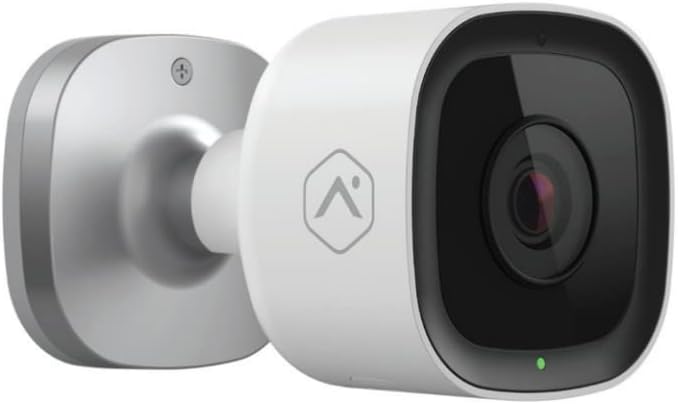
Beeld: Voorkant view of the Alarm.com ADC-V723 Outdoor Wi-Fi Camera, showing its compact, bullet-style design and lens.
2. Veiligheidsinligting
- Ensure the camera is installed in a location that complies with local building codes and regulations.
- Use only the power adapter supplied with the camera.
- Moenie die kamera blootstel aan uiterste temperature buite sy bedryfsbereik nie.
- Avoid placing the camera near sources of strong electromagnetic interference.
- Ontkoppel die kragtoevoer voordat u skoonmaak of enige onderhoud uitvoer.
3. Pakketinhoud
Verifieer dat alle items in jou pakket teenwoordig is:
- Alarm.com ADC-V723 Outdoor Wi-Fi Camera
- Montageplaat
- Monteringskroewe en Muurankers
- Kragadapter
- Installasiegids (hierdie dokument)
4. Opstelling en installering
4.1 Die keuse van 'n ligging
Kies 'n buitelugligging wat die verlangde viewing angle and is within range of your Wi-Fi network. The camera is designed for outdoor use and is IP67 rated for weather resistance. Consider areas with good lighting or where the camera's night vision capabilities can be maximized.
4.2 Montering van die kamera
- Secure the mounting plate to the desired surface using the provided screws and wall anchors. Ensure the plate is level.
- Attach the camera to the mounting plate by aligning the camera with the plate and twisting until it locks securely.
- Adjust the camera's angle to achieve the optimal field of view.
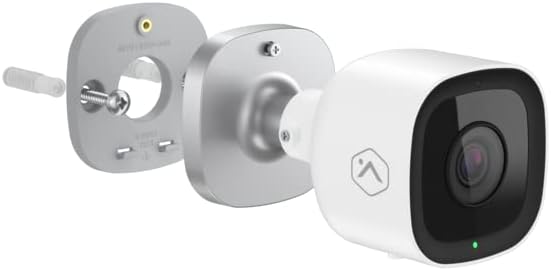
Beeld: Ontplof view showing the Alarm.com ADC-V723 camera, its mounting plate, and a screw with wall anchor, illustrating the assembly process.
4.3 Powering On and Connecting to Wi-Fi
- Connect the power adapter to the camera and plug it into a suitable outdoor power outlet.
- Wait for the camera's LED indicator to show a specific status (refer to the LED status guide in Section 5.2).
- Laai die Alarm.com-mobiele toepassing van jou toestel se appwinkel af.
- Follow the in-app instructions to add the ADC-V723 camera to your Alarm.com system and connect it to your Wi-Fi network. This typically involves scanning a QR code on the camera or entering its MAC address.
5. Bedien die kamera
5.1 Lewendig View en Opname
Access live video feeds and recorded clips through the Alarm.com mobile app or web portal. You can view intydse footage, initiate manual recordings, and review event-triggered clips.
5.2 LED-statusaanwysers
The camera features an LED indicator that communicates its current status:
- Vaste groen: Connected to Wi-Fi and operating normally.
- Flitsende groen: Attempting to connect to Wi-Fi.
- Vaste rooi: Not connected to Wi-Fi or an error has occurred.
- Rooi flikker: Firmware update in progress or factory reset.
5.3 Video Analytics and Alerts
The ADC-V723 supports advanced Video Analytics. Configure detection zones and rules within the Alarm.com app to receive specific alerts for people, vehicles, or animals entering designated areas. Alerts can be customized to send notifications to your mobile device.
5.4 Night Vision and HDR
The camera is equipped with infrared night vision, allowing clear video capture up to 40 feet in low-light conditions. High Dynamic Range (HDR) technology enhances video quality by balancing bright and dark areas, providing clearer images in challenging lighting environments.
6. Onderhoud
- Maak die kameralens gereeld skoon met 'n sagte, damp lap om duidelike beeldkwaliteit te verseker. Moenie harde chemikalieë gebruik nie.
- Periodically check the mounting hardware to ensure the camera remains securely fastened.
- Ensure the power cable is free from damage and properly secured.
- Keep the camera's firmware updated through the Alarm.com app to ensure optimal performance and access to new features.
7. Probleemoplossing
| Probleem | Moontlike oorsaak | Oplossing |
|---|---|---|
| Kamera skakel nie aan nie | Geen krag, foutiewe adapter, los konneksie. | Check power outlet, ensure connections are secure, try a different outlet. |
| Kan nie aan Wi-Fi koppel nie | Incorrect Wi-Fi password, camera too far from router, network interference. | Verify Wi-Fi password, move camera closer to router, reduce interference, restart router. |
| Swak video kwaliteit | Dirty lens, low bandwidth, poor lighting. | Clean lens, check internet speed, ensure adequate lighting or rely on night vision. |
| Geen bewegingswaarskuwings nie | Incorrect Video Analytics settings, notifications disabled. | Review and adjust Video Analytics rules in the app, enable notifications for the camera. |
8. Spesifikasies
| Kenmerk | Detail |
|---|---|
| Modelnommer | ADC-V723x |
| Video-opname-resolusie | 1080p (1920x1080) |
| Konnektiwiteit | Wi-Fi |
| Kragbron | Elektries met koord |
| Binne/buiteluggebruik | Buitelug |
| Viewing Hoek | 167 grade |
| Nagsigreeks | 40 Voet |
| Materiaal | Metaal |
| Afmetings (L x B x H) | 2.5 x 2.5 x 4.5 duim |
| Item gewig | 1.32 pond |
| Internasionale Beskermingsgraad | IP67 |
| Spesiale kenmerk | Motion Sensor, HDR |
9. Waarborg en Ondersteuning
For warranty information and technical support, please contact your Alarm.com service provider or visit the official Alarm.com website. Do not attempt to repair the device yourself, as this may void the warranty.
For additional resources and FAQs, please refer to the Alarm.com support portal.