
BLS T01L
BLS T01L LED Closet Light User Manual
Model: T01L
1. Inleiding
The BLS T01L LED Closet Light is a versatile, motion-sensing lighting solution designed for various indoor applications. It features 20 super bright LEDs, offering 180 lumens of soft white light. This light can be powered by 3 AA batteries for wireless operation or via a 5V USB DC input for constant lighting. Its adjustable light beam and motion sensor provide customizable illumination and detection.

Image 1.1: The BLS T01L LED Closet Light, a 14-inch white light bar with a central motion sensor.
2. Wat is in die boks
Verifieer asseblief dat alle komponente teenwoordig is wanneer u die verpakking oopmaak:
- 1 x BLS Under Cabinet Light (Model T01L)
- 1 x GS-kabel
- 2 x 3M Kleefbande
- 1 x Instruksiehandleiding (hierdie dokument)

Image 2.1: The BLS T01L LED Closet Light shown with its packaging, DC cable, and mounting accessories.
3. Spesifikasies
| Model Naam | T01L |
| Handelsmerk | BLS |
| Ligbrontipe | LED (20 LED's) |
| Helderheid | 180 Lumen |
| Kleur temperatuur | 6000 Kelvin (Koel Wit) |
| Wattage | 2 Watt |
| Kragbron | 3 x AA Batteries (not included) or 5V USB DC Input |
| Produk afmetings | 2.6 cm L x 14.7 cm B x 1.1 cm H |
| Item gewig | 7.8 onse (220 gram) |
| Spesiale kenmerke | Cordless, Motion Activated, Adjustable Angle, Adjustable Motion Sensor Sensitivity |
| Beheer metode | Slide Switch (Auto/On/Off) |
| Installasie tipe | Screws or 3M Adhesive Tape |
| Binne/buiteluggebruik | Binneshuise |
4. Opstelling en installering
Follow these steps to set up your BLS T01L LED Closet Light:
4.1. Aanskakeling van die toestel
The light can be powered by 3 AA batteries or a 5V USB DC input.
- Battery installasie:
- Vind die batterykompartement aan die agterkant van die lig.
- Gently push to open the center part of the battery compartment cover.
- Insert three AA batteries (not included). One battery slides into the hole on the left, the second into the hole on the right, and the third goes into the open center between the first two. Ensure correct polarity (+/-).
- Maak die batterykompartement se deksel stewig toe.
- USB DC Power:
- Connect the provided DC cable to the light's DC input port.
- Plug the other end of the DC cable into a 5V USB power source (e.g., USB wall adapter, power bank).
- Let wel: If using USB DC power, it is recommended to remove the AA batteries to prevent potential issues or unnecessary battery drain.

Image 4.1: Diagram illustrating the 14-inch length of the light and its power options: 3 AA batteries or USB cable.
4.2. Montering van die Lig
The BLS T01L offers multiple installation options:
- Kleefmontage: Peel the backing from the 3M adhesive tapes and firmly press the light onto a clean, dry surface.
- Skroef montage: Use the provided screws to secure the light to the desired surface. This method offers a more permanent installation.
The light can be mounted either horizontally or vertically, depending on your application needs.

Image 4.2: Diagram showing horizontal and vertical installation options using screws or 3M adhesive stickers.
5. Bedryfsinstruksies
5.1. Moduskeuse
The light features a slide switch with three modes:
- OUTO-modus: The light will automatically turn on when motion is detected within 10 feet in a dark environment. It will remain on for 20 seconds after motion ceases. The built-in light sensor ensures it only activates when ambient light is low (e.g., at night).
- AAN-modus: Die lig sal voortdurend aan bly, ongeag beweging of omgewingsligtoestande.
- AF -modus: The light will remain off.
5.2. Adjusting Motion Sensor Sensitivity
The motion sensor can be adjusted to modify its detection sensitivity and range:
- The motion sensor module is designed to swivel. Gently rotate the sensor to adjust its detection angle.
- This allows you to fine-tune the area where motion is detected, preventing unwanted activations.
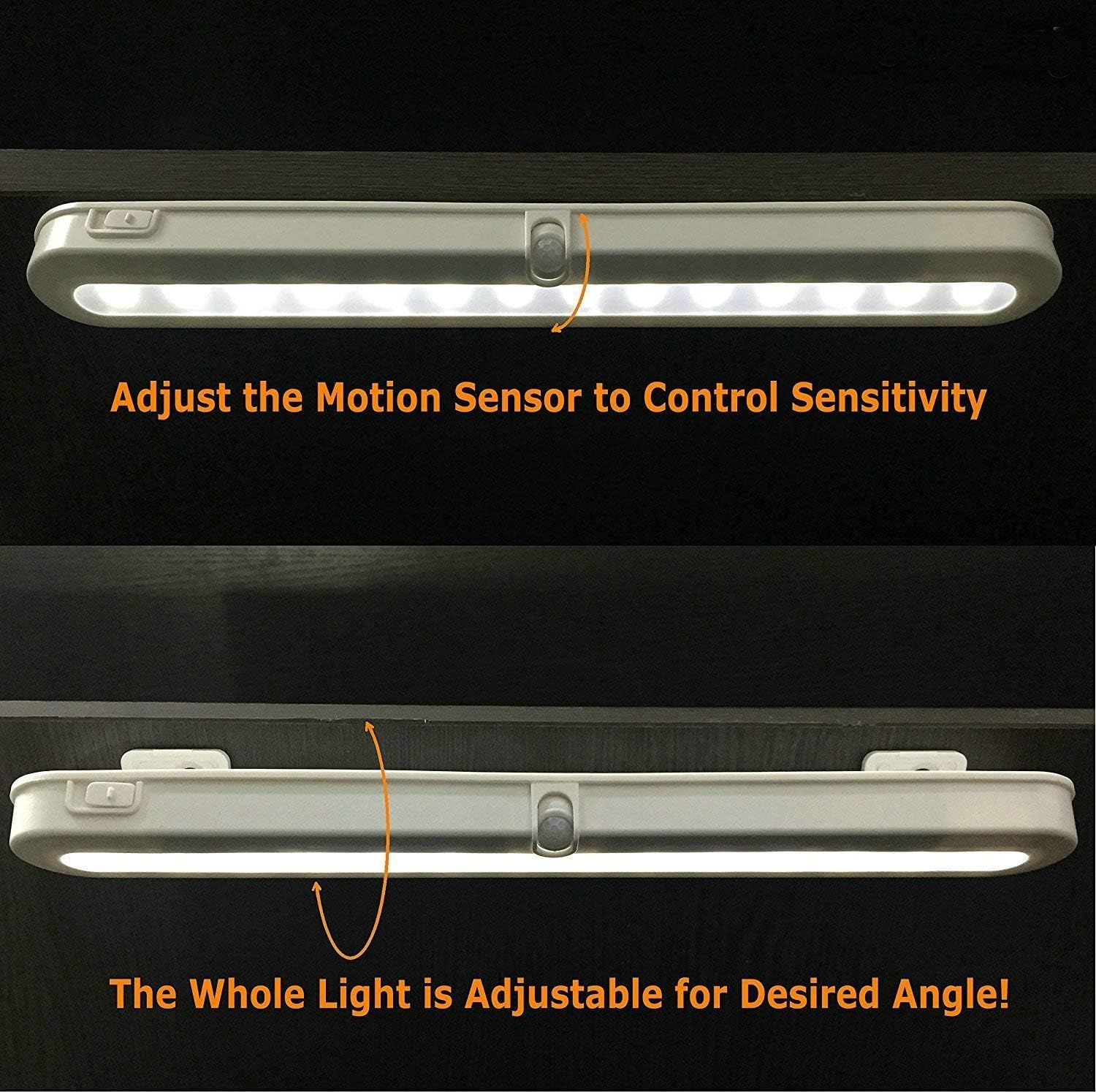
Image 5.1: Illustration of how to adjust the motion sensor to control sensitivity.
5.3. Adjusting Light Beam Angle
The entire light fixture can be adjusted to direct the light beam as desired:
- The light is mounted on a bracket that allows it to swivel.
- Gently pivot the light to achieve the desired illumination angle (e.g., 90°, 120°, 180°).

Beeld 5.2: Voorbeeldamples of adjustable light beam angles (90°, 120°, 180°) for optimal illumination.
6. Onderhoud
6.1. Battery vervanging
When the light output diminishes or the motion sensor becomes less responsive, it may be time to replace the batteries.
- Open the battery compartment cover as described in Section 4.1.
- Verwyder die ou AA-batterye.
- Insert three new AA batteries, ensuring correct polarity.
- Maak die batterykompartement se deksel toe.
Let wel: For optimal performance and to avoid frequent battery changes, consider using high-quality alkaline or rechargeable AA batteries. If using the USB DC power option, remove the AA batteries.
6.2. Skoonmaak
To maintain the appearance and functionality of your light:
- Ensure the light is in the OFF position or disconnected from power before cleaning.
- Vee die oppervlak af met 'n sagte, droë lap.
- Moenie skuurmiddels, oplosmiddels of harde chemikalieë gebruik nie, aangesien dit die afwerking of elektroniese komponente kan beskadig.
7. Probleemoplossing
If you encounter issues with your BLS T01L LED Closet Light, refer to the following common problems and solutions:
| Probleem | Moontlike oorsaak | Oplossing |
|---|---|---|
| Lig skakel nie aan nie. |
|
|
| Light turns on too frequently or not enough (in AUTO mode). |
|
|
| Kort batterylewe. |
|
|
| Lig is dof. |
|
|
8. Waarborginligting
The BLS T01L LED Closet Light comes with an extended warranty. For specific details regarding warranty coverage, terms, and conditions, please refer to the warranty card included with your product or contact BLS customer support.
9. Kliëntediens
If you have any questions, require technical assistance, or need further support, please contact BLS customer service through the following channels:
- E-pos: Refer to your product packaging or the official BLS website for the most current contact email.
- Webwebwerf: Visit the official BLS webwebwerf vir algemene vrae en ondersteuningsbronne.
- Amazon Winkel: U kan ook die BLS Store on Amazon for product information and seller contact options.
Ask a question about this manual
Ask about setup, troubleshooting, compatibility, parts, safety, or missing instructions. Manuals+ will review the question and use this page’s manual context to help answer it.