
1. Inleiding
This manual provides detailed instructions for the installation, operation, and maintenance of your Blackweb BWA17AV015 HDMI 4K 4-Way Splitter. This device is designed to distribute a single HDMI input signal to up to four high-definition display devices simultaneously. It supports various source devices such as DVD players, Blu-ray players, satellite receivers, set-top boxes, DV cameras, A/V receivers, and other HDMI-enabled video products.
2. Pakketinhoud
Kontroleer asseblief die inhoud van die pakket noukeurig. Indien enige items ontbreek of beskadig is, kontak u kleinhandelaar.
- Swartweb BWA17AV015 HDMI 4K 4-Way Splitter Unit
- 5V DC Kragadapter
- Gebruikershandleiding
3. Produk verbyview
Die Swartweb BWA17AV015 HDMI 4K 4-Way Splitter features one HDMI input and four HDMI outputs, allowing for simultaneous display on multiple screens. It is housed in a compact black casing.
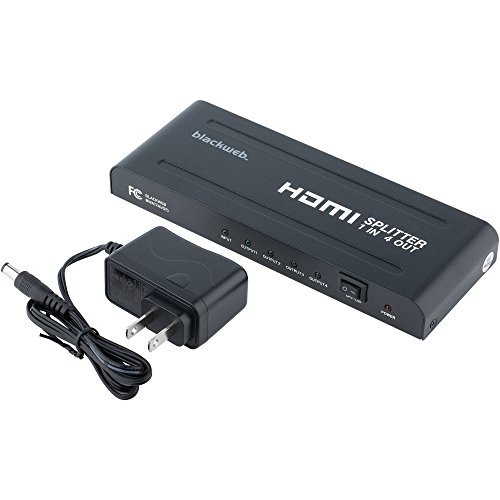
Figuur 1: Voor en agter View of the Blackweb BWA17AV015 HDMI 4K 4-Way Splitter. The image shows the compact black unit with various ports. The front typically includes status indicators, while the rear features the HDMI input, four HDMI outputs, and the power input.
3.1 Voorpaneel
- Krag LED: Verlig wanneer die toestel aangeskakel is.
- Invoer LED: Illuminates when an HDMI input signal is detected.
- Output LEDs (1-4): Illuminates when an HDMI output device is connected and receiving a signal.
3.2 Agterpaneel
- HDMI IN: Connect your HDMI source device (e.g., Blu-ray player, game console).
- HDMI-UIT (1-4): Connect up to four HDMI display devices (e.g., TVs, monitors).
- DC 5V: Connect the provided 5V DC power adapter.
4. Opstelinstruksies
Follow these steps to set up your HDMI splitter:
- Skakel toestelle af: Ensure all HDMI source devices and display devices are powered off before making connections.
- Koppel HDMI-bron: Connect one end of an HDMI cable (not included) to the HDMI output of your source device (e.g., DVD player, set-top box) and the other end to the HDMI-IN poort op die splitter.
- Koppel HDMI-skerms: Connect one end of an HDMI cable (not included) to an HDMI UIT port on the splitter and the other end to the HDMI input of your display device (e.g., TV, monitor). Repeat this step for up to four display devices.
- Koppel krag: Connect the provided 5V DC power adapter to the DC 5V port on the splitter, then plug the adapter into a standard electrical outlet. The Power LED on the splitter should illuminate.
- Krag aan toestelle: Power on your HDMI display devices first, then power on your HDMI source device.
- Verifieer sein: Check that the video and audio signals are displayed correctly on all connected screens. The Input LED and corresponding Output LEDs should be illuminated.
Let wel: Use high-quality HDMI cables for optimal performance, especially for 4K resolutions and longer cable runs.
5. Bedryfsinstruksies
Once properly set up, the Blackweb BWA17AV015 HDMI 4K 4-Way Splitter operates automatically.
- Automatic Signal Distribution: The splitter will automatically detect the HDMI input signal and distribute it to all connected and powered-on HDMI output devices.
- Resolusie-ondersteuning: The splitter supports various HDMI resolutions, including 4K (3840x2160) and 1080p. The output resolution will be determined by the lowest common resolution supported by all connected display devices.
- Oudio-ondersteuning: The splitter passes through various audio formats supported by HDMI.
No additional user interaction is typically required after initial setup.
6. Probleemoplossing
If you encounter issues, refer to the following troubleshooting guide:
| Probleem | Moontlike oorsaak/oplossing |
|---|---|
| No picture or sound on display(s). |
|
| Picture quality is poor or flickering. |
|
| Only some displays show a picture. |
|
7. Spesifikasies
The following are the technical specifications for the Blackweb BWA17AV015 HDMI 4K 4-Way Splitter:
- Model: BWA17AV015
- Produk afmetings: 7.6 x 3.3 x 0.7 duim
- Item gewig: 12.8 onse
- Kleur: Swart
- Connector Tipe: HDMI
- Kabel tipe: HDMI
- Invoer: 1x HDMI
- Uitset: 4x HDMI
- Ondersteunde resolusies: Tot 4K (3840x2160)
- Kragtoevoer: DC 5V (adapter included)
- Versoenbare toestelle: Blu-Ray Player, Camera, DVD Player, Satellite Receiver, Set-Top Box, A/V Receiver, etc.
8. Onderhoud
To ensure the longevity and optimal performance of your HDMI splitter, follow these maintenance guidelines:
- Skoonmaak: Gebruik 'n sagte, droë lap om die buitekant van die eenheid skoon te maak. Moenie vloeibare skoonmaakmiddels of aërosols gebruik nie.
- Omgewing: Keep the device in a cool, dry place, away from direct sunlight, heat sources, and moisture.
- Ventilasie: Verseker voldoende ventilasie rondom die eenheid om oorverhitting te voorkom. Moenie enige ventilasie-openinge blokkeer nie.
- Hantering: Vermy om die eenheid te laat val of aan harde impakte bloot te stel.
9. Veiligheidsinligting
Please read and follow these safety precautions to prevent damage to the unit and ensure your safety:
- Do not expose this unit to water or excessive moisture.
- Do not attempt to open or modify the unit. There are no user-serviceable parts inside.
- Use only the provided power adapter. Using an incorrect power adapter may damage the unit and void the warranty.
- Keep the unit away from sources of heat, such as radiators, heat registers, stoves, or other heat-producing appliances.
- Ontkoppel die eenheid tydens weerligstorms of wanneer dit vir lang tye ongebruik word.
10. Waarborg en Ondersteuning
For warranty information or technical support, please refer to the documentation included with your purchase or contact Blackweb customer service. Keep your proof of purchase for warranty claims.
Let wel: Specific warranty terms and conditions may vary by region and retailer.