
Uncaged Ergonomics RUwbk
Uncaged Ergonomics Rise Up Electric Standing Desk Instruction Manual
Model: RUwbk
Produk verbyview
The Uncaged Ergonomics Rise Up Electric Standing Desk is designed to provide a seamless transition between sitting and standing positions, promoting a healthier and more dynamic work environment. This desk features a robust dual-motor system, anti-collision technology, and programmable memory settings for personalized height adjustments. It is built with a durable, one-piece bamboo desktop and a sturdy alloy steel frame, engineered for long-lasting performance.

Image: The Rise Up Electric Standing Desk, showcasing its spacious black bamboo desktop and white frame, equipped with dual monitors for a complete workstation setup.
- Dubbelmotorstelsel: Ensures smooth, quiet, and efficient height adjustments.
- Verstelbare hoogte reeks: From 23.6 inches to 49.2 inches, accommodating various user heights and preferences.
- Anti-botsingstegnologie: Automatically stops and reverses if an obstruction is detected during movement, enhancing safety.
- Geheue instellings: Four programmable height presets for quick and convenient adjustments.
- Duursame konstruksie: Features a solid 60x30 inch bamboo desktop and a robust alloy steel frame, supporting up to 250 lbs.
Opstelling en samestelling
Your Uncaged Ergonomics Rise Up Electric Standing Desk requires assembly. All necessary tools are included in the package to facilitate a straightforward setup process. Please follow the detailed instructions provided in the separate assembly guide for step-by-step installation.
Key Assembly Components:
- Electric Standing Desk Frame (Alloy Steel)
- 60x30 inch Bamboo Desktop
- Control Panel/Keypad
- Kragadapter en kabels
- Monteringshardeware en gereedskap
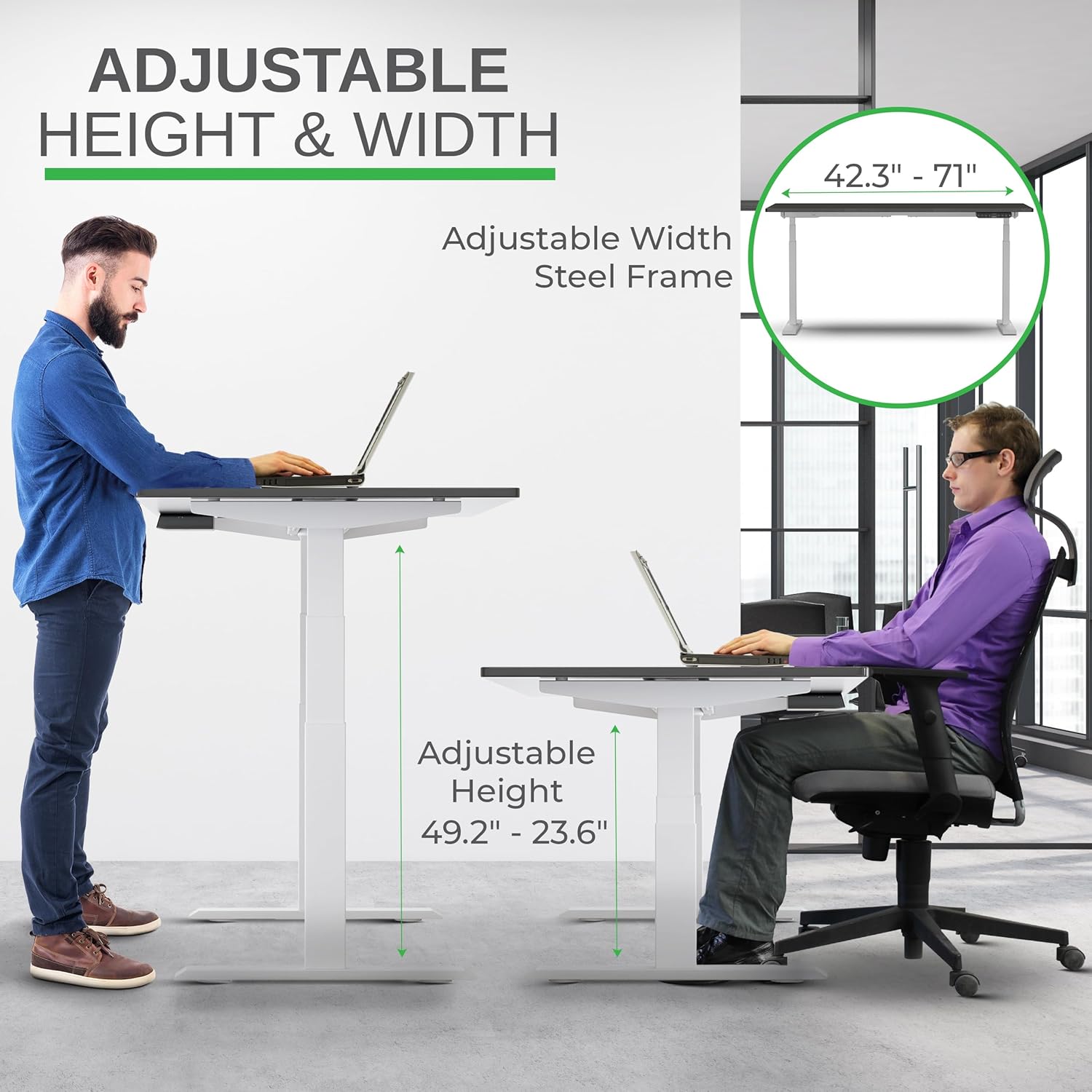
Image: A visual representation of the desk's adjustable height and width capabilities, highlighting the steel frame's adaptability.
Ensure all components are present and undamaged before beginning assembly. It is recommended to assemble the desk on a soft, clean surface to prevent scratches to the desktop or frame.
Bedryfsinstruksies
The Rise Up Electric Standing Desk features an intuitive control panel for easy height adjustments and memory programming.
Beheerpaneel funksies:

Image: A detailed diagram of the desk's multifunctional keypad, illustrating the setting button, memory presets (1-4), digital display, and auto up/down controls.
- Up/Down Buttons (^ / _): Press and hold to manually adjust the desk height. Release to stop at the desired height.
- Geheue-voorinstellings (1, 2, 3, 4):
- Verstel die lessenaar tot die verlangde hoogte met die Op/Af-knoppies.
- Druk die "M"-knoppie. Die skerm sal "S-" wys.
- Within 3 seconds, press the desired number button (1, 2, 3, or 4) to save the current height. The display will show "S-1", "S-2", etc., indicating successful storage.
- To recall a saved height, simply press the corresponding number button. The desk will automatically move to the programmed position.
- Antibotsingstelsel: The desk is equipped with an anti-collision feature. If the desk encounters an obstacle while moving up or down, it will automatically stop and reverse slightly to prevent damage.

Image: Demonstrating the seamless transition from sitting to standing, highlighting the desk's ability to adjust to various ergonomic needs.
Onderhoud
Proper maintenance will ensure the longevity and optimal performance of your Uncaged Ergonomics Rise Up Electric Standing Desk.
- Skoonmaak:
- For the bamboo desktop, wipe with a soft, damp lap. Vermy skuurmiddels of harde chemikalieë wat die afwerking kan beskadig.
- For the steel frame, use a mild cleaner and a soft cloth. Ensure no liquids enter the motor or control components.
- Kabelbestuur: Regularly check and organize cables to prevent tangling or damage, which could interfere with desk movement.
- Gewig kapasiteit: Do not exceed the maximum weight capacity of 250 lbs. Overloading can strain the motors and affect performance.
- Gereelde inspeksie: Periodically check all screws and connections to ensure they are secure. Tighten if necessary.

Beeld: 'n Nabyskoot view of the desk's durable bamboo desktop and integrated control panel, highlighting its scratch-resistant and smooth finish with anti-collision design.
Probleemoplossing
If you encounter any issues with your Rise Up Electric Standing Desk, please refer to the following common solutions. For more complex problems, contact customer support.
| Probleem | Moontlike oorsaak | Oplossing |
|---|---|---|
| Die lessenaar beweeg nie. | Power cable disconnected; Overload; Control panel error. | Check power connections. Reduce weight on desk. Unplug and replug power after 10 seconds. |
| Desk stops unexpectedly. | Anti-collision activated; Overload. | Check for obstructions. Reduce weight. Reset by moving desk slightly in opposite direction. |
| Uneven movement. | Unbalanced load; Loose connections. | Verdeel die gewig eweredig. Kontroleer en draai alle monteerskroewe vas. |
Belangrike nota: The anti-collision system is a safety feature. If the desk repeatedly stops, ensure there are no obstacles in its path and that the weight on the desk does not exceed 250 lbs.
Produkspesifikasies
| Kenmerk | Detail |
|---|---|
| Handelsmerk | Ongekooide Ergonomie |
| Modelnommer | RUwbk |
| Produk Afmetings (D x B x H) | 30" D x 60" B x 49.2" H |
| Lessenaarmateriaal | Solid Bamboo (Black Bamboo finish) |
| Basis materiaal | Alloy Steel (White finish) |
| Minimum Hoogte | 23.6 duim |
| Maksimum Hoogte | 49.2 duim |
| Hefmeganisme | Electric Dual Motor |
| Maksimum gewig kapasiteit | 250 pond |
| Spesiale kenmerke | Adjustable, Electric, Ergonomic, Anti-Collision, Memory Presets |
| Vergadering benodig | Yes (All tools included) |
| Item gewig | 110 pond |
Waarborg inligting
The Uncaged Ergonomics Rise Up Electric Standing Desk comes with a 5-jaar beperkte waarborg. This warranty covers defects in materials and workmanship under normal use and service. For specific terms and conditions, please refer to the warranty documentation included with your product or contact customer support.
This product has been field-tested since 2010, reflecting our commitment to durability and quality.
Kliënte ondersteuning
Uncaged Ergonomics is dedicated to providing outstanding customer support. If you have any questions regarding assembly, operation, maintenance, or warranty claims, please do not hesitate to contact us.
Vir hulp, besoek asseblief die Uncaged Ergonomics Store on Amazon of verwys na die kontakinligting wat in u produkverpakking verskaf word.
Our team is committed to treating every customer like family and ensuring your satisfaction with our products.
Ask a question about this manual
Ask about setup, troubleshooting, compatibility, parts, safety, or missing instructions. Manuals+ will review the question and use this page’s manual context to help answer it.