
1. Inleiding
This manual provides essential information for the proper installation, operation, and maintenance of your SEBSON Motion Detector and Chime. Please read these instructions carefully before using the device to ensure safe and efficient performance. This device is designed to detect movement and provide an audible alert, functioning as both a motion alarm and a passage chime.
2. Veiligheidsinligting
- Ensure the device is installed in a dry environment, as it has an IP20 protection rating, meaning it is not protected against water.
- Moenie die toestel aan uiterste temperature of direkte sonlig blootstel nie.
- Hou buite bereik van kinders.
- Only use the specified 9V E-Block battery type.
- Gooi batterye verantwoordelik weg volgens plaaslike regulasies.
3. Pakketinhoud
- 1 x SEBSON Motion Detector and Chime (Model BWM_ALARM_B)
- Montagebeugel
- Monteringshardeware (skroewe, muurproppe)
- Note: 1x 9V E-Block battery is required and not included.
4. Produk verbyview
The SEBSON Motion Detector and Chime is a compact, battery-powered device designed for versatile use. It features a passive infrared (PIR) sensor to detect movement and offers two distinct audible alert modes: a chime for passage detection and an alarm for security purposes.

Figuur 1: Voorkant view of the SEBSON Motion Detector and Chime.

Figuur 2: Voorkant view of the device, highlighting the SEBSON brand logo.

Figuur 3: Agter view of the motion detector, illustrating the integrated mounting bracket.
5. Opstelling
5.1 Battery installasie
- Gently slide open the battery compartment cover located on the back of the device.
- Insert one 9V E-Block battery, ensuring correct polarity (+/-).
- Maak die batterykompartement se deksel stewig toe.
5.2 Monteer die toestel
The device can be mounted on a wall using the provided bracket and hardware.
- Choose a suitable location for installation. Consider the desired detection area and ensure the sensor has an unobstructed view.
- Detach the mounting bracket from the main unit if it is not already separate.
- Mark the positions for drilling holes on the wall using the bracket as a template.
- Boor die gate en steek die muurproppe in.
- Bevestig die monteerbeugel aan die muur met die meegeleverde skroewe.
- Attach the motion detector unit to the mounted bracket. The sensor housing can pivot 360 degrees within the bracket to adjust the detection angle.
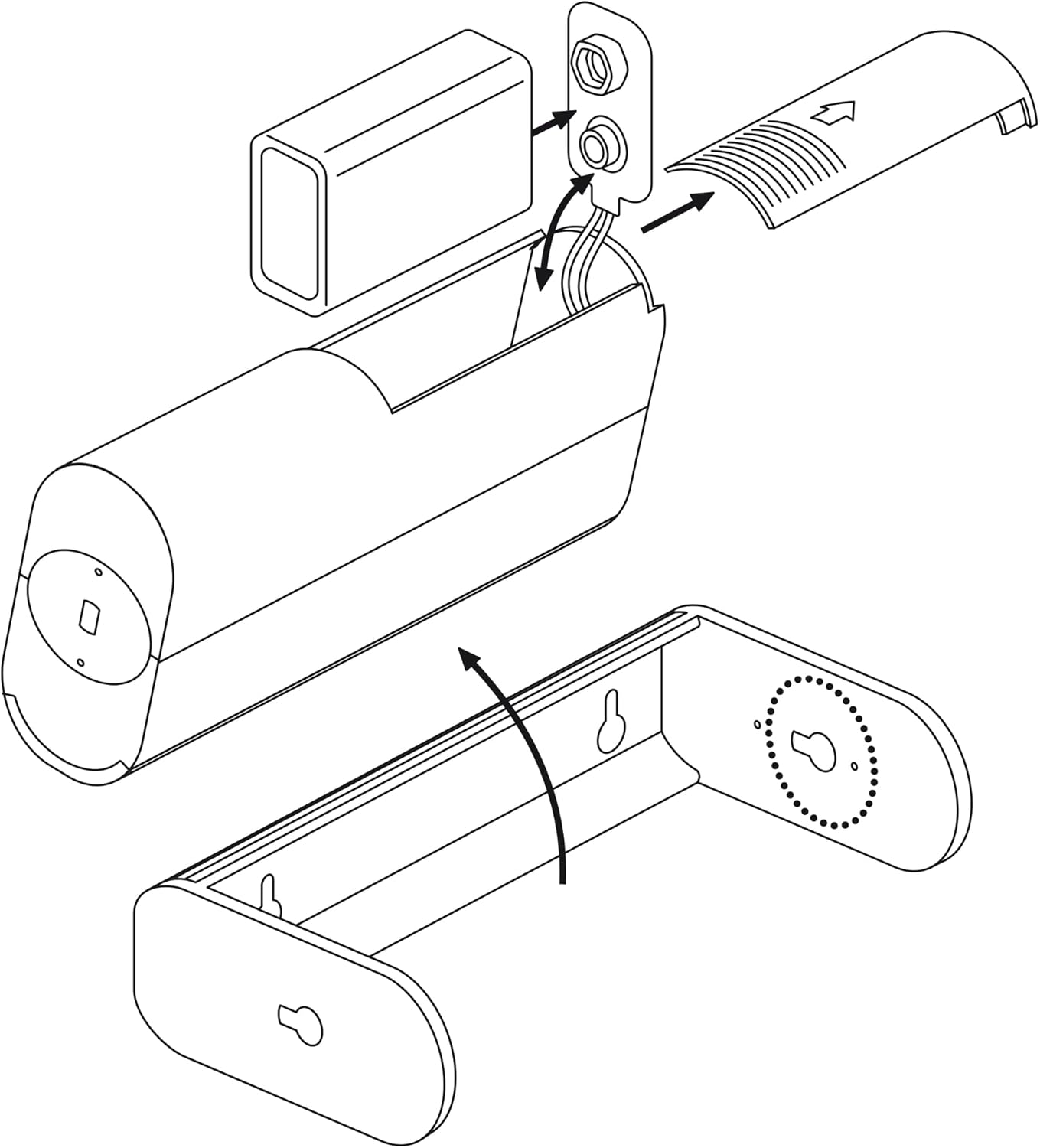
Figure 4: Illustration of battery insertion and how the device attaches to the wall-mounted bracket.
6. Bedryfsinstruksies
6.1 Moduskeuse
The device features a three-position switch for selecting the operating mode:
- KLOK: In this mode, the device emits a short chime sound when motion is detected. This is suitable for use as a passage detector in shops or offices.
- AF: The device is turned off and will not detect motion or emit any sound.
- Alarm: In this mode, the device emits a loud alarm sound (approximately 70dB) when motion is detected. This is suitable for security purposes.
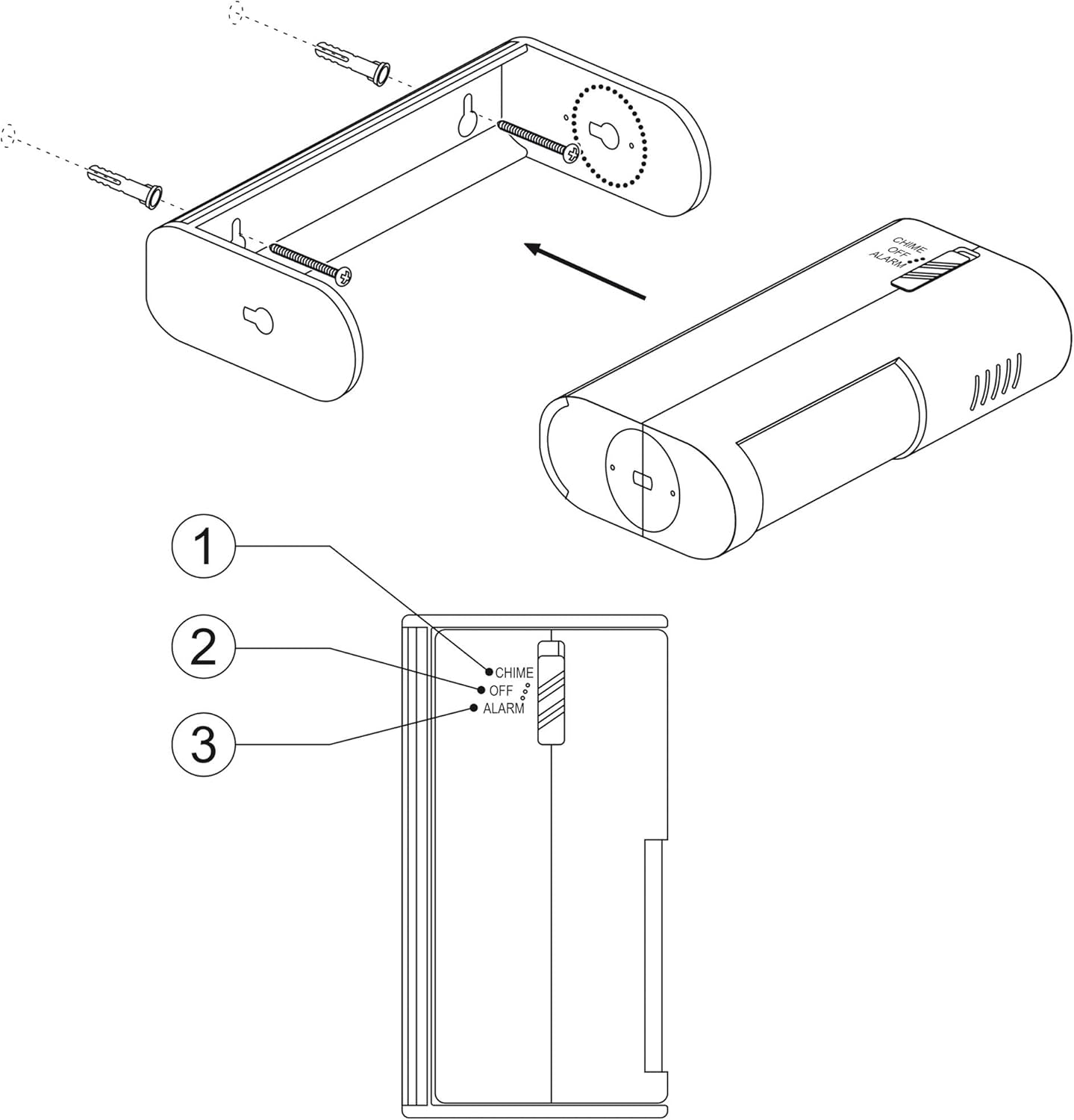
Figuur 5: Gedetailleerd view of the mode selection switch (1: Chime, 2: Off, 3: Alarm).
6.2 Deteksiegebied
The motion detector has a detection range of up to 8 meters and a detection angle of 60 degrees. For optimal performance, position the device to cover the desired area without obstructions.

Figure 6: Diagram showing the detection range (8m) and angle (60°), along with the 360° rotational capability of the sensor head.
7. Onderhoud
7.1 Batteryvervanging
When the sound becomes weak or the device stops responding, it is time to replace the 9V E-Block battery. Follow the battery installation steps in Section 5.1.
7.2 Skoonmaak
To clean the device, use a soft, dry cloth. Do not use abrasive cleaners or solvents, as these may damage the surface or internal components. Ensure no moisture enters the device.
8. Probleemoplossing
- Device not detecting motion:
- Check if the battery is correctly installed and has sufficient power. Replace if necessary.
- Ensure the device is not in the "OFF" position.
- Verify that the detection area is clear of obstructions.
- Adjust the angle of the sensor to cover the desired area.
- No sound or weak sound:
- Vervang die 9V-battery.
- Ensure the device is not in the "OFF" position.
- Vals alarms:
- Reposition the device to avoid areas with rapid temperature changes (e.g., near heaters, air conditioners) or moving objects (e.g., curtains near a window).
- Ensure the detection area is free from small animals if not intended to detect them.
9. Spesifikasies
| Kenmerk | Spesifikasie |
|---|---|
| Model | BWM_ALARM_B |
| Kragtoevoer | 1x 9V DC E-Block Battery (not included) |
| Opsporingsreeks | Tot 8 meter |
| Bespeuringshoek | 60 grade |
| Sensor Rotation | 360 degrees (within bracket) |
| Alarmvolume | Ongeveer. 70dB |
| Beskermingsgradering | IP20 |
| Produkafmetings (L x B x H) | 70 x 190 x 34 mm |
| Gewig | 160 gram |
| Bedryfstemperatuur | 40 grade Celsius |
| Montage tipe | Muurmontering |
10. Waarborg en Ondersteuning
For warranty information and technical support, please refer to the documentation provided with your purchase or visit the official SEBSON webwebwerf. Bewaar u bewys van aankoop vir enige waarborgeise.