
Inleiding
The Perixx PERIBOARD-313 is a wired, full-sized keyboard featuring an integrated touchpad and a 3-level LED backlight. Designed for convenience and efficiency, this keyboard combines typing and pointing functionalities into a single device, making it suitable for various computing environments. Its dimensions are approximately 456mm x 160mm x 30mm, with a touchpad measuring 57mm x 40mm.
This manual provides comprehensive instructions for the proper setup, operation, and maintenance of your PERIBOARD-313 keyboard to ensure optimal performance and longevity.
Pakketinhoud
- 1 x Perixx PERIBOARD-313 Wired USB Backlit Keyboard with Touchpad
- Gebruikershandleiding (hierdie dokument)

Image: The Perixx PERIBOARD-313 keyboard, its USB cable, and the user manual shown next to the product packaging.
Stelselvereistes
- Bedryfstelsel: Windows 7, 8 of 10
- Connectivity: Available USB port
Opstelling
- Pak die sleutelbord uit: Carefully remove the PERIBOARD-313 from its packaging.
- Koppel aan rekenaar: Steek die USB-aansluiting van die sleutelbord in 'n beskikbare USB-poort op jou rekenaar.
- Bestuurder installasie: The keyboard is plug-and-play. Your operating system will automatically detect and install the necessary drivers. No additional software installation is required.
- Verifieer funksionaliteit: Once connected, the keyboard and touchpad should be immediately functional. Test by typing and moving the cursor.
Bedryfsinstruksies
Sleutelborduitleg
The PERIBOARD-313 features a standard full-size US English QWERTY layout with 104 keys, including a dedicated numeric keypad and function keys.

Image: Detailed diagram illustrating the full QWERTY keyboard layout, including the numeric keypad and integrated touchpad.
Touchpad-funksies
The integrated touchpad provides precise cursor control and includes two buttons that function as left and right mouse clicks.
- Wyserbeweging: Slide your finger across the touchpad surface to move the cursor on the screen.
- Links klik: Press the left button below the touchpad or tap once on the touchpad surface.
- Regs klik: Press the right button below the touchpad or tap with two fingers on the touchpad surface (if supported by OS settings).
- Rollees: Use two fingers to scroll vertically on the touchpad (if supported by OS settings).
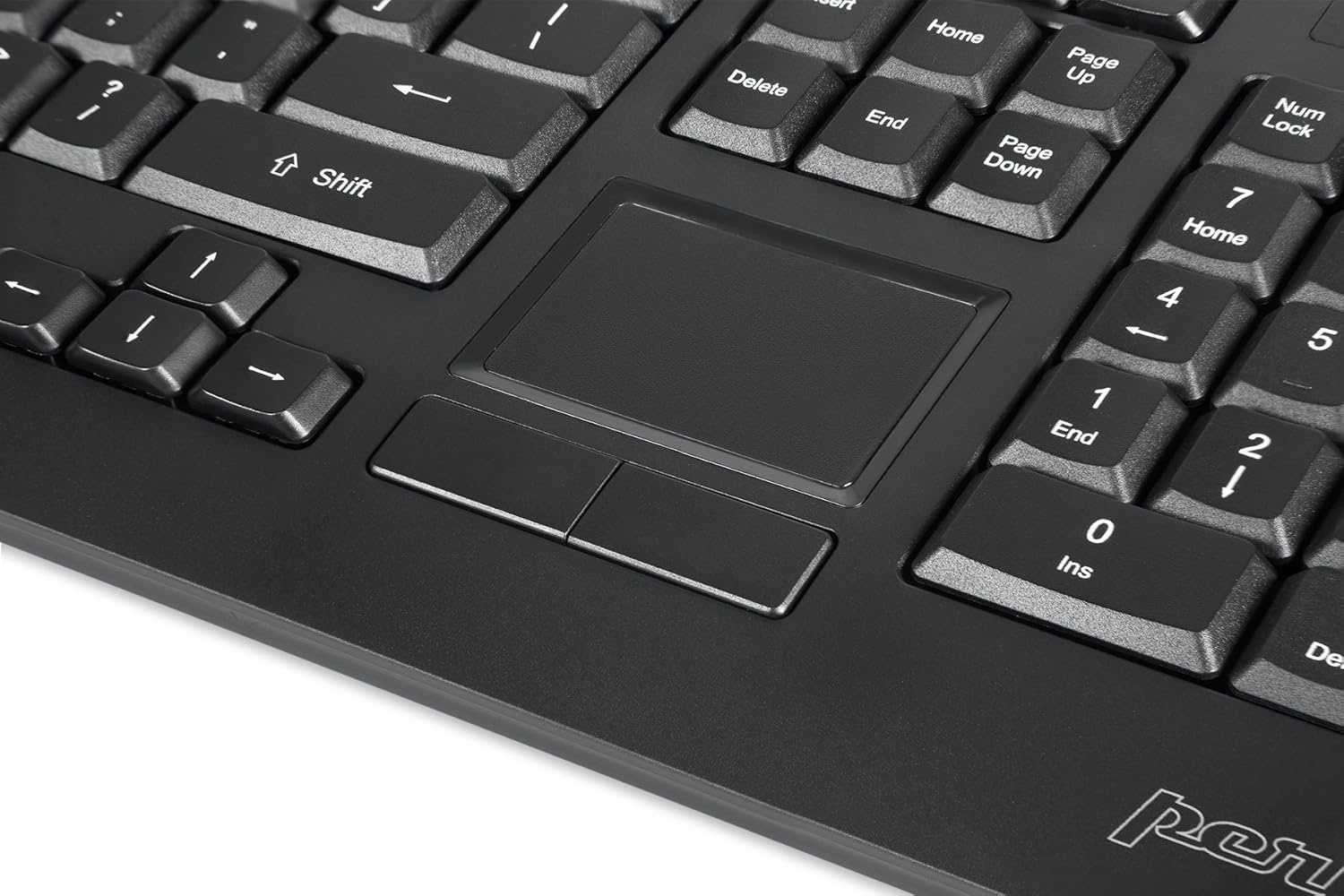
Image: A close-up of the integrated touchpad, highlighting its surface and the two dedicated click buttons.

Image: A user's hand interacting with the touchpad for cursor control.
Agterligbeheer
The keyboard features a white LED backlight with three adjustable brightness levels. Use the dedicated backlight control keys to adjust the illumination.
- Skakel agterlig aan/af: Druk die Fn + F12 sleutel kombinasie.
- Pas Helderheid aan: Druk Fn + F11 om deur die drie helderheidsvlakke te blaai.
Multimedia sleutels
The PERIBOARD-313 includes 10 multimedia function keys for quick access to media controls and internet features. These functions are activated by holding the Fn sleutel en druk die ooreenstemmende funksiesleutel (F1-F10).
- Fn+F1: Maak Media Player oop
- Fn+F2: Volume af
- Fn+F3: Volume op
- Fn+F4: Demp
- Fn+F5: Vorige Snit
- Fn+F6: Volgende Snit
- Fn+F7: Speel / Pouse
- Fn+F8: Stop
- Fn+F9: Maak oop Web Blaaier
- Fn+F10: Maak e-poskliënt oop
Geïntegreerde USB-hubs
The keyboard features two integrated USB 2.0 hubs, allowing you to connect additional USB devices directly to the keyboard for convenience.

Image: The side of the keyboard displaying the two built-in USB 2.0 ports for connecting peripherals.
Onderhoud
- Skoonmaak: Disconnect the keyboard from your computer before cleaning. Use a soft, damp cloth to wipe the surface. For deeper cleaning between keys, use compressed air to remove dust and debris. Avoid using harsh chemicals or abrasive cleaners.
- Berging: Store the keyboard in a dry environment, away from extreme temperatures and direct sunlight.
- Vloeistofblootstelling: This keyboard is not water-resistant. Avoid spilling liquids on it. If liquid exposure occurs, immediately disconnect the keyboard and allow it to dry completely before reconnecting.
Probleemoplossing
| Probleem | Moontlike oorsaak | Oplossing |
|---|---|---|
| Sleutelbord reageer nie | Los USB-verbinding, foutiewe USB-poort, drywerprobleem. |
|
| Touchpad werk nie | Driver issue, touchpad disabled (unlikely for wired), physical damage. |
|
| Backlight not turning on/off or adjusting | Verkeerde sleutelkombinasie, sagtewarekonflik. |
|
| Multimediasleutels werk nie | Verkeerde sleutelkombinasie, sagtewarekonflik. |
|
Spesifikasies
| Handelsmerk | Perixx |
| Model Naam | PERIBOARD-313 US |
| Modelnommer | 11445 |
| Verbindingstegnologie | USB-A (Bedraad) |
| Sleutelbordbeskrywing | QWERTY, Full-sized, Backlit |
| Spesiale kenmerk | Backlit, Integrated Touchpad, USB Hubs |
| Kleur | Swart |
| Keyboard Backlighting Color | Single Color (White LED) |
| Materiaal | ABS Plastiek |
| Aantal sleutels | 104 |
| Skakel Tipe | Membraan |
| Touchpad-afmetings | 57mm x 40mm (2.24" x 1.57") |
| Sleutelbordafmetings | 456mm x 160mm x 30mm (17.95 "x 6.30" x 1.18 ") |
| Item gewig | 1.85 pond |
| Total USB 2.0 Ports | 2 (Integrated Hubs) |
Image: Technical drawing with key dimensions of the PERIBOARD-313 keyboard.
Waarborg
The Perixx PERIBOARD-313 comes with a 1-jaar beperkte waarborg from the date of purchase. This warranty covers manufacturing defects and workmanship under normal use. It does not cover damage caused by misuse, accident, modification, or unauthorized repair. Please retain your proof of purchase for warranty claims.
Ondersteuning
For further assistance, technical support, or warranty inquiries, please visit the official Perixx webwebwerf of kontak hul kliëntediens. Jy kan meer inligting en kontakbesonderhede vind op die Perixx Brand Store on Amazon.