
PatrolEyes PE-DV5-2
PatrolEyes PE-DV5-2 Body Camera User Manual
1296P HD 32GB GPS Auto IR Night Vision Police Body Camera
1. Inleiding
Thank you for choosing the PatrolEyes PE-DV5-2 Body Camera. This device is designed for professional use, offering high-definition video recording, advanced night vision capabilities, and integrated GPS for reliable evidence collection. This manual will guide you through the setup, operation, and maintenance of your new body camera to ensure optimal performance and longevity.
2. Pakketinhoud
Verifieer asseblief dat alle items in u pakket teenwoordig is:
- PatrolEyes PE-DV5-2 Body Camera
- Battery (Included Components)
- USB-laai-/datakabel
- Muurlaaier
- Monteringsknip
- Gebruikershandleiding (hierdie dokument)
3. Onderdele en kontroles
Familiarize yourself with the various parts and controls of your PatrolEyes PE-DV5-2 body camera.

Figuur 3.1: Voorkant view of the PatrolEyes PE-DV5-2 body camera, highlighting the central camera lens, surrounding infrared (IR) lights for night vision, and the PatrolEyes logo at the bottom. The device has a rugged, black casing.

Figuur 3.2: Front-side perspective of the PatrolEyes PE-DV5-2 body camera, providing a clearer view of the camera lens and the array of control buttons located on the side panel, including the yellow button at the top.

Figuur 3.3: Kant view of the PatrolEyes PE-DV5-2 body camera, prominently featuring the red record button and the covered USB port for charging and data transfer.
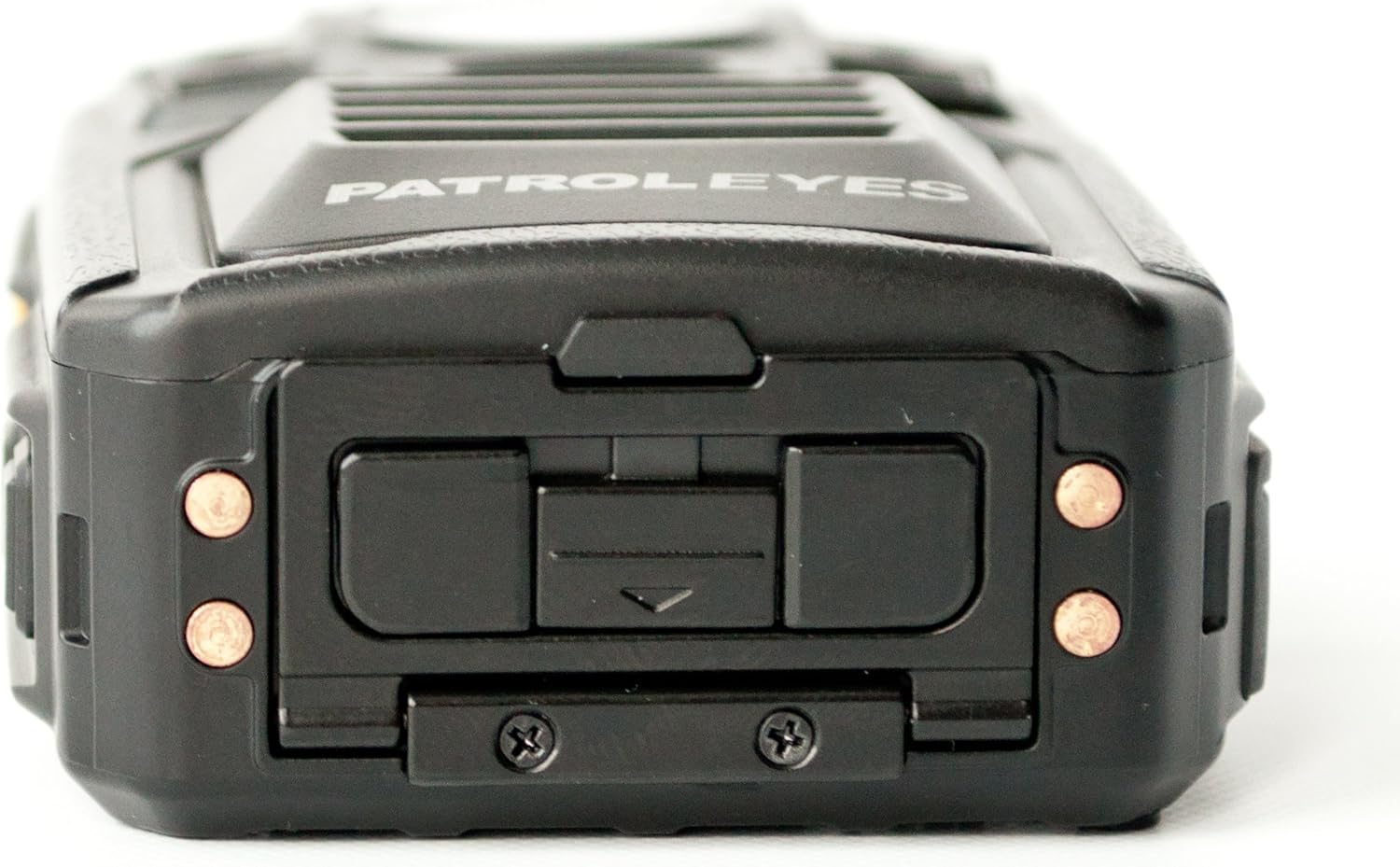
Figuur 3.4: Top view of the PatrolEyes PE-DV5-2 body camera, displaying the GPS indicator light and other top-mounted features.

Figuur 3.5: Onderkant view of the PatrolEyes PE-DV5-2 body camera, revealing the charging contacts designed for use with a docking station.
4. Aan die gang
4.1. Laai die battery
Before first use, fully charge the camera's battery. The camera comes with a rechargeable battery.
- Connect the USB charging cable to the camera's USB port.
- Plug the other end of the USB cable into the wall charger and then into a power outlet.
- The charging indicator light will illuminate. It will change color or turn off once charging is complete.
Alternatively, use a compatible docking station (sold separately) for charging.
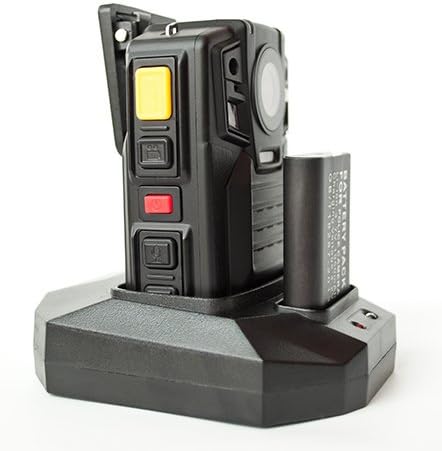
Figuur 4.1: The PatrolEyes body camera securely placed in its docking station, which also features a dedicated slot for charging an additional battery pack.

Figuur 4.2: Agter view of the PatrolEyes docking station, clearly showing the power input port and the USB data port for connecting to a computer.
4.2. Skakel aan/af
- Om aan te skakel: Press and hold the Power button for a few seconds until the device vibrates and the indicator lights turn on.
- Om af te skakel: Press and hold the Power button until the device vibrates and the indicator lights turn off.
4.3. Attaching the Mounting Clip
Attach the provided mounting clip to the back of the camera. This allows you to securely fasten the camera to your uniform or gear.
5. Bedien die kamera
5.1. Opname van video
The camera supports video capture resolutions of 1080p, 480p, and 720p.
- Maak seker dat die kamera aangeskakel is.
- Druk die toegewyde Opneem-knoppie (often red) once to start video recording. The recording indicator light will flash.
- Druk die Opneem-knoppie again to stop recording. The indicator light will stop flashing.
5.2. Neem foto's
The camera has an effective still resolution of 33 MP.
- While in standby mode or during video recording, press the Foto knoppie een keer om 'n stilstaande beeld vas te lê.
5.3. Night Vision (IR)
The camera features auto IR night vision with a range of 30 feet, utilizing infrared light sources.
- The camera is equipped with automatic infrared (IR) activation. In low-light conditions, the IR lights will automatically turn on to provide clear night vision footage.
5.4. GPS-funksionaliteit
The integrated GPS module automatically records location data with your video footage. Ensure the camera has a clear view van die lug vir optimale GPS-seinverkryging.
5.5. Terugspeel
Jy kan weerview recorded videos and photos directly on the camera's screen.
- Enter Playback mode via the menu or a dedicated button (refer to on-screen prompts).
- Navigeer deur files using the directional buttons.
- Press the OK/Select button to play a video or view n foto.
5.6. Koppel aan 'n rekenaar
Om oor te dra files, connect the camera to a computer using the provided USB cable.
- Skakel die kamera aan.
- Verbind die kamera met u USB-kabel met u rekenaar.
- Die kamera sal as 'n verwyderbare skyfaandrywer op jou rekenaar verskyn.
- You can now access and transfer video and photo files.
6. Onderhoud en versorging
6.1. Skoonmaak
- Vee die kameraliggaam af met 'n sagte, damp lap. Moenie harde chemikalieë of skuur skoonmaakmiddels gebruik nie.
- Vir die lens, gebruik 'n gespesialiseerde lensskoonmaakdoek en -oplossing om skrape te voorkom.
6.2. Berging
- Bêre die kamera op 'n koel, droë plek weg van direkte sonlig en uiterste temperature.
- Ensure the battery is partially charged (around 50%) if storing for extended periods to preserve battery life.
6.3. Batteryversorging
- Vermy om die battery gereeld heeltemal te ontlaai.
- Gebruik slegs die oorspronklike of goedgekeurde laaitoebehore.
7. Probleemoplossing
| Probleem | Moontlike oorsaak | Oplossing |
|---|---|---|
| Kamera skakel nie aan nie. | Lae of geen batterylading nie. | Laai die battery vol. |
| Kan nie video opneem/foto's neem nie. | Storage full. | Oordrag files to a computer and delete them from the camera. |
| Swak video-/beeldkwaliteit. | Dirty lens; low light conditions. | Clean the lens; ensure IR is active in low light. |
| GPS kry nie sein nie. | Belemmer view of sky; indoor use. | Beweeg na 'n oop buite area. |
| Kamera word nie deur rekenaar herken nie. | Foutiewe USB-kabel; drywerprobleem. | Try a different USB port/cable; ensure camera is powered on. |
8. Spesifikasies
| Kenmerk | Detail |
|---|---|
| Modelnommer | PE-DV5-2 |
| Video-opname-resolusie | 1080p, 480p, 720p |
| Effektiewe stilresolusie | 33 MP |
| Raamtempo | 30 fps |
| Nagsigreeks | 30 Voet |
| Verbindingstegnologie | Draadloos (Wi-Fi) |
| Kragbron | Battery aangedrewe |
| Ingesluit komponente | Battery |
| Internasionale Beskermingsgraad | IP54 |
| Spesiale kenmerke | Bewegingsensor, Nagvisie |
| Binne/buiteluggebruik | Binne, Buitelug |
| Vervaardiger | Patrollie Ja |
| Eerste Beskikbare Datum | 14 Mei 2017 |
9. Waarborginligting
PatrolEyes products typically come with a limited manufacturer's warranty. Please refer to the warranty card included with your purchase or visit the official PatrolEyes webwebwerf vir gedetailleerde waarborgbepalings en -voorwaardes. Bewaar u bewys van aankoop vir waarborgeise.
10. Kliëntediens
For technical assistance, troubleshooting beyond this manual, or inquiries about your PatrolEyes PE-DV5-2 body camera, please contact PatrolEyes customer support. Contact information can typically be found on the manufacturer's webwebwerf of op die produkverpakking.
Aanlyn hulpbronne: Visit the official PatrolEyes webwebwerf vir algemene vrae, sagteware-opdaterings en bykomende ondersteuningsmateriaal.
Ask a question about this manual
Ask about setup, troubleshooting, compatibility, parts, safety, or missing instructions. Manuals+ will review the question and use this page’s manual context to help answer it.