
1. Inleiding
The AUTOPHIX OM126 is a versatile On-Board Diagnostics II (OBD2) scanner designed to help vehicle owners and technicians diagnose engine-related issues. This tool allows you to read and clear Diagnostic Trouble Codes (DTCs), view live data, and check I/M readiness status, providing essential information for maintaining your vehicle's performance and emissions compliance. This manual provides detailed instructions for the proper use and maintenance of your OM126 scanner.
2. Veiligheidsinligting
Always observe safety precautions when working on a vehicle. Improper use of diagnostic tools can lead to personal injury or damage to the vehicle. Read and follow all instructions carefully.
- Maak seker dat die voertuig op 'n gelyk oppervlak geparkeer is met die parkeerrem aangeskakel.
- Turn off the ignition before connecting or disconnecting the scanner.
- Dra gepaste persoonlike beskermende toerusting, soos veiligheidsbrille.
- Vermy kontak met warm enjinkomponente of bewegende dele.
- Do not operate the scanner while driving.
- Keep the scanner away from water, oil, and extreme temperatures.
3. Produk verbyview
The AUTOPHIX OM126 is a compact and user-friendly diagnostic tool. It features a clear display and intuitive buttons for easy navigation through its functions.
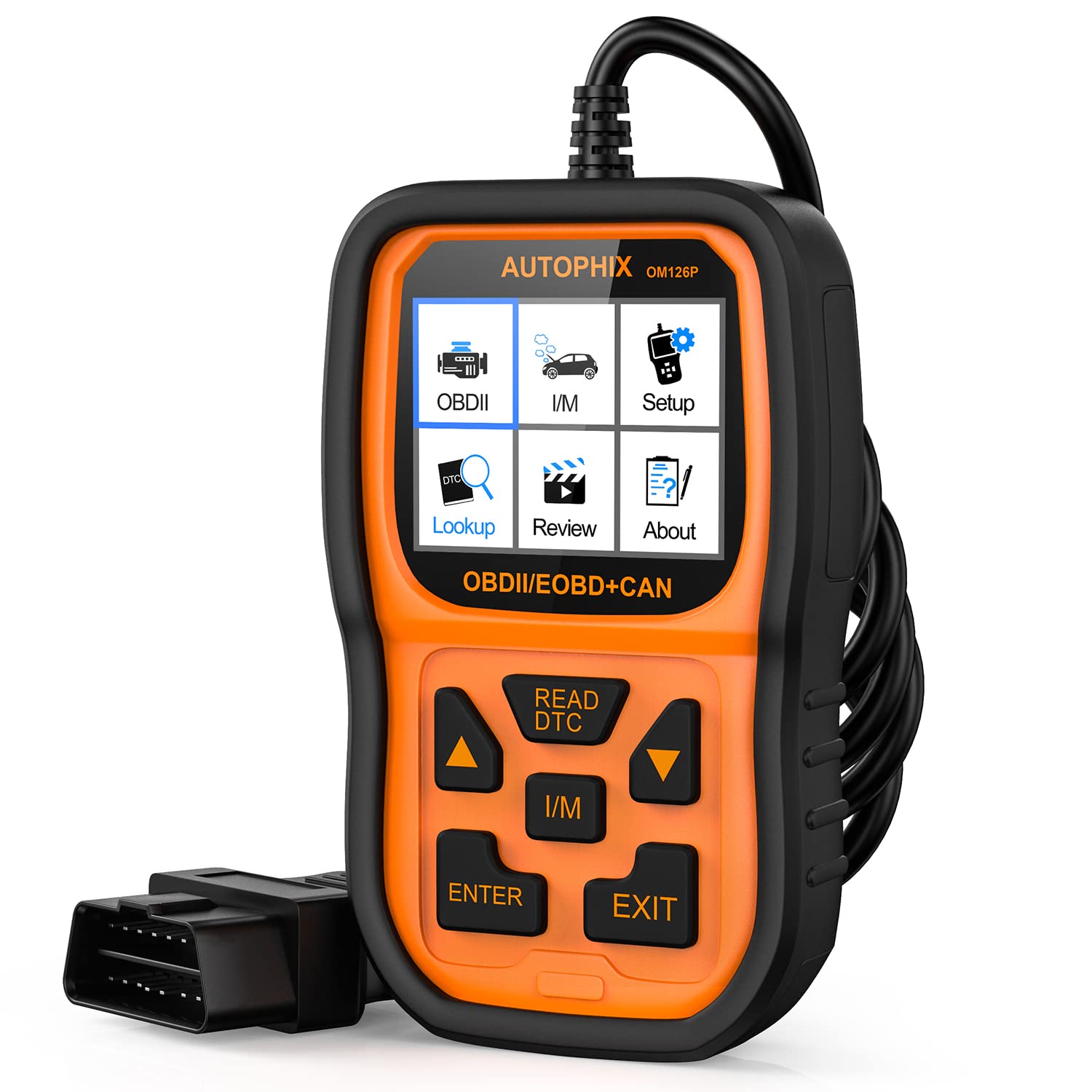
Figuur 3.1: Voorkant view of the AUTOPHIX OM126 OBD2 Scanner, showing the display screen and control buttons.
Sleutel kenmerke:
- Reads and clears generic and manufacturer-specific Diagnostic Trouble Codes (DTCs).
- Turns off Check Engine Light (MIL).
- Displays I/M readiness status.
- Retrieves vehicle information (VIN, CIN, CVN).
- Ondersteun verskeie tale.
- Plug-and-play operation.
4. Opstelling
4.1 Initial Software Update (Recommended)
Before first use, it is recommended to update the scanner's software to ensure compatibility with the latest vehicle models and diagnostic protocols. Visit the official AUTOPHIX website to download the update tool and follow the provided instructions. This typically involves connecting the scanner to a computer via a USB cable.
4.2 Verbinding met die voertuig
- Locate the vehicle's 16-pin Data Link Connector (DLC). This port is usually found under the dashboard on the driver's side. Refer to your vehicle's owner's manual for the exact location.
- Maak seker dat die voertuig se ontsteking in die AF-posisie is.
- Plug the OM126 scanner's OBD2 cable into the vehicle's DLC. Ensure a firm connection.
- Turn the vehicle's ignition to the ON position (engine off). The scanner will automatically power on and establish communication with the vehicle's onboard computer.
5. Bedryfsinstruksies
5.1 Spyskaartnavigasie
Use the UP/DOWN arrow buttons to scroll through menu options. Press the ENTER button to select an option or confirm an action. The ESC/BACK button is used to return to the previous screen or cancel an operation.
5.2 Lees van diagnostiese foutkodes (DTC's)
- From the main menu, select "Read Codes" and press ENTER.
- The scanner will communicate with the vehicle and display any stored DTCs. Each code will typically include a numerical identifier and a brief description.
- Use the UP/DOWN buttons to scroll through multiple codes if present.
5.3 Verwydering van diagnostiese foutkodes (DTC's)
Clearing DTCs will turn off the Check Engine Light (MIL) and erase all diagnostic data. Only clear codes after addressing the underlying issue, as they will reappear if the fault persists.
- From the main menu, select "Erase Codes" and press ENTER.
- A confirmation message will appear. Select "Yes" and press ENTER to proceed.
- The scanner will confirm that the codes have been cleared.
5.4 I/M Gereedheidsstatus
The I/M Readiness function checks if the various emissions-related systems on the vehicle are operating correctly and have completed their self-tests. This is useful for emissions inspections.
- From the main menu, select "I/M Readiness" and press ENTER.
- The display will show the status of various monitors (e.g., O2 Sensor, Catalyst, EVAP System) as either "OK" (complete) or "INC" (incomplete).
5.5 ViewVoertuiginligting
This function allows you to retrieve the Vehicle Identification Number (VIN), Calibration ID (CIN), and Calibration Verification Number (CVN).
- From the main menu, select "Vehicle Info" and press ENTER.
- Die skandeerder sal die beskikbare voertuiginligting vertoon.
6. Onderhoud
- Skoonmaak: Use a soft, dry cloth to clean the scanner's casing and screen. Do not use abrasive cleaners or solvents.
- Berging: Store the scanner in a clean, dry environment, away from direct sunlight and extreme temperatures. Keep it in its original packaging or a protective case when not in use.
- Sagteware-opdaterings: Periodically check the AUTOPHIX official website for software updates to ensure optimal performance and compatibility.
7. Probleemoplossing
If you encounter issues while using the AUTOPHIX OM126, refer to the following common troubleshooting steps:
- Skandeerder skakel nie aan nie:
- Ensure the OBD2 cable is securely connected to the vehicle's DLC.
- Verifieer dat die voertuig se ontsteking in die AAN-posisie is (enjin af).
- Check the vehicle's fuse for the OBD2 port (consult your vehicle's manual).
- Kommunikasiefout met voertuig:
- Confirm the vehicle supports the OBD2 protocol (most vehicles manufactured after 1996 in the US, 2001 in EU gasoline, 2004 in EU diesel).
- Ensure the ignition is ON and the engine is OFF.
- Try connecting the scanner to a different OBD2-compliant vehicle to rule out scanner malfunction.
- Check for any loose connections in the OBD2 cable.
- Kodes kan nie uitgevee word nie:
- Ensure the ignition is ON and the engine is OFF.
- If the underlying fault is still present, codes will not clear or will reappear immediately. Address the vehicle's issue first.
- Screen is blank after update:
- This can sometimes occur during the update process. Ensure the update process is completed fully as per the instructions on the AUTOPHIX webwebwerf.
- Disconnect and reconnect the device.
8. Spesifikasies
| Kenmerk | Spesifikasie |
|---|---|
| Model | OM126 |
| Item gewig | 11.2 onse |
| Produk afmetings | 9 x 5 x 2.6 duim |
| Voltage | 12 Volt |
| Skerm grootte | 2.4 duim |
| Bedryfstelsel | Windows 7 (for update software) |
| Kragbron | Battery Powered (via vehicle OBD2 port) |