
Audibax Missouri 2000 A
Audibax Missouri 2000 A Dual VHF Wireless Microphone System
Gebruikershandleiding
1. Inleiding
Thank you for choosing the Audibax Missouri 2000 A Dual VHF Wireless Microphone System. This professional wireless microphone system is designed to deliver clear, interference-free audio for various applications. This manual provides essential information for the safe and efficient use of your new system. Please read it thoroughly before operation and retain it for future reference.
2. Veiligheidsinligting
- Kragbron: Ensure the receiver is connected to a 230V power supply. Use only the provided power adapter.
- Batterygebruik: Microphones operate on AA batteries. Replace batteries when the low battery indicator appears to ensure optimal performance. Do not mix old and new batteries, or different types of batteries.
- Omgewing: Avoid exposing the system to water, moisture, extreme temperatures, or direct sunlight. Operate in a well-ventilated area.
- Hantering: Handle microphones and receiver with care. Avoid dropping or subjecting them to strong impacts.
- Diens: Moenie probeer om die eenheid self oop te maak of te herstel nie. Verwys alle diens na gekwalifiseerde personeel.
3. Pakketinhoud
Maak asseblief seker dat al die items wat hieronder gelys word, in u pakket ingesluit is:
- 1x Audibax Missouri 2000 A Receiver Unit
- 2x Audibax Missouri 2000 A Handheld Wireless Microphones
- 1x Power Adapter for Receiver
- 1x Gebruikershandleiding
- (AA Batteries for microphones are not included and must be purchased separately)
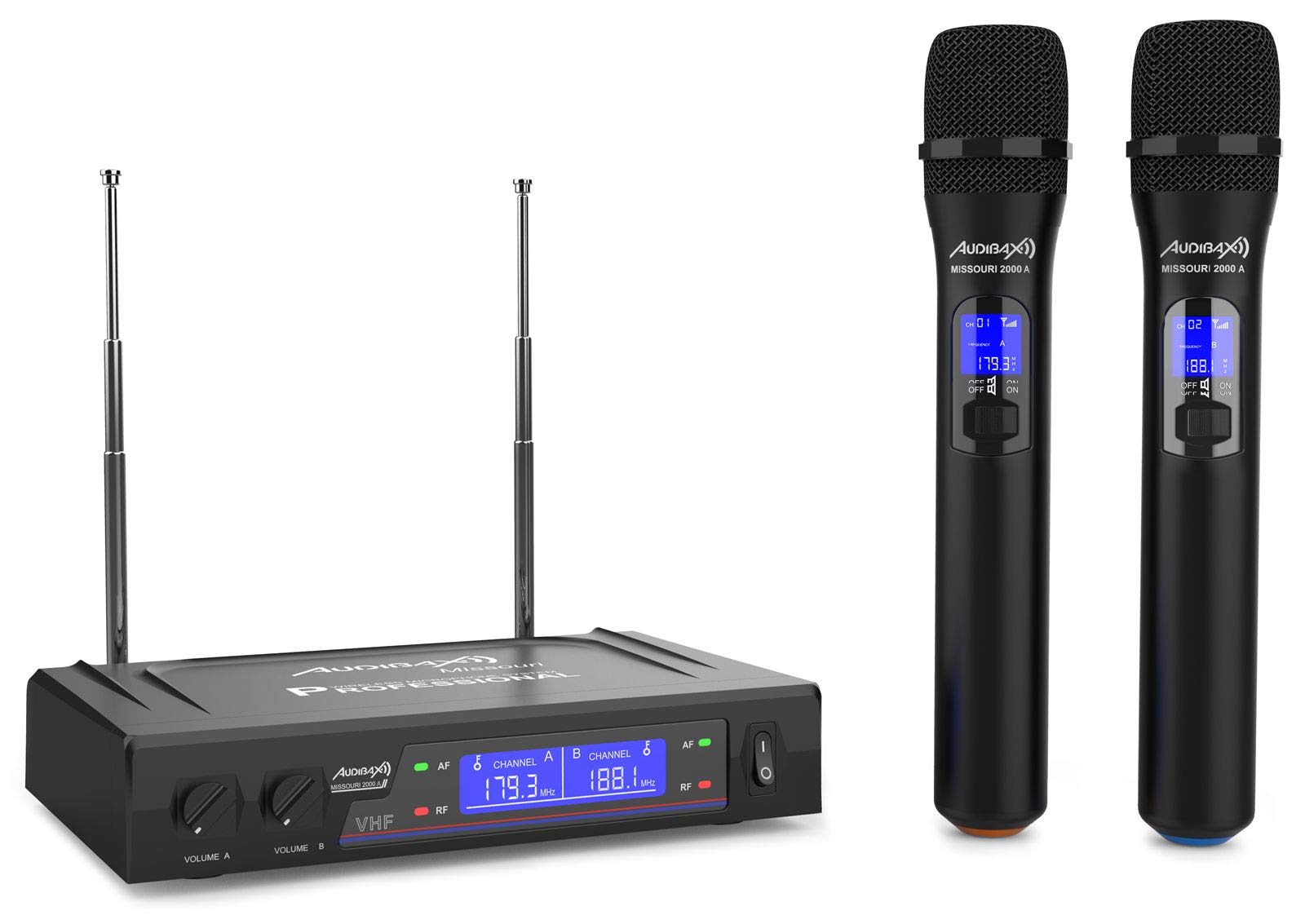
Figure 3.1: Complete Audibax Missouri 2000 A system including receiver and two microphones.
4. Produk verbyview
The Audibax Missouri 2000 A is a dual VHF wireless microphone system designed for professional audio applications. It features two high-quality handheld wireless microphones and a receiver unit with independent volume controls and RF/AF indicators.
Sleutel kenmerke:
- Dual VHF wireless system with 2 handheld microphones.
- Receiver with Diversity antennas for improved signal reception and up to 80 meters coverage.
- Clean sound with a signal-to-noise ratio of 105 dB, minimizing interference.
- Independent volume control for each microphone on the receiver.
- RF/AF indicators on the receiver display for monitoring signal status.
- Microphone power via AA batteries, offering extended autonomy.
- Dynamic cardioid microphone capsule for focused sound capture and attenuation of off-axis sounds.
- Output connectors: XLR balanced and auxiliary (MIX) output.

Figure 4.1: Front panel of the receiver unit.

Figure 4.2: Two handheld wireless microphones.
5. Opstelling
5.1 Ontvanger Opstelling
- Plasing: Position the receiver unit on a stable, flat surface, away from potential sources of interference (e.g., computers, Wi-Fi routers). Ensure adequate ventilation.
- Antenna verbinding: Screw the two included antennas firmly into the ANT A and ANT B connectors on the rear of the receiver. Adjust them vertically for optimal signal reception.
- Kragverbinding: Connect the provided power adapter to the DC IN port on the rear of the receiver and then plug it into a 230V AC power outlet.
- Oudio-uitvoer:
- For a mixed output of both microphones, connect an audio cable (e.g., 6.35mm jack) from the "OUT MIX" port on the receiver to the input of your mixer, amplifier, or sound system.
- For individual balanced outputs, use XLR cables to connect the "BALANCED" XLR output ports (if available on your specific model) to your audio system.
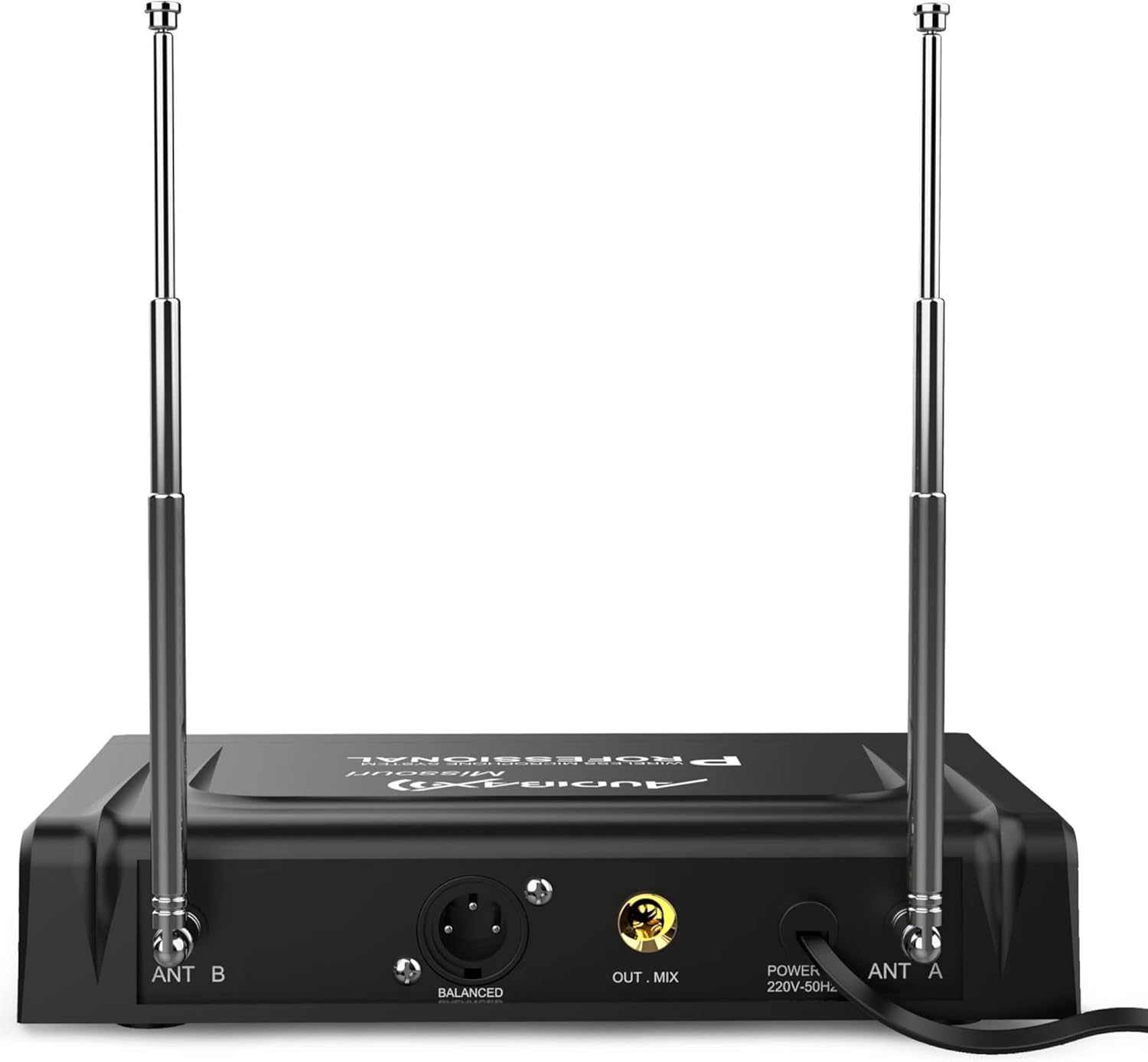
Figure 5.1: Rear panel connections of the receiver unit.
5.2 Mikrofoonopstelling
- Battery installasie: Unscrew the bottom part of each microphone to access the battery compartment. Insert two AA batteries, ensuring correct polarity (+/-). Screw the bottom part back on securely.
- Krag aan: Slide the ON/OFF switch on each microphone to the "ON" position. The microphone display should illuminate, showing the channel and frequency.
- Demp-funksie: Each microphone has a MUTE switch. Use this to temporarily silence the microphone without turning it off completely.
6. Bedryfsinstruksies
6.1 Skakel die stelsel aan
- Ensure all connections (power, audio output) are secure on the receiver.
- Turn on your mixer or amplifier first, with its volume set to minimum.
- Press the power button on the receiver unit. The display will light up.
- Turn on each microphone by sliding its ON/OFF switch to "ON".
- Observe the receiver's display. The "RF" (Radio Frequency) indicator for each channel should light up, indicating a successful connection between the microphone and receiver. The "AF" (Audio Frequency) indicator will light up when sound is detected by the microphone.

Figure 6.1: Receiver display with RF/AF indicators and frequency information.
6.2 Volumebeheer
- The receiver has independent volume knobs for Microphone A (VOLUME A) and Microphone B (VOLUME B). Adjust these to set the desired output level for each microphone.
- Gradually increase the volume on your mixer or amplifier to the desired listening level.
6.3 Frequency Information
The Audibax Missouri 2000 A operates on fixed VHF frequencies. For this specific model, the frequencies are 179.300 MHz and 188.100 MHz. These frequencies are displayed on both the receiver and microphone units.
7. Onderhoud
7.1 Skoonmaak
- Always disconnect the receiver from the power outlet before cleaning.
- Use a soft, dry cloth to wipe the surfaces of the receiver and microphones.
- Moenie vloeibare skoonmaakmiddels, aërosols of oplosmiddels gebruik nie, aangesien dit die afwerking of interne komponente kan beskadig.
7.2 Batteryvervanging
- When the microphone's display indicates low battery, replace both AA batteries immediately to avoid interruption during use.
- Maak seker dat die polariteit korrek is wanneer nuwe batterye ingesit word.
- Gooi gebruikte batterye verantwoordelik volgens plaaslike regulasies weg.
7.3 Berging
- When not in use for extended periods, remove batteries from the microphones to prevent leakage.
- Bêre die stelsel op 'n koel, droë plek, weg van direkte sonlig en uiterste temperature.
8. Probleemoplossing
| Probleem | Moontlike oorsaak | Oplossing |
|---|---|---|
| Geen geluid van mikrofone nie |
|
|
| Intermittent sound or signal dropouts |
|
|
| Swak klankgehalte / Vervorming |
|
|
| RF indicator not lighting up |
|
|
9. Spesifikasies
| Kenmerk | Detail |
|---|---|
| Handelsmerk | Audibax |
| Model Naam | Missouri 2000 A |
| Modelnommer | 10107904 |
| Verbindingstegnologie | Wireless (VHF), XLR |
| Mikrofoonvormfaktor | Handheld |
| Polêre patroon | Eenrigting (kardioïed) |
| Frekwensierespons | 40 Hz - 18 kHz |
| Sein-tot-geraas verhouding | 105 dB |
| Audio Sensitiwiteit | 105 Desibel |
| Geraasvlak | 103 Desibel |
| Receiver Frequencies | 179.300 MHz / 188.100 MHz |
| Kragbron | Receiver: 230V AC; Microphones: AA Batteries (not included) |
| Aantal kanale | 2 |
| Bedryfsreeks | Tot 80 meter (siglyn) |
| Produkafmetings (LxBxH) | 39 x 31 x 8 cm |
| Item gewig | 1.04 kilogram |
| Aanbevole gebruike | Videoconferencing, Karaoke |
| Ingesluit komponente | Microphones, Receiver, User Manual |
10. Waarborg en Ondersteuning
For warranty information and technical support, please refer to the documentation provided with your purchase or contact Audibax customer service directly. Keep your proof of purchase for any warranty claims.
Ask a question about this manual
Ask about setup, troubleshooting, compatibility, parts, safety, or missing instructions. Manuals+ will review the question and use this page’s manual context to help answer it.