
Inleiding
This manual provides essential information for the safe and efficient use of your SANSUI SCM39-B11 39V High-Vision LCD TV. Please read these instructions thoroughly before operating the television and retain them for future reference. This television features a reliable Japanese design, incorporating a main board developed by Toshiba Visual Solutions Corporation, with evaluation and production management handled by a specialized team in Echizen City, Fukui Prefecture.
The SCM39-B11 model is a 2017 release, designed for terrestrial digital broadcasting, and supports external HDD recording via USB connection.
Veiligheidsinligting
Volg altyd basiese veiligheidsmaatreëls wanneer u hierdie televisie gebruik om die risiko van brand, elektriese skok en besering te verminder.
- Moenie die televisie aan reën of vog blootstel nie.
- Moenie ventilasie-openinge blokkeer nie. Maak seker dat daar voldoende spasie rondom die televisie is vir behoorlike lugvloei.
- Moenie die televisie op 'n onstabiele trollie, staander, driepoot, hakie of tafel plaas nie.
- Ontkoppel die televisie tydens weerligstorms of wanneer dit vir lang tye nie gebruik word nie.
- Verwys alle diens na gekwalifiseerde dienspersoneel.
Pakketinhoud
Verifieer dat alle items in die pakket teenwoordig is:
- SANSUI SCM39-B11 39V LCD TV
- Afstandbeheer
- Batterye (vir afstandbeheer)
- MiniB-CAS Card
- B-CAS Card Cover (with screws)
- Stand (with screws)
- Instructiehandleiding (hierdie dokument)
- Waarborgkaart
Opstelgids
1. Staaninstallasie
Carefully place the television screen-down on a soft, flat surface. Attach the included stand to the bottom of the television using the provided screws. Ensure the stand is securely fastened before placing the television upright.

Beeld: Voorkant view of the SANSUI SCM39-B11 TV with its stand, showing the display and the two silver-colored feet.
2. Aansluitkabels
Refer to the back panel of the television for connection ports.

Beeld: Agter view of the SANSUI SCM39-B11 TV, displaying the back panel with various input ports including HDMI, USB, and antenna connections.
- Antenna verbinding: Connect your terrestrial digital antenna cable to the ANTENNA IN port.
- HDMI-toestelle: Connect DVD players, Blu-ray players, game consoles, or other HDMI-compatible devices to the HDMI 1 or HDMI 2 ports. This model has 2 HDMI ports.
- USB External HDD: For recording, connect a compatible external USB Hard Disk Drive (HDD) to the USB port.
- Krag: Connect the power cord to the AC inlet on the television and then to a wall outlet.
3. Aanvanklike Opstelling
After connecting all cables and powering on the TV, the initial setup wizard will guide you through the process. This typically includes:
- Taalkeuse.
- Region selection.
- Automatic channel scan for terrestrial digital broadcasts. Ensure your antenna is properly connected for this step.
Bedryfsinstruksies
Basiese bewerkings
- Krag aan/af: Druk die KRAG knoppie op die afstandbeheer.
- Kanaalkeuse: Gebruik die CH +/- buttons or the number buttons on the remote.
- Volume aanpassing: Gebruik die VOL +/- knoppies.
- Invoerbron: Druk die INSET button to cycle through connected devices (TV, HDMI 1, HDMI 2, etc.).
Recording with External HDD
This TV supports recording terrestrial digital broadcasts to an external USB HDD. Ensure your HDD is connected to the USB port.
- Opnames skeduleer: Use the Electronic Program Guide (EPG) to select programs for recording. The EPG supports a 1-week display.
- Automatic Chapter Marking: The TV can detect commercials during recording and automatically set chapter marks, allowing for easier navigation during playback.
Terugspeelfunksies
When playing back recorded content from an external HDD, the following functions are available:
- Herhaal terugspeel: Replay a section or the entire program.
- Chase Playback: Watch a program from the beginning while it is still being recorded.
- 1.5x Speed Playback: Watch recorded content at an accelerated speed.
Beeld- en klankverbeterings
- Blue Light Guard: Activate this function via the remote control to reduce blue light emission by up to approximately 50%, which may help reduce eye strain.
- Picture Enhancer: This feature automatically adjusts the super-resolution processing level according to the input content, ensuring optimal image display at all times.
- Japanese Paper Speakers: The integrated speakers utilize Japanese paper for clear sound reproduction across high to low frequencies.
Bykomende kenmerke
- Screen Freeze Function: Pause the live broadcast or current display.
- HDMI Connected Device Linkage: Control compatible HDMI-connected devices using the TV remote.
- Bi-directional Data Communication: Supports two-way data communication.
Onderhoud
Skoonmaak van die televisie
- Skerm: Vee die skerm liggies af met 'n sagte, droë, pluisvrye lap. Vir hardnekkige merke, vee liggiesampen the cloth with water or a specialized screen cleaner (ensure it is safe for LCD screens) and wipe carefully. Do not spray liquid directly onto the screen.
- Liggaam: Wipe the television body with a soft, dry cloth. Avoid using abrasive cleaners, waxes, or solvents as they can damage the finish.
Afstandbeheersorg
- Replace batteries when the remote control's response becomes slow or inconsistent.
- Moenie ou en nuwe batterye, of verskillende tipes batterye meng nie.
- Keep the remote control away from moisture and direct sunlight.
Probleemoplossing
Indien u probleme met u televisie ondervind, raadpleeg die volgende algemene probleme en oplossings voordat u ondersteuning kontak.
| Probleem | Moontlike oorsaak/oplossing |
|---|---|
| Geen krag nie | Ensure the power cord is securely plugged into both the TV and the wall outlet. Check if the outlet is functioning. |
| No picture / No signal | Verify antenna connection. Check the input source selection (e.g., HDMI 1, HDMI 2, TV). Perform a channel scan if necessary. |
| Geen klank nie | Check volume level and mute status. Ensure external audio devices are properly connected if used. |
| Afstandbeheer werk nie | Kontroleer en vervang batterye. Maak seker daar is geen obstruksies tussen die afstandbeheerder en die TV se IR-sensor nie. |
| External HDD recording issues | Ensure the USB HDD is properly connected and formatted for the TV. Some HDDs may have compatibility issues. Try a different USB port or HDD if available. |
| HDMI device not recognized | Ensure the HDMI cable is securely connected. Try a different HDMI port or cable. Power cycle both the TV and the HDMI device. |
Produkspesifikasies

Image: A table detailing the specifications of the SANSUI SCM39-B11 TV, including screen size, resolution, tuner type, recording capabilities, connectivity, and power consumption.
| Kenmerk | Spesifikasie |
|---|---|
| Model Naam | SCM39-B11 |
| Skerm grootte | 39V-type (39 inches) |
| Vertoon tegnologie | LCD |
| Resolusie | High-Vision (HD 1366 x 768) |
| Tuners | Terrestrial Digital x1, BS Digital: None, CS Digital: None |
| External HDD Recording | Supported via USB |
| HDMI-poorte | 2 stelsels |
| USB-poorte | 1-stelsel |
| Muurbevestigingsversoenbaar | VESA 200mm x 200mm |
| Produk Gewig | 6.1 kg |
| Afmetings (B x H x D) | Approx. 88.8 cm x 57.5 cm x 21.0 cm (with stand) |
| Kragverbruik | 61 W |
| Jaar vrystelling | 2017 |

Beeld: Voorkant view of the SANSUI SCM39-B11 TV with overlaid measurements for width (88.8cm), height (57.5cm), and weight (6.1kg).

Beeld: Sykant view of the SANSUI SCM39-B11 TV, illustrating the depth of the television body (9.9cm) and the total depth including the stand (21cm).
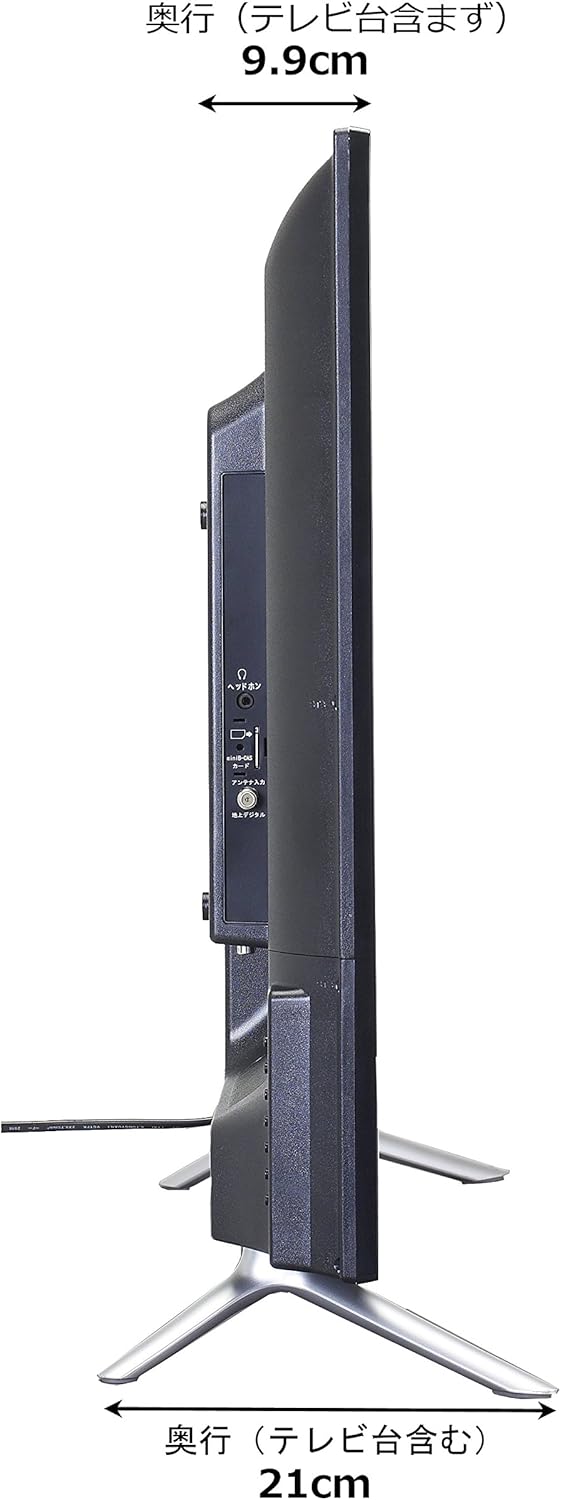
Image: Diagram showing the SANSUI SCM39-B11 TV on a stand next to a human figure (approx. 160cm tall) for visual scale, with TV dimensions indicated.
Waarborg en Ondersteuning
Your SANSUI SCM39-B11 television comes with a warranty. Please refer to the included warranty card for details regarding coverage period and terms. Keep your purchase receipt as proof of purchase.
For technical support, service, or inquiries not covered in this manual, please contact SANSUI customer service. Contact information can typically be found on the warranty card or the official SANSUI webwebwerf.