
Inleiding
This manual provides comprehensive instructions for the safe and effective use of your Winplus AC55925-80 3-in-1 Emergency Socket Power Bank. This device combines a compact power bank, a USB car charger, and an emergency glass-breaking tool. Please read this manual thoroughly before operation and retain it for future reference.
Produk verbyview
The Winplus 3-in-1 Emergency Socket Power Bank is designed for convenience and safety, offering multiple functionalities in a compact form factor.

Figure 1: Winplus 3-in-1 Emergency Socket Power Bank with key features highlighted.
Komponente:
- Compact Power Bank: Provides portable power for charging devices.
- USB-motorlaaier: Plugs into a 12V car socket to charge devices and the power bank.
- Emergency Glass-Breaking Tool: Integrated for emergency situations.
- USB-uitsetpoort: For connecting charging cables to devices.
- Mikro USB-invoerpoort: For charging the internal power bank.
- LED-aanwyser: Wys laaistatus.

Figuur 2: Gedetailleerd view of the device's ports.
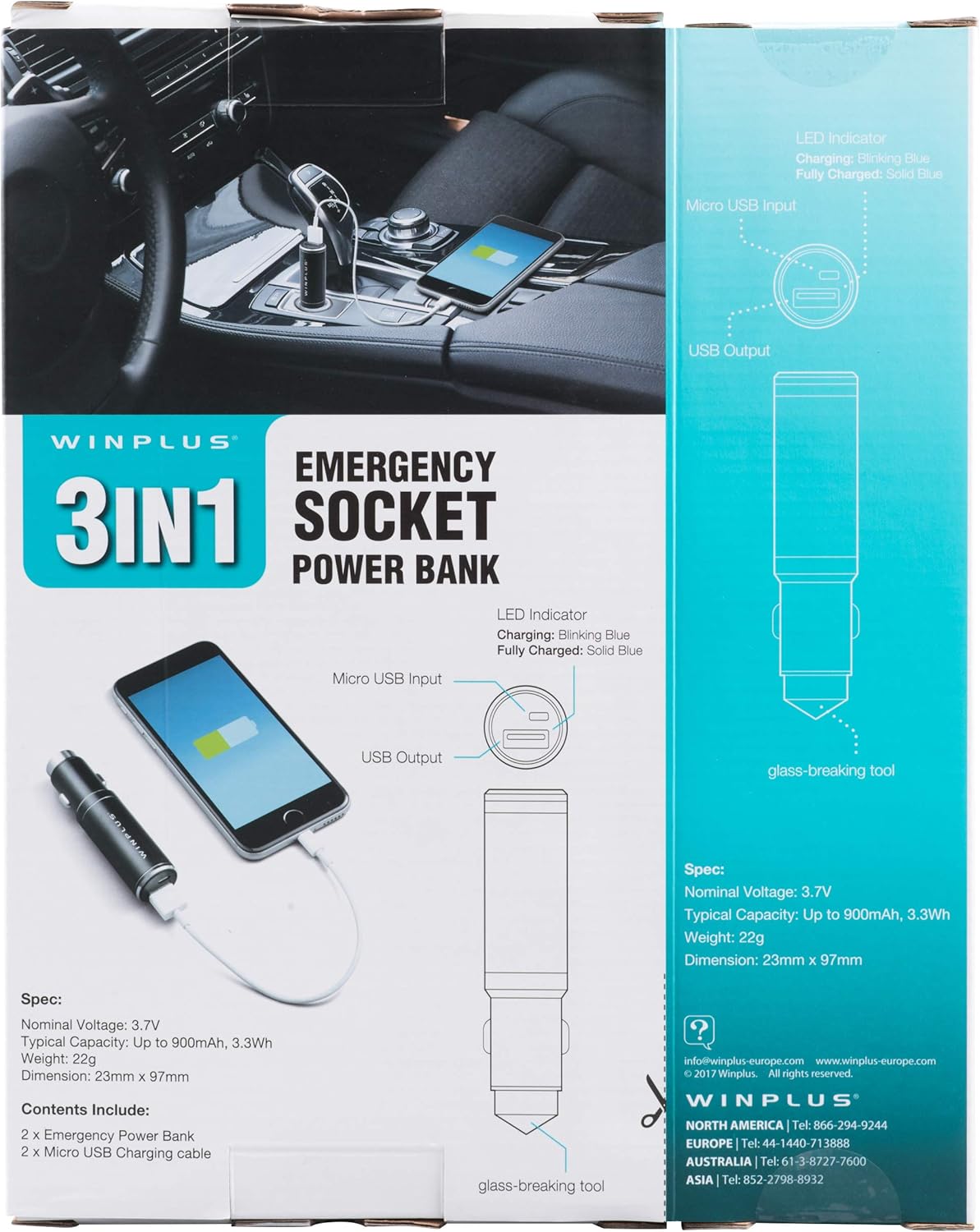
Figure 3: LED indicator status and glass-breaking tool location.
Opstelling
Aanvanklike laai van die kragbank:
- Locate the Micro USB Input port on the device.
- Connect the provided Micro USB charging cable to the Micro USB Input port.
- Connect the other end of the USB cable to a standard USB power source (e.g., a computer USB port, a wall adapter, or the car's 12V socket when used as a car charger).
- The LED indicator will blink blue during charging.
- Once fully charged, the LED indicator will turn solid blue.
Note: It is recommended to fully charge the power bank before its first use.
Bedryfsinstruksies
Gebruik as 'n draagbare kragbank:
- Ensure the power bank is charged (solid blue LED indicator).
- Connect your device's charging cable to the USB Output port on the power bank.
- Connect the other end of the cable to your mobile device (smartphone, tablet, etc.).
- Die kragbank sal outomaties jou toestel begin laai.
Using as a USB Car Charger:
- Insert the Winplus 3-in-1 device into your vehicle's 12V accessory socket (cigarette lighter socket).
- Connect your device's charging cable to the USB Output port on the Winplus device.
- Koppel die ander kant van die kabel aan jou mobiele toestel.
- Your device will begin charging. The internal power bank will also charge simultaneously if it is not full.
Using the Emergency Glass-Breaking Tool:
The emergency glass-breaking tool is located at the tip of the device, opposite the USB ports. This tool is intended for emergency use only to break vehicle side windows in situations where occupants are trapped.
- In an emergency, firmly press the tip of the tool against a corner of a side window.
- Apply steady pressure until the spring-loaded mechanism activates and shatters the glass.
- Once the glass is broken, carefully clear any remaining shards before exiting the vehicle.
WAARSKUWING: Use this tool only in genuine emergencies. Misuse can cause serious injury. Keep out of reach of children.
Onderhoud
- Hou die toestel droog. Vog kan interne stroombane beskadig.
- Moenie aan uiterste temperature (warm of koud) blootstel nie.
- Maak die toestel skoon met 'n sagte, droë lap. Moenie harde chemikalieë of skuurmiddels gebruik nie.
- Berg in 'n koel, droë plek wanneer dit nie gebruik word nie.
- Vermy om die toestel te laat val of aan sterk impakte te onderwerp.
Probleemoplossing
| Probleem | Moontlike oorsaak | Oplossing |
|---|---|---|
| Toestel laai nie. | Power bank is depleted. Kabel is foutief. USB port is dirty or damaged. | Herlaai die kragbank. Probeer 'n ander laaikabel. Clean the USB ports carefully or try another port. |
| LED-aanwyser brand nie. | Device is not connected to a power source. Device is fully charged (if solid blue). Toestel is foutief. | Ensure proper connection to a power source. Check if it's already solid blue. Kontak kliëntediens as probleme voortduur. |
| Stadige laai. | Cable is not suitable. Power source is low current. Device being charged has high power requirements. | Gebruik 'n hoëgehalte-laaikabel. Connect to a higher current USB adapter. This device provides 2.1A output, which is standard for fast charging most phones. |
Spesifikasies
- Model: AC55925-80
- Nominale Voltage: 3.6 V
- Tipiese kapasiteit: Up to 2500 mAh, 9 Wh
- Battery sel samestelling: Litium polimeer
- USB-uitset: 5V / 2.1A
- Mikro-USB-invoer: 5V / 0.5A
- Afmetings: 23mm x 127mm (ongeveer)
- Item gewig: 510 g (for the 2-pack)
- Connector Tipe: Micro USB (Input), USB Type-A (Output)
Veiligheidsinligting
- Moenie die batterypak uitmekaar haal, oopmaak of versnipper nie.
- Moenie die battery aan hitte of vuur blootstel nie. Vermy berging in direkte sonlig.
- Moenie 'n batterypak kortsluit nie. Moenie batterypakke lukraak in 'n boks of laai stoor waar hulle mekaar kan kortsluit of deur ander metaalvoorwerpe kortgesluit kan word nie.
- Moenie batterypakke aan meganiese skok onderwerp nie.
- Indien 'n battery lek, moenie toelaat dat die vloeistof in kontak kom met die vel of oë nie. Indien kontak gemaak is, was die aangetaste area met oorvloedige hoeveelhede water en raadpleeg 'n dokter.
- Moenie enige ander laaier gebruik as wat spesifiek voorsien is vir gebruik met die toerusting nie.
- Hou batterypakke buite bereik van kinders.
- Soek onmiddellik mediese advies indien 'n batterypak ingesluk is.
- Koop altyd die korrekte batterypak vir die toerusting.
- Hou batterypakke skoon en droog.
- Moenie 'n battery vir lang laai laat wanneer dit nie gebruik word nie.
- Dispose of battery packs properly according to local regulations.
Waarborg en Ondersteuning
For warranty information or technical support, please contact Winplus North America Inc. directly.
- Vervaardiger: Winplus North America Inc
- Kontakinligting: Refer to product packaging or the official Winplus webwebwerf vir die mees onlangse ondersteuningsbesonderhede.
You can also visit the Winplus webwebwerf vir algemene vrae en bykomende produkinligting: www.winplus-europe.com