
Inleiding
The Casio CTK-2550 Digital Keyboard is a versatile 61-key portable piano designed for beginners and enthusiasts. It offers a wide array of sounds, rhythms, and learning features to enhance your musical journey. This manual provides essential information for setting up, operating, and maintaining your keyboard.

Beeld: Voorkant view of the Casio CTK-2550 61-Key Portable Piano Keyboard, showcasing its black body, white and black keys, control panel, and built-in speakers.
Sleutel kenmerke
- 61 Standard Keys: Provides a full range for playing various musical pieces.
- 400 Toontjies: A diverse selection of instrument sounds, including pianos, electric pianos, organs, guitars, basses, synths, and drum kits.
- 100 Ritmes: Accompaniment patterns across various genres like 8 Beat, 16 Beat, Ballad, Dance, Pops, Rock, Jazz, European, Latin, World, and Piano Rhythms.
- 50 Dance Music Patterns: Dedicated mode for creating electronic dance music, including EDM, House, and Hip-Hop styles.
- 60 Song Bank: Built-in songs for listening and learning, categorized into World, Event, Piano/Classics, and User Songs.
- Step-Up Lesson System: An integrated learning system to help users practice and master songs.
- Raakreaksie: Keys respond to playing dynamics, allowing for expressive performances.
- Pitch Bend Wheel: For adding expressive pitch variations to notes.
- Chordana Play App Integration: Connects with the Chordana Play app for expanded learning and functionality.
- Draagbare ontwerp: Lightweight and can be battery-powered for on-the-go use.
Opstelling
1. Uitpak en Onderdele
Carefully remove all components from the packaging. Ensure you have the Casio CTK-2550 keyboard, the included power supply, and the music stand.
2. Attaching the Music Stand
Locate the wire-frame music stand. Insert its prongs into the designated slots at the top rear of the keyboard. This stand is used to hold sheet music or a tablet.
3. Powering the Keyboard
The CTK-2550 can be powered in two ways:
- Netspanningsadapter: Connect the included AC adapter to the DC 9.5V power input jack on the rear panel of the keyboard and then plug it into a wall outlet.
- Batterye: For portable use, the keyboard can be powered by six AA-size alkaline batteries. Open the battery compartment on the underside of the keyboard and insert the batteries, ensuring correct polarity.
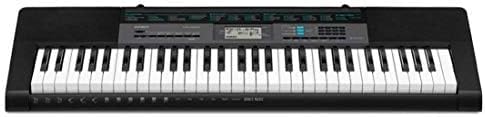
Image: Close-up of the rear panel of the Casio CTK-2550, showing the power input, audio in, phones/output, USB, and sustain pedal jacks.
Bedryfsinstruksies
1. Aan/Af en Volume
- Druk die KRAG knoppie om die sleutelbord aan of af te skakel.
- Verstel die hoofvolume met behulp van die VOLUME slider located on the left side of the control panel.
2. Kies van klanke
The CTK-2550 features 400 built-in tones. To select a tone:
- Druk die TOON knoppie.
- Gebruik die nommerblokkie of die + / - buttons to enter the desired tone number. A list of tones is printed on the keyboard's panel.
Examples of Tone Categories: Piano (001-014), Electric Piano (015-028), Organ (043-064), Guitar (065-078), Bass (079-088), Synth-Lead (166-202), Drum Set (395-400).
3. Playing Rhythms (Accompaniment)
The keyboard includes 100 rhythms for automatic accompaniment. To use rhythms:
- Druk die RHYTHM/SONG BANK CONTROLLER knoppie.
- Use the number pad or + / - buttons to select a rhythm.
- Druk BEGIN/STOP om die ritme te begin.
- Pas die tempo aan met behulp van die TEMPO knoppies.
Examples of Rhythm Categories: 8 Beat (001-003), Dance (011-015), Rock (021-026), Jazz (027-033), World (054-087), Piano Rhythms (091-100).
4. Dance Music Mode
Engage the Dance Music Mode to create and play along with 50 electronic dance music patterns.
- Druk die DANCE MUSIC knoppie.
- Select a pattern (e.g., EDM 01-35, House 36-45, Hip-Hop 46-50).
- Use the keys to trigger different phrases and build your track.
5. Song Bank and Lesson System
The 60-song bank allows you to listen to pre-recorded songs or use the Step-Up Lesson System to learn them.
- Druk die LIEDJIE BANK knoppie.
- Select a song using the number pad or + / - knoppies.
- Gebruik die LUISTER, VOLG, of FRASE functions to engage with the lesson system.
6. Touch Response and Pitch Bend
- The keys are touch-sensitive, meaning the volume and tone will change based on how hard or soft you press them.
- Gebruik die PITCH BEND wheel on the left side of the keyboard to smoothly raise or lower the pitch of notes while playing.
Konnektiwiteit
The rear panel of the CTK-2550 offers several connection options:
- PHONES/OUTPUT (Standard Stereo Jack): Connect headphones for private practice or connect to an external PA system/ampverligter vir ampverligte klank.
- AUDIO IN (3.5mm Stereo Mini Jack): Connect an external audio player (like a smartphone or tablet) to play along with your favorite music through the keyboard's speakers.
- SUSTAIN Jack: Connect an optional sustain pedal for extended note decay, similar to a traditional piano.
- USB (tipe B): Connect the keyboard to a computer or smart device (Android/Apple) for MIDI data transfer, allowing use with digital audio workstation (DAW) software or educational apps like Chordana Play.
Spesifikasies
| Kenmerk | Detail |
|---|---|
| Handelsmerk | Casio |
| Model Naam | CTK-2550 |
| Aantal sleutels | 61 |
| Polifonie | 48 notas |
| Tone | 400 AHL Tones |
| Ritmes | 100 Ritmes |
| Dance Music Patterns | 50 |
| Song Bank | 60 liedjies |
| Lesson Function | Step-Up Lesson System |
| Konnektiwiteit | USB (MIDI), Audio In, Phones/Output, Sustain |
| Kragbron | AC Adapter (9.5V DC) or 6x AA Batteries |
| Item gewig | 7.3 pond |
| Item afmetings | 12.09 x 37.24 x 3.62 duim |
Onderhoud
- Skoonmaak: Vee die sleutelbord af met 'n sagte, droë lap. Vir hardnekkige vuilgoed, gebruik 'n effens droë lap.amp lap en droog dit dan deeglik af. Vermy skuurmiddels of oplosmiddels.
- Berging: Bêre die sleutelbord op 'n koel, droë plek weg van direkte sonlig, uiterste temperature en hoë humiditeit.
- Hantering: Avoid dropping the keyboard or subjecting it to strong impacts. Do not place heavy objects on the keys.
- Batterysorg: As jy batterye gebruik, verwyder dit as die sleutelbord vir 'n lang tydperk nie gebruik sal word nie om lekkasie te voorkom.
Probleemoplossing
- Geen klank:
- Check if the power is on and the volume is turned up.
- Ensure headphones are not plugged in if you intend to use the speakers.
- Verify that the correct tone is selected.
- Sleutels reageer nie:
- Gaan kragtoevoer na.
- If using batteries, ensure they are fresh and correctly inserted.
- Verwronge klank:
- Verlaag die volume.
- Ensure external audio devices connected to AUDIO IN are not set too high.
- Programverbindingskwessies:
- Maak seker dat die USB-kabel stewig gekoppel is.
- Check app settings and device compatibility.
Waarborg en Ondersteuning
The Casio CTK-2550 comes with a 1-jaar onderdele en arbeid waarborg. For technical support, service, or warranty claims, please refer to the contact information provided in your product's warranty card or visit the official Casio webwebwerf.
Vir bykomende hulpbronne en produkinligting, besoek die Casio Winkel op Amazon.