
Flashpoint LED Ring Light
Flashpoint Foto/Video 13 Duim Dimbare LED Ligring Gebruikershandleiding
Model: LED Ring Light
Handelsmerk: Flitspunt
Inleiding
This user manual provides essential information for the safe and effective operation of your Flashpoint 13-inch Dimmable LED Light Ring. Designed for photo and video applications, this light ring offers optimal brightness control and accurate color rendering for various content creation needs, including makeup tutorials, live streaming, and general photography.
Lees asseblief hierdie handleiding deeglik deur voordat u die produk gebruik en bewaar dit vir toekomstige verwysing.
Veiligheidsinligting
- Elektriese veiligheid: Ensure the power adapter is connected to a compatible AC 120V, 50/60Hz power source. Do not operate with wet hands or in damp voorwaardes.
- Ventilasie: Do not cover the ventilation openings on the light ring's housing. Adequate airflow is necessary to prevent overheating.
- Hantering: Handle the light ring with care. Avoid dropping or subjecting it to strong impacts.
- Waterweerstand: Hierdie produk is Nie waterbestand nieVermy blootstelling aan water of hoë humiditeit.
- Oogbeskerming: Do not look directly into the illuminated LED lights for extended periods, as this may cause eye strain.
- Kinders: Hou buite bereik van kinders.
Pakketinhoud
Verifieer dat alle items in jou pakket teenwoordig is:
- Flashpoint 13-inch Dimmable LED Light Ring
- Wisselstroomadapter
- Drasak
- Color Filter Covers (for muted or orange color temperature adjustment)
Opstelling
- Mounting the Light Ring: The Flashpoint LED Ring Light is designed to be mounted on a standard 5/8" light stand (light stand not included). Securely attach the light ring to the top of your light stand.
- Aansluitkrag: Locate the AC power input on the back of the light ring. Connect the provided AC power adapter to this input. Ensure the connection is firm. Plug the other end of the power adapter into a suitable wall outlet.
- Optional Color Filters: If desired, attach the included color filter covers to the front of the light ring to adjust the color temperature for specific lighting effects or skin tones.
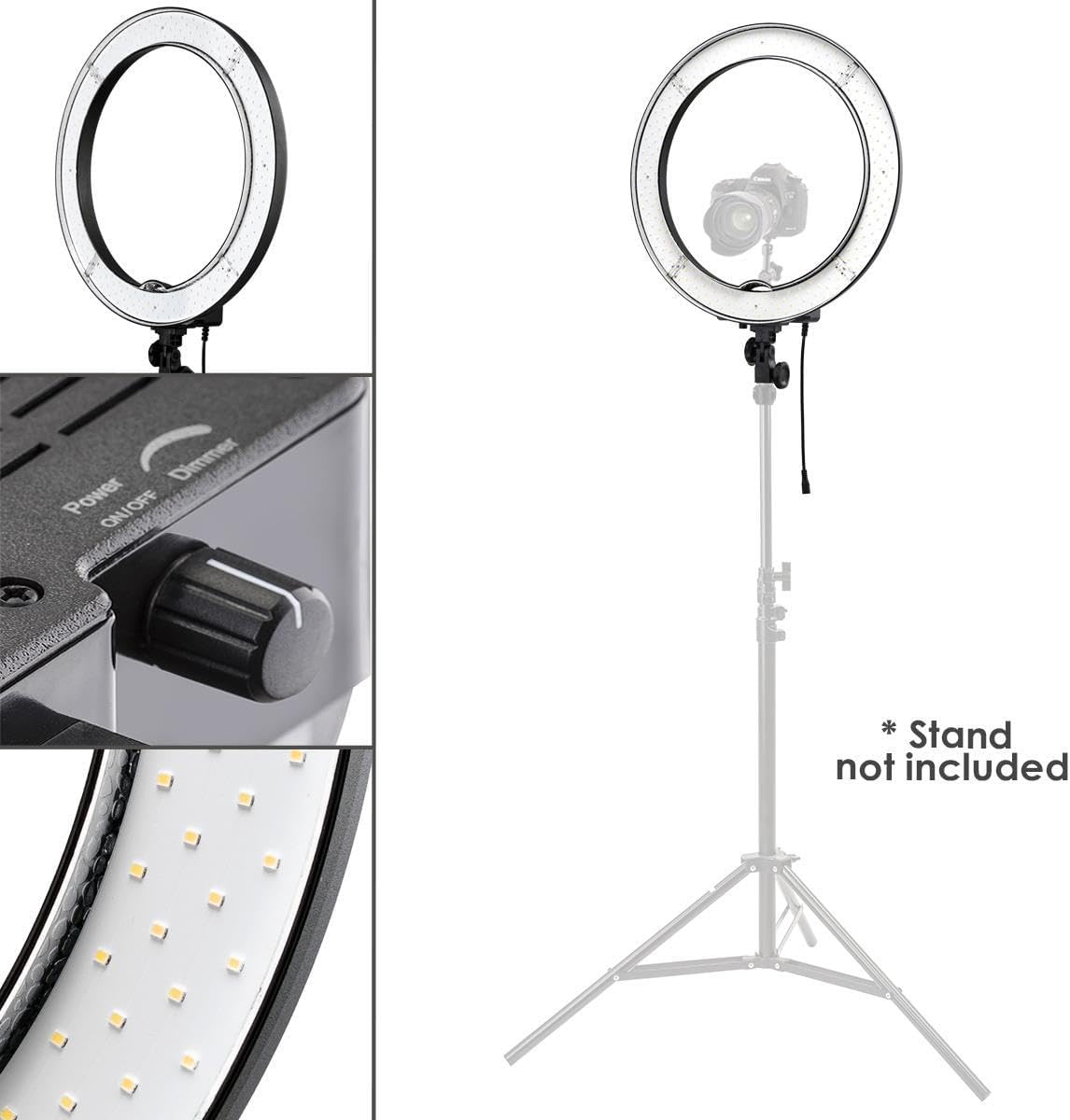
Figure 1: The Flashpoint LED Ring Light mounted on a stand, illustrating its general setup and key features. Note: Light stand is not included.

Figuur 2: Gedetailleerd view of the secure power connector, ensuring a stable power supply to the light ring.
Bedryfsinstruksies
- Krag aan/af: Locate the "Power ON/OFF" knob on the back of the light ring. Rotate the knob clockwise to turn the light on. Rotate it counter-clockwise until it clicks to turn the light off.
- Adjusting Brightness (Dimmer): Once powered on, continue rotating the same knob clockwise to increase the brightness (10-100%). Rotate it counter-clockwise to dim the light. This stepless dimming feature allows for precise control over illumination.
- Verstel van lighoek: The light ring features an adjustable mounting bracket. Loosen the locking knob on the bracket, tilt the light ring to your desired angle, and then tighten the knob to secure its position.

Figure 3: The control panel on the back of the light ring, featuring the power and dimmer knob.

Figuur 4: Gedetailleerd view of the stepless dimmer knob for precise brightness adjustment.

Figure 5: The adjustable mounting bracket allows for flexible positioning of the light.
Onderhoud
- Skoonmaak: Disconnect the power before cleaning. Use a soft, dry cloth to wipe the exterior of the light ring. Do not use abrasive cleaners or solvents.
- Berging: When not in use, store the light ring in its provided carrying bag in a cool, dry place, away from direct sunlight and moisture.
- LED-versorging: Avoid touching the LED bulbs directly. If dust accumulates on the LEDs, gently clean with a soft, lint-free cloth.
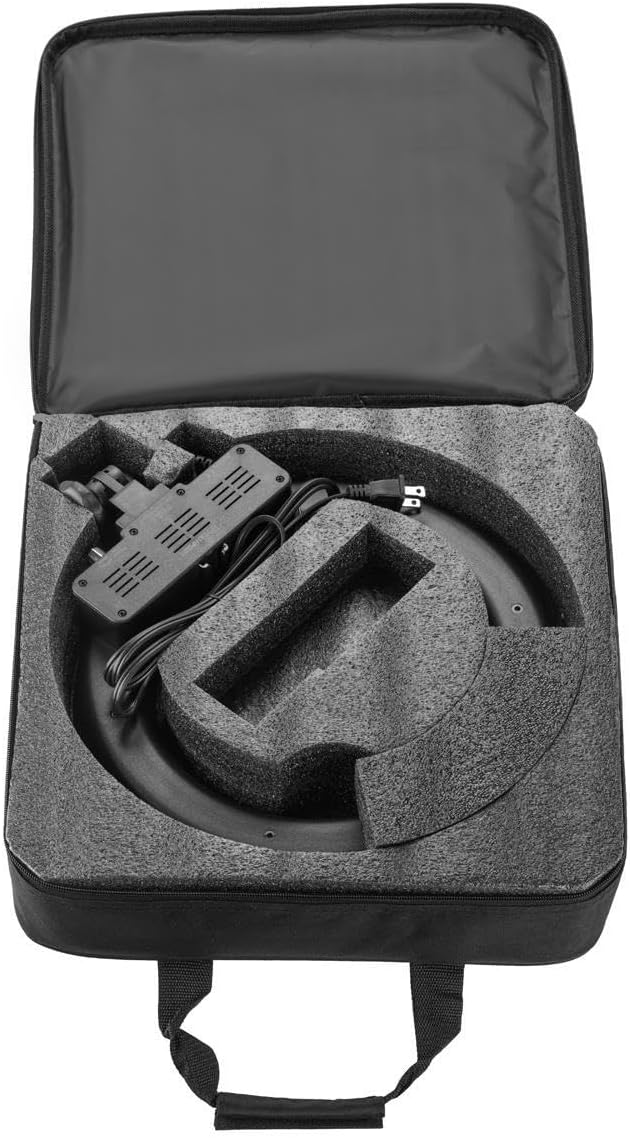
Figure 6: The light ring fits securely into its carrying bag for protection and transport.

Figure 7: The durable carrying bag provides convenient storage and portability.
Probleemoplossing
| Probleem | Moontlike oorsaak | Oplossing |
|---|---|---|
| Lig skakel nie aan nie. | Power cable not securely connected or no power from outlet. | Check all power connections. Ensure the power adapter is fully inserted into the light ring and the wall outlet. Test the outlet with another device. |
| Die lig is te dof of te helder. | Dimmer knob setting. | Rotate the dimmer knob on the back of the light ring to adjust the brightness to your desired level. |
| Lig flikker of is inkonsekwent. | Onstabiele kragtoevoer of los verbinding. | Ensure the power connection is stable. Try plugging into a different outlet. If the issue persists, contact customer support. |
| Light ring is unstable on stand. | Improperly secured to stand or stand is not suitable. | Ensure the light ring is securely fastened to the light stand. Use a sturdy, compatible light stand for optimal stability. |
Spesifikasies
| Kenmerk | Detail |
|---|---|
| Produk afmetings | 16 x 16 x 4.5 duim |
| Item gewig | 5.55 pond |
| Modelnommer | LED ring lig |
| Handelsmerk | Vlampunt |
| Krag Invoer | AC 120V, 50/60Hz |
| Helderheidsbeheer | 10-100% traplose verduistering |
| Kleur temperatuur | 5500K (Daylight Balanced) |
| Kleurweergawe-indeks (CRI) | 85 |
| Waterweerstandvlak | Nie waterbestand nie |
| UPC | 840014174751 |
Waarborg en Ondersteuning
For warranty information or technical support, please refer to the warranty card included with your product or visit the official Flashpoint website. You may also contact Flashpoint customer service directly for assistance with product inquiries, troubleshooting, or replacement parts.
Aanlyn ondersteuning: www.flashpointlighting.com/support