
1. Inleiding
Thank you for choosing the BBC Jadel K100 Gaming Keyboard. This manual provides essential information for setting up, operating, maintaining, and troubleshooting your new keyboard. The Jadel K100 is designed for gaming, office, and daily home use, featuring multimedia keys and a mechanical suspension design for a responsive typing experience.
Please read this manual thoroughly before using the product to ensure proper function and longevity.
2. Pakketinhoud
Maak asseblief seker dat alle items teenwoordig is wanneer u dit uitpak:
- BBC Jadel K100 Gaming Keyboard
- Gebruikershandleiding (hierdie dokument)
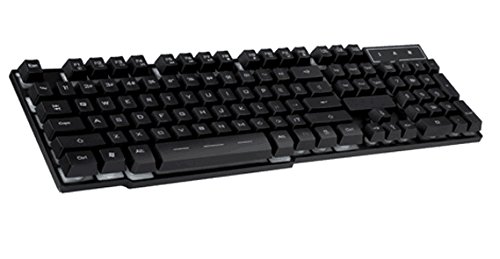
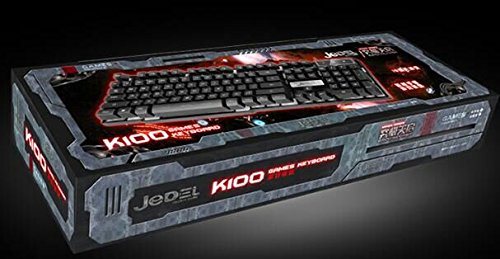
Image 1: The BBC Jadel K100 Gaming Keyboard, showcasindie ontwerp en verpakking daarvan.
3. Opstelling
Follow these steps to connect your BBC Jadel K100 Gaming Keyboard to your computer:
- Pak die sleutelbord uit: Verwyder die sleutelbord versigtig uit sy verpakking.
- Koppel aan rekenaar: Locate an available USB port on your laptop or desktop computer. Insert the USB connector of the keyboard firmly into the USB port.
- Bestuurder installasie: The keyboard is plug-and-play. Your operating system (Windows, macOS, Linux) should automatically detect and install the necessary drivers. This process may take a few moments.
- Verifieer verbinding: Once drivers are installed, the keyboard should be ready for use. Test by typing in a text editor or browser.
Let wel: This keyboard is compatible with laptops and desktop computers running standard operating systems.
4. Bedryfsinstruksies
The Jadel K100 keyboard features a standard 104-key layout, including a numeric keypad and function keys. It also incorporates multimedia functions accessible via the FN sleutel.
Beeld 2: Nabyskoot view of the BBC Jadel K100 keyboard's main keys, including Esc, Tab, Caps Lock, Shift, Ctrl, and Alt.
4.1. Standard Key Functions
All standard alphanumeric, symbol, and navigation keys operate as expected on a typical keyboard.
4.2. Multimedia Functions (FN Key)
The Jadel K100 includes an FN (Function) key, similar to those found on laptops, to access multimedia controls. To use these functions, press and hold the FN key, then press the corresponding function key (F1-F12) or other designated keys.
Common multimedia functions typically include:
- FN + F1-F12: Control media playback (play/pause, stop, previous/next track), volume (mute, volume up/down), and other system functions (e.g., open default browser, email client, calculator). Refer to the keycap legends for specific functions.
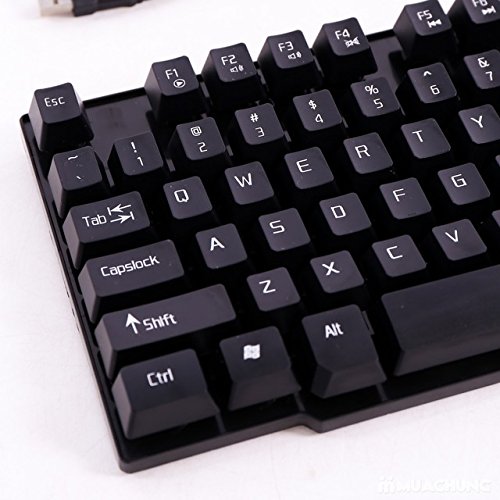
Beeld 3: Gedetailleerd view of the BBC Jadel K100 keyboard's F-keys, which often include multimedia shortcuts when combined with the FN key.
4.3. Spelervaring
The mechanical suspension design provides a tactile and responsive feel, enhancing the gaming experience. The keyboard is designed for durability and comfort during extended gaming sessions.
5. Onderhoud
Behoorlike onderhoud verseker die lang lewensduur en optimale werkverrigting van jou sleutelbord.
- Skoonmaak:
- Ontkoppel die sleutelbord van jou rekenaar voordat jy dit skoonmaak.
- Gebruik 'n sagte, pluisvrye lap effens dampmet water of 'n sagte skoonmaakoplossing afgevee om die sleutelkappe en oppervlak af te vee.
- Vir stof en puin tussen sleutels, gebruik saamgeperste lug.
- Vermy die gebruik van harde chemikalieë, skuurmiddels of die spuit van vloeistowwe direk op die sleutelbord.
- Berging: Bêre die sleutelbord op 'n koel, droë plek weg van direkte sonlig en uiterste temperature wanneer dit nie vir lang tye gebruik word nie.
- Hantering: Avoid dropping the keyboard or exposing it to excessive force, which can damage internal components or key mechanisms.
6. Probleemoplossing
If you encounter issues with your BBC Jadel K100 keyboard, refer to the following common problems and solutions:
| Probleem | Moontlike oorsaak | Oplossing |
|---|---|---|
| Sleutelbord reageer nie | Los USB-verbinding, foutiewe USB-poort, drywerprobleem. |
|
| Spesifieke sleutels werk nie | Debris under keycap, physical damage, software conflict. |
|
| Multimedia-sleutels werk nie | Incorrect usage of FN key, software conflict. |
|
7. Spesifikasies
| Kenmerk | Detail |
|---|---|
| Handelsmerk | BBC |
| Modelnommer | Jadel K100 |
| Sleutelbordbeskrywing | Speletjies |
| Aantal sleutels | 104 |
| Tipe sleutel | Meganiese skorsing |
| Kleur | SWART |
| Versoenbare toestelle | Skootrekenaar, tafelrekenaar |
| Konnektiwiteit | USB |
| Styl | Moderne |
| Hand Oriëntasie | Ambidekstrous |
| Vervaardiger | bbc |
8. Waarborg en Ondersteuning
Specific warranty details for the BBC Jadel K100 Gaming Keyboard are not provided in this manual. For warranty information, please refer to the product packaging or contact your retailer at the point of purchase.
For technical support or further assistance, please contact the manufacturer or your retailer. Keep your purchase receipt as proof of purchase for any warranty claims.