
Inleiding
Dankie vir die aankoopasing the Ezonetronics 1DIN Car Stereo, Model RM-CW9601. This unit features a 7-inch retractable touchscreen, Bluetooth connectivity, FM radio, and multimedia playback capabilities. This manual provides essential information for installation, operation, and maintenance to ensure optimal performance and user satisfaction. Please read this manual thoroughly before using the product.
Veiligheidsinligting
- Moenie die eenheid op 'n manier gebruik wat jou aandag van die bestuur aflei nie. Prioritiseer altyd padveiligheid.
- Ensure proper installation by a qualified professional to prevent damage to the unit or vehicle.
- Vermy blootstelling van die eenheid aan uiterste temperature, direkte sonlig vir lang tye of vog.
- Do not attempt to disassemble or modify the unit. This may void the warranty and pose safety risks.
- Hou die volume op 'n vlak wat jou toelaat om eksterne verkeersgeluide te hoor.
Pakketinhoud
Verifieer dat alle items in die pakket teenwoordig is:
- Ezonetronics 1DIN Car Stereo Unit (RM-CW9601)
- Krag- en luidsprekerkabel
- Afstandbeheer
- Gebruikershandleiding (hierdie dokument)
- Monteringsbykomstighede (hakies, skroewe)
- Opsioneel: Agterview Camera (if included in your specific package)
Produk verbyview
The Ezonetronics RM-CW9601 features a single DIN chassis with a motorized retractable 7-inch touchscreen display. The front panel includes essential controls and ports for easy access.

Figuur 1: Voorkant view of the Ezonetronics RM-CW9601 car stereo, illustrating the 7-inch screen in both retracted and extended positions, along with front panel controls and ports.
Front Panel Controls and Ports:
- Aan / uit-knoppie: Press to turn on/off, short press to change mode.
- Volumeknop: Draai om die volume aan te pas. Druk om te demp/ontdemp.
- USB-poort: Vir mediaweergawe vanaf USB-skywe.
- SD-kaartgleuf: Vir mediaweergawe vanaf SD-kaarte.
- AUX-invoer: 3.5 mm-aansluiting vir eksterne klanktoestelle.
- Herstel-knoppie: Small button to reset the unit (requires a pointed object).
- Screen Retract/Extend Button: Controls the motorized screen movement.
Opstelling
1. Installasie
The RM-CW9601 is designed for a standard 1DIN car stereo opening. Professional installation is highly recommended. Ensure the vehicle's battery is disconnected before starting installation.
- Verwyder die bestaande motorstereo van die paneelbord.
- Connect the wiring harness to the vehicle's wiring.
- Bevestig die eenheid in die paneelbord met behulp van die meegeleverde monteerhakies en skroewe.
- Reconnect the vehicle's battery and test the unit.
2. Wiring Diagram (General)
Refer to the detailed wiring diagram included with your product packaging for specific connections. Below are common connections:
- Geel draad: Konstante 12V (Battery)
- Rooi draad: Geskakelde 12V (Toebehore/Ontsteking)
- Swart draad: Grond
- Oranje draad: Illumination (Optional)
- Blou draad: Kragantenne / AmpLifier Afstandbeheer Aanskakel
- Luidsprekerdrade: Connect to vehicle speakers (e.g., White/White-Black for Front Left, Grey/Grey-Black for Front Right, Green/Green-Black for Rear Left, Purple/Purple-Black for Rear Right).
- Invoer vir agteruitkamera: Connect to the rearview camera video output and reverse trigger wire.
- Stuurwielbeheer-invoer: Connect to vehicle's steering wheel control wires (if applicable).

Figuur 2: Illustration of USB connection points, relevant for media input and smartphone integration.
Bedryfsinstruksies
1. Basiese werking
- Krag aan/af: Druk die aan/uit-knoppie op die voorpaneel of afstandbeheer.
- Volume aanpassing: Rotate the volume knob or use the remote control.
- Moduskeuse: Short press the power/mode button to cycle through available modes (Radio, USB, SD, Bluetooth, AUX, CarPlay/Android Auto).
- Skermbeheer: Use the dedicated button to retract or extend the 7-inch display.
2. Bluetooth-funksie
Die eenheid ondersteun Bluetooth vir handvrye oproepe en draadlose klankstroming.
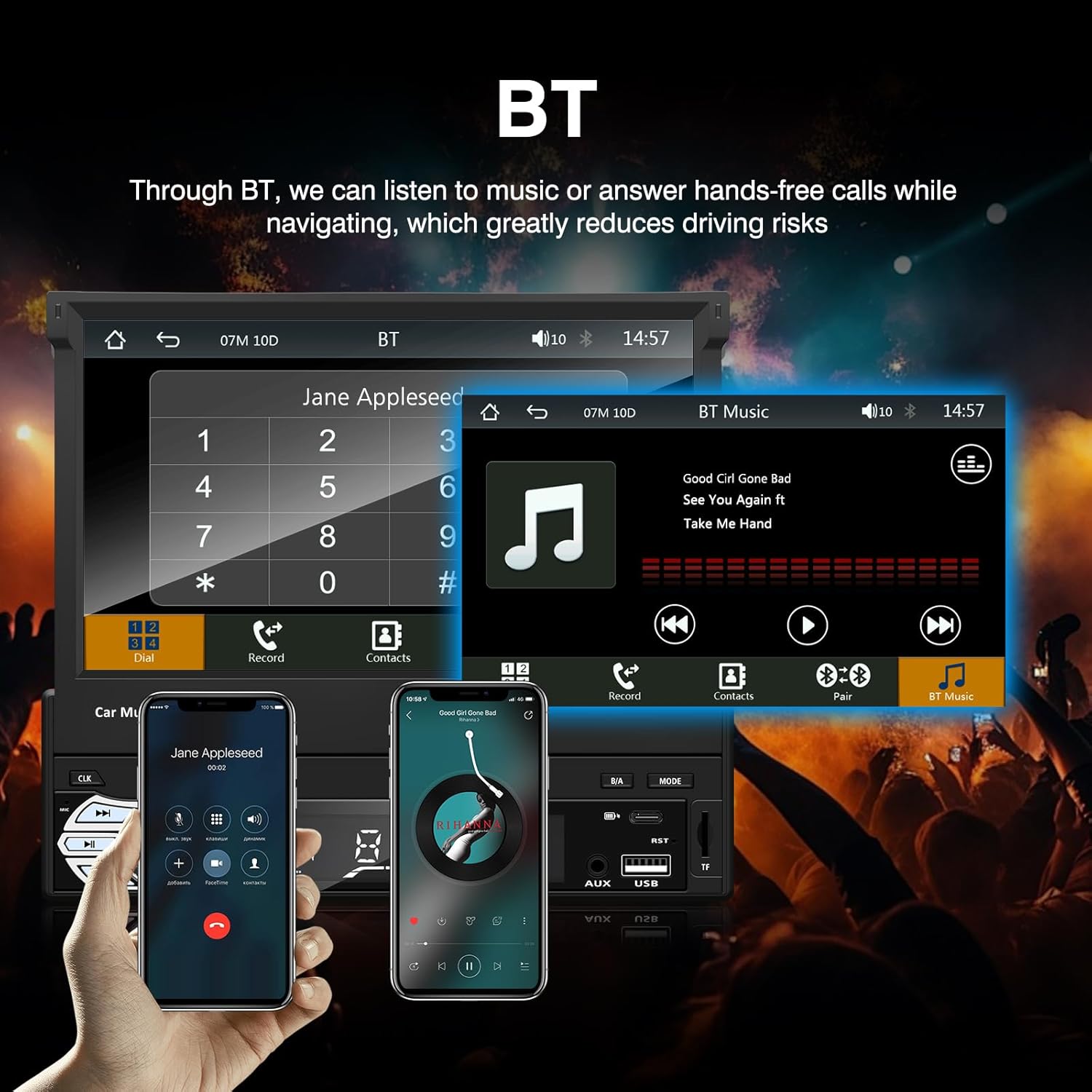
Figuur 3: Bluetooth interface for hands-free calls and music streaming, showing a dial pad and music controls.
- Saambinding: Aktiveer Bluetooth op jou mobiele toestel. Soek vir available devices and select "Ezonetronics" or similar. Enter PIN "0000" if prompted.
- Handvrye oproepe: Once paired, you can make and receive calls directly through the car stereo. Use the touchscreen or remote to dial, answer, or end calls.
- Oudio-stroom (A2DP): Play music from your paired device wirelessly. Control playback (play/pause, skip) from the car stereo or your device.
3. USB/SD Media Playback
Insert a USB drive or SD card into the respective slot. The unit will automatically switch to USB/SD mode and begin playing compatible media files.

Figuur 4: Icons indicating support for Bluetooth, Auxiliary input, TF (SD) Card, and USB connections for media playback.
- Supported formats include RM, RMVB, ASF, MKV, DIVX, MPEG4, AVI, VOB for video, and MP3/MP4 for audio.
- Navigeer deur dopgehou en files using the touchscreen interface.
4. FM Radio
Access the FM radio mode to listen to local broadcasts.

Figuur 5: FM Radio interface with frequency display and equalizer settings for audio customization.
- Outo -skandering: Automatically search and save strong stations.
- Handmatige instelling: Fine-tune frequencies using the touchscreen.
- presets: Save your favorite stations for quick access (up to 18 preset stations).
5. Apple CarPlay / Android Auto
Connect your compatible smartphone via USB to access Apple CarPlay or Android Auto features directly on the stereo's display.

Figuur 6: Wired Apple CarPlay interface, displaying phone applications like navigation, music, and messages on the car stereo screen.

Figuur 7: Wired Android Auto interface, displaying Android applications like Google Maps, Spotify, and phone calls on the car stereo screen.
- Ensure your phone has CarPlay or Android Auto enabled.
- Use a high-quality USB cable for a stable connection.
- Access navigation, music, messages, and other compatible apps safely while driving.
6. Spieëlskakel
Mirror Link allows you to display your smartphone's screen content directly onto the car stereo's display via a USB data cable.

Figuur 8: Mirror Link function demonstrating a smartphone screen being projected onto the car stereo display.
- Connect your smartphone to the USB port using a data cable.
- Follow the on-screen prompts on both the stereo and your phone to establish the connection.
- Note: Functionality may vary depending on your smartphone model and operating system.
7. Agterview Kamera-invoer
When a rearview camera is connected and the vehicle is shifted into reverse, the stereo automatically displays the camera feed.

Figuur 9: Reversing display showing the view from a rearview camera with parking assistance lines, providing an intuitive aid for parking.
- Verseker die agterkantview camera is properly installed and connected to the dedicated input.
- The display will automatically switch to the camera view when the reverse gear is engaged.
8. Stuurwielbeheer
The unit supports connection to your vehicle's existing steering wheel controls for convenient operation. Refer to your vehicle's manual and the stereo's wiring diagram for proper connection and configuration.
Onderhoud
- Skoonmaak van die skerm: Gebruik 'n sagte, pluisvrye lap om die raakskerm saggies af te vee. Moenie skuurmiddels of oplosmiddels gebruik nie.
- Algemene skoonmaak: Wipe the unit's exterior with a dry, soft cloth.
- Vermy vloeistowwe: Moenie vloeistowwe direk op die eenheid spuit nie.
- Temperatuur: Avoid prolonged exposure to extreme heat or cold, which can affect the unit's lifespan.
Probleemoplossing
| Probleem | Moontlike oorsaak | Oplossing |
|---|---|---|
| Eenheid skakel nie aan nie. | Verkeerde bedrading; Gebarste sekering; Probleem met voertuigbattery. | Check power connections (Yellow, Red, Black wires). Inspect vehicle fuses. Ensure battery is charged. |
| Geen klank nie. | Volume te laag; Stil geaktiveer; Verkeerde luidsprekerbedrading. | Verhoog die volume. Kontroleer of stilte aktief is. Verifieer luidsprekerverbindings. |
| Bluetooth koppel nie. | Bluetooth not enabled on phone; Incorrect pairing process. | Ensure phone's Bluetooth is on and discoverable. Re-attempt pairing. |
| USB/SD media not playing. | Ongesteun file format; Corrupted media; Drive/card not inserted correctly. | Kontroleer file formats. Try a different USB drive/SD card. Ensure proper insertion. |
| Agterview kamera vertoon nie. | Camera not connected; Reverse trigger wire not connected. | Verify camera video input and reverse trigger wire connection. |
If problems persist, consult a qualified technician or contact customer support.
Spesifikasies
- Handelsmerk: EZoneTronics
- Modelnommer: RM-CW9601
- Kleur: Swart
- Skerm: 7-inch Capacitive Touchscreen, Retractable
- Verbindingstegnologie: Bluetooth, USB, SD, AUX, RCA
- Bluetooth: Integrated Bluetooth 2.0 with A2DP/Hands-free
- Versoenbare toestelle: Slimfoon
- Klankuitsetmodus: Stereo
- Ondersteuning vir videokodering: RM, RMVB, ASF, MKV, DIVX, MPEG4, AVI, VOB
- USB/SD-ondersteuning: Up to 32GB max.
- Spesiale kenmerke: Touchscreen, Steering Wheel Control Support, Rear Camera Input, Apple CarPlay, Android Auto, Mirror Link
- Vervaardiger: Rhythm Electronics Limited
Waarborg en Ondersteuning
This product comes with a limited manufacturer's warranty.
- Main Unit Warranty: 12 months for defective items (excluding damaged or misused items after receipt).
- Toebehore waarborg: 3 months for accessories.
For warranty claims or technical support, please contact your retailer or the manufacturer directly. Keep your purchase receipt as proof of purchase.