
APA 16623
APA 16623 Digital Workshop Battery Charger User Manual
Model: 16623 | Brand: APA
Inleiding
This user manual provides essential information for the safe and effective operation of your APA 16623 Digital Workshop Battery Charger. This microprocessor-controlled battery charger is designed for various types of lead-acid batteries, including AGM, Gel, Wet, and Maintenance-Free batteries, and aims to extend battery life. It features advanced automatic protection mechanisms against overheating, short circuits, and reverse polarity. The integrated multi-function indicator provides real-time feedback on charging progress and overall battery health. Please read this manual thoroughly before first use and keep it for future reference.
Veiligheidsinstruksies
Volg altyd die volgende veiligheidsmaatreëls om beserings of skade aan die toestel te voorkom:
- Lees alle instruksies voordat u die laaier gebruik.
- Moenie die laaier blootstel aan reën of nat toestande nie.
- Gebruik slegs in goed geventileerde areas.
- Ensure the charger is disconnected from the power supply before making or breaking connections to the battery.
- Avoid sparks or flames near the battery during charging, as batteries can produce explosive gases.
- Dra oogbeskerming en beskermende klere wanneer jy met batterye werk.
- Hou buite bereik van kinders.
- Moenie bevrore batterye laai nie.
- As die kragkoord beskadig is, moet dit deur die vervaardiger, sy diensagent of soortgelyke gekwalifiseerde persone vervang word om 'n gevaar te vermy.
Produk verbyview
The APA 16623 charger features a robust design with intuitive controls and a clear digital display.

Figuur 1: Voorkant view of the APA 16623 Digital Workshop Battery Charger with its red and black housing and attached battery clamps.

Figuur 2: Close-up view of the charger's control panel, showing the digital display, various indicator lights for charging status, battery type selection, and current settings.

Figuur 3: Agter view of the charger demonstrating the integrated storage for the power cable and battery clamps, ensuring neat and compact storage.
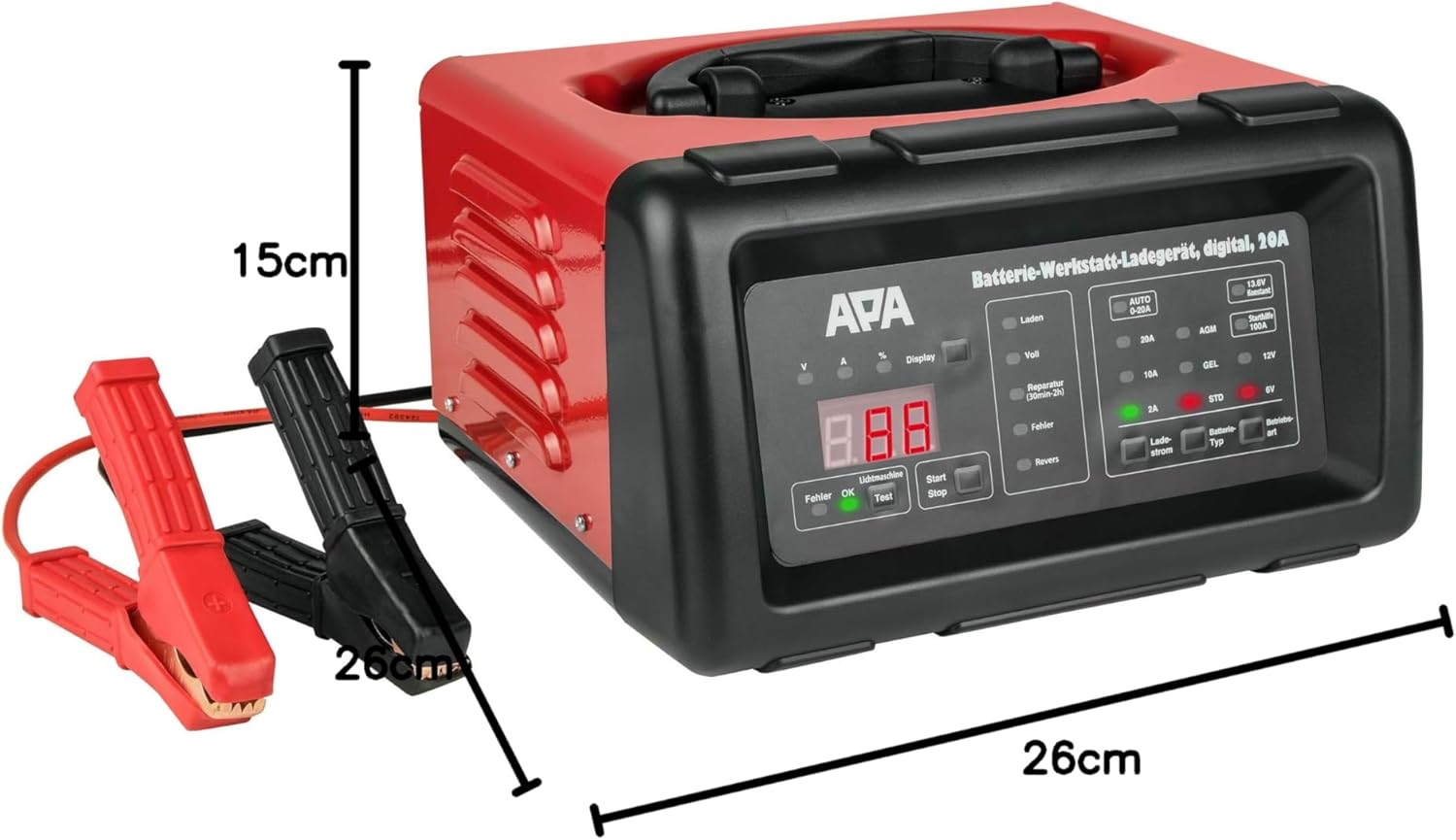
Figuur 4: The battery charger shown with its approximate dimensions: 26 cm width, 26 cm depth, and 15 cm height, providing a clear idea of its compact size.
Opstelling
- Pak uit: Verwyder die laaier en alle bykomstighede versigtig uit die verpakking.
- Inspekteer: Check the charger and cables for any signs of damage. Do not use if damaged.
- Plasing: Plaas die laaier op 'n stabiele, plat oppervlak in 'n goed geventileerde area, weg van direkte sonlig, hittebronne en vog.
- Batteryvoorbereiding: Maak seker dat die batteryklemme skoon en vry van korrosie is. Indien nodig, maak hulle skoon met 'n draadborsel.
Bedryfsinstruksies
1. Connecting the Charger to the Battery
- Maak seker dat die laaier van die wisselstroomsok ontkoppel is.
- Verbind die ROOI (+) positiewe clamp na die positiewe (+) batteryterminaal.
- Verbind die SWART (-) negatiewe aansluitingamp to the negative (-) battery terminal. For vehicles, connect the black clamp to the vehicle chassis away from the battery and fuel line if the battery is still in the vehicle.
- Maak seker dat verbindings veilig is.
2. Connecting to Power and Selecting Mode
- Plug the charger's power cord into a standard 240V AC power outlet.
- Die digitale skerm sal verlig.
- Use the "Battery Type" button to select the appropriate battery type (AGM, GEL, STD) and voltage (6V or 12V). The charger automatically detects the voltage for 12V batteries.
- Use the "Charge Current" button to select the desired charging current (2A, 10A, or 20A). For most applications, the "AUTO 0-20A" mode is recommended, which automatically adjusts the current.
- Press the "Start/Stop" button to begin charging. The display will show charging progress and battery status.
3. Laai proses
The charger features a multi-stage laai proses:
- Desulfasie: If a deeply discharged or sulfated battery is detected, the charger may enter a desulfation phase (indicated by "Reparatur" on the display, lasting 30min-2h).
- Sagte begin: Gradually increases current to protect the battery.
- Grootmaatkoste: Charges the battery at the maximum selected current until it reaches approximately 80% capacity.
- Absorpsieheffing: Charges at a decreasing current until the battery is fully charged.
- Float/Maintenance Charge: Once fully charged ("Voll" indicated), the charger switches to a maintenance mode, providing a small current to keep the battery at optimal charge.
4. Jump Start Function (100A)
The charger can provide a temporary boost for starting a vehicle with a discharged battery.
- Ensure the charger is connected to the battery and power as described above.
- Select the "Starthilfe 100A" (Jump Start 100A) mode.
- Attempt to start the vehicle. Do not crank for more than 5 seconds. Wait at least 1 minute between attempts.
- Once the vehicle starts, disconnect the charger from the AC outlet first, then disconnect the clamps from the battery/chassis.
5. Disconnecting the Charger
- Press the "Start/Stop" button to stop charging.
- Unplug the charger from the AC power outlet.
- Ontkoppel die SWART (-) negatiewe aansluitingamp from the battery/chassis.
- Ontkoppel die ROOI (+) positiewe clamp vanaf die batteryterminal.
Onderhoud
- Skoonmaak: Clean the charger's exterior with a soft, dry cloth. Do not use abrasive cleaners or solvents.
- Kabel inspeksie: Inspekteer die laaikabels en -klemme gereeld.amps vir enige tekens van skade, rafeling of korrosie. Vervang indien nodig.
- Berging: Store the charger in a cool, dry place when not in use. Utilize the integrated cable storage to keep cables tidy.
- Ventilasie: Maak seker dat die ventilasie-openinge vry van stof en puin is om oorverhitting te voorkom.
Probleemoplossing
| Probleem | Moontlike oorsaak | Oplossing |
|---|---|---|
| Laaier skakel nie aan nie. | No power supply; faulty outlet; damaged power cord. | Check power connection; try a different outlet; inspect power cord for damage. |
| "Fehler" (Error) indicator lights up. | Reverse polarity connection; short circuit; battery fault. | Gaan klamp connections (red to +ve, black to -ve); inspect cables for shorts; test battery condition. |
| Battery laai nie. | Incorrect mode selected; poor connection; deeply discharged battery. | Verifieer batterytipe en -volumetage selection; ensure clamps are securely connected; allow time for desulfation mode if applicable. |
| Charger overheats. | Swak ventilasie; oormatige lading. | Ensure adequate ventilation around the charger; reduce charging current if possible. |
Spesifikasies
| Kenmerk | Spesifikasie |
|---|---|
| Handelsmerk | APA |
| Model | 16623 |
| Invoer Voltage | 240V AC |
| Uitset Voltage | 6V / 12V GS |
| Laaistroom | 2A, 10A, 20A (Automatic 0-20A) |
| Jump Start Huidig | 100A |
| Battery Tipes | AGM, Gel, Wet, Maintenance-Free Lead-Acid Batteries |
| Laai tyd | Approx. 2 hours (depending on battery size and discharge level) |
| Materiaal | Plastiek behuising |
| Afmetings (L x B x H) | 26 cm x 26 cm x 15 cm (ongeveer) |
| Gewig | 5783 Grams (approx. 5.78 kg) |
| Veiligheidsnakoming | UL (as per specification) |
Waarborg en Ondersteuning
For warranty information and technical support, please refer to the documentation provided with your purchase or contact APA customer service. Keep your proof of purchase for any warranty claims.
Manufacturer: EAL GmbH
Ask a question about this manual
Ask about setup, troubleshooting, compatibility, parts, safety, or missing instructions. Manuals+ will review the question and use this page’s manual context to help answer it.