
1. Inleiding
This manual provides comprehensive instructions for the proper use and care of your XIAOMI Mi In-Ear Headphones Basic (Silver), model 362891. To ensure optimal performance and longevity of your product, please read this manual thoroughly before initial use and retain it for future reference.
2. Pakketinhoud
Upon opening your product packaging, please verify that all items listed below are present and in good condition:
- One pair of XIAOMI Mi In-Ear Headphones Basic (Silver)
- Integrated cable with 3.5mm audio jack and in-line remote with microphone
3. Produk verbyview
Familiarize yourself with the components of your Mi In-Ear Headphones Basic.

Figuur 3.1: Volledig view of the XIAOMI Mi In-Ear Headphones Basic, highlighting the silver earbud design, white cable, in-line remote, and 3.5mm jack.
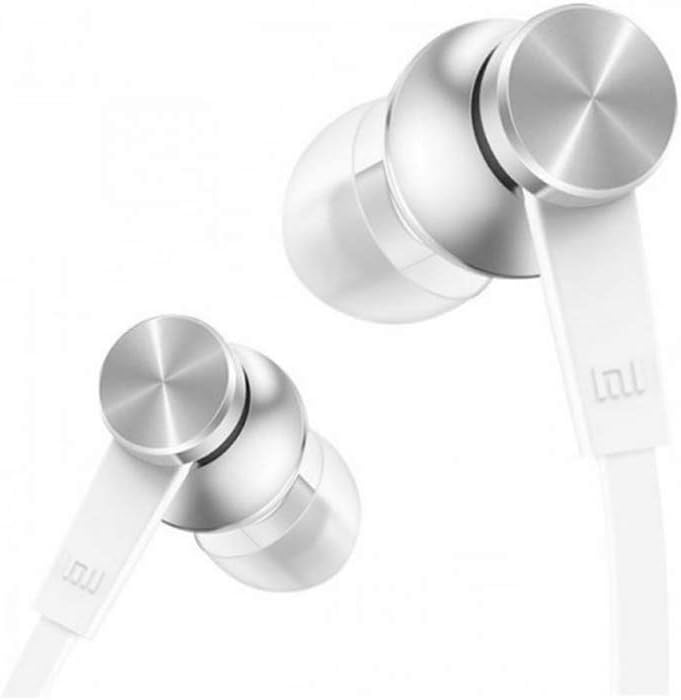
Figuur 3.2: Gedetailleerd view of the earbud housing, showcasing the sophisticated metal technology and aluminum alloy cavity.

Figuur 3.3: Syprofile of the earbuds, illustrating the connection point to the flat cable designed to resist tangling.

Figure 3.4: Close-up of the in-line remote, which includes a built-in microphone, and the universal 3.5mm audio jack for device connection.
4. Opstelling
Follow these steps to set up your headphones for first use:
- Identify Left and Right Earbuds: The earbuds are typically marked with 'L' for left and 'R' for right. Ensure correct placement for optimal sound experience.
- Plaas oordopjes in: Gently insert each earbud into the corresponding ear canal. Adjust them until they fit snugly and comfortably. A proper seal is crucial for sound quality and bass response.
- Koppel aan oudiotoestel: Plug the 3.5mm audio jack firmly into the headphone port of your smartphone, tablet, computer, or other compatible audio device.
5. Bedryfsinstruksies
Your Mi In-Ear Headphones Basic feature an in-line remote for convenient control:
- Oudioterugspeel:
- Press the button once to Play/Pause music.
- Druk die knoppie twee keer om na die volgende snit oor te gaan.
- Press the button three times to go to the previous track.
- Oproepbeheer:
- Press the button once to Answer/End a call.
- Press and hold the button to Reject an incoming call.
- Mikrofoon: Die ingeboude mikrofoon maak handvrye kommunikasie tydens oproepe moontlik. Maak seker dat die mikrofoon korrek geposisioneer is vir duidelike stemopname.
6. Onderhoud
Proper maintenance ensures the longevity and hygiene of your headphones:
- Skoonmaak van oorpunte: Regularly remove the ear tips and clean them with a soft, damp lap. Maak seker dat hulle heeltemal droog is voordat hulle weer vasgemaak word.
- Cleaning Earbud Grilles: Gently wipe the earbud grilles with a dry cotton swab to remove any earwax or debris. Avoid using liquids directly on the grilles.
- Kabelversorging: The flat cable is designed to be tangle-free. Avoid sharp bends or excessive pulling on the cable to prevent internal damage.
- Berging: When not in use, store your headphones in a clean, dry place, away from extreme temperatures and direct sunlight. Avoid wrapping the cable too tightly.
7. Probleemoplossing
As jy probleme met jou oorfone ondervind, raadpleeg die volgende algemene oplossings:
| Probleem | Moontlike oorsaak | Oplossing |
|---|---|---|
| Geen klank of lae volume nie |
|
|
| Swak klankgehalte (bv. verwring, gebrek aan bas) |
|
|
| Mikrofoon werk nie |
|
|
If the issue persists after attempting these solutions, please contact XIAOMI customer support for further assistance.
8. Spesifikasies
Detailed technical specifications for the XIAOMI Mi In-Ear Headphones Basic (Silver):
- Modelnommer: 362891
- Handelsmerk: XIAOMI
- Kleur: Silwer
- Oorplasing: In Oor
- Vormfaktor: In Oor
- Verbindingstegnologie: Bedraad
- Koptelefoonaansluiting: 3.5 mm-aansluiting
- Frekwensieresponsreeks: 20 Hz - 20 kHz
- Materiaal: Metal (Aluminum Alloy Cavity)
- Kabellengte: 1.25 meter
- Kabelkenmerk: Wirwarvry
- Spesiale kenmerk: Mikrofoon Ingesluit
- Beheer tipe: Call Control (In-line remote)
- Item gewig: Ongeveer 0.01 kilogram (0.493 onse)
- Waterweerstandvlak: Nie waterbestand nie
- Aanbevole gebruike: Musiek, speletjies
- Versoenbare toestelle: Xiaomi phones, Android devices, iOS devices (with 3.5mm jack)
9. Veiligheidsinligting
Please observe the following safety guidelines to prevent damage to your headphones or personal injury:
- Volumevlakke: Vermy om vir lang tye op hoë volume vlakke te luister om gehoorskade te voorkom.
- Omgewingsbewustheid: Do not use headphones in situations where inability to hear ambient sounds could pose a danger (e.g., while driving, cycling, or walking in traffic).
- Water en vog: Hierdie oorfone is nie waterbestand nie. Vermy blootstelling aan water, reën of oormatige vog.
- Skoonmaak: Use only a dry, soft cloth for cleaning. Do not use harsh chemicals or abrasive materials.
- Kinders: Keep out of reach of small children, as small parts may pose a choking hazard.
10. Waarborg en Ondersteuning
XIAOMI products are designed and manufactured to the highest quality standards. For information regarding warranty coverage, terms, and conditions, please refer to the warranty card included with your purchase or visit the official XIAOMI website. For technical support, troubleshooting assistance, or service inquiries, please contact XIAOMI customer support through their official channels.
XIAOMI Official Webwebwerf: www.mi.com