
1. Produk verbyview
The KUFATEC 41422-1 Bluetooth Adapter enables wireless music streaming from your smartphone or mobile device to your Audi vehicle equipped with MMI 3G (model year 2010 and later, including Navigation and Navigation Plus). This adapter utilizes Bluetooth 4.0 technology to deliver high-quality audio directly to your car's sound system.
Sleutel kenmerke:
- Music streaming via Bluetooth 4.0 with optimal sound quality.
- Control via smartphone.
- Automatic connection to known devices.
- Verbind tot 2 toestelle gelyktydig.
- Easy Plug & Play installation.
- Invisible mounting behind the head unit is possible.
2. Pakketinhoud
Voordat u met die installasie begin, maak seker dat alle komponente teenwoordig is:
- Bluetooth-ontvanger
- Coding Dongle
- 2x Release Keys
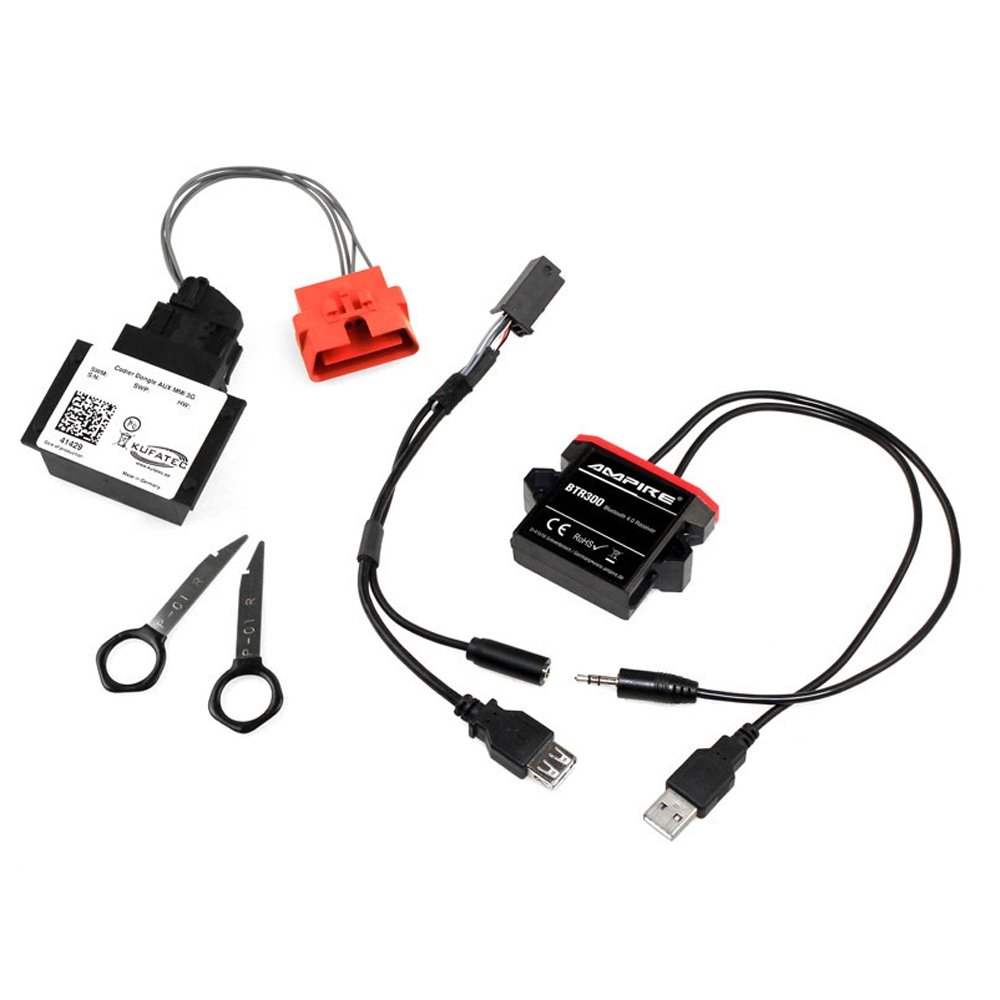
This image displays the essential components included with the KUFATEC 41422-1 Bluetooth adapter. On the left, a white cable with a black connector leads to the Bluetooth receiver. In the center, two black metal release keys with finger loops are visible. On the right, the coding dongle, labeled 'Codier Dongle AUX MMI 3G' and 'KUFATEC 41429', is shown with a red connector.
3. Opstelling en installering
The KUFATEC 41422-1 adapter is designed for easy Plug & Play installation. The Bluetooth function coding is performed automatically via the included coding dongle.
Installasie stappe:
- Carefully remove the Audi MMI 3G head unit from the dashboard using the provided release keys. Refer to your vehicle's service manual for specific instructions on head unit removal.
- Connect the Bluetooth receiver to the appropriate port on the back of the MMI 3G head unit.
- Connect the coding dongle to the vehicle's OBD diagnostic connector. The dongle will automatically perform the necessary coding for the Bluetooth function.
- Once coding is complete, disconnect the coding dongle.
- Route the Bluetooth receiver cable and position the receiver in a suitable, invisible location behind the head unit.
- Carefully re-install the MMI 3G head unit into the dashboard.
Important Note on Coding Dongle:
The coding dongle is designed for single-vehicle use. It reads the vehicle's chassis number during its first application and locks itself to that specific vehicle. It cannot be used on another vehicle thereafter. Due to this, coding dongles are excluded from exchange or credit notes.
4. Bedryfsinstruksies
Once installed and coded, the KUFATEC 41422-1 adapter allows for seamless music streaming.
Bind jou toestel saam:
- Ensure your MMI 3G system is powered on.
- On your smartphone or mobile device, navigate to the Bluetooth settings.
- Soek vir available Bluetooth devices. The KUFATEC adapter should appear in the list.
- Select the KUFATEC adapter to pair. No PIN is typically required.
- Once paired, your device will automatically connect to the adapter when in range and the MMI system is active.
Musiek speel:
- Select the AUX input on your Audi MMI 3G system.
- Start playing music from any application on your paired smartphone (e.g., MP3 player, internet radio, streaming services).
- Audio will be transmitted wirelessly to your car's speakers.
- Control playback (play/pause, skip tracks, volume) directly from your smartphone.
5. Onderhoud en Veiligheid
To ensure optimal performance and longevity of your KUFATEC 41422-1 adapter, observe the following guidelines:
- Veiligheidswaarskuwing: Avoid interference with the vehicle's electronic devices.
- Handle the adapter with care.
- Respect temperature and humidity limitations as specified for automotive electronic components.
- Keep the adapter free from dust and moisture.
6. Probleemoplossing
This section addresses common issues you might encounter. If you experience problems not covered here, please refer to the support section.
Geen oudio-uitvoer nie:
- Ensure the MMI 3G system is set to the correct AUX input.
- Verify that your smartphone is successfully paired and connected to the KUFATEC adapter.
- Check the volume levels on both your smartphone and the MMI system.
- Confirm that music is actively playing on your smartphone.
Toestel koppel nie:
- Ensure the adapter is correctly installed and receiving power.
- Turn off and on your smartphone's Bluetooth, then try searching again.
- Restart your MMI 3G system (if possible, consult your vehicle manual).
- Ensure no other devices are actively connected to the adapter, as it supports up to 2 simultaneous connections.
Coding Dongle Issue:
- Ensure the dongle is firmly connected to the OBD port.
- Verify that the vehicle's ignition is on during the coding process.
- Remember that the dongle is single-use and will not function on a second vehicle.
7. Spesifikasies
| Kenmerk | Detail |
|---|---|
| Modelnommer | 41422-1 |
| Handelsmerk | KUFATEC |
| Verbindingstegnologie | Bluetooth |
| Bluetooth weergawe | 4.0 |
| Bluetooth Profile | A2DP |
| Klankformate word ondersteun | AAC, MP3 (Standard audio files) |
| Frekwensiereeks | 20Hz-20kHz |
| Versoenbare voertuie | Audi with MMI 3G (from model year 2010, including Navigation and Navigation Plus) |
| Versoenbare toestelle | Slimfoon |
| Kragbron | Elektriese kabel |
| Installasie tipe | Plug and Play System |
| Beheer metode | Tactile (via smartphone) |
8. Waarborg en Ondersteuning
Information regarding specific warranty terms and direct support contacts for the KUFATEC 41422-1 Bluetooth Adapter is not available in this manual. Please refer to the product packaging or the official KUFATEC webwebwerf vir die mees onlangse waarborgbesonderhede en kliëntediensopsies.