
Instapark PWT-07
Instapark PWT-07 Digital Programmable Water Timer User Manual
Model: PWT-07
Inleiding
This manual provides detailed instructions for the setup, operation, maintenance, and troubleshooting of your Instapark PWT-07 Digital Programmable Water Timer. Please read this manual thoroughly before using the device to ensure proper function and longevity.
Veiligheidsinligting
- Use only 1.5V AA alkaline batteries. Do not mix old and new batteries, or different battery types.
- Ensure the battery compartment is securely closed to maintain the IP66 waterproof rating.
- Do not expose the timer to extreme temperatures or direct sunlight for prolonged periods, which may affect battery life and device performance.
- Disconnect the timer from the faucet and drain it before freezing temperatures to prevent damage.
- This device is designed for outdoor use with standard ¾” (GHS) threaded faucets.
Pakketinhoud
Verifieer dat alle items in die pakket teenwoordig is:
- Instapark PWT-07 Water Timer
- Gebruikershandleiding (hierdie dokument)
- Waarborgkaart
Note: 2 AA alkaline batteries are required and not included.
Produk Kenmerke
- Single-station digital programmable faucet water timer.
- Impulse solenoid valve for reliable operation.
- Compatible with standard ¾” (GHS) threaded outdoor hose faucets.
- User-friendly interface with a single oversized rotary dial and 4 pushbuttons.
- Large, easy-to-read LCD display (2.1” x 1”).
- Waterdigte gradering: IP66.
- Built-in rain delay function (24, 48, or 72 hours).
- Manual watering option without interrupting programmed schedules.
- Detachable battery compartment for easy battery replacement.
- Low power consumption, up to 4,000 on/off cycles per battery set.
Opstelling
1. Battery Installasie
The Instapark PWT-07 requires two (2) 1.5V AA alkaline batteries (not included).
- Vind die batterykompartement aan die agterkant van die timer.
- Skuif die batteryklepdeksel afwaarts om oop te maak.
- Insert two new AA alkaline batteries, ensuring correct polarity (+/-).
- Skuif die batteryklepdeksel terug in plek totdat dit stewig klik.
- The LCD display should illuminate, indicating successful battery installation. If the display shows a low battery indicator, remove the batteries, wait for the screen to go completely dark, then reinsert them.
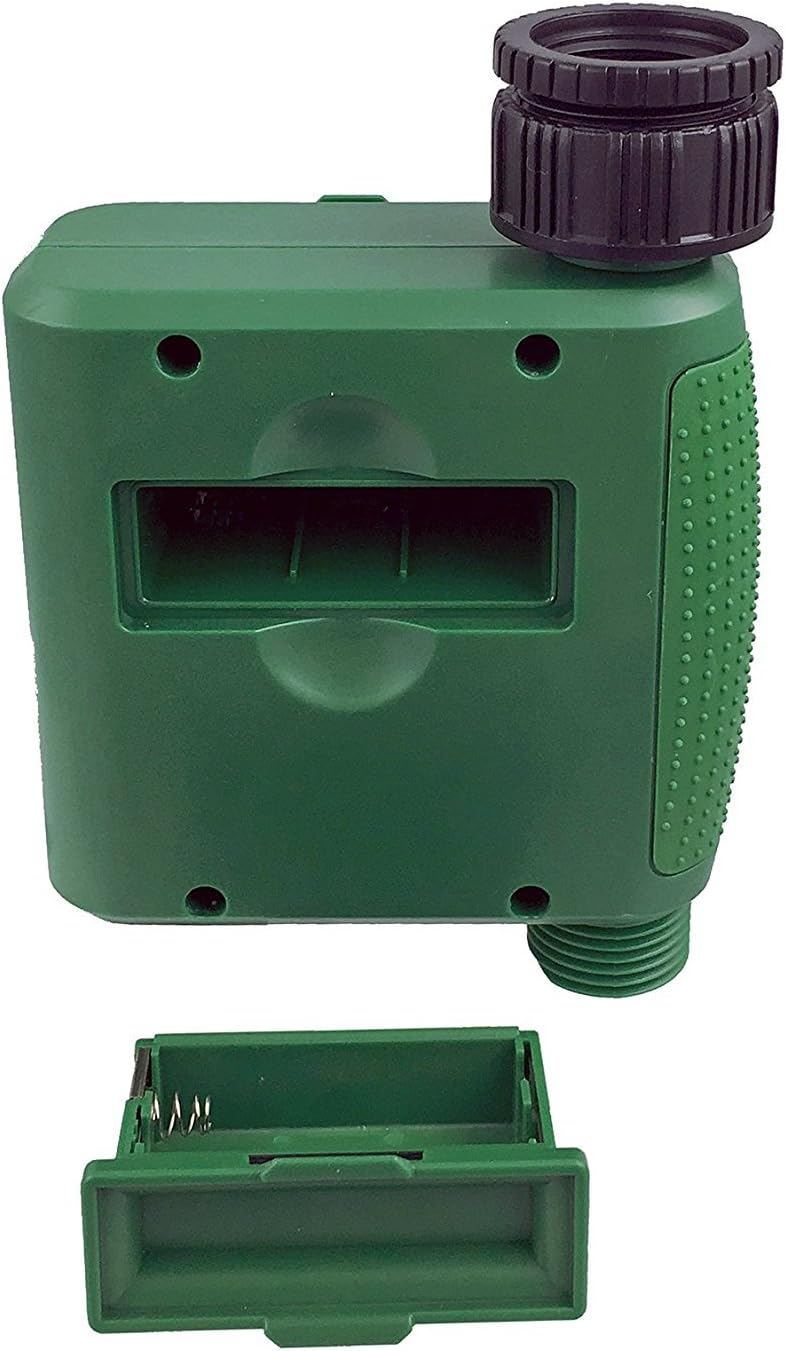
Figuur 1: Batterykompartement met verwyderde deksel.
2. Mounting the Timer
Attach the timer to your outdoor faucet:
- Ensure the faucet is clean and free of debris.
- Screw the timer's inlet (top connector) onto a standard ¾” (GHS) outdoor hose faucet. Hand-tighten only to prevent damage. Do not overtighten.
- Connect your garden hose or irrigation system to the timer's outlet (bottom connector). Hand-tighten securely.
- Turn on the faucet fully. The timer is designed to operate under pressure.

Figure 2: Instapark PWT-07 mounted on a faucet.
Bedryfsinstruksies
The timer features a large rotary dial and four buttons: STEL, +, -, en HANDLEIDING.

Figure 3: Control panel and LCD display.
1. Stel huidige tyd
- Draai die draaiknop na STEL KLOK.
- Gebruik die + en - buttons to adjust the current hour. Press STEL te bevestig.
- Gebruik die + en - buttons to adjust the current minute. Press STEL te bevestig.
2. Programming Watering Schedule
The timer allows you to set a start time, duration, and frequency for watering.
Stel begintyd:
- Draai die draaiknop na BEGIN TYD.
- Gebruik die + en - buttons to set the desired watering start hour. Press STEL te bevestig.
- Gebruik die + en - buttons to set the desired watering start minute. Press STEL te bevestig.
Set How Long (Duration):
- Draai die draaiknop na HOE LANK.
- Gebruik die + en - buttons to set the watering duration (from 5 seconds to 360 minutes). Press STEL te bevestig.
Set How Often (Frequency):
- Draai die draaiknop na HOE DIKWELS.
- Gebruik die + en - buttons to select the watering frequency (e.g., every 10 seconds, 30 seconds, 1 minute, 3 minutes, 5 minutes, 1 hour, 2 hours, 4 hours, 12 hours, 1 day, 2 days, 3 days, 4 days, 5 days, 6 days, 7 days). Press STEL te bevestig.
After setting all parameters, turn the rotary dial to HARDLOOP to activate the programmed schedule.
3. Handmatige Gietering
Om handmatig nat te maak sonder om jou geprogrammeerde skedule te beïnvloed:
- Ensure the dial is set to HARDLOOP or AF.
- Druk die HANDLEIDING button. The display will show a default manual watering duration.
- Gebruik die + en - buttons to adjust the desired manual watering duration.
- Druk STEL to start manual watering. The timer will run for the selected duration and then automatically shut off.
- To stop manual watering prematurely, press the HANDLEIDING knoppie weer.
4. Reënvertragingsfunksie
The rain delay function allows you to pause your watering schedule for a set period without losing your program settings.
- Ensure the dial is set to HARDLOOP.
- Druk en hou die - button for 3 seconds. The display will show "DELAY" and a default delay duration.
- Gebruik die + en - buttons to select a delay duration of 24, 48, or 72 hours.
- Druk STEL to activate the rain delay. The timer will resume its programmed schedule after the delay period ends.
- To cancel the rain delay, press and hold the - knoppie weer vir 3 sekondes.
Onderhoud
- Battery vervanging: Replace batteries when the low battery indicator appears on the LCD. Always use new AA alkaline batteries.
- Skoonmaak: Vee die timer met advertensie uitamp lap. Moenie skuur skoonmaakmiddels of oplosmiddels gebruik nie.
- Winterisering: Before the first frost, disconnect the timer from the faucet. Remove the batteries and store the timer indoors in a dry, frost-free location. Failure to do so may result in damage from freezing water.
- Filterskerm: Periodically check the filter screen inside the inlet connector for debris. Clean if necessary to ensure proper water flow.
Probleemoplossing
| Probleem | Moontlike oorsaak | Oplossing |
|---|---|---|
| Timer does not turn on / LCD is blank. | Dooie of verkeerd geïnstalleerde batterye. | Replace with new AA alkaline batteries, ensuring correct polarity. If still blank, remove batteries, wait for screen to fully clear, then reinsert. |
| Water does not turn on at scheduled time. |
|
|
| Water does not turn off. |
|
|
| Water lek uit verbindings. |
|
|
| Low battery indicator flashes even with new batteries. | Firmware not booting correctly after battery change. | Remove batteries, wait for the LCD screen to go completely dark (may take a few minutes), then reinsert new batteries. |
Spesifikasies
| Model | PWT-07 |
| Kragbron | 2 x 1.5V AA alkaliese batterye (nie ingesluit nie) |
| Tipe klep | Impuls magneetklep |
| Werkende waterdruk | 14.5 tot 116 psi |
| Bystandstroom | <100 µA |
| Watering Frequency Settings | 10s, 30s, 1m, 3m, 5m, 1h, 2h, 4h, 12h, 1d, 2d, 3d, 4d, 5d, 6d, 7d (16 settings) |
| Watering Duration Settings | 5s, 10s, 15s, 20s, 25s, 30s, 35s, 40s, 45s, 50s, 55s, 1-360m |
| Tydskermformaat | 24-uur |
| Waterdigte gradering | IP66 |
| Materiaal | ABS Plastiek |
| Produk afmetings | 4.25" D x 6" B x 2.6" H |
| Item gewig | 14.2 ons |
Waarborg en Ondersteuning
The Instapark PWT-07 Digital Programmable Water Timer is backed by a standard 1-year manufacturer's warranty from the date of purchase. This warranty covers defects in materials and workmanship under normal use.
For warranty claims, technical support, or any questions regarding your product, please contact Instapark customer service. Please have your purchase receipt and product model number (PWT-07) available when contacting support.
Contact information for Instapark customer service can typically be found on the manufacturer's webwebwerf of u aankoopdokumentasie.