
1. Inleiding
The Imperial DABMAN i400 is a versatile audio adapter designed to enhance your existing stereo system with modern radio and streaming capabilities. It provides access to thousands of internet radio stations, digital radio (DAB+), and traditional FM radio. Additionally, it supports audio streaming via Bluetooth, UPnP/DLNA, and USB, offering a comprehensive listening experience.
2. Veiligheidsinstruksies
- Kragtoevoer: Gebruik slegs die meegeleverde kragadapter. Maak seker die volume istage pas by jou plaaslike kragtoevoer.
- Water en vog: Do not expose the device to rain, moisture, or dripping/splashing liquids. Do not place objects filled with liquids, such as vases, on the device.
- Ventilasie: Ensure adequate ventilation. Do not block ventilation openings. Avoid placing the device on soft surfaces that may obstruct airflow.
- Hittebronne: Hou die toestel weg van hittebronne soos verkoelers, hitteregisters, stowe of ander hitteproduserende toestelle.
- Skoonmaak: Ontkoppel die krag voor skoonmaak. Gebruik 'n sagte, droë lap. Moenie vloeibare of aërosol skoonmaakmiddels gebruik nie.
- Diens: Moenie probeer om hierdie produk self te onderhou nie. Verwys alle diens na gekwalifiseerde dienspersoneel.
3. Pakketinhoud
Kontroleer asseblief dat alle items in die pakket teenwoordig is:
- Imperial DABMAN i400 Internet Digital Radio
- Kragadapter
- Telescopic Antenna with F-connector
- Wire Antenna with F-connector
- RCA-kabel
- Audio Cable (3.5mm jack)
- Afstandbeheer
- Gebruikershandleiding (hierdie dokument)

Image: Imperial DABMAN i400 with its power adapter, telescopic antenna, wire antenna, RCA cable, 3.5mm audio cable, and remote control.
4. Produk verbyview
Voorkant View

Image: The front of the Imperial DABMAN i400, showing its display and control buttons on the top edge.
The front of the DABMAN i400 features a clear 3.2-inch LCD display for navigation and information. Control buttons are located on the top edge of the device for easy access to functions like power, mode selection, volume, and station presets.
Agter View en verbindings
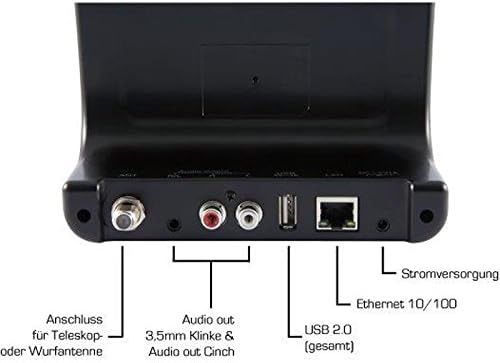
Image: The rear panel of the Imperial DABMAN i400, detailing its various connection ports. From left to right: Antenna connection (ANT), Audio output (RCA L/R and 3.5mm jack), USB 2.0 ports, Ethernet 10/100 (LAN), and Power supply (DC 5V/1A).
- MIER: F-connector for connecting the telescopic or wire antenna for DAB+/FM reception.
- Audio Output (R/L): RCA (Cinch) stereo audio output for connecting to an ampverligter of stereostelsel.
- Oudio-uitvoer (3.5 mm-aansluiting): 3.5mm stereo audio output for connecting to other audio devices.
- USB 2.0: USB port for playing media from a USB storage device.
- LAN: Ethernet port (RJ45) for wired network connection.
- DC 5V/1A: Power input for the included power adapter.
5. Opstelling
- Koppel Antenna: Screw the telescopic antenna or connect the wire antenna to the ANT F-connector on the rear panel. Extend the telescopic antenna for optimal reception.
- Koppel aan oudiostelsel: Use the provided RCA cable to connect the Audio Output (R/L) on the DABMAN i400 to an available audio input (e.g., AUX, CD, LINE IN) on your amplifier or stereo system. Alternatively, use the 3.5mm audio cable if your system has a compatible input.
- Netwerk konneksie:
- Bedraad (LAN): Koppel 'n Ethernet-kabel vanaf jou router aan die LAN port on the rear of the DABMAN i400.
- Wireless (WLAN): The device will prompt you to set up Wi-Fi during the initial startup wizard. Select your network and enter the password.
- Koppel krag: Steek die kragadapter in die DC 5V/1A input on the rear panel, then plug the adapter into a wall outlet. The device will power on automatically or enter standby mode.
- Aanvanklike Opstelling Wizard: Upon first power-on, the device will guide you through an initial setup process, including language selection, time/date settings, and network configuration. Follow the on-screen instructions.
6. Bedryfsinstruksies
Basiese navigasie
Use the control buttons on the top of the device or the remote control to navigate menus, select options, adjust volume, and change modes.
Mode seleksie
Press the 'Mode' button (or equivalent on remote) to switch between available modes:
- Internet Radio: Access thousands of online radio stations worldwide. Browse by genre, location, or search for specific stations.
- DAB+ Digitale Radio: Enjoy high-quality digital radio broadcasts. The device will scan for available stations in your area.
- FM Radio: Stem in op tradisionele analoog FM-radiostasies.
- Bluetooth: Stream audio wirelessly from your Bluetooth-enabled smartphone, tablet, or computer.

Image: Bluetooth connectivity icon.
To pair: Select Bluetooth mode on the DABMAN i400. On your external device, search for available Bluetooth devices and select 'DABMAN i400'.
- UPnP/DLNA: Stroom musiek files from compatible devices on your local network (e.g., a network-attached storage (NAS) drive or a computer running a media server).

Image: UPnP (Universal Plug & Play) icon.
- USB-weergawe: Speel oudio files (e.g., MP3) from a USB flash drive connected to the USB port on the rear of the device.

Image: MP3 music file ikoon.
Voorinstellings
Save your favorite stations as presets for quick access. Refer to the on-screen menu for instructions on how to save and recall presets.
Air Music Control App
Control your DABMAN i400 using the Air Music Control App available for smartphones and tablets. This app allows for convenient remote control and browsing of stations.

Image: Air Music Control App icon.
7. Onderhoud
- Skoonmaak: Wipe the device with a soft, dry, lint-free cloth. Do not use abrasive cleaners, waxes, or solvents.
- Sagteware-opdaterings: Periodically check for available software updates through the device's system settings menu to ensure optimal performance and access to new features.
- Berging: Indien die toestel vir 'n lang tydperk gestoor word, ontkoppel dit van die kragtoevoer en bêre dit op 'n koel, droë plek.
8. Probleemoplossing
- Geen krag:
- Maak seker dat die kragadapter stewig aan die toestel en 'n werkende kragpunt gekoppel is.
- Probeer 'n ander kragpunt.
- Geen klank:
- Check the volume level on both the DABMAN i400 and your connected audio system.
- Ensure the audio cables are correctly connected to the appropriate input on your audio system.
- Verify that your audio system is set to the correct input source.
- Cannot Connect to Wi-Fi/Internet:
- Maak seker dat jou Wi-Fi-router aan is en korrek funksioneer.
- Dubbelkontroleer die Wi-Fi-wagwoord.
- Try moving the device closer to your Wi-Fi router or use a wired LAN connection.
- Restart your router and the DABMAN i400.
- Poor DAB+/FM Reception:
- Ensure the antenna is fully extended and positioned for optimal reception.
- Try repositioning the device or antenna.
- Check if you are in an area with good DAB+ or FM coverage.
- Probleme met Bluetooth-paring:
- Ensure the DABMAN i400 is in Bluetooth pairing mode.
- Make sure your external device's Bluetooth is enabled and discoverable.
- Move your external device closer to the DABMAN i400.
- Probeer om die toestelle te ontkoppel en weer te koppel.
9. Spesifikasies
| Kenmerk | Spesifikasie |
|---|---|
| Handelsmerk | Imperiale |
| Modelnommer | 22-241-00 |
| Kleur | Swart |
| Skerm grootte | 3.2 duim |
| Verbindingstegnologie | Bluetooth, LAN (Ethernet), WLAN (Wi-Fi), RCA (Cinch) L/R, 3.5mm Audio Jack |
| Spesiale kenmerke | Portable (as an adapter), Internet Radio, DAB+, FM, UPnP/DLNA |
| Totale USB-poorte | 1 |
| Versoenbare toestelle | Bluetooth devices, UPnP/DLNA compatible devices |
| Kragbron | AC (via power adapter) |
| Ondersteunde radiobande | FM, DAB, DAB+, Internetradio |
| Produk afmetings | 15L x 8.1W x 14H sentimeter |
| Ingesluit komponente | Power Adapter, Telescopic Antenna, Wire Antenna, RCA Cable, Audio Cable, Remote Control, User Manual |
| Tale ondersteun | German, English, French, Dutch |
10. Waarborg en Ondersteuning
Vervaardiger se waarborg
The Imperial DABMAN i400 comes with a manufacturer's warranty. Please refer to the warranty card included in your package or the manufacturer's official website for specific terms and conditions. Spare parts availability is guaranteed for 1 year.
Kliënte ondersteuning
For technical assistance, troubleshooting beyond this manual, or warranty claims, please contact Imperial customer support. Contact information can typically be found on the manufacturer's webwebwerf of in die produkverpakking.