
Inleiding
Dankie vir die aankoopasing the QUMOX L165U 2.4GHz Wireless Gamepad. This high-quality game controller is designed for use with PC and Android devices, offering a reliable 2.4GHz wireless connection for an enhanced gaming experience. Please read this manual carefully to ensure proper setup and operation of your new gamepad.

Figure 1: QUMOX L165U Gamepad with included USB adapter and OTG connection kit.
Pakketinhoud
Maak seker dat alle items in jou pakket teenwoordig is:
- 1x QUMOX L165U Gamepad
- 1x 2.4GHz USB Wireless Adapter
- 1x OTG Connection Kit (Micro USB to USB-A adapter)
Opstelling
1. Battery Installasie
The QUMOX L165U Gamepad is powered by 2 AAA batteries (not included). To install the batteries:
- Locate the battery compartment on the back of the gamepad.
- Skuif die batterydeksel oop.
- Plaas 2 AAA-batterye in en maak seker dat die polariteit (+/-) korrek is.
- Maak die batterydeksel stewig toe.

Figure 2: Open battery compartment for AAA battery installation.
2. Koppel aan 'n rekenaar
- Plug the 2.4GHz USB Wireless Adapter into an available USB port on your PC.
- Turn on the gamepad by pressing the 'START' button. The gamepad will automatically attempt to connect.
- The PC should recognize the gamepad and install necessary drivers automatically.
- If the gamepad does not connect, press the 'MODE' button on the gamepad to cycle through connection modes until it is recognized by your PC.
3. Connecting to an Android Device (with OTG support)
- Connect the OTG Connection Kit to your Android device's Micro USB port.
- Plug the 2.4GHz USB Wireless Adapter into the USB-A end of the OTG Connection Kit.
- Turn on the gamepad by pressing the 'START' button. The gamepad will automatically attempt to connect.
- Your Android device should recognize the gamepad.
- If the gamepad does not connect, press the 'MODE' button on the gamepad to cycle through connection modes until it is recognized by your Android device.
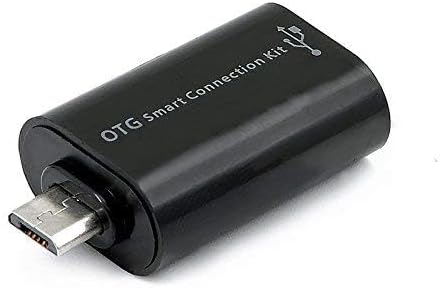
Figure 3: OTG Connection Kit for Android device connectivity.
Bedryfsinstruksies
Once connected, your QUMOX L165U Gamepad is ready for use. The layout is standard for most game controllers.
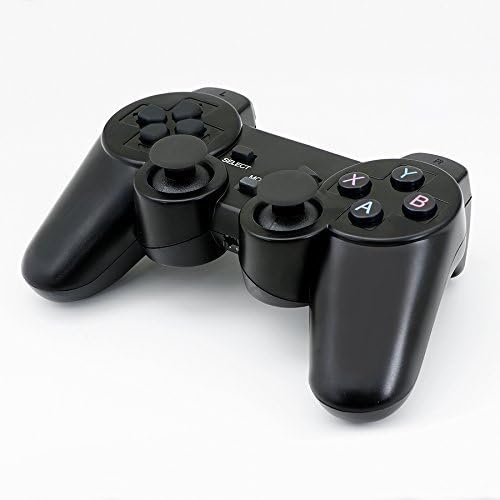
Figuur 4: Bo view of the QUMOX L165U Gamepad, highlighting button layout.
- Rigtingpad (D-pad): Vir presiese rigtinginvoer.
- Analoog Joysticks: Twee analoogstokke vir 360-grade beweging en kamerabeheer.
- Aksieknoppies (A, B, X, Y): Standaard aksieknoppies vir in-speletjie bevele.
- Skouerknoppies (L1, R1) en snellers (L2, R2): Located on the top of the gamepad for additional actions.
- KIES/TERUG-knoppie: Gewoonlik gebruik vir menu-navigasie of spesifieke in-speletjie funksies.
- START-knoppie: Used to pause games or confirm selections.
- MODUS-knoppie: Cycles through different operating modes (e.g., Android, PC) if automatic detection fails.
Video Demonstrasie
Video 1: A seller-provided overview of a 2-pack wireless controller, demonstrating its features and compatibility. While showing a similar product, it illustrates general wireless controller usage and setup.
Onderhoud
- Skoonmaak: Gebruik 'n sagte, droë lap om die gamepad skoon te maak. Vermy die gebruik van harde chemikalieë of skuurmiddels.
- Berging: Bêre die gamepad op 'n koel, droë plek weg van direkte sonlig en uiterste temperature.
- Batterysorg: Remove batteries if the gamepad will not be used for an extended period to prevent leakage.
Probleemoplossing
| Probleem | Moontlike oorsaak | Oplossing |
|---|---|---|
| Gamepad does not connect. | Low batteries, incorrect mode, adapter not properly inserted. | Replace batteries. Press the 'MODE' button to cycle through modes. Ensure USB adapter is fully inserted into PC or OTG adapter. |
| Knoppies of joysticks reageer nie. | Connection issue, game incompatibility, physical damage. | Reconnect the gamepad. Check game settings for controller support. If issue persists, contact support. |
| Android device does not recognize gamepad. | Android device lacks OTG support, OTG adapter issue. | Verify your Android device supports OTG. Ensure OTG adapter is functioning correctly. |
Spesifikasies
| Kenmerk | Detail |
|---|---|
| Modelnommer | L165U |
| Verbindingstegnologie | 2.4GHz Wireless (via USB Adapter) |
| Versoenbare toestelle | PC, Android (with OTG support) |
| Kragbron | 2x AAA-batterye |
| Item gewig | 5.3 onse |
| Pakket afmetings | 8.07 x 5.63 x 2.95 duim |
| Kleur | Swart |
Waarborg en Ondersteuning
For warranty information or technical support, please refer to the contact details provided with your purchase or visit the official QUMOX webwebwerf. Bewaar u bewys van aankoop vir enige waarborgeise.