
Inleiding
Thank you for choosing the Awei A860BL-BK Bluetooth In-Ear Earphones. This manual provides essential information for the proper setup, operation, and maintenance of your device. Please read it thoroughly before use to ensure optimal performance and longevity of your earphones.
Pakketinhoud
Verifieer dat al die items wat hieronder gelys word, in u pakket teenwoordig is:
- Awei A860BL-BK Bluetooth In-Ear Earphones
- USB-laaikabel
- Oorpunte (verskeie groottes)
- Gebruikershandleiding

Produk verbyview
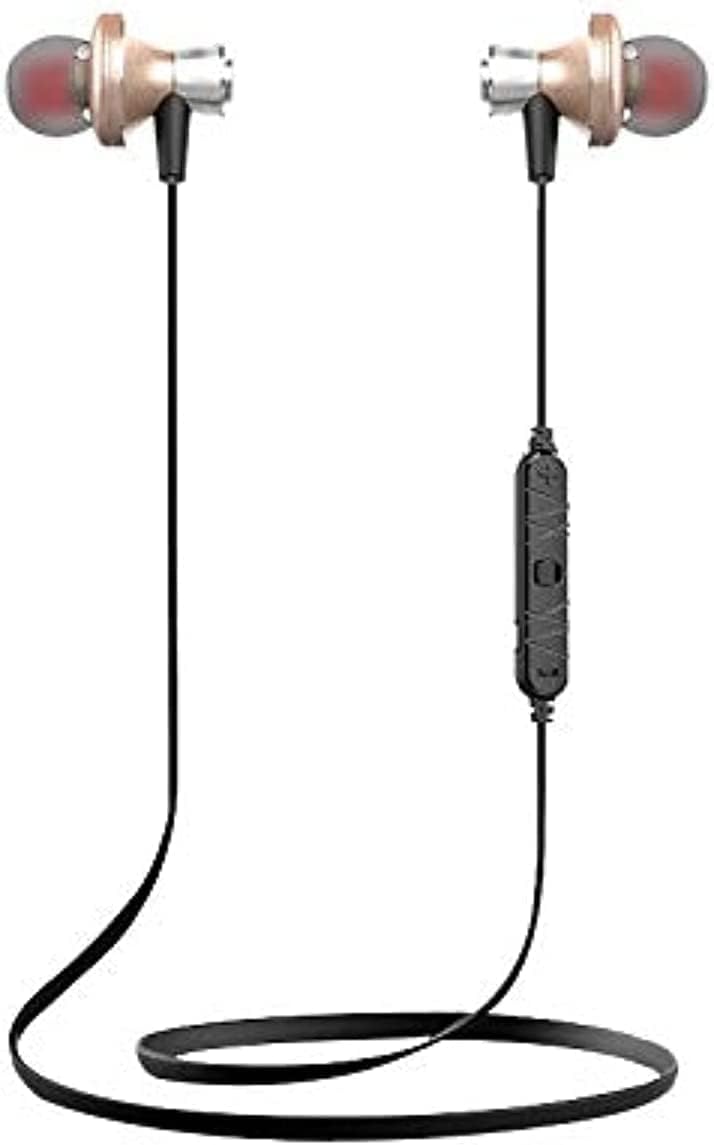
The Awei A860BL-BK earphones are designed for wireless audio playback and hands-free calling. They feature an in-ear design for comfortable fit and sound isolation.

Opstelling
1. Laai die oorfone
Before first use, fully charge the earphones. Connect the USB charging cable to the charging port on the earphones and to a compatible USB power source (e.g., computer, wall adapter). The charging indicator light will typically show red during charging and turn off or blue when fully charged.
- Laai tyd: Approximately 1 to 2 hours.
2. Bluetooth-koppeling
Om jou oorfone aan 'n Bluetooth-geaktiveerde toestel te koppel:
- Ensure the earphones are fully charged and turned off.
- Press and hold the multi-function button on the earphones until the indicator light flashes red and blue alternately, indicating pairing mode.
- Aktiveer Bluetooth op jou toestel (slimfoon, tablet, ens.) en soek vir beskikbare toestelle.
- Select "Awei A860BL-BK" from the list of found devices.
- Once connected, the indicator light on the earphones will typically flash blue slowly or turn off.
If pairing fails, turn off both devices, restart them, and repeat the pairing process.
Bedryfsinstruksies
Krag aan/af
- Krag aan: Press and hold the multi-function button for approximately 3 seconds until the indicator light flashes blue.
- Skakel af: Press and hold the multi-function button for approximately 3-5 seconds until the indicator light flashes red and then turns off.
Musiekbeheer
- Speel/pouse: Druk kort op die multifunksieknoppie.
- Volgende snit: Druk die Volume + knoppie lank.
- Vorige snit: Druk die Volume - knoppie lank.
- Volume op: Druk kort op die Volume + knoppie.
- Volume af: Druk kort op die Volume - knoppie.
Oproepbeheer
- Beantwoord/beëindig oproep: Druk kort op die multifunksieknoppie.
- Verwerp oproep: Druk die multifunksieknoppie lank.
- Herbel laaste nommer: Dubbeldruk die multifunksieknoppie.
Stemassistent
- Aktiveer stemassistent: Triple-press the multi-function button (functionality depends on your connected device).
Onderhoud
Behoorlike onderhoud verseker die lang lewensduur en prestasie van jou oorfone.
- Skoonmaak: Gebruik 'n sagte, droë lap om die oorfone skoon te maak. Moenie skuurmiddels of oplosmiddels gebruik nie.
- Berging: Bêre die oorfone op 'n koel, droë plek weg van direkte sonlig en uiterste temperature.
- Waterweerstand: These earphones are nie waterbestand nie. Avoid exposure to liquids, moisture, and high humidity.
- Kabelversorging: Avoid pulling the cable excessively or bending it sharply to prevent damage.
Probleemoplossing
If you encounter issues with your Awei A860BL-BK earphones, refer to the following common solutions:
| Probleem | Moontlike Oplossing |
|---|---|
| Oorfone skakel nie aan nie. | Ensure the earphones are fully charged. Connect to a power source and charge for 1-2 hours. |
| Kan nie met toestel koppel nie. |
|
| Geen geluid of lae volume nie. |
|
| Die oproepkwaliteit is swak. |
|
Spesifikasies
Detailed technical specifications for the Awei A860BL-BK Bluetooth In-Ear Earphones:
- Handelsmerk: Awei
- Model: A860BL-BK
- Verbinding: Draadloos (Bluetooth)
- Bluetooth weergawe: Nie gespesifiseer nie (veronderstelde standaard)
- Draadlose reeks: Tot 10 meter
- Mikrofoon: Ja
- Musiekondersteuning: Ja
- Kleur: Swart
- Oorfoontipe: In-Oor
- Laai tyd: 1-2 uur
- Musiek Speeltyd: Ongeveer 4 uur
- Praat Tyd: Ongeveer 6 uur
- Geraasbeheer: Nee
- Beheer tipe: Volume control, Touch
- Waterweerstand: Nie waterbestand nie
- Ingesluit komponente: Oorwenke
Veiligheidsinligting
Neem asseblief die volgende veiligheidsriglyne in ag:
- Do not disassemble, repair, or modify the earphones.
- Hou weg van uiterste temperature, direkte sonlig en oop vlamme.
- Vermy blootstelling aan water of ander vloeistowwe.
- Moenie die oorfone vir lang tye teen uitermatig hoë volumes gebruik nie om gehoorskade te voorkom.
- Hou buite bereik van kinders en troeteldiere.
Waarborg en Ondersteuning
Vir waarborginligting of tegniese ondersteuning, verwys asseblief na die dokumentasie wat by die aankooppunt verskaf is of kontak u kleinhandelaar. Bewaar u bewys van aankoop vir enige waarborgeise.