
1. Inleiding
This manual provides instructions for the proper use and maintenance of your Casio GX-12B Value Series Desk Top/Compact Desk Type Calculator. Please read this manual thoroughly before using the calculator to ensure optimal performance and longevity.
Sleutel kenmerke:
- Extra Large 12-Digit Display
- Two-Way Power (Solar and Battery)
- 2 Independent Memories
- Item Counter Function
- Mark-up Percentage Funksie
- Durable Plastic Keys
- Compact Desk Type Design
2. Opstelling en kragtoevoer
Kragbron:
The Casio GX-12B calculator operates on a two-way power system, utilizing both solar power and a single LR44 button-cell battery. For optimal performance, ensure the solar panel is exposed to sufficient light. In low-light conditions, the battery automatically takes over.
Battery installasie/vervanging:
- Maak seker dat die sakrekenaar afgeskakel is.
- Vind die batteryklepdeksel aan die agterkant van die sakrekenaar.
- Using a small screwdriver, carefully remove the screw and open the battery compartment cover.
- Remove the old LR44 battery (if replacing) and insert a new LR44 battery with the positive (+) side facing up.
- Plaas die deksel van die batterykompartement terug en maak dit met die skroef vas.
- Druk die AC (All Clear) button to reset the calculator.
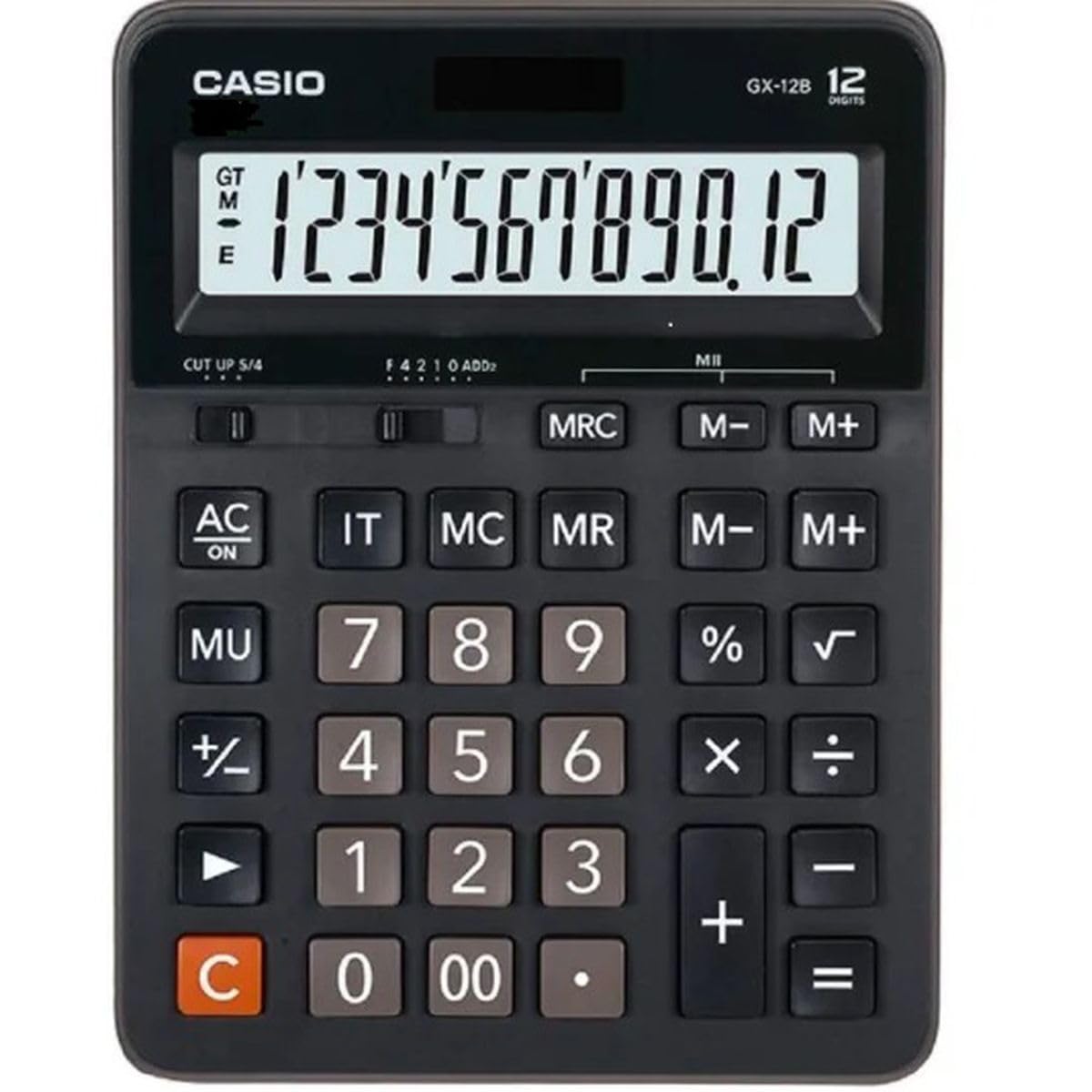
This image displays the Casio GX-12B calculator, highlighting its approximate length of 8.8 inches (22 cm) for scale. The calculator features a large display and clearly labeled keys.
3. Basiese bewerkings
Familiarize yourself with the key functions to perform calculations efficiently.
Sleutelfunksies verbyview:
- AC: All Clear. Clears all values and operations, resetting the calculator.
- C: Clear Entry. Clears the last entered number.
- + / - / × / ÷: Basic arithmetic operations.
- =: Executes the pending calculation.
- %: Persentasietage key. Used for percentage calculations (e.g., 100 + 10% = 110).
- MU: Mark-up key. Used for profit margin calculations.
- M+: Adds the displayed value to the memory.
- M-: Subtracts the displayed value from the memory.
- MRC: Memory Recall/Clear. Press once to recall the memory value. Press twice to clear the memory.
- IT: Item Counter. Counts the number of entries in a series of calculations.
Example Calculations:
- Byvoeging: To calculate 123 + 456:
- Druk AC
- Voer in 123
- Druk +
- Voer in 456
- Druk = (Result: 579)
- Percenttage: To add 10% to 200:
- Druk AC
- Voer in 200
- Druk +
- Voer in 10
- Druk % (Result: 220)
- Geheue funksie: To calculate (5 × 3) + (8 × 2):
- Druk AC
- Voer in 5 × 3 M+ (15 is added to memory)
- Voer in 8 × 2 M+ (16 is added to memory)
- Druk MRC (Result: 31)
- Druk MRC again to clear memory.
4. Sorg en Onderhoud
- Skoonmaak: Wipe the calculator with a soft, dry cloth. For stubborn dirt, use a cloth lightly dampened with water and a mild detergent, then wipe dry immediately. Avoid using strong solvents or abrasive cleaners.
- Berging: Bêre die sakrekenaar op 'n koel, droë plek weg van direkte sonlig en uiterste temperature.
- Vermy impak: Moenie die sakrekenaar laat val of aan harde impakte onderwerp nie, aangesien dit interne komponente of die skerm kan beskadig.
- Batterylewe: If the display becomes dim or unresponsive, replace the LR44 battery.
5. Probleemoplossing
| Probleem | Moontlike oorsaak | Oplossing |
|---|---|---|
| Die skerm is leeg of dof. | Insufficient light for solar panel, or low battery. | Move the calculator to a brighter area. Replace the LR44 battery if the issue persists. |
| Verkeerde berekeningsresultate. | Incorrect key input, or memory not cleared. | Druk AC to clear all operations and memory, then re-enter the calculation. Ensure correct order of operations. |
| Sleutels reageer nie. | Low battery, or internal malfunction. | Replace the LR44 battery. If the problem continues, contact customer support. |
6. Spesifikasies
- Model: GX-12B
- Vertoon: 12-Digit Extra Large LCD
- Kragbron: Two-Way Power (Solar and 1 x LR44 Battery)
- Afmetings (L x B): Ongeveer 20.8 cm x 15.9 cm (8.2 duim x 6.3 duim)
- Gewig: Ongeveer 0.32 kg (0.7 lbs)
- Materiaal: Plastiek
- Funksies: Basic arithmetic, Percentage, Mark-up, Memory (M+, M-, MRC), Item Counter
7. Waarborginligting
This Casio product is covered by a Limited Warranty. For specific terms, conditions, and duration of the warranty, please refer to the warranty card included with your purchase or visit the official Casio webwebwerf. Bewaar u bewys van aankoop vir waarborgeise.
8. Kliëntediens
If you encounter any issues not covered in this manual or require further assistance, please contact Casio customer support. Contact details can typically be found on the official Casio webwebwerf of op die produkverpakking.