
1. Inleiding
This manual provides detailed instructions for the installation, operation, and maintenance of your Night Owl WM-8HD10L-4720 8-Channel Wired Security System. This system is designed to provide reliable surveillance with high-definition video quality, motion detection, and night vision capabilities. Please read this manual thoroughly before setting up and operating your system to ensure proper functionality and safety.
The Night Owl WM-8HD10L-4720 system includes an 8-channel Digital Video Recorder (DVR) and four wired security cameras, offering comprehensive coverage for your property.
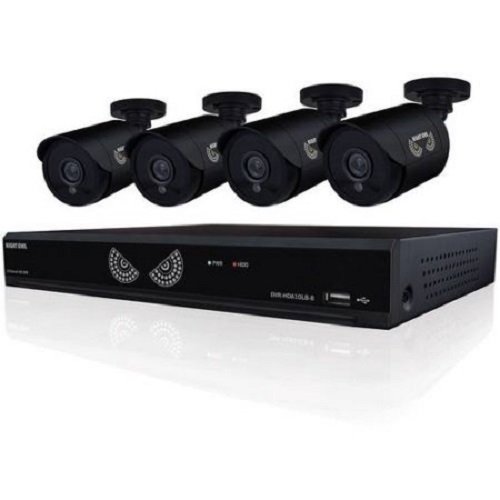
Figure 1: Night Owl WM-8HD10L-4720 8-Channel Wired Security System components, including the DVR and cameras.
2. Veiligheidsinligting
Volg altyd basiese veiligheidsmaatreëls wanneer u hierdie produk gebruik om die risiko van brand, elektriese skok en beserings aan persone te verminder.
- Lees alle instruksies voordat u die stelsel gebruik.
- Keep the system away from water and moisture.
- Moenie probeer om hierdie produk self te onderhou nie. Verwys alle diens na gekwalifiseerde dienspersoneel.
- Gebruik slegs die kragadapter wat saam met die stelsel voorsien word.
- Ensure proper ventilation for the DVR to prevent overheating.
Kalifornië Proposition 65 Waarskuwing:
ATTN CA RESIDENTS: WARNING: This product can expose you to Polybrominated biphenyls, which is known to the State of California to cause Cancer and birth defects or other reproductive harm. For more information go to www.p65warnings.ca.gov.
3. Opstelling
Volg hierdie stappe om jou Night Owl-sekuriteitstelsel op te stel.
3.1 Uitpak en inspeksie
- Verwyder alle komponente versigtig uit die verpakking.
- Verify that all items listed in the product contents are present.
- Inspect all components for any signs of damage. Do not use damaged components.
3.2 Die DVR koppel
- Connect a monitor to the DVR's video output port (VGA or HDMI, if available).
- Connect a USB mouse to the DVR's USB port for navigation.
- Connect the DVR to your network router using an Ethernet cable (optional, for remote viewing).
3.3 Kameras koppel
Each camera connects to the DVR using a wired connection. The system supports up to 8 cameras, and comes with 4.
- Mount each camera in your desired location, ensuring a clear field of view.
- Run the camera's video/power cable to the DVR.
- Connect the video connector from the camera cable to an available video input port on the back of the DVR.
- Connect the power connector from the camera cable to the power splitter, and then connect the splitter to the camera power adapter.
3.4 Aanskakel
- Once all connections are secure, connect the DVR power adapter to the DVR and then to a power outlet.
- The system will power on automatically. Follow the on-screen prompts for initial setup, including setting the date, time, and creating a password.
4. Bedryf die stelsel
This section covers the basic operation of your Night Owl security system.
4.1 Lewendig View
After powering on, the DVR will display the live view from all connected cameras on the monitor. You can switch between single-camera view en multi-kamera view deur die kontroles op die skerm of die muis te gebruik.
4.2 Opnamemodusse
The system supports various recording modes, including continuous recording and motion-activated recording.
- Motion Sensor Recording: The system is equipped with motion sensors. When motion is detected in a camera's field of view, the DVR will automatically begin recording. You can configure motion detection zones and sensitivity settings in the DVR's menu.
- Geskeduleerde opname: Set specific times for the DVR to record continuously or based on motion.
4.3 Nagvisie
The cameras are equipped with low light technology for night vision. In low-light conditions, the cameras automatically switch to infrared (IR) mode, providing clear black and white video surveillance.
4.4 Afstandsbediening Viewing (opsioneel)
If your DVR is connected to the internet, you may be able to access live camera feeds and recorded footage remotely via a compatible mobile application. Refer to the Night Owl website or app store for specific instructions on setting up remote access.
5. Onderhoud
Behoorlike onderhoud verseker die lang lewensduur en optimale werkverrigting van u sekuriteitstelsel.
- Skoonmaak: Regularly clean the camera lenses with a soft, dry cloth to remove dust and smudges. Ensure the DVR is free from dust buildup, especially around ventilation areas.
- Firmware -opdaterings: Periodically check the Night Owl official website for available firmware updates for your DVR. Firmware updates can improve system performance, add new features, and enhance security.
- Hardeskyfgesondheid: The DVR's hard drive stores all recorded footage. Monitor its health through the DVR's system settings and ensure there is sufficient space for recordings.
6. Probleemoplossing
This section addresses common issues you might encounter with your security system.
- No Video Signal from Camera:
- Check all cable connections between the camera and the DVR.
- Maak seker dat die kamera krag ontvang.
- Test the camera with a different cable or DVR port if available.
- DVR Not Powering On:
- Verify the power adapter is securely connected to the DVR and a working power outlet.
- Maak seker dat die kragaansluiting funksioneel is.
- Remote App Password Error:
- The password for the mobile app may be different from the DVR's local password. Refer to the app's specific setup instructions or the Night Owl support resources for remote access password management.
- Ensure your DVR has an active internet connection.
- Swak nagsigkwaliteit:
- Maak seker dat die kameralens skoon en vry van obstruksies is.
- Check for strong light sources near the camera that might interfere with IR illumination.
7. Spesifikasies
Technical specifications for the Night Owl WM-8HD10L-4720 security system.
| Kenmerk | Beskrywing |
|---|---|
| Modelnommer | WM-8HD10L-4720 |
| Handelsmerk | Naguil |
| Verbindingstegnologie | Bedraad |
| Video-opname-resolusie | 720p |
| Spesiale kenmerke | Bewegingsensor, Nagvisie |
| Aantal kanale | 8 |
| Kleur | Swart |
| Kragbron | Elektries met koord |
| Aanbevole gebruik | Toesig |
| Lae lig tegnologie | Nagvisie |
| Raamtempo | 30 fps |
| Opnamemodus | Bewegingsensor |
| Lens tipe | Varifokaal |
| Produk afmetings | 18.3 x 8.7 x 12.2 duim |
| Item gewig | 2 pond |
| Batterye benodig | 1 Lithium Polymer (for internal clock/memory backup) |
| UPC | 810830023137 |
8. Waarborginligting
Night Owl products typically come with a limited manufacturer's warranty. For specific details regarding the warranty period, coverage, and terms for your WM-8HD10L-4720 system, please refer to the warranty card included with your product or visit the official Night Owl webwebwerf. Bewaar u bewys van aankoop vir waarborgeise.
9. Ondersteuning
For technical assistance, customer service, or additional resources, please visit the official Night Owl support website or contact their customer service department. You can often find FAQs, video tutorials, and downloadable software/firmware updates on their support portal.
Aanlyn ondersteuning: Visit the Night Owl official webwebwerf vir ondersteuningsbronne.
Kontakinligting: Refer to the Night Owl webwebwerf vir huidige kontaknommers en bedryfsure.


