
Inleiding
This manual provides comprehensive instructions for the setup, operation, and maintenance of your Fire Cam MINI1080 Helmet Camera. Designed for durability and ease of use, this camera captures high-definition video and photos, making it an essential tool for documenting critical moments.
Wat is in die boks
- Fire Cam MINI1080 Helmet Camera
- BlackJack Fire Cam Mount (for US style fire helmets or brim style helmets)
- 32GB U3 Micro SD Card with Adapter
- 2 Rechargeable 3.7V Li-Po Batteries
- Water Resistant Cap (for audio recording)
- Waterproof Cap (no audio, for underwater use)
- Spare Waterproof O-rings
- 2 Spare Glass Lenses
- USB Cable with AC Wall Charger
Sleutel kenmerke
- Professional-grade heat and water-resistant design.
- Underwater use capability down to 33 feet.
- Compact design with high-definition 1080p at 30fps and 720p at 60fps wide-angle view.
- Video and Photo modes.
- Adjustable settings: Time/Date Stamp, Auto Power Off, Audio Record, Loop Record, Video Quality.
- Includes a 32GB U3 micro SD card for extended recording.
- BlackJack Fire Cam Mount included; other mounting options are available.
Opstelling
1. Installasie van battery en SD-kaart
Before first use, ensure the battery is fully charged using the provided USB cable and AC wall charger. Insert the micro SD card into the designated slot. The camera supports up to 32GB U3 micro SD cards.
2. Monteer die kamera
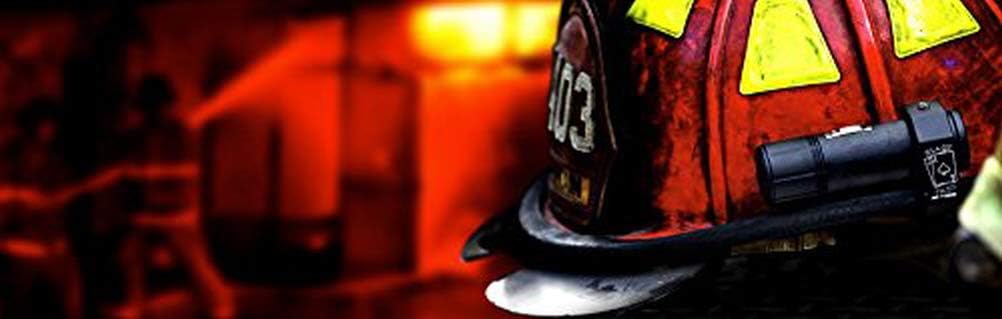
The Fire Cam MINI1080 comes with a BlackJack Fire Cam Mount. This mount is designed for secure attachment to US-style fire helmets or any brim-style helmet. Use the provided Allen wrench to loosen the screws on the mount, position it as desired, and then tighten the screws to secure the camera firmly.
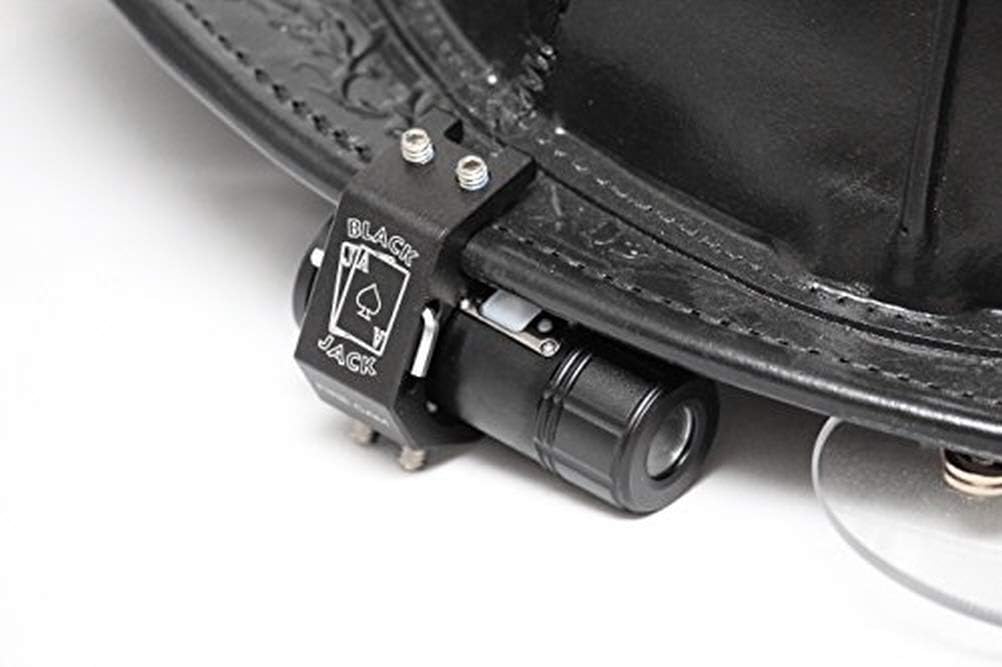
Image: Fire Cam MINI1080 Helmet Camera securely attached to the side of a firefighter's helmet, demonstrating typical mounting.
Beeld: 'n Gedetailleerde view of the Fire Cam MINI1080 camera alongside its BlackJack mount, showing the components before assembly.
3. Waterweerstand
The camera includes two end caps: one water-resistant cap for audio recording and one fully waterproof cap for use up to 30 feet underwater. Ensure the correct cap is securely fastened for your intended use to prevent water damage.
Bedryfsinstruksies
1. Power On/Off and Recording
The camera features a single, user-friendly button for all operations. Press the button once to power on and begin recording. The indicator light will flash (e.g., purple/blue) to confirm recording is active. To stop recording and power off, press and hold the button until you hear five beeps, indicating the camera has shut down.
2. Video and Photo Modes
The camera supports both video and photo capture. Refer to the detailed instructions included with your product for specific steps on switching between modes and adjusting settings such as video quality (1080p or 720p), time/date stamp, auto power off, and loop recording.
3. Data-oordrag
Om toegang te verkry tot opgeneemde footage, remove the micro SD card from the camera and insert it into a compatible card reader connected to your computer. The camera's software is designed for easy playback and transfer of files.
Onderhoud
- Skoonmaak: Gebruik 'n sagte, droë lap om die kamera se liggaam en lens skoon te maak. Vermy skuurmiddels of harde chemikalieë.
- Batterysorg: Fully charge batteries before extended storage. Store in a cool, dry place.
- SD kaart: Periodically reformat the micro SD card to maintain optimal performance and prevent data corruption. Back up all important footage before reformatting.
- O-ringe: Inspect the waterproof O-rings regularly for wear and tear. Replace them if damaged to ensure water resistance. Spare O-rings are included.
- Lensbeskerming: Use the spare glass lenses if the primary lens becomes scratched or damaged.
Probleemoplossing
Camera Not Functioning Correctly
If the camera stops working or exhibits unusual behavior (e.g., turns on and immediately off), the micro SD card may require reformatting. Remove the card, insert it into a computer, and reformat it. If issues persist, contact Fire Cam customer support.
Probleme met videokwaliteit
Ensure the lens is clean and free from obstructions. Verify that the correct video quality setting (1080p or 720p) is selected according to your preferences.
Audio Recording Issues
Confirm that the water-resistant cap (with audio capability) is installed, not the fully waterproof cap. Check camera settings to ensure audio recording is enabled.
Spesifikasies
| Produk afmetings | 3.25 x 1.13 x 1.13 duim |
| Item gewig | 3 onse |
| Item Modelnommer | FCMINI1080 |
| Batterye | 1 Produkspesifieke batterye benodig (ingesluit) |
| Fotosensortegnologie | CMOS |
| Video-opname-resolusie | 1080p |
| Maksimum diafragma | 2 f |
| Tipe flitsgeheue | Mikro SD |
| Video-opname-formaat | MP4 |
| Ondersteunde oudioformaat | MP3, AAC |
| Verbindingstegnologie | USB |
| Kleur | swart |
| Vervaardiger | Fire Cam LLC |
| Datum Eerste Beskikbaar | 6 Julie 2016 |
Waarborg en Ondersteuning
While specific warranty details are not provided in the product information, Fire Cam offers customer support for their products. Individual camera parts are replaceable, allowing for extended use. For assistance, troubleshooting, or to inquire about replacement parts, please contact Fire Cam customer service directly.
The manufacturer, Fire Cam LLC, is committed to product quality and user satisfaction.