
1. Inleiding
This manual provides essential information for the safe and efficient operation of your Cotek SP-3000-112 High Frequency Pure Sine Wave Inverter. This device converts 12V DC power from batteries into 120V AC power, suitable for a wide range of electronic appliances. Please read this manual thoroughly before installation and use, and retain it for future reference.
2. Veiligheidsinligting
Failure to follow these safety instructions may result in electric shock, fire, serious injury, or death. Always exercise caution when working with electrical equipment.
- Lees alle instruksies: Before operating the inverter, read all instructions and cautionary markings on the inverter, the batteries, and all appropriate sections of this manual.
- Gekwalifiseerde personeel: Installation and servicing should be performed by qualified personnel familiar with batteries and inverters.
- Ventilasie: Ensure adequate ventilation around the inverter. Do not install in a zero-clearance compartment.
- Vermy water: Do not expose the inverter to rain, snow, spray, or bilge water.
- Behoorlike aarding: Die omsetter moet behoorlik geaard wees.
- Batteryveiligheid: Work near lead-acid batteries is dangerous. Batteries generate explosive gases during normal operation. Ensure proper ventilation and wear appropriate personal protective equipment.
- Ontkoppel krag: Always disconnect the battery supply before performing any maintenance or troubleshooting.
- Korrekte Voltage: Verseker die DC-invoer voltage matches the inverter's specifications (12VDC for this model).


3. Produk verbyview
3.1 Sleutelkenmerke
- Suiwer sinusgolfuitset vir sensitiewe elektronika.
- Power ON / OFF remote control capability (Green Terminal).
- Input & output fully isolated for enhanced safety.
- Temperature & load controlled cooling fan for optimal performance.
- User-friendly interface with 3-color LED status indicators.
- Multiple protection features: Reverse Polarity (Fuse), Under Voltage / Oor Voltage, Output Protection (Short Circuit / Overload / Over Temperature).
- E-13 / UL / CE / FCC approved.
3.2 Omskakelaarkomponente

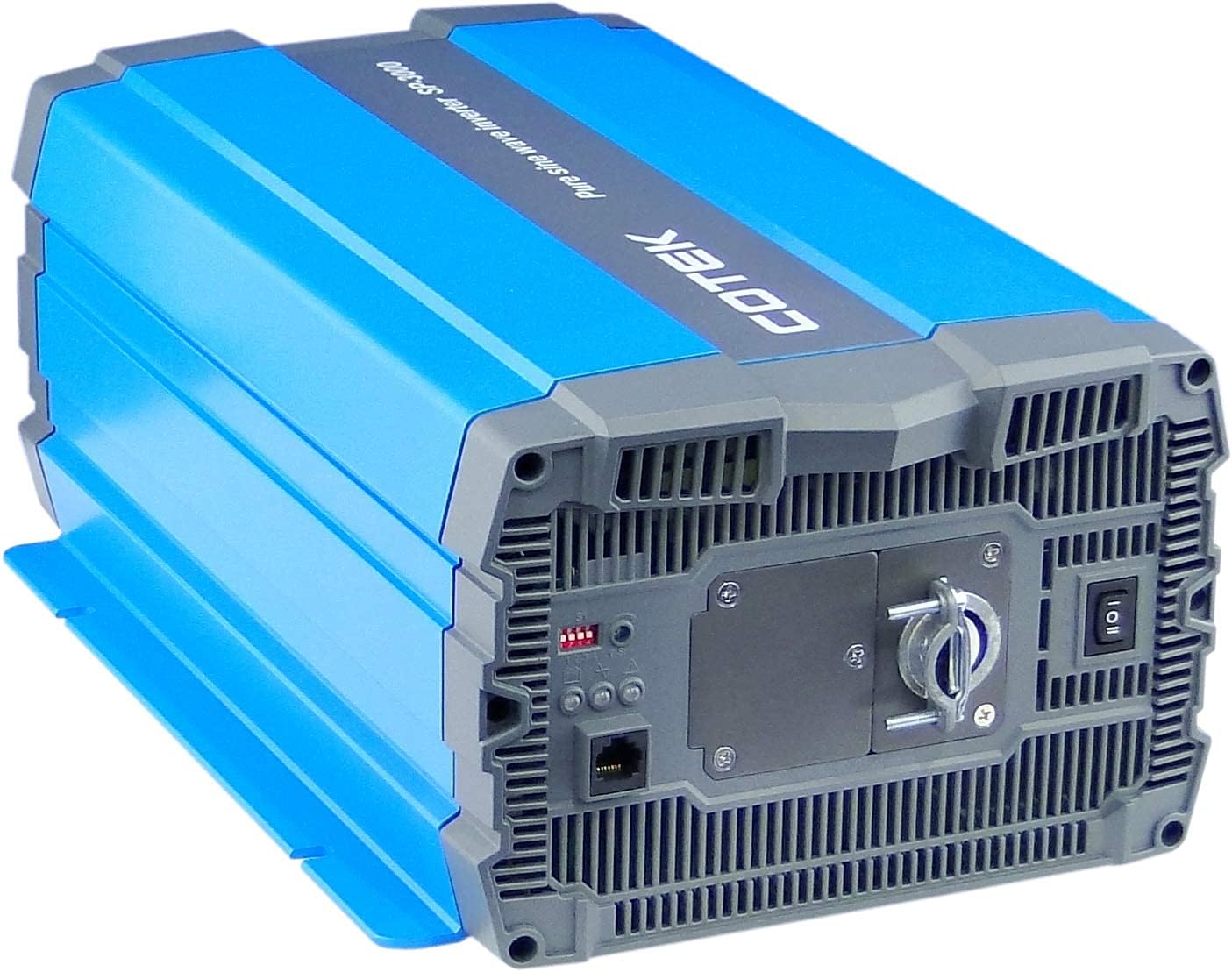
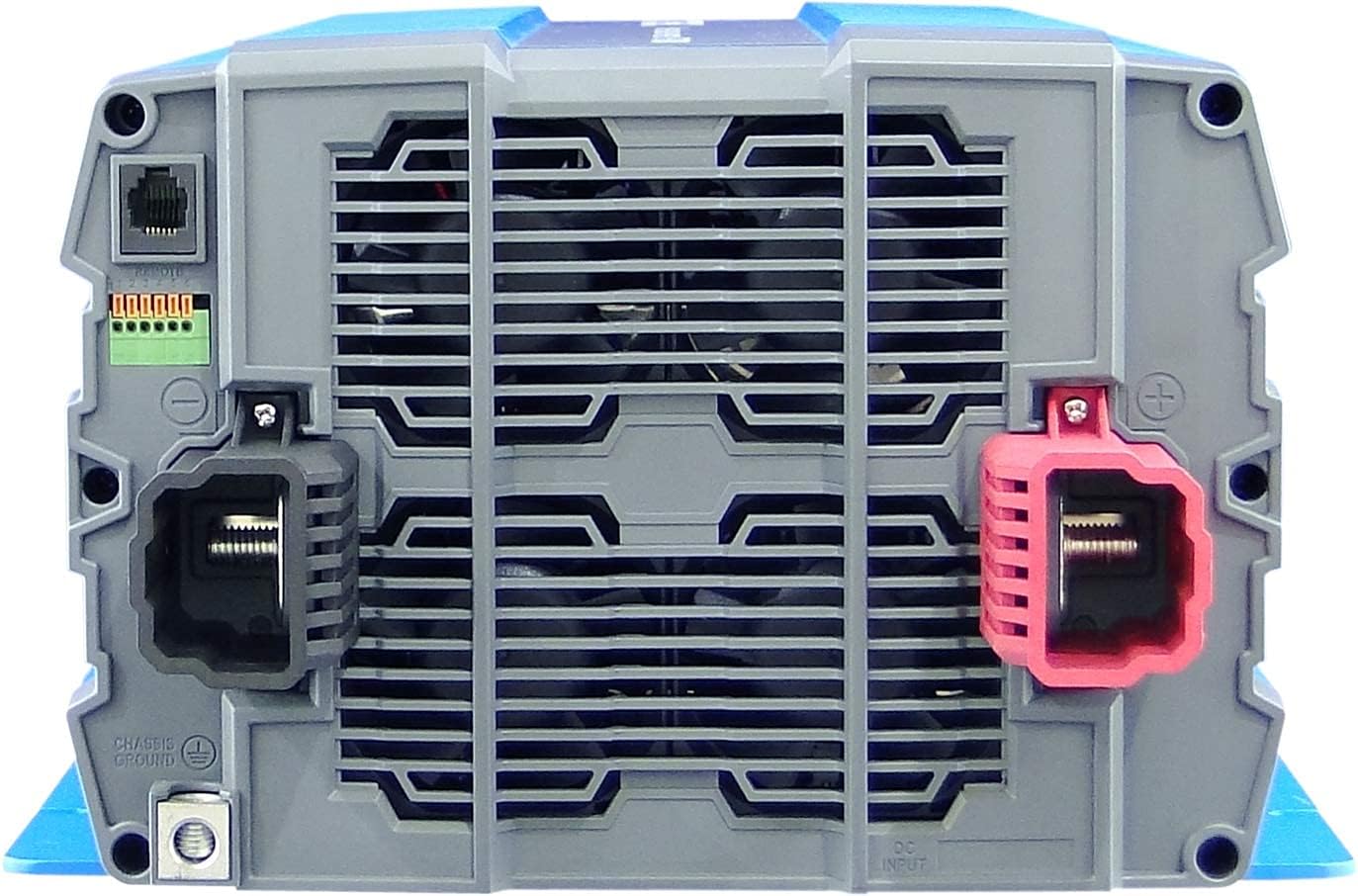
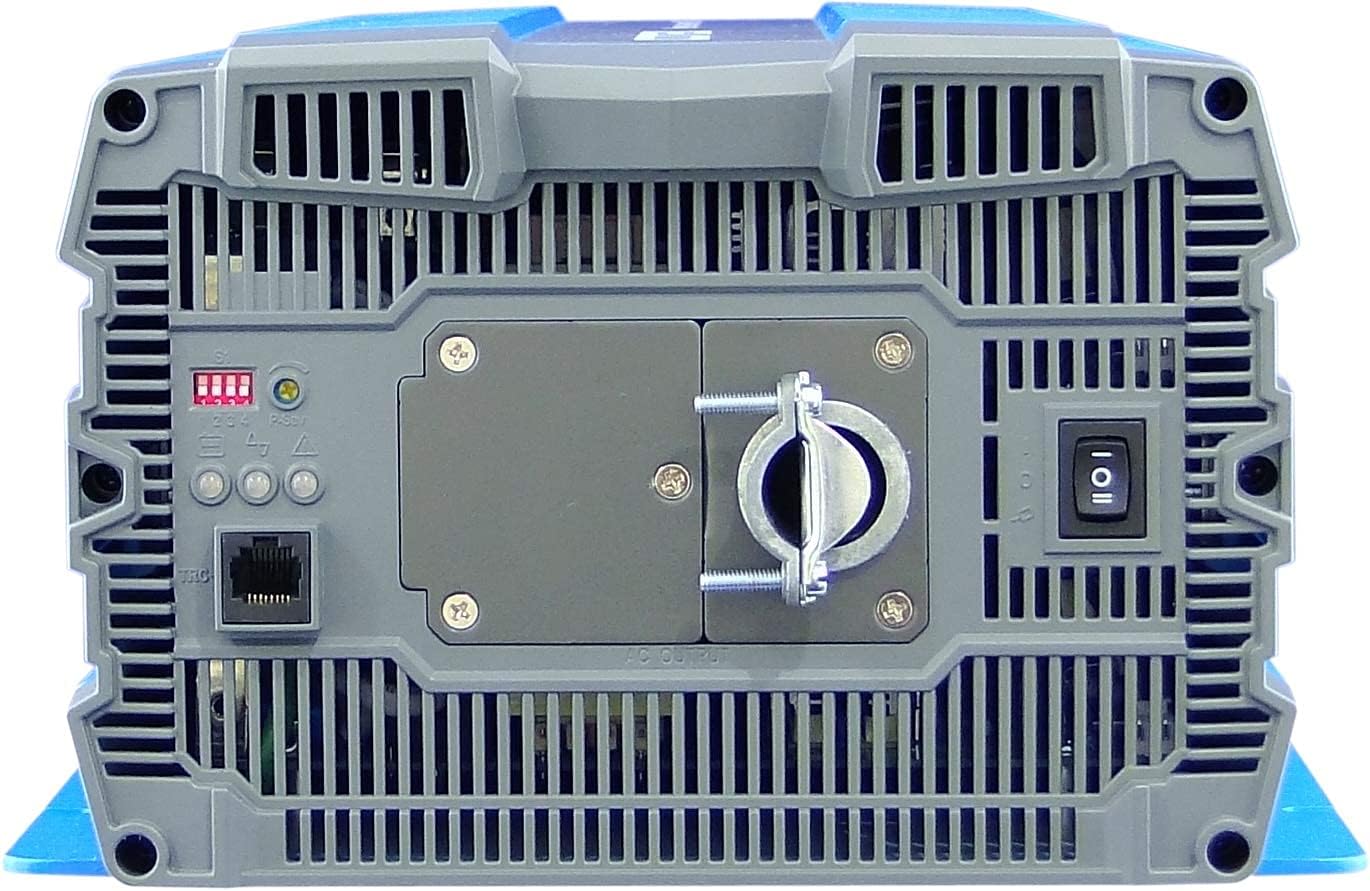
4. Opstelling en installering
Proper installation is crucial for the safe and efficient operation of your inverter. Refer to local electrical codes and standards.
4.1 Plasing
- Install the inverter in a dry, well-ventilated area, away from direct sunlight, heat sources, and flammable materials.
- Ensure sufficient clearance around the inverter for proper airflow, especially around the cooling fan vents.
- Mount the inverter securely on a stable, non-combustible surface.
- Avoid areas where dust, moisture, or corrosive fumes are present.
4.2 Bedrading
All wiring must comply with applicable electrical codes and be performed by a qualified electrician.
- Aarding: Connect the inverter's chassis ground terminal to a reliable earth ground using appropriate gauge wire.
- GS-invoerverbinding:
- Ensure the battery bank voltage is 12VDC.
- Use appropriately sized cables for the DC input to minimize voltage drop and ensure safety. Refer to cable sizing charts based on current and distance.
- Connect the positive (+) terminal of the battery bank to the red (+) terminal on the inverter.
- Connect the negative (-) terminal of the battery bank to the black (-) terminal on the inverter.
- Install a DC-rated fuse or circuit breaker between the battery bank and the inverter's positive terminal, as close to the battery as possible.
- WS-uitvoerverbinding:
- Connect your AC loads to the hardwire AC output terminal block.
- Ensure the total load does not exceed the inverter's continuous power rating (3000W).
- Afstandbeheer (opsioneel): Connect the remote control unit to the RJ45 port or use the green terminal for external ON/OFF control if desired.
5. Bedryfsinstruksies
5.1 Aan-/afskakel
- Om aan te skakel: Ensure all DC and AC connections are secure. Flip the main power switch on the inverter's rear panel to the 'ON' position. The Power LED indicator should illuminate.
- Om af te skakel: Disconnect all AC loads from the inverter. Flip the main power switch to the 'OFF' position.
5.2 LED-aanwysers
The inverter features 3-color LED status indicators on the control panel (refer to Figure 4) to provide operational feedback:
- Groen LED: Dui normale werking en kraglewering aan.
- Geel LED: Indicates a warning condition, such as low battery voltage or high temperature. The inverter may continue to operate but requires attention.
- Rooi LED: Indicates a fault condition, such as overload, short circuit, or severe over/under voltage. The inverter will shut down to protect itself and connected devices.
5.3 DIP-skakelaarinstellings
The DIP switches on the control panel allow for customization of certain inverter parameters, such as output voltage, frequency, and power saving mode. Refer to the detailed specifications table (Figure 5) or the product datasheet for specific configurations. Always adjust DIP switches when the inverter is powered off.
6. Onderhoud
Gereelde onderhoud verseker die lang lewensduur en betroubare werking van u omsetter.
- Skoonmaak: Periodically clean the exterior of the inverter with a dry cloth. Ensure ventilation openings are free from dust and debris. Do not use liquid cleaners.
- Verbindings: Regularly check all electrical connections (DC input, AC output, ground) for tightness and corrosion. Loose connections can cause overheating and poor performance.
- Battery inspeksie: Inspect batteries for signs of damage, corrosion, or electrolyte leakage. Ensure battery terminals are clean and tight.
- Omgewing: Verifieer dat die bedryfsomgewing binne die gespesifiseerde temperatuur- en humiditeitsreekse bly.
7. Probleemoplossing
Hierdie afdeling bied oplossings vir algemene probleme wat u mag teëkom. Indien die probleem voortduur, kontak kliëntediens.
| Probleem | Moontlike oorsaak | Oplossing |
|---|---|---|
| Omskakelaar skakel nie aan nie. | No DC input power; Loose battery connections; Blown DC fuse/breaker; Inverter switch OFF. | Gaan battery voltage; Tighten connections; Replace fuse/reset breaker; Turn inverter switch ON. |
| Geen WS-uitset nie. | Overload; Short circuit; Over-temperature shutdown; Low/High DC input voltage. | Reduce AC load; Check for short circuits in wiring/appliances; Allow inverter to cool; Check battery voltage. |
| Yellow LED illuminated. | Lae battery voltage warning; High temperature warning. | Recharge batteries; Ensure adequate ventilation, reduce load. |
| Red LED illuminated / Inverter shut down. | Overload; Short circuit; Over-temperature; Under/Over voltage. | Identify and correct the fault (e.g., reduce load, fix short, allow cooling, check battery voltage), then restart the inverter. |
| Cooling fan runs constantly or loudly. | Hoë interne temperatuur as gevolg van swaar lading of swak ventilasie. | Reduce load; Improve ventilation around the inverter. |
8. Spesifikasies
The following table outlines the technical specifications for the Cotek SP-3000 Series Pure Sine Wave Inverter, specifically for the SP-3000-112 model.

| Kategorie | Parameter | SP-3000-112 |
|---|---|---|
| Uitset | AC Voltage | 100 / 110 / 115 / 120VAC ±5% |
| Gegradeerde krag | 3000 W | |
| Surge Power (1 Sec.) | 6000 W | |
| Maksimum uitsetkrag (1 min) | 3450 W | |
| Uitset golfvorm | Pure Sine Wave (THD<3%) | |
| Frekwensie | 50 / 60 Hz ±0.5% | |
| Invoer | DC Voltage | 12VDC |
| Voltage Reeks | 10.5 ~ 16.5VDC | |
| Geen laaistroom nie | <3.0A@12VDC | |
| Kragbesparingsmodus | <0.4A@12VDC | |
| Doeltreffendheid (Maks.) | 90% | |
| Beskerming | Input Under - Voltage Beskerming | 10.5 ± 0.3VDC |
| Input Under - Voltage Alarm | 11.0 ± 0.3VDC | |
| Input Under - Voltage Herstel | 12.0 ± 0.3VDC | |
| Input Over - Voltage Beskerming | 16.5 ± 0.3VDC | |
| Input Over - Voltage Herstel | 14.5 ± 0.3VDC | |
| Uitset oorlading | Afskakel uitset voltage, herbegin om te herstel | |
| Uitset kort | Afskakel uitset voltage, herbegin om te herstel | |
| Omgewing | Bedryfstemp. | -20°C ~ +40°C |
| Berging Temp. & Humiditeit | -30°C ~ +70°C, 10 ~ 95% RH | |
| Algemeen | Afmetings (B x H x D) | 442 x 214 x 102 mm (17.4 x 8.4 x 4.0 duim) |
| Gewig | 8.2 kg (18.1 lbs) | |
| Verkoeling | Temperatuur- en lasbeheerde koelwaaier |

9. Waarborg en Ondersteuning
9.1 Waarborginligting
The Cotek SP-3000-112 Pure Sine Wave Inverter comes with a 2-jaar vervaardigerwaarborgHierdie waarborg dek defekte in materiaal en vakmanskap onder normale gebruik. Bewaar asseblief u bewys van aankoop vir waarborgeise.
9.2 Kliëntediens
For technical assistance, troubleshooting beyond this manual, or warranty inquiries, please contact Cotek customer support through their official website or your point of purchase. Provide your model number (SP-3000-112) and a detailed description of the issue to expedite service.