
Inleiding
This manual provides instructions for the proper setup, operation, maintenance, and troubleshooting of your Excalibur Deluxe Virtual Casino 5-in-1 Video Game. Please read this manual thoroughly before using the device to ensure optimal performance and longevity.
The Excalibur Deluxe Virtual Casino is a handheld electronic gaming device featuring five classic casino games: Poker, Blackjack, Slots, Craps, and Roulette. It is designed for portable entertainment.
Opstelling
1. Battery Installasie
The Excalibur Deluxe Virtual Casino requires 3 AAA batteries (not included) for operation.
- Vind die batteryklepdeksel aan die agterkant van die toestel.
- Skuif die deksel oop in die rigting wat deur die pyl aangedui word.
- Insert 3 AAA batteries, ensuring the correct polarity (+ and -) as marked inside the compartment.
- Plaas die batteryklepdeksel terug en maak seker dat dit stewig vasklik.
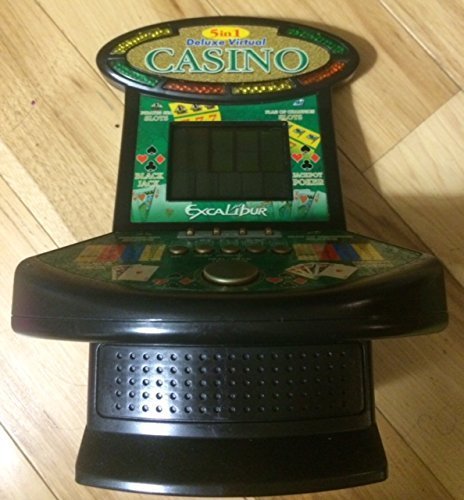
Figuur 1: Excalibur Deluxe Virtual Casino handheld device. This image shows the front of the device, featuring the LED display and control buttons, which include a directional pad and action buttons.
2. Aanvanklike Aanskakeling
After installing batteries, press the KRAG button, usually located on the top or front of the device, to turn it on. The screen should illuminate, displaying the main menu or game selection screen.
Bedryfsinstruksies
Kontroles verbyview
- Rigtingpad (D-pad): Used for navigating menus and making selections within games.
- SELECT/MENU Button: Typically used to confirm selections or access in-game menus.
- ACTION Buttons (A, B, C, etc.): Used for specific game actions, such as dealing cards, spinning reels, or placing bets. Refer to individual game instructions for specific button functions.
- SOUND/VOLUME Button: Adjusts the device's sound level or mutes audio.
- Kragknoppie: Skakel die toestel aan of af.
Spelkeuse
From the main menu, use the D-pad to highlight your desired game (Poker, Blackjack, Slots, Craps, or Roulette). Press the KIES button to confirm your choice and start the game.
Basic Gameplay (General)
- Placing Bets: Gebruik die D-pad to select bet amounts or areas on the table (for Craps/Roulette). Confirm with an AKSIE knoppie.
- Game Actions: Follow on-screen prompts. For example, in Poker/Blackjack, use AKSIE buttons to "Hit," "Stand," "Deal," or "Fold." In Slots, press an AKSIE button to "Spin."
- Viewing Rules: Some games may have an option to view rules within their respective menus. Access this via the SPYSKAART knoppie indien beskikbaar.
Onderhoud
Skoonmaak
To clean the device, gently wipe the exterior with a soft, dry cloth. Do not use abrasive cleaners, solvents, or immerse the device in water. For the screen, use a soft, lint-free cloth specifically designed for electronics displays.
Battery sorg en berging
- Verwyder batterye as die toestel nie vir 'n lang tydperk gebruik gaan word om lekkasie te voorkom.
- Bêre die toestel op 'n koel, droë plek, weg van direkte sonlig en uiterste temperature.
- Moenie ou en nuwe batterye, of verskillende tipes batterye meng nie.
Probleemoplossing
| Probleem | Moontlike oorsaak | Oplossing |
|---|---|---|
| Toestel kan nie aangeskakel word nie. | Dooie of verkeerd geïnstalleerde batterye. | Kontroleer die polariteit van die batterye. Vervang met vars AAA-batterye. |
| Die skerm is leeg of flikker. | Low batteries or a temporary software glitch. | Replace batteries. Turn the device off and on again. |
| Knoppies reageer nie. | Low batteries or a software issue. | Replace batteries. Turn the device off and on again. Ensure buttons are not stuck. |
| Geen klank nie. | Die volume is gedemp of te laag gestel. | Druk die SOUND/VOLUME button to adjust volume or unmute. |
Spesifikasies
- Model: B01GGZSPTA
- Handelsmerk: Excalibur
- Vertoon tipe: LED
- Vormfaktor: Handheld
- Kragbron: 3 x AAA-batterye (nie ingesluit nie)
- Speletjies Ingesluit: Poker, Blackjack, Slots, Craps, Roulette
Waarborg en Ondersteuning
Excalibur products are designed for quality and reliability. For information regarding warranty coverage, please refer to the warranty card included with your purchase or visit the official Excalibur webwebwerf.
For technical support or customer service inquiries, please contact Excalibur customer support through their official channels. Contact details are typically available on the product packaging or the manufacturer's webwebwerf.