
Amazon Basics BSK30BK
Amazon Basics Portable Wireless, 2.1 Bluetooth Speaker (Model BSK30BK)
Instruksie Handleiding
Inleiding
Dankie vir die aankoopasing the Amazon Basics Portable Wireless, 2.1 Bluetooth Speaker. This manual provides important information regarding the setup, operation, maintenance, and troubleshooting of your new speaker. Please read it thoroughly before use and retain it for future reference.
Produk verbyview
The Amazon Basics Portable Wireless, 2.1 Bluetooth Speaker offers high-quality sound with a portable design. It features Bluetooth connectivity for wireless audio streaming, a 3.5mm aux-in jack for wired connections, and a built-in microphone for hands-free calling.
Pakketinhoud
- Amazon Basics Portable Wireless, 2.1 Bluetooth Speaker
- USB-laaikabel
- Instruksie Handleiding
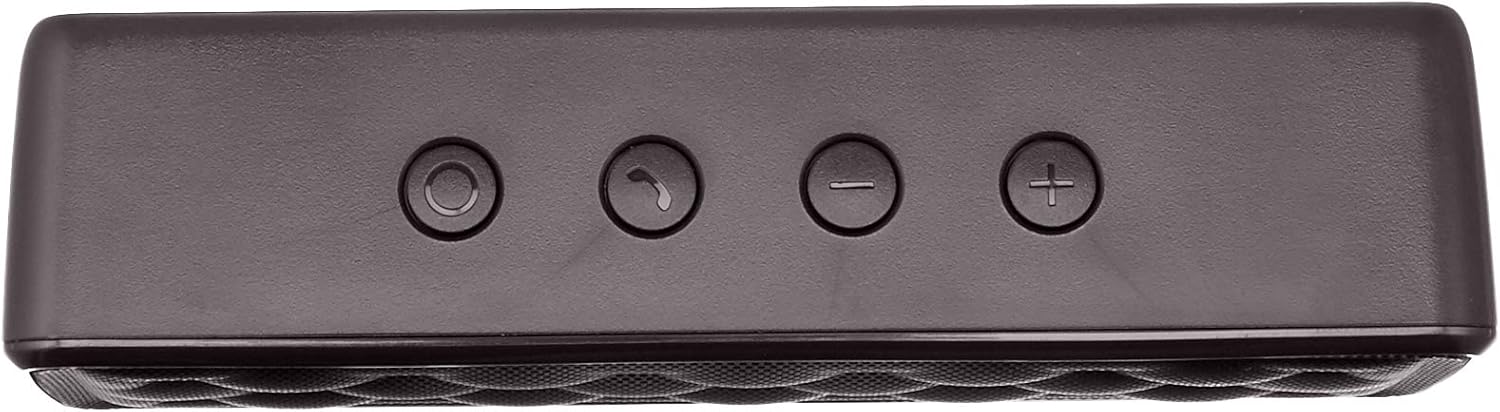
Luidsprekerkomponente


Opstelling
1. Laai die luidspreker op
Before first use, fully charge the speaker. Connect the supplied USB charging cable to the Micro USB port on the speaker and the other end to a USB power source (e.g., computer USB port, USB wall adapter). The charging indicator light will illuminate during charging and turn off when fully charged. A full charge takes approximately 3 hours.
2. Skakel aan/af
To power on the speaker, slide the ON/OFF switch located on the rear panel to the "ON" position. To power off, slide the switch to the "OFF" position.
Bedryfsinstruksies
Bluetooth-koppeling
- Ensure the speaker is powered on and within 33 feet (10 meters) of your Bluetooth-enabled device.
- The speaker will automatically enter pairing mode, indicated by a flashing blue LED light.
- Gaan op jou toestel na Bluetooth-instellings en soek vir beskikbare toestelle.
- Select "Amazon Basics Speaker" from the list.
- Once paired, the blue LED light will stop flashing and remain solid. You can now stream audio wirelessly.
Note: If pairing fails, turn off the speaker and your device's Bluetooth, then repeat the steps. The speaker will attempt to reconnect to the last paired device automatically when powered on.
Oudio-weergawe
- Volumebeheer: Use the '+' and '-' buttons on the top panel of the speaker to adjust the volume. You can also control the volume from your connected device.
- Speel/pouse: Use the controls on your connected device to play or pause audio.
Handvrye oproepe
When connected via Bluetooth, the speaker's built-in microphone allows for hands-free calling.
- Beantwoord/beëindig oproep: Press the Call/Bluetooth button once to answer an incoming call or end an ongoing call.
- Verwerp oproep: Press and hold the Call/Bluetooth button for 2 seconds to reject an incoming call.
- Herhaal: Double-press the Call/Bluetooth button to redial the last number.
AUX-invoermodus
To connect non-Bluetooth audio devices, use the 3.5mm AUX input jack on the rear panel. Connect one end of a 3.5mm audio cable (not included) to the speaker's AUX port and the other end to your audio device's headphone jack. The speaker will automatically switch to AUX mode when a cable is inserted.

Onderhoud
- Maak die luidspreker skoon met 'n sagte, droë lap. Moenie skuurmiddels of oplosmiddels gebruik nie.
- Avoid exposing the speaker to extreme temperatures, humidity, or direct sunlight.
- Moenie die luidspreker in water dompel nie. Dit is nie waterdig nie.
- Bêre die luidspreker op 'n koel, droë plek wanneer dit nie vir lang tye gebruik word nie.
Probleemoplossing
| Probleem | Moontlike oorsaak | Oplossing |
|---|---|---|
| Luidspreker skakel nie aan nie. | Battery is leeg. | Laai die luidspreker met die meegeleverde USB-kabel. |
| Kan nie via Bluetooth koppel nie. | Bluetooth is off on your device; speaker is out of range; speaker is already paired to another device. | Ensure Bluetooth is enabled on your device. Move the speaker closer to your device (within 33 feet). Disconnect from other devices or restart the speaker to enter pairing mode. |
| Geen geluid of lae volume nie. | Volume is too low on speaker or device; incorrect input mode. | Increase volume on both the speaker and your connected device. Ensure the correct input mode (Bluetooth or AUX) is active. |
| Klank vervorming. | Volume is too high; speaker is too far from the device. | Reduce the volume on the speaker and/or your device. Move the speaker closer to your device. |
Spesifikasies
| Model Naam | BSK30BK |
| Verbindingstegnologie | Bluetooth, hulp |
| Wireless Range | Tot 33 voet (10 meter) |
| Luidspreker uitset krag | 2 x 2.5 Watts (5 Watts total) |
| Batterylewe | Tot 8 uur (op 'n volle lading) |
| Laai tyd | Ongeveer 3 uur |
| Afmetings (L x B x H) | 6.3" x 1.5" x 2.6" (16 cm x 3.8 cm x 6.6 cm) |
| Gewig | 8.1 onse (0.23 kg) |
| Ingeboude mikrofoon | Ja |
| Waterdig | Nee |
Waarborg inligting
This product is covered by a Limited Warranty. For detailed information regarding warranty terms and conditions, please refer to the documentation included with your purchase or visit the Amazon Basics official webwebwerf.
Kliënte ondersteuning
For further assistance, troubleshooting, or product information, please visit the Amazon Basics support page or contact customer service through your Amazon account.
Belangrike veiligheidsinligting
- Moenie die produk uitmekaar haal, herstel of verander nie.
- Hou die produk weg van water en hoë humiditeit.
- Vermy langdurige blootstelling aan direkte sonlig of uiterste hitte.
- Moenie die produk laat val of aan harde impakte onderwerp nie.
- Gooi die produk en sy battery verantwoordelik weg volgens plaaslike regulasies.
Produkvideo's
No official instructional videos from the seller are available for this product at this time.
Ask a question about this manual
Ask about setup, troubleshooting, compatibility, parts, safety, or missing instructions. Manuals+ will review the question and use this page’s manual context to help answer it.