
Belangrike veiligheidsinstruksies
LEES ALLE INSTRUKSIES SORGVULDIG VOOR GEBRUIK.
- Ontkoppel altyd die waaier uit die kragtoevoer voordat u dit skoonmaak, onderhoud of verskuif.
- Moenie vingers of enige ander voorwerpe deur die rooster steek terwyl die waaier aan die gang is nie.
- Moenie enige waaier met 'n beskadigde koord of prop gebruik nie. Gooi waaier weg of stuur terug na 'n gemagtigde diensfasiliteit vir ondersoek en/of herstel.
- Moenie koord onder die matte dra nie. Moenie koord bedek met matte, lopers of soortgelyke bedekkings nie. Rangskik koord weg van die verkeersarea en waar dit nie gestruikel sal word nie.
- Moenie die waaier in nat of damp plekke soos badkamers of waskamers.
- Hierdie waaier is slegs bedoel vir binnenshuise gebruik. Moenie buite gebruik nie.
- Keep the fan away from curtains, drapes, or any objects that may get caught in the fan blades.
- Hou toesig oor kinders wanneer die waaier gebruik word.
Produk verbyview
The Optimus 18-inch High Velocity Industrial Floor Fan is designed to provide powerful air circulation in various indoor environments. Its robust construction and high-velocity motor make it suitable for workshops, garages, and large rooms.
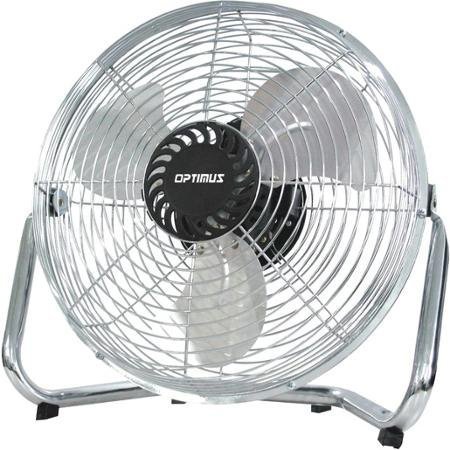
Image: Optimus 18-inch High Velocity Industrial Floor Fan. This image shows the fan with its silver metallic finish and sturdy floor stand.
Sleutel kenmerke:
- 18-inch diameter for wide air distribution.
- Industrial-grade high velocity airflow.
- Durable metallic finish.
- Floor standing design for stable placement.
- Multiple power levels for adjustable airflow.
Opstel instruksies
- Pak die waaier uit: Carefully remove the fan and all components from the packaging. Retain packaging for future storage or transport.
- Assemble the Floor Stand:
- Attach the fan head to the floor stand using the provided screws and tools. Ensure all connections are secure.
- Verify the fan head can pivot smoothly on the stand.
- Plasing: Place the fan on a firm, level surface. Ensure there is adequate space around the fan for proper air circulation and to prevent obstruction of the air intake/output. Keep the fan at least 3 feet away from walls or furniture.
- Kragverbinding: Ensure the fan is in the "OFF" position before plugging it into a standard 120V AC electrical outlet.
Bedryfsinstruksies
This fan features push-button controls for easy operation. A remote control may also be included for convenience.
- Krag aan/af: Locate the power button on the control panel. Press the button once to turn the fan ON. Press it again to turn the fan OFF.
- Aanpassing van waaierspoed: The fan has 4 power levels. After turning the fan ON, repeatedly press the speed control button to cycle through the available speed settings (Low, Medium, High, Max). The fan will operate at the selected speed.
- Aanpassing van lugvloeirigting: The fan head can be tilted manually to direct airflow upwards or downwards. Gently tilt the fan head to the desired angle. Do not force the fan head beyond its intended range of motion.
Onderhoud
Regular cleaning and maintenance will ensure optimal performance and extend the life of your fan.
- Maak die waaier skoon:
- Always unplug the fan from the power source before cleaning.
- Gebruik 'n sagte, damp cloth to wipe the exterior surfaces of the fan. Do not use abrasive cleaners or harsh chemicals, as these may damage the finish.
- To clean the fan blades, carefully remove the front grille (if detachable, refer to assembly instructions for details). Wipe the blades with a soft cloth. Ensure the grille is securely reattached before operating the fan.
- Maak seker dat alle dele heeltemal droog is voordat die waaier weer ingeprop word.
- Berging: Wanneer dit nie vir lang tye gebruik word nie, bêre die waaier op 'n koel, droë plek. Dit word aanbeveel om dit in sy oorspronklike verpakking te bêre om dit teen stof en skade te beskerm.
Probleemoplossing
| Probleem | Moontlike oorsaak | Oplossing |
|---|---|---|
| Die waaier skakel nie aan nie. | Not plugged in; power outlet not working; fan switch is off. | Ensure fan is securely plugged into a working outlet. Check household fuse/circuit breaker. Press the power button to turn the fan on. |
| Lae lugvloei. | Fan speed set too low; obstructed intake/output; dirty blades. | Increase fan speed. Clear any obstructions. Clean fan blades and grilles as per maintenance instructions. |
| Ongewone geraas of geratel. | Loose parts; fan not on a level surface; foreign object in blades. | Unplug the fan and check for any loose screws or components. Place the fan on a stable, level surface. Carefully inspect for and remove any foreign objects. |
Spesifikasies
| Kenmerk | Detail |
|---|---|
| Handelsmerk | Optimus |
| Model Naam | Hoë snelheid |
| Item Modelnommer | 306c1b92-f36b-4ccc-ac62-2ad33d5c9efb |
| Deursnee | 18 duim |
| Kleur | Silwer |
| Styl | Industriële |
| Kragbron | Elektries met koord |
| Aantal kragvlakke | 4 |
| Beheer metode | Knoppie beheer |
| Binne/buiteluggebruik | Binneshuise |
| Ingesluit komponente | Floor Stand, Remote Control |
| Spesifikasie Met | OSHA |
Waarborg en Ondersteuning
Optimus products are manufactured to high-quality standards. This product is covered by a limited warranty against defects in materials and workmanship from the date of purchase. Please refer to the warranty card included with your product for specific terms and conditions.
For technical support, troubleshooting assistance, or warranty claims, please contact Optimus customer service. Contact information can typically be found on the product packaging or the official Optimus webwebwerf.
Bewaar asseblief u aankoopbewys vir waarborgdoeleindes.