
Yaheetech YT-00009601
Yaheetech Mobile Computer Desk Instruction Manual
Model: YT-00009601
Inleiding
Dankie vir die aankoopasing the Yaheetech Mobile Computer Desk. This manual provides detailed instructions for assembly, operation, and maintenance to ensure safe and efficient use of your new desk. Please read this manual thoroughly before assembly and retain it for future reference.
Veiligheidsinligting
To prevent injury and damage to the product, please observe the following safety guidelines:
- Ensure proper assembly of all components before use.
- Do not exceed the maximum weight limits for each shelf:
- Top: 30 kg (66.1 lb)
- Drawer: 2 kg (4.4 lb)
- Middle Shelf: 20 kg (44.1 lb)
- Bottom Shelf: 10 kg (22 lb)
- Use the locks on the casters to stabilize the desk when it is in place.
- Hou klein dele weg van kinders tydens montering.
- Vermy die plasing van warm items direk op die lessenaaroppervlak sonder beskerming.
- Moenie op die lessenaar staan of sit nie.
Pakketinhoud
Please verify that all components listed in your product's included parts list are present before beginning assembly. If any parts are missing or damaged, please contact customer support.
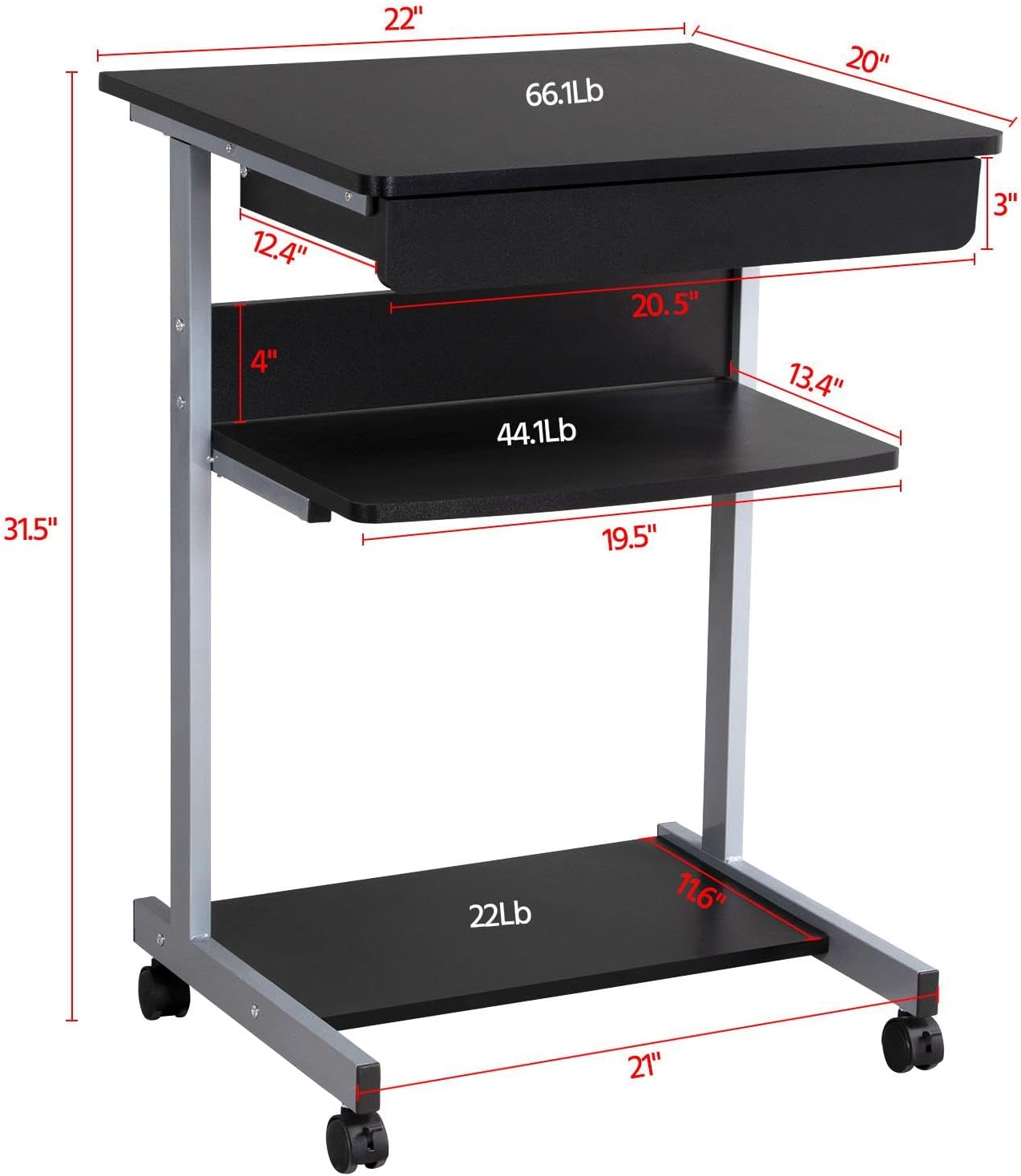
Image: Diagram showing the dimensions and weight capacities of the desk components.
Opstelling en samestelling
Assembly is designed to be straightforward. It is recommended to have a clear, spacious area for assembly. All necessary tools are included.
Monteerstappe:
- Attach the side frames: Secure the horizontal bars to the vertical support frames using the provided screws.
- Install casters: Screw the four rolling casters into the bottom of the desk frame. Ensure the two lockable casters are placed at the front for easy access.
- Mount the bottom shelf: Attach the bottom shelf to the lower section of the frame using the designated screws.
- Attach the middle shelf: Secure the middle shelf to the frame at the desired height.
- Install the keyboard tray slides: Attach the drawer slides to the desk frame. Ensure they are correctly oriented for smooth operation.
- Assemble the keyboard tray: Connect the sides and back of the keyboard tray, then slide the bottom panel into place. Attach the remaining drawer slides to the keyboard tray.
- Insert the keyboard tray: Carefully slide the assembled keyboard tray into the installed drawer slides on the desk frame.
- Attach the top desktop panel: Secure the main desktop panel to the top of the frame.
Video: Detailed installation instructions for the Yaheetech Mobile Computer Desk.

Beeld: Nabyskoot view highlighting the heavy MDF boards, thickened frame, smooth steel ball drawer, open middle shelf, open bottom shelf, and lockable casters.
Bedryfsinstruksies
Mobiliteit en stabiliteit:
- The desk is equipped with four rolling casters for easy movement.
- To secure the desk in place, engage the locks on the two front casters. Push the lever down to lock and up to unlock.
Gebruik van die sleutelbordbak:
- The keyboard tray slides smoothly on metal runners. Gently pull the tray outwards to extend it for use.
- Push the tray inwards until it is fully retracted when not in use to save space.
Bergrakke:
- The top surface is suitable for a laptop or monitor, with a maximum load of 30 kg (66.1 lb).
- The middle shelf can hold items up to 20 kg (44.1 lb), such as books or accessories. The back plate helps prevent items from falling.
- The bottom shelf is designed for a printer or other larger items, with a maximum load of 10 kg (22 lb).
Video: Demonstration of the small rolling computer desk cart for home office use, highlighting mobility and storage.

Image: The desk in use with a laptop, showing its compact design and functionality.
Onderhoud
To maintain the appearance and longevity of your Yaheetech Mobile Computer Desk:
- Skoonmaak: Vee die oppervlaktes af met adamp lap. Vermy harde chemikalieë of skuurmiddels.
- Inspeksie: Kontroleer gereeld alle skroewe en verbindings om te verseker dat hulle styf vas is. Draai weer vas indien nodig.
- toorkuns: Keep the casters free of debris to ensure smooth rolling.
Probleemoplossing
If you encounter any issues with your desk, please refer to the following common solutions:
- Die lessenaar is wankelrig: Ensure all screws are securely tightened. Check that the desk is on a flat, even surface. Engage the locks on the casters.
- Keyboard tray not sliding smoothly: Check the drawer slides for any obstructions or debris. Ensure the slides are properly aligned and lubricated if necessary.
- Ontbrekende dele: Indien enige onderdele met aankoms ontbreek, kontak asseblief kliëntediens onmiddellik.
Vir probleme wat nie hier gedek word nie, kontak asseblief Yaheetech-kliëntediens.
Spesifikasies
| Handelsmerk | Yaheetech |
| Modelnommer | YT-00009601 |
| Produk Afmetings (D x B x H) | 20"D x 22"B x 31.1"H (56 x 51 x 79 cm) |
| Item gewig | 24.3 pond |
| Kleur | Swart |
| Materiaal tipe | Engineered Wood (MDF), Metal (Iron) |
| Maximum Weight Recommendation (Top) | 30 Kilograms (66.1 lb) |
| Maximum Weight Recommendation (Drawer) | 2 Kilograms (4.4 lb) |
| Maximum Weight Recommendation (Middle Shelf) | 20 Kilograms (44.1 lb) |
| Maksimum Gewig Aanbeveling (Onderste Rak) | 10 Kilograms (22 lb) |
| Aantal laaie | 1 |
| Aantal rakke | 2 (Open Shelves) |
| Spesiale kenmerk | Compact, Mobile with Lockable Casters |
| Vereiste samestelling | Ja |
| Sluit alle monteergereedskap in | Ja |
Waarborg en Ondersteuning
For warranty information, please refer to the documentation included with your purchase or contact Yaheetech directly. Yaheetech aims to provide quality products and customer satisfaction.
If you require further assistance, have questions about assembly, or need to report missing/damaged parts, please contact Yaheetech customer support through their official webwebwerf of die kleinhandelaar waar die produk gekoop is.
Verwante Dokumente - YT-00009601
 |
IFANNY Computer Desk Assembly Guide and Care Instructions Comprehensive assembly guide for the IFANNY Computer Desk, including parts identification, hardware list, step-by-step assembly instructions, maximum load specifications, and essential care and maintenance tips for wooden furniture. |
 |
Computer Desk with Keyboard Tray - User Manual and Assembly Guide Comprehensive user manual for the Wrought Studio Computer Desk with Keyboard Tray, including assembly instructions, parts list, safety precautions, and multilingual support. Features a pull-out keyboard tray. |
 |
AODK Desk with Single-Side Shelf and Keyboard Tray - User Manual & Assembly Guide Detailed user manual and assembly guide for the AODK Desk with Single-Side Shelf and Keyboard Tray. Includes a comprehensive parts list, step-by-step assembly instructions, important safety precautions, and customer service information. |
 |
Home Office Computer Desk Assembly Instructions Step-by-step guide for assembling the Home Office Computer Desk with Monitor Stand and Keyboard Tray, featuring a keyboard tray and storage shelves. |
 |
Tribesigns Ariana L-Shaped Computer Desk Installation Guide Step-by-step installation instructions for the Tribesigns Ariana 55-inch L-shaped computer desk with monitor stand and storage shelf. Includes parts list and assembly diagrams. |
 |
Rekenaarlessenaar met rak - Monteringsinstruksies Gebruikershandleiding en monteerinstruksies vir die IFANNY Rekenaarlessenaar met Rak. Sluit onderdelelys, hardewarebesonderhede en stap-vir-stap-leiding vir die bou van die lessenaar in. |
Ask a question about this manual
Ask about setup, troubleshooting, compatibility, parts, safety, or missing instructions. Manuals+ will review the question and use this page’s manual context to help answer it.