
1. Inleiding
This manual provides essential instructions for the proper setup, operation, and maintenance of your YI YAS.1616.INT 4K Action Camera Kit. Please read this manual thoroughly before using the product to ensure optimal performance and safety. Keep this manual for future reference.
2. Produk verbyview
2.1 Kit Inhoud
The YI YAS.1616.INT 4K Action Camera Kit includes the following components:
- YI 4K Action Camera
- YI Monopod
- Bluetooth-afstandbeheer
- Herlaaibare battery
- USB kabel
- Instruksie Handleiding

Image 2.1: Contents of the YI 4K Action Camera Kit.
2.2 Kamerakenmerke
The YI 4K Action Camera is designed for high-quality video and photo capture, featuring:
- 4K/30fps Video Recording: Captures video at 60mbps, offering 4 times the quality of standard 1080p.
- Advanced Imaging Hardware: Equipped with an Amarelle A9SE75 chip, Sony IMX377 image sensor, and 7-layer optical glass lenses with an F2.8 large aperture for enhanced light intake.
- 2.19" LCD-aanraakskerm: A 640 x 360 high-resolution display with Gorilla Glass Retina for easy previewing, shooting, and scratch resistance.
- Lang batterylewe: A 1400mAh 4.4V lithium-ion battery provides up to 120 minutes of 4K/30fps video recording on a single charge.
- Doeltreffende verkoelingstelsel: Prevents overheating during extended recording sessions.
- Verbinding: Built-in Wi-Fi for smartphone app control and Bluetooth for remote control.
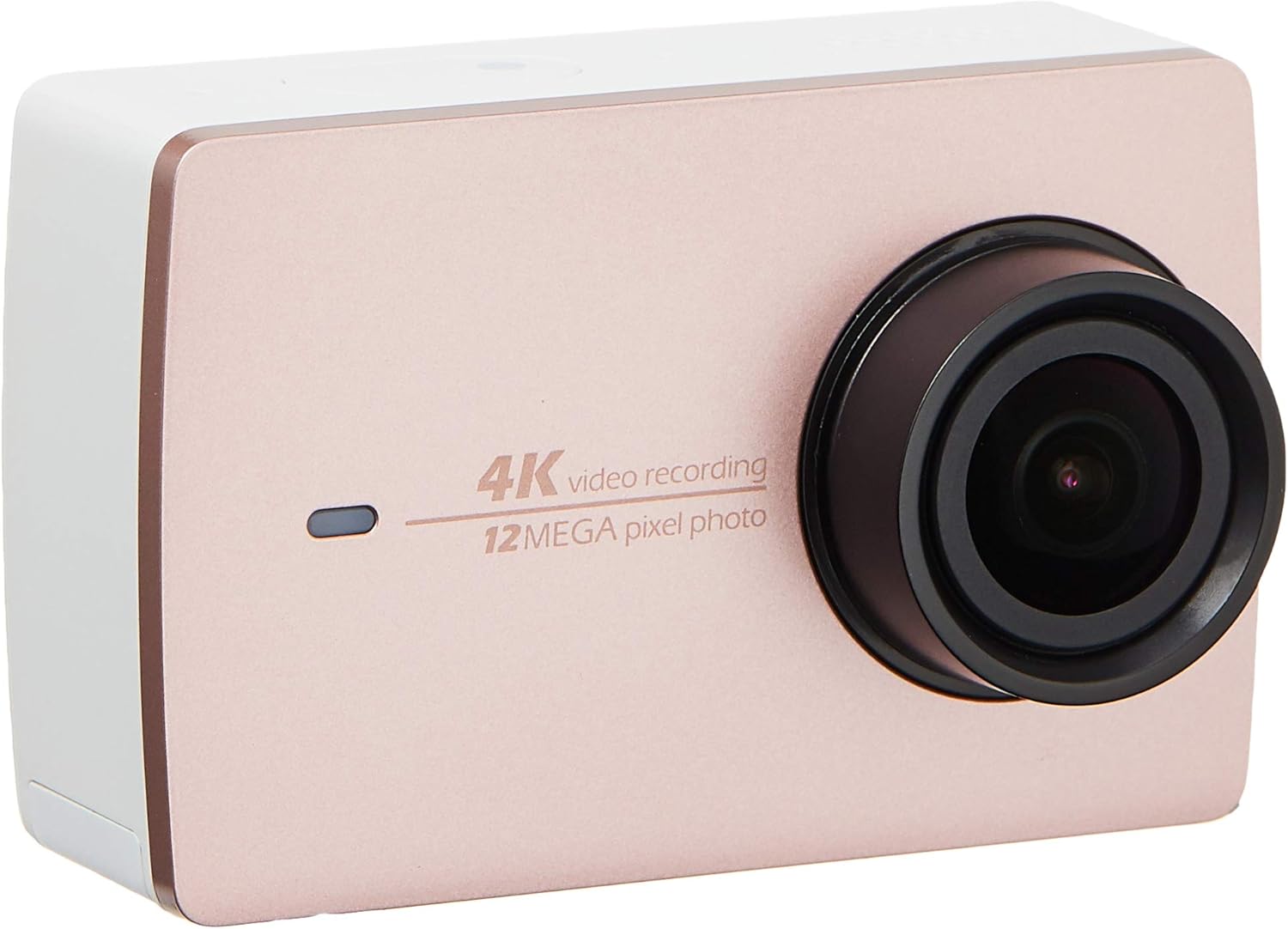
Beeld 2.2: Voorkant view of the YI 4K Action Camera.
3. Opstelling
3.1 Batteryinstallasie en -laai
- Vind die batterykompartement op die kamera.
- Insert the 1400mAh lithium-ion battery, ensuring correct polarity.
- Maak die batterykompartement stewig toe.
- Connect the camera to a power source using the provided USB cable for charging. The charging indicator will illuminate.
3.2 Geheuekaart installasie
The YI 4K Action Camera supports SDHC and SmartMedia flash memory types.
- Maak die geheuekaartgleufdeksel oop.
- Insert a compatible memory card (not included) into the slot with the contacts facing the correct direction. Push until it clicks into place.
- Maak die geheuekaartgleufdeksel toe.
3.3 Aan-/afskakel
- Om aan te skakel: Druk en hou die aan/af-knoppie in totdat die skerm verlig.
- Om af te skakel: Druk en hou die aan/af-knoppie in totdat die kamera afskakel.
3.4 Connecting the Bluetooth Remote
The included Bluetooth remote allows for convenient control of the camera.
- Maak seker dat die kamera aangeskakel is.
- Activate Bluetooth pairing mode on the camera via the settings menu.
- Follow the remote's instructions to enter pairing mode.
- Once paired, the remote can be used to switch between video and photo modes and trigger recording/capture.

Image 3.1: The YI Monopod, included in the kit.
4. Bedien die kamera
4.1 Aanraakskermnavigasie
The 2.19" LCD touchscreen provides intuitive control:
- Swiep: Navigate through different modes (Video, Photo, Time-lapse, etc.) and settings.
- Tik: Select options, adjust settings, or start/stop recording.
- Preview: View jou gevange footage and photos directly on the screen.
4.2 Video-opname
- Select the Video mode on the touchscreen.
- Adjust video resolution (e.g., 4K/30fps) and other settings as desired.
- Press the Shutter button or tap the record icon on the screen to start recording.
- Press the Shutter button or tap the record icon again to stop recording.
4.3 Foto-opname
- Select the Photo mode on the touchscreen.
- Adjust photo settings such as resolution, exposure, and white balance.
- Press the Shutter button or tap the capture icon on the screen to take a photo.
4.4 Wi-Fi Connectivity and App Usage
The camera's built-in Wi-Fi allows connection to a smartphone app for remote control, live preview, and content management.
- Download the official YI Action Camera app from your device's app store.
- Aktiveer Wi-Fi op die kamera via die instellingskieslys.
- Connect your smartphone to the camera's Wi-Fi network (SSID and password displayed on camera screen).
- Open the YI Action Camera app to control the camera, view footage, en oordrag files.
5. Onderhoud
5.1 Skoonmaak
- Use a soft, lint-free cloth to clean the camera body and touchscreen.
- Vir die lens, gebruik 'n gespesialiseerde lensskoonmaakdoek en -oplossing. Vermy skuurmiddels.
- Maak seker dat alle poorte vry van stof en puin is.
5.2 Berging
- Bêre die kamera op 'n koel, droë plek weg van direkte sonlig en uiterste temperature.
- Remove the battery if storing for extended periods to prevent leakage.
5.3 Firmware-opdaterings
Periodically check the official YI website or the YI Action Camera app for available firmware updates. Keeping your camera's firmware updated ensures optimal performance and access to new features.
6. Probleemoplossing
6.1 Algemene kwessies en oplossings
- Kamera skakel nie aan nie: Maak seker dat die battery volledig gelaai en korrek geplaas is.
- Opname stop onverwags: Check if the memory card has sufficient space or if it's a high-speed card suitable for 4K recording. Ensure the battery is not depleted.
- Raakskerm reageer nie: Try restarting the camera. If the issue persists, ensure the screen is clean and dry.
- Bluetooth remote not connecting: Ensure both the camera and remote are in pairing mode and within range. Check the remote's battery.
- Wi-Fi-verbindingskwessies: Verify the camera's Wi-Fi is enabled and your smartphone is connected to the correct network. Try restarting both devices.
For further assistance, refer to the official YI support resources.
7. Spesifikasies
| Vervaardiger | YI |
| Modelnommer | 90010 |
| Produk afmetings | 6.6 x 3 x 4.3 cm |
| Gewig | 96.39 g |
| Fotosensortegnologie | CMOS |
| Video-opname-resolusie | 4K |
| Maksimum brandpuntsafstand | 1 |
| Maksimum diafragma | 2.8 millimeter |
| Tipe flitsgeheue | SDHC, SmartMedia |
| Video-opname-formaat | MP4 |
| Ondersteunde oudioformaat | AAC, MP3 |
| Skerm grootte | 2.19 duim |
| Verbindingstegnologie | Wi-Fi |

Image 7.1: YI 4K Action Camera with monopod, illustrating approximate dimensions.
8. Waarborg en Ondersteuning
8.1 Waarborginligting
Hierdie produk kom met 'n 1 Jaar Plaaslike (Singapoer) WaarborgBewaar asseblief u aankoopbewys vir waarborgeise. Die waarborg dek vervaardigingsdefekte onder normale gebruiksomstandighede.
8.2 Kliëntediens
For technical support, service, or warranty inquiries, please visit the official YI Technology website or contact their authorized service centers in Singapore. Contact information can typically be found on the product packaging or the official webwebwerf.