
Bios BBYCA10300783
BIOS Weather Indoor/Outdoor Wireless Thermometer & Hygrometer
Model: 312BC (BBYCA10300783)
Brand: Bios
Inleiding
This manual provides detailed instructions for the setup, operation, and maintenance of your BIOS Weather Indoor/Outdoor Wireless Thermometer & Hygrometer. Please read this manual thoroughly before using the device to ensure proper function and longevity.
The BIOS Weather Indoor/Outdoor Wireless Thermometer & Hygrometer is designed to provide accurate readings of indoor temperature and humidity, as well as outdoor temperature. It features wireless connectivity for the outdoor sensor, a moon phase display, and the capability to connect with up to three sensors (additional sensors sold separately).
- Wireless range up to 30 meters (100 feet) from the outdoor sensor.
- Indoor monitor includes a hygrometer sensor for RH percentage readings (20% to 95%).
- Displays temperature from up to 3 sensors (Model No. 312TX, sold separately).
- Tracks relative indoor humidity and moon phase.
Pakketinhoud
Nadat u die verpakking oopgemaak het, maak asseblief seker dat alle komponente teenwoordig en in 'n goeie toestand is:
- 1 x Main Display Unit (Indoor Monitor)
- 1 x Draadlose buitesensor
- 1 x Instruksiehandleiding (hierdie dokument)

Image: The main display unit (left) and the wireless outdoor sensor (right). The main unit shows indoor temperature, humidity, moon phase, time, and outdoor temperature. The outdoor sensor displays its current temperature.
Opstelgids
1. Battery Installasie
Both the main display unit and the wireless outdoor sensor require batteries (not included).
- Open the battery compartment on the back of both the main display unit and the outdoor sensor.
- Insert the required batteries (e.g., AA or AAA, refer to the battery compartment markings for correct type and polarity).
- Maak die batterykompartemente veilig toe.
Let wel:
- It is recommended to insert batteries into the outdoor sensor first, then the main display unit, to facilitate immediate pairing.
- Use high-quality alkaline batteries for optimal performance, especially in cold weather for the outdoor sensor.
2. Sensorplasing
Proper placement of both units is crucial for accurate readings and reliable wireless communication.
- Hoofvertooneenheid: Place indoors, away from direct sunlight, heat sources, or drafts that could affect temperature and humidity readings. Ensure it is within 30 meters (100 feet) of the outdoor sensor.
- Draadlose buitensensor:
- Mount in a shaded area to avoid direct sunlight, which can cause artificially high temperature readings.
- Protect from direct rain and snow. An overhang or a weather-resistant enclosure is ideal.
- Avoid placing near large metal objects, electrical appliances, or thick walls that could interfere with the wireless signal.
- Ensure it is within the 30-meter (100-foot) wireless range of the main unit.
3. Aanvanklike paring
The main display unit and outdoor sensor should automatically pair upon battery installation. If pairing does not occur:
- Maak seker dat beide eenhede vars batterye het.
- Bring the outdoor sensor closer to the main display unit.
- Press the "CH" (Channel) button on the main display unit to cycle through channels or initiate a search for the sensor.
- If issues persist, remove batteries from both units, wait a few minutes, and reinsert them, starting with the outdoor sensor.
Bedryfsinstruksies
1. Vertoon oorview
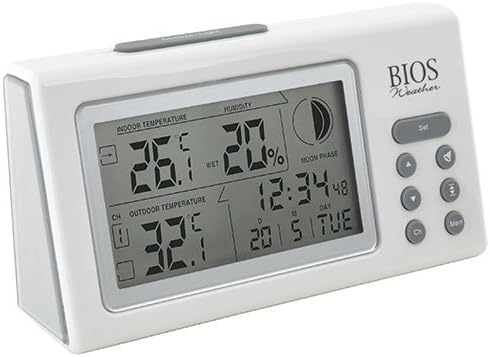
Beeld: Hoekig view of the main display unit, highlighting the various segments for indoor temperature, humidity, moon phase, time, and outdoor temperature.
The main display unit provides the following information:
- Binnentemperatuur: Wys die huidige temperatuur binne die kamer waar die hoofeenheid geleë is.
- Humiditeit: Shows the relative indoor humidity percentage.
- Buitetemperatuur: Displays the temperature from the connected wireless outdoor sensor.
- Tyd en Datum: Huidige tyd en datum.
- Maanfase: An icon indicating the current moon phase.
- Kanaalaanwyser: Shows which outdoor sensor channel is currently displayed (if multiple sensors are used).
2. Knoppie Funksies
The main display unit features several buttons for configuration and viewing data:
| Knoppie | Funksie |
|---|---|
| STEL | Enters setup mode for time, date, and other settings. Press to confirm settings. |
| ▲ / ▼ (Up/Down) | Adjusts values during setup. Cycles through channels for outdoor sensors. |
| CH (Kanaal) | Switches between outdoor sensor channels (1, 2, 3) or initiates a search for sensors. |
| MEM (Geheue) | Displays maximum and minimum temperature/humidity readings. Press again to clear. |
3. Stel tyd en datum in
- Druk en hou die STEL knoppie totdat die tydvertoning flikker.
- Gebruik die ▲ or ▼ knoppies om die uur aan te pas.
- Druk STEL to confirm and move to the next setting (minutes, year, month, day).
- Herhaal stappe 2 en 3 totdat alle instellings gekonfigureer is.
- Druk STEL one last time to exit setup mode.
4. Viewing Max/Min Readings
Druk die MEM knoppie om view the maximum recorded indoor temperature, humidity, and outdoor temperature. Press MEM weer aan view the minimum readings. To clear the memory, press and hold the MEM button while the max/min readings are displayed.
Onderhoud
1. Skoonmaak
To clean the display unit and outdoor sensor, use a soft, damp cloth. Do not use abrasive cleaners, solvents, or harsh chemicals, as these may damage the plastic casing of elektroniese komponente.
2. Battery vervanging
When the battery indicator appears on the display, it is time to replace the batteries in the respective unit (main unit or outdoor sensor). Always replace all batteries in a unit at the same time with new, high-quality batteries of the correct type.
Belangrik:
- Gooi ou batterye verantwoordelik volgens plaaslike regulasies weg.
- Indien die eenheid nie vir 'n lang tydperk gebruik gaan word nie, verwyder die batterye om lekkasie en skade te voorkom.
Probleemoplossing
If you experience issues with your BIOS Weather Thermometer & Hygrometer, please refer to the following common problems and solutions:
| Probleem | Moontlike oorsaak/oplossing |
|---|---|
| Geen buitetemperatuurlesing of "---" word vertoon nie. |
|
| Onakkurate temperatuur-/humiditeitslesings. |
|
| Die skerm is dof of leeg. |
|
| Tyd/Datum is verkeerd. |
|
Produkspesifikasies

Image: The main display unit with indicated dimensions: 21.59 cm (length), 7.62 cm (width), and 19.05 cm (height).
| Kenmerk | Detail |
|---|---|
| Modelnommer | BBYCA10300783 (312BC) |
| Tik | Indoor/Outdoor Thermometer and Hygrometer |
| Materiaal | Plastiek |
| Kleur | Wit |
| Afmetings (hoofeenheid) | Hoogte: 19.05 cm, Breedte: 7.62 cm, Diepte: 21.59 cm |
| Gewig | 0.30 kg |
| Wireless Range | Tot 30 meter (100 voet) |
| Binnehuise humiditeitsreeks | 20% tot 95% RH |
| Sensor Capability | Supports up to 3 outdoor sensors (additional sensors Model No. 312TX, sold separately) |
| Spesiale kenmerke | Wireless connectivity, Multi-Sensor support, Humidity Tracking, Moon Phase Display |
| Kragbron | Battery aangedrewe |
Waarborg inligting
This BIOS Weather product comes with a 1-jaar waarborg op onderdele from the date of purchase. This warranty covers defects in materials and workmanship under normal use. It does not cover damage resulting from misuse, accident, unauthorized modification, or improper installation.
Behou asseblief jou aankoopbewys vir waarborgeise.
Kliënte ondersteuning
If you have any questions, require technical assistance, or need to make a warranty claim, please contact Bios customer support. For more information and resources, you may also visit the official Bios store on Amazon:
Visit the Bios Store on Amazon
Please have your product model number (BBYCA10300783) and purchase date ready when contacting support.