
1. Belangrike veiligheidsinstruksies
Please read all instructions carefully before operating this product. Retain these instructions for future reference.
- Kragbron: Connect the unit only to an AC 120V, 60 Hz power supply.
- Ventilasie: Ensure adequate ventilation. Do not block ventilation openings. Maintain a minimum distance of 20 cm (8 inches) from the rear and sides of the unit for proper airflow.
- Water en vog: Moenie hierdie toestel aan reën of vog blootstel nie. Moenie voorwerpe gevul met vloeistowwe, soos vase, op die apparaat plaas nie.
- Skoonmaak: Unplug the unit from the wall outlet before cleaning. Use a dry cloth only. Do not use liquid cleaners or aerosol cleaners.
- Hitte: Moenie naby enige hittebronne soos verkoelers, hitteregisters, stowe of ander toerusting (insluitend ampversterkers) wat hitte produseer.
- Diens: Moenie probeer om hierdie produk self te onderhou nie. Verwys alle diens na gekwalifiseerde dienspersoneel.
- kabels: Beskerm kragkabels teen trap of knyp, veral by proppe, gerieflikheidsaansluitings en die punt waar hulle uit die apparaat kom.
2. Wat is in die boks
Verifieer dat al die items wat hieronder gelys word, in jou pakket ingesluit is:
- Ontvanger
- Speakers (Front x2, Center x1, Surround x2, Subwoofer x1)
- Afstand beheerder
- AAA (R03) batterye x 2
- Binnenshuise FM-antenne
- AM lus antenna
- Luidspreker opstelling mikrofoon
- Color-coded speaker cables
- Instruksiehandleiding (hierdie dokument)
3. Produk verbyview
The Onkyo HT-S7800 is a 5.1.2 channel Dolby Atmos home theater package designed to deliver immersive audio and high-quality video. It features a powerful AV receiver with advanced connectivity and streaming capabilities, paired with a comprehensive speaker system.
Sleutel kenmerke
- Powered Zone 2 and Zone 2 line out for distributed analog/digital audio playback.
- 8 HDMI inputs (1 front/7 rear) and 2 outputs supporting 4K/60 Hz, 3D, ARC, Deep Color, x.V.Color, lip-sync, Dolby Atmos, Dolby TrueHD, DTS:X, DTS-HD Master Audio, DVD-Audio, multichannel PCM, and CEC.
- Chromecast built-in, AirPlay, Wi-Fi, and Bluetooth for app-based audio streaming (requires firmware update).
- Access to streaming services like TuneIn Radio, Pandora, Spotify, TIDAL, and Deezer.
- AccuEQ with AccuReflex room calibration for optimized sound.
Stelselkomponente
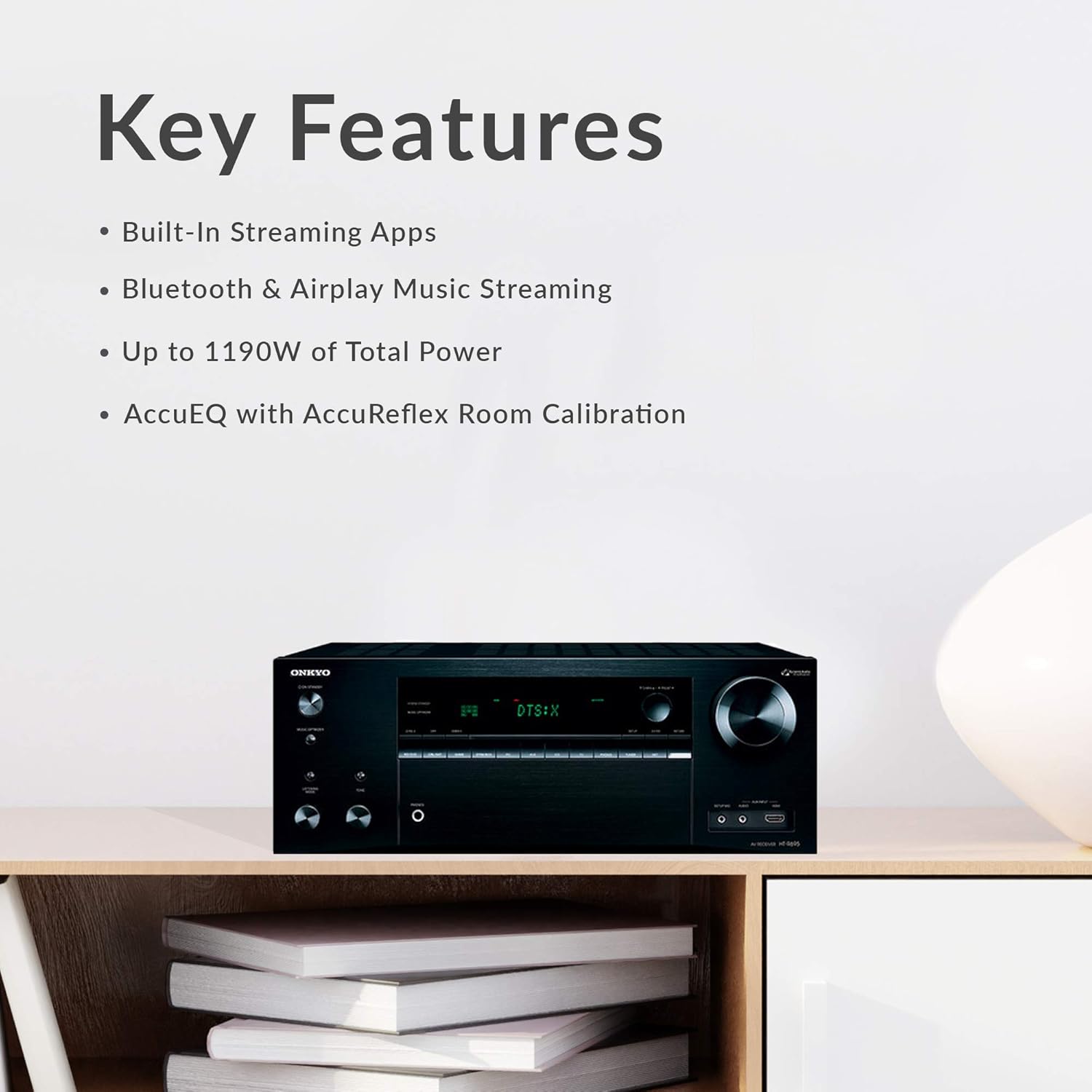
- AV Receiver: Central unit for audio/video processing and amplifikasie.
- Front Speakers (x2): Full-range, acoustic-suspension speakers with integrated Dolby Atmos-enabled modules.
- Center Speaker (x1): Designed for clear dialogue reproduction.
- Surround Speakers (x2): For immersive surround sound effects.
- Powered Subwoofer (x1): 10-inch subwoofer for deep bass frequencies.

4. Opstelling
4.1 Uitpak
Carefully remove all components from their packaging. Keep the packaging materials for future transport or storage.
4.2 Luidsprekerplasing
Optimal speaker placement is crucial for the best audio experience, especially with Dolby Atmos. For a 5.1.2 setup:
- Voorluidsprekers: Place them equidistant from your main listening position, forming an equilateral triangle.
- Sentrumspreker: Position directly above or below your TV, centered with the screen.
- Omringende luidsprekers: Place to the sides or slightly behind the main listening position, at ear level.
- subwoofer: Experiment with placement, typically in a corner or along a wall, to find the best bass response for your room.
- Dolby Atmos-enabled Speakers: The front speakers in this package include upward-firing drivers. Ensure they have a clear path to the ceiling for sound reflection.
4.3 Koppel luidsprekers
Use the provided color-coded speaker cables to connect the speakers to the receiver. Match the colors on the cables to the corresponding terminals on both the speakers and the receiver. Ensure positive (+) terminals connect to positive and negative (-) to negative.

For a more secure connection, consider using banana plugs for the speaker wires, especially at the receiver terminals.
4.4 Connecting Source Devices
Connect your source devices (e.g., Blu-ray player, game console, cable box) to the HDMI IN ports on the receiver. Connect the HDMI OUT (MAIN) port on the receiver to your TV's HDMI input. Ensure you use HDMI 2.0 compliant cables for 4K/60 Hz and HDR content.
4.5 Kragverbinding
Once all audio and video connections are made, connect the receiver's power cord to a wall outlet. Insert the batteries into the remote control.
4.6 Initial Setup & AccuEQ Calibration
After powering on the receiver and TV, follow the on-screen setup guide. Use the included speaker setup microphone and the AccuEQ room calibration system to automatically optimize the sound settings for your specific room acoustics and speaker placement. This process measures speaker distances, levels, and crossover frequencies.
5. Bedryfsinstruksies
5.1 Basiese werking
- Krag aan/af: Press the POWER button on the receiver or remote control.
- Volumebeheer: Use the VOLUME knob on the receiver or the VOL +/- buttons on the remote control to adjust the sound level.
5.2 Invoerkeuse
Use the input selector buttons on the receiver's front panel or the remote control (e.g., BD/DVD, CBL/SAT, GAME, STRMBOX, CD, TV, TUNER, NET) to switch between connected source devices.

5.3 Oudiomodusse
The receiver supports various audio formats, including Dolby Atmos and DTS:X. The system will automatically detect and process the appropriate audio format from your source. You can also manually select listening modes via the remote control.
5.4 Netwerkkenmerke
Connect the receiver to your home network via Wi-Fi or Ethernet to access network features. A firmware update may be required to enable all streaming functionalities.
- Chromecast ingeboude: Stream audio from compatible apps on your smartphone or tablet.
- AirPlay: Stream music from Apple devices.
- Bluetooth: Pair your Bluetooth-enabled devices to stream audio wirelessly.
- Stroomdienste: Access integrated services like Pandora, Spotify, TIDAL, and Deezer.
5.5 afstandbeheer
The included remote control provides full command over the receiver's functions.

Familiarize yourself with the layout for easy navigation and control of your home theater system.
6. Onderhoud
Skoonmaak
To maintain the appearance and performance of your system:
- Wipe the receiver and speakers with a soft, dry cloth.
- Do not use abrasive cloths, waxes, or chemical cleaning agents.
- Avoid spraying liquids directly onto the components.
Firmware-opdaterings
Periodically check the Onkyo website for available firmware updates. Updates can improve performance, add new features, or resolve issues. Follow the instructions provided with the firmware update carefully.
7. Probleemoplossing
If you encounter issues with your Onkyo HT-S7800 system, refer to the following common solutions:
- Geen krag: Ensure the power cord is securely plugged into both the receiver and a working wall outlet. Check the power switch on the receiver.
- Geen klank: Verify that the correct input source is selected. Check all speaker connections, ensuring they are secure and correctly wired (positive to positive, negative to negative). Confirm the volume is not muted or set too low. Run AccuEQ calibration again.
- Geen foto: Ensure HDMI cables are securely connected between the source device, receiver, and TV. Confirm the correct HDMI input is selected on both the receiver and the TV. Try bypassing the receiver and connecting the source directly to the TV to isolate the issue.
- Subwoofer Not Working: Check the subwoofer's power connection and ensure it is turned on. Verify the subwoofer cable is securely connected to the receiver's SUBWOOFER PRE OUT. Adjust subwoofer settings in the receiver's menu. Note that the subwoofer may only activate when bass signals are present.
- Netwerkverbindingsprobleme: Ensure your Wi-Fi router is on and functioning. Re-enter Wi-Fi credentials if necessary. Try connecting via an Ethernet cable if Wi-Fi is unstable. Perform a firmware update if available.
- Afstandbeheer werk nie: Check and replace the batteries. Ensure there are no obstructions between the remote and the receiver's IR sensor.
If the problem persists, consult the detailed troubleshooting section in the full user manual or contact Onkyo customer support.
8. Spesifikasies
| Kenmerk | Spesifikasie |
|---|---|
| Model Naam | HT-S7800 |
| Surround Sound Channel-konfigurasie | 5.1.2 |
| Invoer Voltage | 120 Volt (AC) |
| Kragverbruik | 580 W |
| Luidspreker Maksimum uitsetkrag | 200 Watt |
| Frekwensierespons | 10 Hz–100 kHz/+1 dB, -3 dB (Direct/Pure Audio) |
| Verbindingstegnologie | Bluetooth, HDMI, Wi-Fi |
| Draadlose kommunikasietegnologie | Bluetooth, WiFi |
| Bluetooth-reeks | 10 meter |
| Produk Dimensies (Ontvanger) | 20"D x 30"W x 33"H (Overall System) |
| Item gewig | 81.6 Pounds (Overall System) |
| Woofer deursnee | 12 Inches (Subwoofer) |
| Ingesluit komponente | Receiver, Speakers, Remote, Batteries, Antennas, Microphone, Cables, Manual |
| Kleur | Swart |
9. Waarborg en Ondersteuning
Waarborg inligting
This Onkyo product comes with a Limited Warranty. Please refer to the warranty card included in your package or visit the official Onkyo webwebwerf vir gedetailleerde bepalings en voorwaardes rakende dekking, duur en diensprosedures.
Kliënte ondersteuning
For technical assistance, product inquiries, or service requests, please contact Onkyo customer support through their official website or the contact information provided in your product documentation. Have your model number (HT-S7800) and purchase date ready when contacting support.