
Inleiding
This manual provides detailed instructions for the setup, operation, maintenance, and troubleshooting of your EZCAP284 HD 1080P Capture HDMI YPbPr Recorder. Please read this manual thoroughly before using the device to ensure proper functionality and to prevent damage.
Veiligheidsinligting
- Moenie die toestel aan vog, reën of uiterste temperature blootstel nie.
- Vermy om die toestel te laat val of aan sterk impakte te onderwerp.
- Gebruik slegs die gespesifiseerde kragadapter.
- Moenie probeer om die toestel uitmekaar te haal of te wysig nie. Dit sal die waarborg ongeldig maak.
- Hou die toestel weg van kinders.
Pakketinhoud
Verifieer dat alle items in jou pakket teenwoordig is:
- EZCAP284 HD 1080P Capture Device
- Afstandbeheer
- Kragadapter (nie eksplisiet gelys nie, maar geïmpliseer vir werking)
- Gebruikershandleiding (hierdie dokument)
Produk verbyview
The EZCAP284 is a standalone HD video capture device designed for recording gameplay and other HDMI/YPbPr sources directly to a USB storage device without the need for a PC. It features HDMI pass-through for real-time viewing.

Figuur 1: Bo view of the EZCAP284 device, featuring a prominent record button.

Figuur 2: Gedetailleerd view of the input and output ports on the EZCAP284.
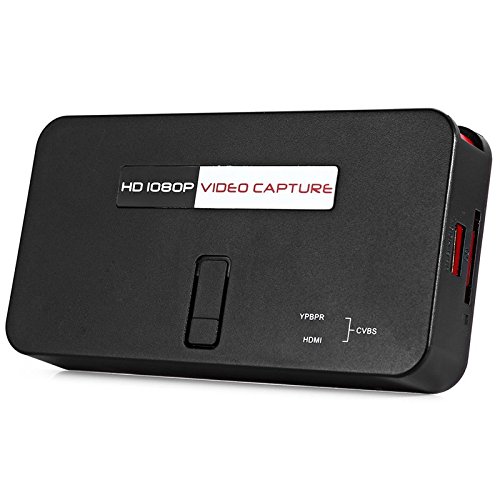
Figuur 3: Onder view of the EZCAP284 device, indicating model and certification information.
Opstelling
- Koppel videobron: Connect your game console (e.g., PS3) or other video source to the HDMI-IN or YPbPr IN port on the EZCAP284 using the appropriate cables.
- Verbind skerm: Connect your TV or monitor to the HDMI UIT port on the EZCAP284. This allows you to view your gameplay in real-time while recording.
- Connect USB Storage: Insert a USB flash drive or external hard drive (formatted as FAT32 or NTFS) into the USB 2.0 port on the EZCAP284. This is where your recordings will be saved.
- Koppel krag: Connect the power adapter to the DC IN port on the EZCAP284 and then plug it into a power outlet. The device will power on.
- Optional Audio Input: If you wish to record live commentary, connect a microphone to the 3.5 mm oudio-ingang hawe.
Bedryfsinstruksies
Recording Gameplay
- Ensure all connections are secure as described in the Setup section.
- Turn on your video source (e.g., game console) and your display.
- Druk die REC button on the EZCAP284 device or the remote control to start recording. The indicator light will change to show recording is in progress.
- Druk die REC button again to stop recording. The indicator light will revert to its standby state.
- Your recorded video file will be saved to the connected USB storage device.
Adding Live Commentary
To record your voice along with the gameplay:
- Koppel 'n mikrofoon aan die 3.5 mm oudio-ingang port before starting your recording.
- The device will automatically mix the microphone audio with the video source audio during recording.
Afspeel
Om view your recorded videos, safely remove the USB storage device from the EZCAP284 and connect it to a computer or a media player that supports the recorded video format.
Onderhoud
- Skoonmaak: Gebruik 'n sagte, droë lap om die buitekant van die toestel skoon te maak. Moenie vloeibare skoonmaakmiddels of oplosmiddels gebruik nie.
- Berging: Bêre die toestel op 'n koel, droë plek weg van direkte sonlig en uiterste temperature wanneer dit nie gebruik word nie.
- Firmware: Gaan die vervaardiger na webbesoek die webwerf gereeld vir enige firmware-opdaterings wat werkverrigting kan verbeter of funksies kan byvoeg.
Probleemoplossing
| Probleem | Moontlike oorsaak | Oplossing |
|---|---|---|
| Geen video-uitvoer op skerm nie. | Incorrect cable connection; input source not active; display input not selected. | Check HDMI/YPbPr connections. Ensure video source is on. Select correct input on your TV/monitor. |
| Recording fails or stops unexpectedly. | USB storage full; USB drive not compatible; power interruption. | Ensure USB drive has sufficient space. Try a different USB drive (FAT32/NTFS). Check power connection. |
| No audio in recording. | Audio cables not connected; source audio muted; microphone not connected or faulty. | Verify audio connections from source. Ensure source audio is not muted. Check microphone connection and functionality. |
| Afstandbeheer werk nie. | Batteries low or inserted incorrectly; IR sensor blocked. | Replace batteries. Ensure line of sight to the device's IR sensor. |
Spesifikasies
| Kenmerk | Beskrywing |
|---|---|
| Model | EZCAP284 |
| Tik | Adapter / Video Capture Device |
| Materiaal | Koper (interne komponente) |
| Koppelvlakke | 3.5mm Audio In, HDMI In, HDMI Out, YPbPr In, USB 2.0 |
| Video-opname-resolusie | Tot 1080p |
| Platformversoenbaarheid | PlayStation (and other HDMI/YPbPr sources) |
| Ingesluit komponente | Afstandbeheer |
| Kleur | Swart |
| Afmetings (L x B x H) | 14.00 x 7.40 x 2.00 cm (ongeveer) |
| Gewig | 0.463 kg (benaderde pakketgewig) |
Waarborg en Ondersteuning
For warranty information and technical support, please refer to the documentation provided with your purchase or contact the seller/manufacturer directly. Keep your proof of purchase for warranty claims.