
1. Inleiding
Thank you for choosing the Sunding SD-576A Bicycle Computer. This device is designed to provide comprehensive cycling data, enhancing your riding experience with its 28 functions, large LCD screen, touch button interface, and rainproof design. Please read this manual carefully before installation and use to ensure optimal performance and longevity of your device.

Image 1.1: The Sunding SD-576A Bicycle Computer display showing various metrics.
2. Pakketinhoud
Verifieer dat al die items wat hieronder gelys word, in jou pakket ingesluit is:
- Sunding SD-576A Bicycle Computer Unit
- Mounting Base with Wired Sensor
- Wiel magneet
- Cable Ties (for installation)
- CR2032 Batteries (pre-installed or included separately)
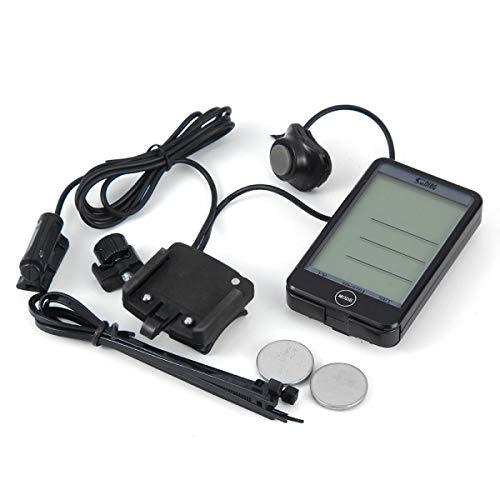
Image 2.1: All components included with the Sunding SD-576A Bicycle Computer.
3. Opstelling en installering
3.1. Battery Installasie
The unit typically comes with batteries pre-installed. If not, or if replacement is needed:
- Open the battery compartment cover on the back of the computer unit.
- Plaas die CR2032-battery in met die positiewe (+) kant na bo.
- Maak die batterykompartement se deksel stewig toe.
3.2. Mounting the Computer and Sensor
- Attach the mounting base to your bicycle handlebar or stem using the provided cable ties. Ensure it is secure and the display is easily visible.
- Insert the bicycle computer unit into the mounting base until it clicks into place.
- Mount the wired speed sensor to the front fork of your bicycle using cable ties. Position it so that the sensor head is aligned with the wheel magnet.
- Attach the wheel magnet to a spoke on your front wheel.
- Adjust the position of the sensor and magnet so that the gap between them is less than 2mm when the wheel rotates. This is crucial for accurate speed readings.
- Route the sensor wire along the brake cable or fork, securing it with cable ties to prevent interference with moving parts.
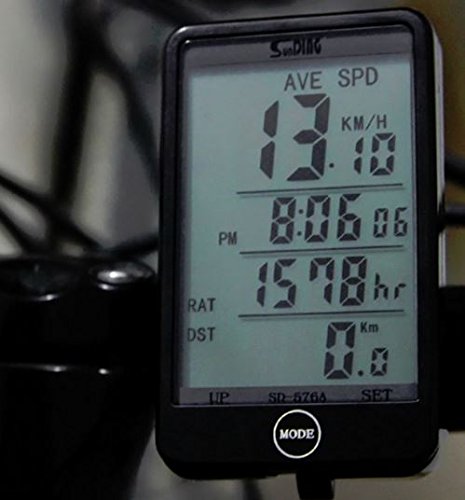
Image 3.1: The Sunding SD-576A Bicycle Computer mounted on a bicycle handlebar.
3.3. Initial Settings (Wheel Circumference)
Accurate speed and distance readings depend on correct wheel circumference settings.
- In the initial setup or settings mode, press the MODUS button to navigate to the wheel circumference setting.
- Gebruik die STEL button to adjust the digits.
- Refer to the table below for common wheel circumferences. If your wheel size is not listed, measure it manually (in mm).
- Druk MODUS again to confirm and move to the next setting (e.g., ODO initial value, clock).
| Wiel Grootte | Omtrek (mm) |
|---|---|
| 16 duim | 1261 |
| 18 duim | 1416 |
| 20 duim | 1596 |
| 24 duim | 1907 |
| 26 duim | 2073 |
| 27 duim | 2155 |
| 27.5 duim | 2180 |
| 29 duim | 2326 |
| 700C | 2136 |
4. Operasie
The Sunding SD-576A features a touch button interface and a remote button for mode changes. The main display shows various functions, which can be cycled through using the MODUS knoppie.
4.1. Funksies Oorview
- SPD: Current Speed
- GEHOOR: Odometer (Total Distance)
- DST: Trip Distance
- MXS: Maximum Speed
- AVS: Average Speed
- TTM: Total Trip Time
- TM: Trip Time
- RAT: Riding All Time
- CLK: Clock (12H/24H)
- SW: Stopwatch
- Temperatuur: Current Ambient Temperature
- TM UP/DN: Trip Time Up/Down
- Trip UP/DN: Trip Distance Up/Down
- Vergelyker: Speed comparison indicator
- Onderhoudswaarskuwing: Reminder for bicycle maintenance
- Care Reminder: General care reminder
- Over-Speed Reminder: Alerts when exceeding a set speed
- Lae battery aanwyser: Notifies when battery is low
- Vries raamgeheue: Records data at a specific point
- Smart Backlight: Automatic backlight activation
4.2. Mode and Set Buttons
The device features a touch-sensitive area at the bottom, functioning as the MODUS button, and a separate STEL button. A remote button may also be available for convenient mode switching.
- MODE-knoppie: Press to cycle through different display functions. Hold to enter settings mode for the current function.
- SET-knoppie: Used to adjust values when in settings mode.
- Afstandknoppie: If included, press to cycle through display modes without touching the main unit.
4.3. Agterligfunksie
The SD-576A features a smart backlight that can be set to auto on/off. It provides clear visibility in low-light conditions.

Image 4.1: Comparison of the Sunding SD-576A display in Day Mode (without backlight) and Night Mode (with green backlight activated).
5. Onderhoud
To ensure the longevity and accuracy of your Sunding SD-576A Bicycle Computer, follow these maintenance guidelines:
- Skoonmaak: Wipe the unit with a soft, damp lap. Moenie skuur skoonmaakmiddels of oplosmiddels gebruik nie.
- Rainproof Design: The unit is rainproof, but avoid submerging it in water or exposing it to high-pressure water jets.
- Battery vervanging: When the low battery indicator appears, replace the CR2032 battery promptly to avoid data loss.
- Sensor/Magnet Alignment: Periodically check the alignment and gap (less than 2mm) between the sensor and magnet for consistent readings.
- Berging: If storing the bicycle for an extended period, remove the computer unit from its mount to conserve battery life.
6. Probleemoplossing
If you encounter issues with your bicycle computer, refer to the following common problems and solutions:
- No Speed Reading / Inaccurate Readings:
- Check the distance between the sensor and the wheel magnet. It must be less than 2mm.
- Ensure the sensor and magnet are correctly aligned.
- Verify the sensor wire is securely connected to the mounting base.
- Gaan die batteryvlak na.
- Display Not Working / Faint Display:
- Vervang die battery.
- Ensure the unit is properly seated in the mounting base.
- Incorrect Odometer (ODO) or Trip Distance (DST):
- Verify that the wheel circumference setting is correct.
- Ensure the sensor and magnet are functioning correctly.
- Knoppies reageer nie:
- Ensure the unit is clean and free from debris around the touch button area.
- Try removing and reinserting the battery to reset the device.
7. Spesifikasies
| Kenmerk | Detail |
|---|---|
| Handelsmerk | Sunding |
| Model | SD-576A |
| Funksies | 28 Funksies |
| Tipe vertoon | LCD met agterlig |
| Konnektiwiteit | Bedraad |
| Soort sensor | Speed Sensor, Odometer |
| Menslike koppelvlak-invoer | Touch Button, Remote Button |
| Kragbron | Battery aangedrewe |
| Battery Tipe | CR2032 Lithium Metal |
| Materiaal tipe | Akrielnitril Butadieen Styreen (ABS) |
| Item gewig | 100 gram |
| Montage tipe | Stuurstang |
| Spesiale kenmerke | Rainproof, Smart Backlight, Touch Screen |
8. Waarborg en Ondersteuning
Sunding products are manufactured to high-quality standards. For warranty information or technical support, please refer to the documentation provided with your purchase or contact your retailer. Keep your proof of purchase for any warranty claims.