
Inleiding
This manual provides essential instructions for the safe and efficient operation, maintenance, and troubleshooting of your NuWave 30602 Double Precision Induction Cooktop Burner. Please read this manual thoroughly before first use and retain it for future reference.
Belangrike veiligheidsinligting
Always follow basic safety precautions when using electrical appliances to reduce the risk of fire, electric shock, and injury. This appliance is for household use only.
- Moenie aan warm oppervlaktes raak nie. Gebruik handvatsels of knoppe.
- Om teen elektriese skok te beskerm, moenie die koord, proppe of die toestel in water of ander vloeistof dompel nie.
- Noukeurige toesig is nodig wanneer enige toestel deur of naby kinders gebruik word.
- Trek uit die stopcontact wanneer dit nie gebruik word nie en voor skoonmaak. Laat afkoel voor jy dele aan- of afhaal.
- Moenie enige toestel gebruik met 'n beskadigde koord of prop, of nadat die toestel wanfunksioneer of op enige manier beskadig is nie.
- Die gebruik van bykomstighede wat nie deur die toestelvervaardiger aanbeveel word nie, kan beserings veroorsaak.
- Moenie buite gebruik nie.
- Moenie dat koord oor die rand van tafel of toonbank hang, of aan warm oppervlaktes raak nie.
- Moenie op of naby 'n warm gas- of elektriese brander, of in 'n verhitte oond plaas nie.
- Uiterste versigtigheid moet gebruik word wanneer 'n toestel wat warm olie of ander warm vloeistowwe bevat, verskuif word.
- Koppel altyd eers die prop aan die toestel, en steek dan die koord in die muursok. Om te ontkoppel, draai enige beheer na "af" en verwyder dan die prop uit die muursok.
- Moenie die toestel vir ander as die bedoeling gebruik nie.
- Individuals with pacemakers or similar medical devices should consult their physician before using an induction cooktop.
- Use only induction-compatible cookware (magnetic bottom).
Produk verbyview
The NuWave 30602 is a double precision induction cooktop designed for efficient and precise cooking. It features two independent cooking zones, each with its own control panel.
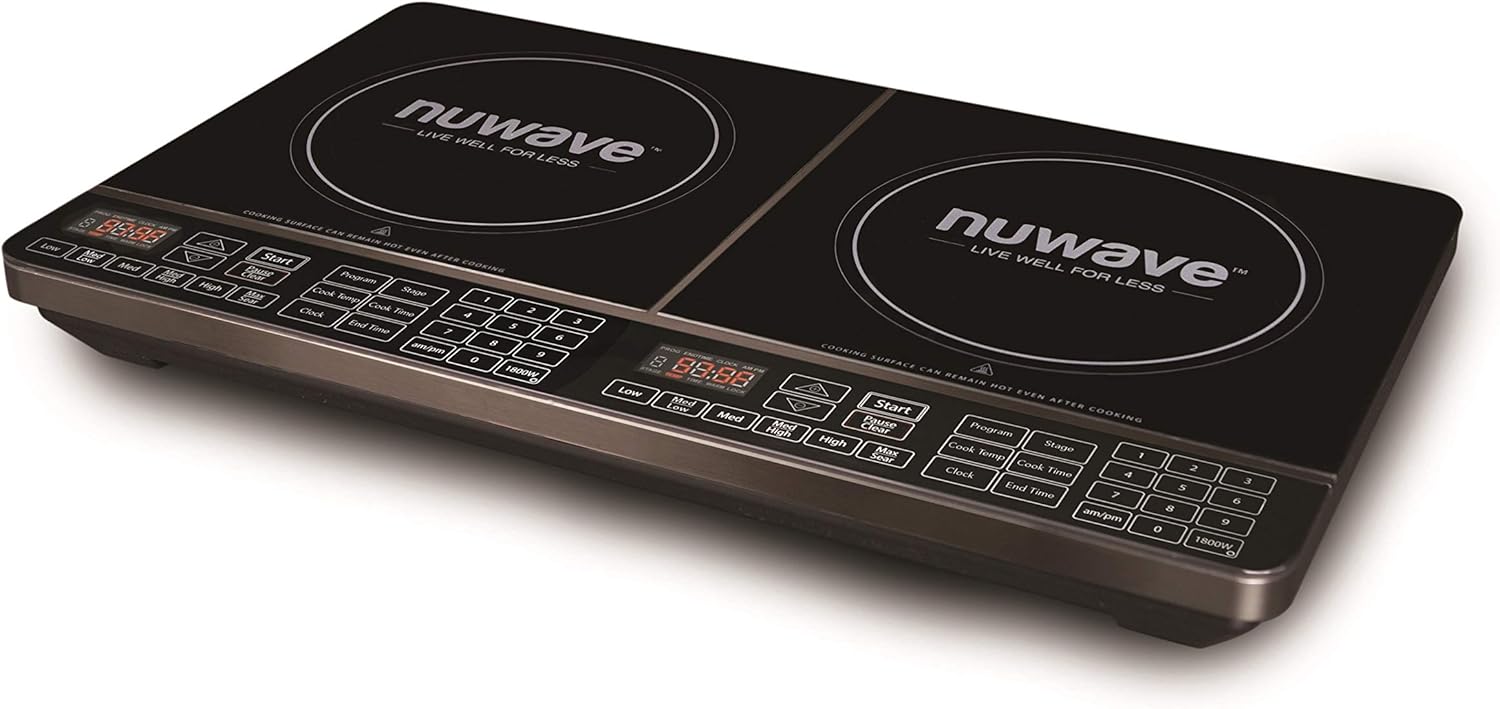
Beeld 1: Hoekig view of the NuWave 30602 Double Precision Induction Cooktop Burner. This image shows the overall design of the cooktop, including the two cooking zones and the integrated control panels.
Beheerpaneelkenmerke
Each cooking zone has a dedicated control panel with touch-sensitive buttons and a digital display. Key controls include:
- Digitale skerm: Shows temperature, time, and error codes.
- Start/Pause/Clear: Initiates, pauses, or clears cooking settings.
- Program/Stage: Vir multi-stage kook.
- Temperature/Wattage Controls: Buttons for adjusting temperature (Low, Med Low, Med, Med High, High, Max Sear) and wattage (am/pm, 1800W).
- Clock/Cook Time/End Time: For setting timers and delayed cooking.
- Nommerblokkie (1-9, 0): For precise temperature and time input.

Beeld 2: Bo-na-onder view of the NuWave 30602 Double Precision Induction Cooktop Burner, highlighting the control panels for each burner. This image provides a clear view of all buttons and the digital displays.
Opstelling
- Uitpak: Carefully remove the cooktop from its packaging. Retain packaging for storage or return if necessary.
- Plasing: Place the cooktop on a stable, level, heat-resistant surface. Ensure there is adequate ventilation around the unit. Do not block the air vents located on the bottom or sides.
- Kragverbinding: Plug the power cord into a standard 120V AC electrical outlet. Ensure the outlet is properly grounded.
- Rear Power Switch: Locate the main ON/OFF switch at the back of the unit, near where the power cord connects. Flip this switch to the 'ON' position to supply power to the cooktop. The digital displays will illuminate.
- Kookgerei-kontrole: Before cooking, ensure you are using induction-compatible cookware. This typically includes cast iron, enameled iron, and stainless steel with a magnetic bottom. A simple test is to place a magnet on the bottom of your pot or pan; if it sticks, the cookware is compatible.
Bedryfsinstruksies
Basiese werking
- Ensure the rear power switch is ON.
- Place induction-compatible cookware containing food or liquid on the desired cooking zone.
- Press the 'Start' button for the chosen cooking zone. The display will show a default temperature or wattage.
- Adjust the temperature or wattage using the dedicated temperature buttons (Low, Med Low, Med, Med High, High, Max Sear) or the number pad for precise settings. The cooktop offers 94 different temperature settings, ranging from 100°F to 575°F, in 5-degree increments.
- To stop cooking, press the 'Clear' button for the active zone, or remove the cookware. The unit will automatically shut off if no cookware is detected for a period.
Voorgeprogrammeerde instellings
The cooktop includes 6 different pre-programmed temperature settings for common cooking tasks. Refer to your quick-start guide for specific details on activating these programs.
Hou Warm-funksie
Activate the 2-hour 'Keep Warm' feature to maintain food at approximately 155°F (68°C). This is ideal for keeping dishes warm after cooking.
Multi-Stage Kook
The 'Program' and 'Stage' buttons allow you to set up to three different cooking stages with varying temperatures and times. This is useful for recipes that require different heat levels during the cooking process.
Wattage Bestuur
The cooktop allows for wattage adjustment between the two heating elements. This feature helps manage power consumption, especially when using both burners simultaneously. Consult the display for current wattage distribution and adjust as needed.
Sluitfunksie
To prevent accidental changes to settings during cooking, use the lock feature. This typically involves a long-press or simultaneous press of specific buttons. Refer to the on-screen prompts or quick-start guide for exact activation and deactivation steps. Note that activating the lock feature may require precise button presses.
Aanhangerwerk
It is normal for the internal cooling fan(s) to operate continuously while the cooktop is heating and for a period after cooking has finished. This ensures proper cooling of internal components.
Onderhoud en Skoonmaak
Regular cleaning ensures optimal performance and extends the life of your cooktop.
- Voor skoonmaak: Always unplug the cooktop from the power outlet and ensure it has completely cooled down.
- Kookplaat oppervlak: Vee die glasoppervlak af met adamp cloth and mild detergent. For stubborn stains or spills, use a non-abrasive cooktop cleaner specifically designed for glass or ceramic surfaces. Avoid abrasive pads, scouring powders, or harsh chemicals that can scratch or damage the surface.
- Beheerpaneel: Vee die beheerpaneel af met 'n sagte, damp cloth. Do not use excessive water or allow liquids to seep into the controls.
- Buitekant: Clean the exterior housing with a soft, damp lap.
- Ventilasies: Ensure the air intake and exhaust vents are clear of dust and debris. Use a soft brush or vacuum cleaner to gently clean them.
- Gemors: Maak gemorste vloeistof onmiddellik skoon, veral suikerhoudende vloeistowwe, om te verhoed dat dit verhard en die glasoppervlak moontlik beskadig.
Probleemoplossing
Indien u probleme met u kookplaat ondervind, raadpleeg die volgende algemene probleme en oplossings:
| Probleem | Moontlike oorsaak | Oplossing |
|---|---|---|
| Kookplaat skakel nie aan nie. | Rear power switch is OFF. Unit not plugged in. Power outage. | Ensure the rear power switch is ON. Check if the power cord is securely plugged into a working outlet. Check your household circuit breaker. |
| Die skerm wys 'n foutkode (bv. E0, E1). | No cookware or incompatible cookware detected. Overheating. Internal malfunction. | Ensure induction-compatible cookware is centered on the cooking zone. Allow the unit to cool if it overheated. If the error persists, contact customer support. |
| Temperature setting (e.g., 'Sear') does not activate. | Tydelike sagtewarefout. | Turn the unit off using the rear power switch, wait a few seconds, then turn it back on. This often resets the controls. |
| Cooktop makes a humming or buzzing noise. | Normal operation of induction technology or cooling fan. | This is typically normal. Induction cooktops use electromagnetic fields which can cause a slight hum in some cookware. The cooling fan also produces noise. |
| Temperature control seems inaccurate or too high/low. | Induction heats very rapidly. Cookware type and food volume affect heat transfer. | Adjust temperature in smaller increments. Familiarize yourself with how your specific cookware reacts to induction heat. Start with lower settings and increase as needed. |
If the problem persists after attempting these solutions, please contact Nuwave customer support.
Spesifikasies
- Modelnommer: 30602
- Handelsmerk: Nuwave
- Krag: 900/1800 Watts (shared between two burners)
- Temperatuurreeks: 100°F - 575°F
- Temperatuurinstellings: 94 precise temperature settings, 5-degree increments
- Voorgeprogrammeerde instellings: 6
- Hou Warm Kenmerk: 2 uur by 155°F
- Verhittingselemente: 2 (Sealed Burner type)
- Tipe kontroles: Raaksensitiewe knoppies
- Spesiale kenmerke: Temperature Control, Induction Compatible
- Item gewig: Ongeveer 17.4 pond
- UPC: 735343078521, 793842115260, 652185306028
Waarborg inligting
For detailed warranty information, please refer to the warranty card included with your product packaging. You may also visit the official Nuwave webwebwerf vir die mees onlangse waarborgbepalings en -voorwaardes.
Kliënte ondersteuning
If you require further assistance, have questions about your NuWave 30602 Double Precision Induction Cooktop Burner, or need to report a service issue, please contact Nuwave customer support through their official webwebwerf of die kontakinligting wat in u produkdokumentasie verskaf word.