
1. Inleiding
This manual provides essential information for the safe and efficient operation, installation, and maintenance of your Daitsu ADDH10 Digital Dehumidifier. Please read these instructions thoroughly before using the appliance and retain them for future reference.
The Daitsu ADDH10 is designed to reduce humidity levels in indoor environments, helping to prevent mold, mildew, and other moisture-related issues. It features a digital display and automatic functions for user convenience.
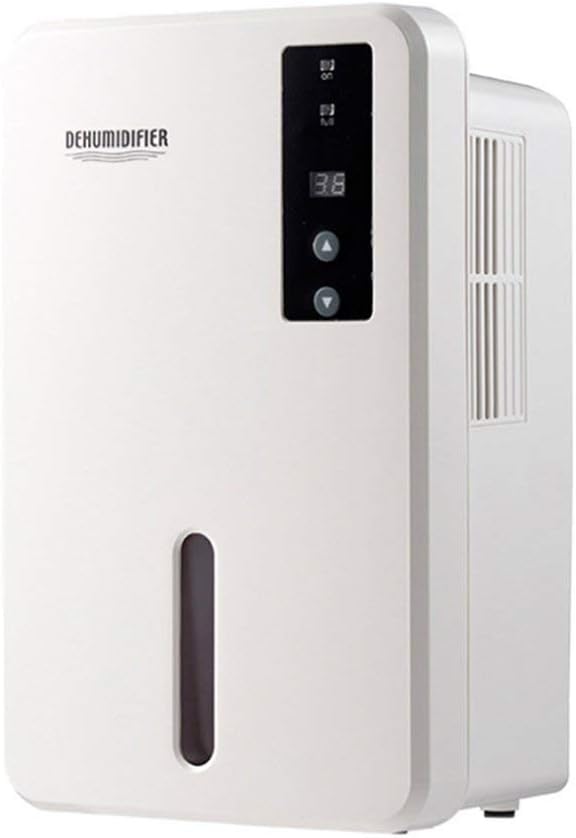
Beeld 1.1: Voorkant view of the Daitsu ADDH10 Digital Dehumidifier, showing the control panel and water tank window.
2. Veiligheidsinligting
Volg altyd basiese veiligheidsmaatreëls wanneer u elektriese toestelle gebruik om die risiko van brand, elektriese skok en beserings te verminder.
- Lees alle instruksies voordat u die ontvochtiger gebruik.
- Maak seker dat die kragtoevoer ooreenstem met die voltage gespesifiseer op die graderingetiket.
- Moenie die ontvochtiger met 'n beskadigde koord of prop gebruik nie.
- Hou die toestel weg van hittebronne, direkte sonlig en vlambare materiale.
- Do not block the air inlet or outlet. Ensure adequate air circulation around the unit.
- Plaas die ontvochtiger altyd op 'n stabiele, gelyk oppervlak.
- Ontkoppel die eenheid voor skoonmaak, onderhoud of wanneer dit vir lang tye nie gebruik word nie.
- Hierdie toestel is nie bedoel vir gebruik deur persone (insluitend kinders) met verminderde fisiese, sensoriese of geestelike vermoëns, of 'n gebrek aan ervaring en kennis nie, tensy hulle toesig of instruksies oor die gebruik van die toestel gegee is deur 'n persoon wat verantwoordelik is vir hul veiligheid.

Image 2.1: Illustration of the dehumidifier's double security protection, including automatic shut-off when the water tank is full and over-temperature protection (auto-stop if heat sink exceeds 80°C).
3. Produkkomponente en -kenmerke
Maak jouself vertroud met die hoofonderdele van jou ontvochtiger:
- Beheerpaneel: Digital display and buttons for operation.
- Luginlaat: Waar vogtige lug in die eenheid ingetrek word.
- Luguitlaat: Waar droë lug uitgestoot word.
- Watertenk: Collects condensed water. Features a transparent window to monitor water level.
- Water Tank Handle/Lid: For easy removal and emptying.

Image 3.1: Diagram showing the key components: Air outlet, Control panel, Air inlet, and the 1.5L water tank capacity.
The dehumidifier has a 1.5-liter water tank capacity and features automatic shut-off when the tank is full, indicated by a float sensor. It also includes over-temperature protection.
4. Opstelling en installering
4.1 Uitpak
- Verwyder die ontvochtiger versigtig uit sy verpakking.
- Verwyder alle verpakkingsmateriaal, kleefband en beskermende films.
- Inspect the unit for any signs of damage. If damaged, do not operate and contact your retailer.
4.2 Plasing
- Plaas die ontvochtiger op 'n stewige, gelyk oppervlak wat sy gewig kan ondersteun wanneer die watertenk vol is.
- Ensure there is at least 20 cm (8 inches) of space around the air inlet and outlet for proper air circulation.
- Vermy die plasing van die eenheid naby mure, meubels of gordyne wat lugvloei kan belemmer.
- Do not place the unit in direct sunlight or near heat-generating appliances.
- For optimal performance, operate the dehumidifier in an enclosed area. Close all doors and windows in the room.
4.3 Kragverbinding
- Ensure your hands are dry before plugging in the unit.
- Steek die kragkabel in 'n behoorlik geaarde elektriese aansluiting.
5. Bedryfsinstruksies
5.1 Beheerpaneel verbyview
The control panel features a digital display and control buttons:
- Digitale skerm: Shows current humidity level or settings.
- Kragknoppie: Skakel die eenheid aan of af.
- Op/af knoppies: Adjust desired humidity level or other settings.

Image 5.1: Various angles of the dehumidifier, highlighting the digital control panel with up/down buttons and the transparent water tank.
5.2 Basiese werking
- Skakel aan: Press the Power button to turn on the dehumidifier. The digital display will light up, showing the current room humidity.
- Stel Gewenste Humiditeit in: Use the Up and Down buttons to set your desired humidity level. The unit will operate until the room humidity reaches the set level, then cycle on and off to maintain it.
- Skakel af: Druk weer die aan/uit-knoppie om die ontvochtiger af te skakel.
5.3 Maak die watertenk leeg
When the water tank is full, the dehumidifier will automatically stop operating, and an indicator light (if available) may illuminate. The unit will not resume operation until the tank is emptied and reinserted correctly.
- Trek die watertenk versigtig uit die voorkant van die eenheid.
- Dra die tenk versigtig na 'n wasbak of drein.
- Remove the tank lid (if applicable) and pour out the collected water.
- Replace the lid securely and slide the empty water tank back into the dehumidifier until it clicks into place.
- The unit will resume operation automatically if the power is on and the desired humidity level has not been reached.

Image 5.2: The transparent water tank, designed for easy removal and emptying.
6. Onderhoud
Gereelde onderhoud verseker optimale werkverrigting en verleng die lewensduur van jou ontvochtiger. Ontkoppel altyd die eenheid voordat jy enige onderhoud uitvoer.
6.1 Skoonmaak van die watertenk
- Clean the water tank regularly (e.g., every few weeks) to prevent mold and bacteria growth.
- Verwyder die watertenk soos beskryf in Afdeling 5.3.
- Wash the tank with mild detergent and warm water. Rinse thoroughly.
- Droog die tenk heeltemal af voordat dit weer in die eenheid geplaas word.
6.2 Skoonmaak van die buitekant
- Vee die buitekant van die ontvochtiger af met 'n sagte, damp lap.
- Moenie skuurmiddels, oplosmiddels of harde chemikalieë gebruik nie, aangesien dit die oppervlak kan beskadig.
- Maak seker dat geen water die interne komponente binnedring nie.
6.3 Berging
- Indien die ontvochtiger vir 'n lang tydperk gestoor word, maak seker dat die watertenk leeg en skoon is.
- Maak die buitekant van die eenheid skoon.
- Bêre die eenheid regop in 'n koel, droë plek, weg van direkte sonlig en uiterste temperature.
7. Probleemoplossing
Voordat u kliëntediens kontak, raadpleeg asseblief die volgende probleemoplossingsgids vir algemene probleme:
| Probleem | Moontlike oorsaak | Oplossing |
|---|---|---|
| Ontvochtiger skakel nie aan nie. | Geen kragtoevoer. Kragkabel nie stewig ingeprop nie. |
Kyk of die kragaansluiting werk. Maak seker dat die kragkabel stewig in die eenheid en die muursok ingeprop is. |
| Die eenheid loop, maar versamel nie water nie. | Kamerhumiditeit is reeds laag. Temperatuur is te laag. Lugvloei is geblokkeer. |
Check the current humidity level on the display. If it's below your set point, the unit will not collect water. Ontvochtigers is minder effektief in baie koue omgewings. Maak seker dat luginlaat en -uitlaat nie versper word nie. |
| Die eenheid hou op met werk en die aanwyserliggie brand. | Watertenk is vol. Die watertenk is nie behoorlik geplaas nie. |
Maak die watertenk leeg. Plaas die watertenk korrek terug totdat dit in plek klik. |
| Ongewone geraas tydens operasie. | Die eenheid is nie op 'n gelyke oppervlak nie. Probleem met interne komponent. |
Maak seker dat die eenheid op 'n stabiele, gelyk oppervlak geplaas word. Indien geraas voortduur, staak gebruik en kontak kliëntediens. |
8. Spesifikasies
| Kenmerk | Spesifikasie |
|---|---|
| Handelsmerk | Daitsu |
| Modelnommer | ADDH10 (Technical Model: bb_S0403263) |
| Kleur | Wit |
| Item gewig | 10 kilogram |
| Produk Afmetings (ongeveer) | 286 mm (hoogte) x 180 mm (breedte) x 134 mm (diepte) |
| Watertenk kapasiteit | 1.5 liter |
| Bedryfsmodus | Outomatiese |
| Ingesluit komponente | Ontvochtiger |
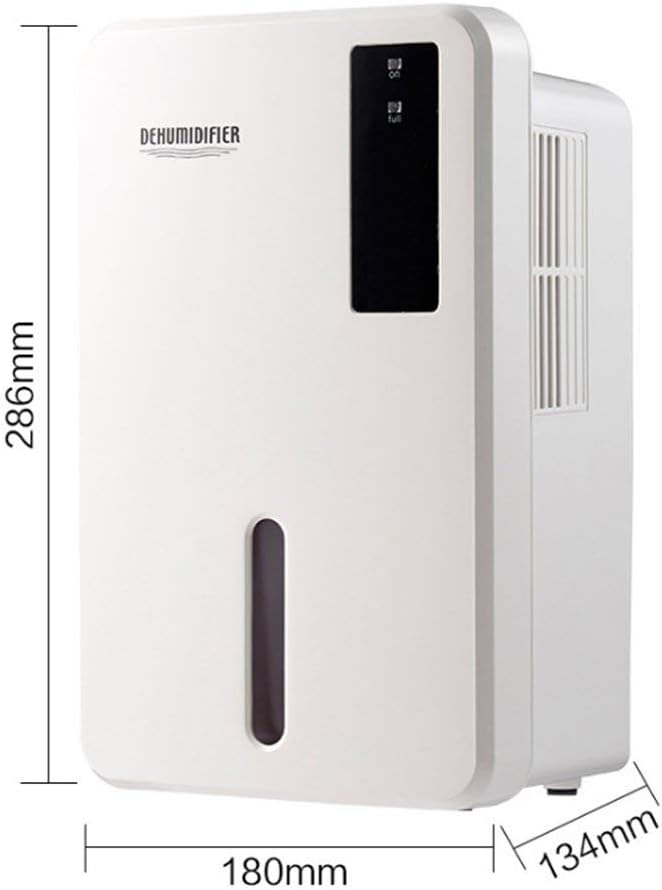
Image 8.1: Diagram illustrating the dimensions of the dehumidifier: 286mm height, 180mm width, and 134mm depth.
9. Waarborg en Ondersteuning
For warranty information, please refer to the documentation included with your product packaging or visit the official Daitsu webwebwerf. Waarborgbepalings en -voorwaardes kan per streek en kleinhandelaar verskil.
If you encounter issues not covered in the troubleshooting section or require further assistance, please contact your retailer or the manufacturer's customer support. Have your model number (ADDH10) and purchase details ready when contacting support.