
WASABI MANGO UHD430 SE
Wasabi Mango UHD430 4K Monitor Gebruikershandleiding
Model: UHD430 SE
Inleiding
The Wasabi Mango UHD430 Real 4K HDMI 2.0 Monitor is a high-performance display featuring a 43-inch LG AH-IPS panel, delivering stunning 3840 x 2160 UHD 4K resolution. Designed for clarity and vibrant colors, this monitor supports 10-bit color depth and offers wide viewhoeke.
Sleutel kenmerke sluit in:
- 43-inch LG AH-IPS LED Backlit Panel for superior image quality.
- UHD 4K (3840 x 2160) resolution for incredibly detailed visuals.
- 1.06 billion colors (10-bit) for rich and accurate color reproduction.
- Multiple connectivity options: HDMI 2.0 (x2), HDMI 1.4a (x2), DisplayPort 1.2 (x1), D-Sub, USB 3.0 Hub.
- 60Hz refresh rate via DisplayPort 1.2 and HDMI 2.0 for smooth motion.
- Built-in 10W + 10W speakers for integrated audio.

Beeld: Voorkant view of the Wasabi Mango UHD430 4K monitor, showcasing its sleek design and a remote control for operation.
Pakketinhoud
Merk asseblief die blokkie vir die volgende items:
- Wasabi Mango UHD430 Monitor
- DisplayPort-kabel
- HDMI kabel
- Remote Control (Note: Text on remote may be in Korean)
- Power Cable (110~240V adapter + US plug)
- USB-hubkabel
- Screws for stand
- Optiese klank kabel
- Gebruikershandleiding
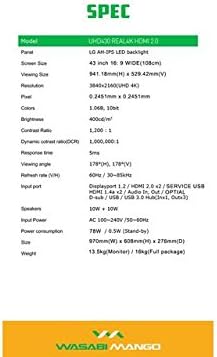
Image: A visual representation of the monitor's dimensions and a list of all accessories included in the package, such as various cables, remote control, and stand screws.
Opstelling
1. Montering van die staanplek
- Plaas die monitor versigtig met die gesig na onder op 'n sagte, skoon oppervlak om skrape te voorkom.
- Attach the stand base to the monitor using the provided screws. Ensure it is securely fastened.
2. Aansluiting by 'n kragbron
- Koppel die kragkabel aan die monitor se kragtoevoerpoort.
- Steek die ander kant van die kragkabel in 'n geaarde elektriese aansluiting.
3. Connecting to a Source Device
The monitor supports various input types. Choose the appropriate cable for your device:
- DisplayPort 1.2: For optimal 4K @ 60Hz performance, use the included DisplayPort cable. Connect one end to the monitor's DisplayPort input and the other to your computer's DisplayPort output.
- HDMI 2.0: For 4K @ 60Hz, use an HDMI 2.0 cable. Connect to one of the HDMI 2.0 ports on the monitor.
- HDMI 1.4a: Supports 4K @ 30Hz. Connect to one of the HDMI 1.4a ports.
- D-Sub: For analog connections.
- USB 3.0 Hub: Connect the USB Hub cable from your computer to the monitor's USB 3.0 input to enable the monitor's USB ports.
Note: Using a longer (over 1.5m) or low-quality DisplayPort/HDMI cable may limit the refresh rate to 30Hz at 4K resolution.
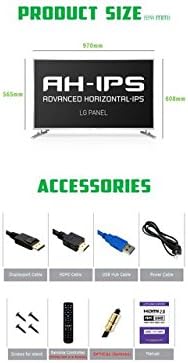
Image: The back panel of the monitor, illustrating the arrangement of power input, DisplayPort, HDMI, D-Sub, and USB ports for connection.
Gebruik die monitor
Krag aan/af
- Druk die aan/af-knoppie op die monitor of die afstandbeheerder om die monitor aan of af te skakel.
Invoerkeuse
- Use the "Input" button on the remote control to cycle through available input sources (DisplayPort, HDMI1, HDMI2, HDMI3, HDMI4, D-Sub).
On-Screen Display (OSD)-kieslys
The OSD menu allows you to adjust various display settings. Use the remote control to navigate:
- Press the "Menu" button to open the OSD.
- Use the arrow keys (Up/Down/Left/Right) to navigate through menu options.
- Press "OK" or "Enter" to select an option or confirm a setting.
- Press "Exit" or "Menu" again to close the OSD.
Algemene OSD-instellings sluit in:
- Prentinstellings: Brightness, Contrast, Color Temperature, Sharpness.
- Oudio-instellings: Volume, Demp.
- Invoerkeuse: Manual input source selection.
- OSD-instellings: OSD Language, OSD Transparency, OSD Timeout.
- Ander instellings: Aspect Ratio, ECO Mode.

Image: The monitor displaying content, with the remote control visible, indicating its use for navigating the monitor's functions and settings.
Onderhoud
Maak die monitor skoon
- Ontkoppel altyd die monitor van die kragtoevoer voordat u dit skoonmaak.
- Gebruik 'n sagte, pluisvrye lap effens dampmet water of 'n nie-skurende skermreiniger afgevee.
- Moenie skoonmaakmiddel direk op die skerm spuit nie.
- Vermy die gebruik van benseen, verdunner, ammoniak of skuurmiddels, aangesien dit die skermoppervlak kan beskadig.
- Vee die skerm liggies af om stof en vlekke te verwyder.
Algemene Sorg
- Hou die monitor weg van direkte sonlig, hittebronne en oormatige stof.
- Verseker behoorlike ventilasie rondom die monitor om oorverhitting te voorkom.
- Moenie swaar voorwerpe op die monitor of sy kabels plaas nie.
- Vermy om die monitor te laat val of aan harde impakte bloot te stel.
Probleemoplossing
| Probleem | Moontlike oorsaak | Oplossing |
|---|---|---|
| Geen krag | Kragkabel nie gekoppel nie; Kragaansluiting werk nie. | Maak seker dat die kragkabel stewig aan die monitor en die stopcontact gekoppel is. Toets die stopcontact met 'n ander toestel. |
| Geen sein / leë skerm | Incorrect input source selected; Video cable loose or faulty; Source device not powered on. | Press "Input" button on remote to select correct source. Check video cable connections. Ensure source device is on and outputting video. |
| Beeld is verwring of vaag | Incorrect resolution setting; Faulty video cable; Graphics card driver issue. | Set display resolution to 3840x2160. Try a different video cable. Update graphics card drivers. |
| Geen oudio nie | Volume too low or muted; Audio cable not connected (if using external speakers); Incorrect audio output selected on source device. | Increase volume or unmute. Ensure audio is routed correctly from source device to monitor. |
| Afstandbeheer werk nie | Batteries are dead or incorrectly inserted; Obstruction between remote and monitor. | Replace batteries. Ensure clear line of sight to the monitor's IR receiver. |
Spesifikasies
| Kenmerk | Detail |
|---|---|
| Model Naam | UHD430 Real 4K HDMI 2.0 |
| Paneel tipe | LG AH-IPS LED Backlight |
| Skerm grootte | 43 inches (109.2 cm), 16:9 Wide |
| Resolusie | 3840 x 2160 UHD 4K |
| Kleure | 1.06 Billion (10-bit) |
| Kontrasverhouding | 1200:1 |
| Dinamiese kontrasverhouding | 1,000,000:1 |
| Helderheid | 400 cd/m² |
| Reaksie Tyd | 5 ms (G tot G) |
| Viewing Hoek | 178 grade horisontaal, 178 grade vertikaal |
| Herlaaitempo | 60 Hz (DisplayPort 1.2 & HDMI 2.0), 30 Hz (HDMI 1.4a) |
| Invoerpoorte | DisplayPort 1.2 x1, HDMI 2.0 x2, HDMI 1.4a x2, D-Sub x1, USB 3.0 Hub (In x1, Out x3) |
| Oudio | 10W + 10W Speakers |
| Krag Invoer | Wisselstroom 100-240V / 50-60Hz |
| Kragverbruik | 78W (Operating) / 0.5W (Stand-by) |
| Afmetings (B x H x D) | 970 mm x 608 mm x 276 mm (met staander) |
| Gewig | 13.5 kg (Monitor) / 18 kg (Full package) |
Image: A graphic detailing the technical specifications of the UHD430 monitor, such as screen size, resolution, and refresh rate.
Waarborg en Ondersteuning
The Wasabi Mango UHD430 monitor comes with a manufacturer's warranty. Please refer to the warranty card included in your package for specific terms and conditions.
Defective Pixel Policy: For the UHD430 SE model, 0-15 defective pixels (including dead/stuck/sub pixels) are permitted under the warranty policy.
For technical support or service inquiries, please contact your retailer or the official Wasabi Mango support channels. Keep your purchase receipt and product serial number handy for faster service.
Ask a question about this manual
Ask about setup, troubleshooting, compatibility, parts, safety, or missing instructions. Manuals+ will review the question and use this page’s manual context to help answer it.