
1. Belangrike veiligheidsinligting
Before using the FITFIU Fitness BEST-100 Static Bicycle, please read and understand all instructions in this manual. Keep this manual for future reference.
- Raadpleeg 'n dokter voordat u enige oefenprogram begin.
- Ensure the bicycle is placed on a flat, stable surface.
- Hou kinders en troeteldiere weg van die toerusting tydens gebruik.
- The maximum recommended user weight is 100 kg.
- The maximum recommended user height is 1.65 m.
- Dra gepaste oefenklere en -skoene.
- Hou onmiddellik op met oefening as jy flou, duiselig of pyn ervaar.
- Regularly inspect the bicycle for wear and tear, especially moving parts and connections.
2. Produk verbyview
The FITFIU Fitness BEST-100 is an ultra-compact static bicycle designed for moderate exercise at home or for rehabilitation purposes. It features a 5 kg inertia disc and 8 levels of adjustable magnetic resistance.
The integrated LCD display provides essential workout data, including speed, time, distance, and calories burned. The pedals are equipped with adjustable straps for secure foot placement.

Beeld 2.1: verbyview of the FITFIU Fitness BEST-100 Static Bicycle.
3. Wat is in die boks
Pak alle komponente versigtig uit en maak seker dat jy die volgende items het:
- 1x BEST-100 Static Bicycle (Grey)
- 1x Instruksiehandleiding (hierdie dokument)
- 1x Assembly Kit (includes necessary tools and fasteners)
Indien enige onderdele ontbreek of beskadig is, moenie met montering voortgaan nie. Kontak kliëntediens vir hulp.
4. Monteer-instruksies
Assembly of the BEST-100 static bicycle requires careful attention to the provided diagrams and instructions. It is recommended to have a second person assist with certain steps.
- Base Stabilizers: Attach the front and rear stabilizer bars to the main frame using the provided bolts and nuts. Ensure they are securely tightened.
- pedale: Identify the left (L) and right (R) pedals. Thread the left pedal counter-clockwise and the right pedal clockwise into their respective crank arms. Tighten firmly. Attach the foot straps to the pedals.
- Saalpaal en sitplek: Insert the seat post into the main frame. Adjust the height to your preference using the adjustment knob and secure it. Attach the seat to the seat post.
- Handlebar Post and Handlebars: Connect the handlebar post to the main frame. Attach the handlebars to the handlebar post. Ensure all connections are secure.
- Console/Display: Connect the sensor cables from the main frame to the LCD display unit. Mount the display unit onto the handlebar assembly.
- Finale kontrole: Before first use, verify that all bolts, nuts, and connections are securely tightened. Ensure the bicycle is stable and does not wobble.

Image 4.1: Seat height adjustment mechanism. Adjust to ensure comfortable and effective pedaling.

Image 4.2: Pedals with adjustable straps for secure foot placement during exercise.
5. Bedryfsinstruksies
5.1 Aanpassing van weerstand
The BEST-100 features 8 levels of magnetic resistance. To adjust the resistance, turn the knob located on the main frame below the handlebars. Turn clockwise to increase resistance for a more challenging workout, and counter-clockwise to decrease resistance for an easier workout.

Image 5.1: Resistance adjustment knob. Turn to select one of 8 resistance levels.
5.2 Gebruik van die LCD-skerm
The LCD display tracks your workout progress. It typically shows the following metrics:
- SPOED: Huidige fietsryspoed.
- TYD: Duur van jou oefensessie.
- AFSTAND: Totale afstand afgelê tydens oefensessie.
- KALORIEË: Geskatte kalorieë verbrand.
The display is battery-powered. If the display becomes dim or unresponsive, replace the batteries (type usually AAA, refer to the battery compartment for specifics).

Image 5.2: LCD display showing workout metrics and handlebars for support.
6. Onderhoud
Regular maintenance ensures the longevity and safe operation of your static bicycle.
- Skoonmaak: Wipe down the bicycle with a damp lap na elke gebruik om sweet en stof te verwyder. Vermy skuurmiddels of oplosmiddels.
- Inspeksie: Periodically check all bolts, nuts, and moving parts for tightness. Tighten any loose fasteners.
- Smering: Die magnetiese weerstandstelsel is oor die algemeen onderhoudsvry. Moenie probeer om interne komponente te smeer nie, tensy dit spesifiek deur die vervaardiger aangedui word.
- Berging: Store the bicycle in a dry, cool place away from direct sunlight and extreme temperatures.
7. Probleemoplossing
If you encounter issues with your BEST-100 static bicycle, refer to the following common problems and solutions:
| Probleem | Moontlike oorsaak | Oplossing |
|---|---|---|
| Bicycle is unstable or wobbles. | Loose assembly bolts; uneven floor. | Check and tighten all assembly bolts. Ensure the bicycle is on a level surface. |
| Pedaling movement is not smooth or makes noise. | Loose components; internal friction. | Verify all connections are tight. If noise persists, contact customer support. |
| LCD display is not working or shows incorrect data. | Dooie batterye; los sensorverbinding. | Replace the batteries in the display unit. Check that the sensor cable is securely connected. |
| Resistance adjustment is not effective. | Probleem met interne meganisme. | Maak seker dat die weerstandsknop vrylik draai. Kontak kliëntediens indien die probleem voortduur. |
If the problem is not listed or persists after attempting the solutions, contact FITFIU Fitness customer support.
8. Spesifikasies
| Kenmerk | Spesifikasie |
|---|---|
| Modelnommer | 1100005 |
| Afmetings (L x B x H) | 60 x 40 x 85 cm |
| Produk Gewig | 9 kg |
| Maksimum gebruikersgewig | 100 kg |
| Inertia Disc Weight | 5 kg |
| Weerstandsvlakke | 8 (Verstelbaar) |
| Weerstandmeganisme | Magneties |
| Materiaal | Allooi staal |
| Tipe vertoon | LCD |
| Vertoon funksies | Spoed, Tyd, Afstand, Kalorieë |
| Kleur | Grys |
| Kragbron (Skerm) | Battery aangedryf |
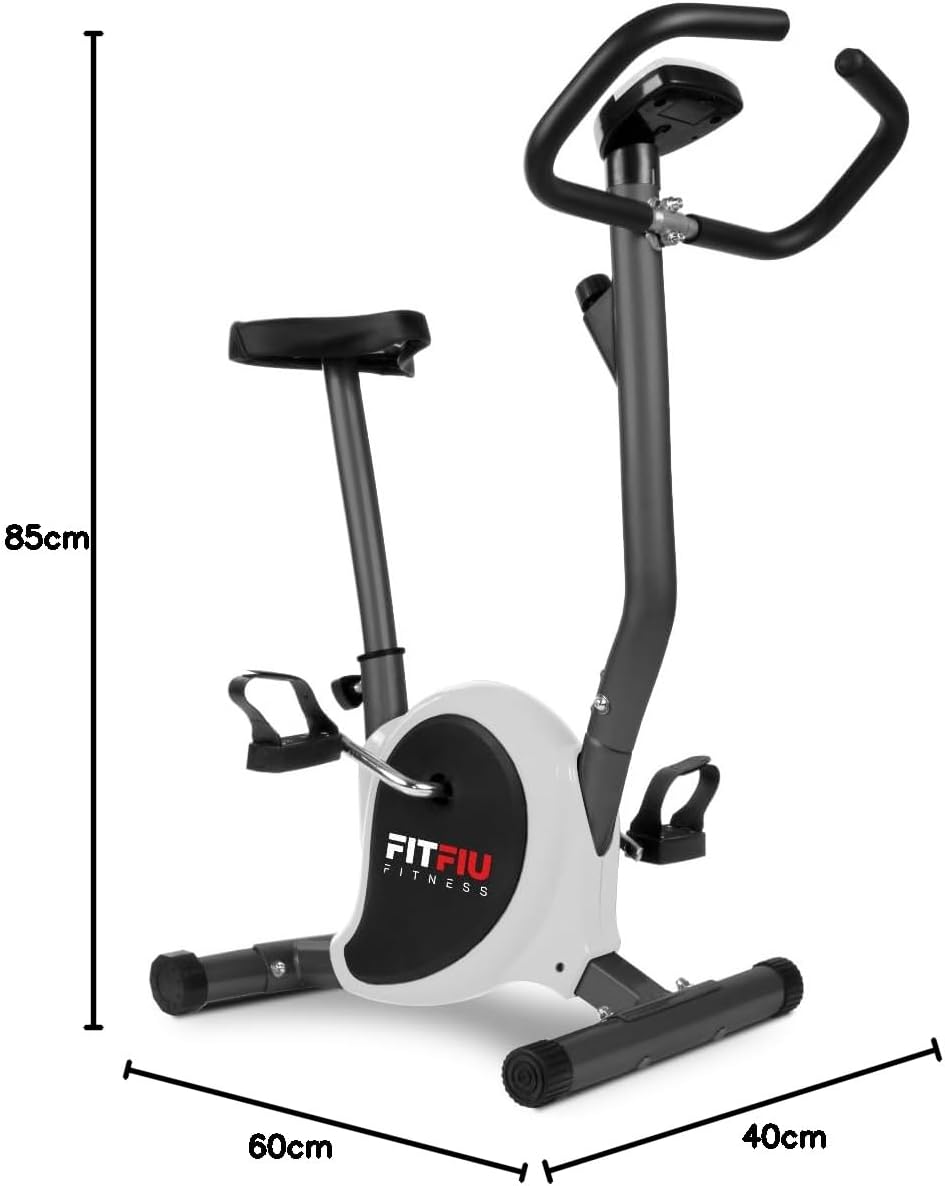
Image 8.1: Diagram showing the dimensions of the static bicycle.
9. Waarborg en Ondersteuning
For warranty information, product support, or to purchase replacement parts, please contact FITFIU Fitness customer service. Refer to your purchase documentation for specific warranty terms and contact details.
You can typically find support information on the official FITFIU Fitness webwebwerf of deur die kleinhandelaar waar jy die produk gekoop het.