
1. Belangrike veiligheidsinligting
Waarskuwing: Electrical engineering work must only be carried out by qualified electricians or under their direct supervision. Always adhere to country-specific standards and regulations for electrical installations. Consult a local electrical installer if you are unsure.
- Devices with a connection value greater than 380 V/400 V require a high current connection and must only be connected by an approved electrician.
- For devices with a rated power exceeding 12 kW, approval from your network operator may be required (this applies to Germany; other countries may have different regulations).
This manual provides instructions for the safe and efficient use of the ABB PM/a1.5.1.1 Mini Presence Detector.
2. Produk verbyview
The ABB PM/a1.5.1.1 Mini Presence Detector is a KNX-compatible device designed for intelligent room automation. It functions as both a presence and motion detector, enabling efficient control of lighting based on occupancy and ambient brightness.
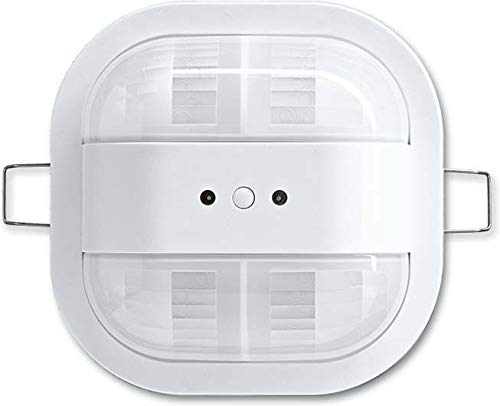
Image showing the compact design of the ABB PM/a1.5.1.1 Mini Presence Detector.
3. Opstelling en installering
The ABB PM/a1.5.1.1 Mini Presence Detector is designed for surface mounting and is suitable for installation in suspended ceilings.
3.1 Monteringsriglyne
- Montage tipe: Surface-mounted.
- Optimale Montage Hoogte: 3 meters (9.84 feet) for best detection coverage.
- Installasie hoogte: The device has an installation height of 16 mm.
- Detection Field: The detection field diameter on the floor is 8 meters.
3.2 Elektriese aansluiting
- The detector features an integrated KNX bus coupler for seamless integration into KNX systems.
- Ensure all wiring is performed by a qualified electrician in accordance with local electrical codes and safety standards.
4. Bedryfsinstruksies
The presence detector offers versatile control options for lighting and other functions within a room.
4.1 Opsporingsvermoëns
- Funksie: Operates as a presence detector, motion detector, or a combination of both.
- Detection Range (at 2.5m mounting height):
- Seated persons: max. 5 meters
- Walking persons: max. 6.5 meters
- Detection Range (at 3m mounting height):
- Seated persons: max. 6.5 meters
- Walking persons: max. 8 meters
- Detection Range (at 4m mounting height):
- Seated persons: max. 9 meters
- Walking persons: max. 10.5 meters
- Anti-creep protection/field monitoring: Ensures comprehensive coverage and prevents blind spots.
4.2 Beligtingbeheer
- Kanale: The device features 2 independent channels for controlling different light strips or zones.
- Helderheid aanpassing: Adjustable response brightness and a teach function for setting optimal brightness levels.
- Constant Light Switch: Functions as a constant light switch with up to 2 independent channels, allowing brightness-dependent switching of two light strips.
- Beheerlogika: Lighting can be controlled based on both room brightness and detected movement.
4.3 Bedryfsparameters
- Minimum Duty Cycle: 10 sekondes.
- Maksimum bedryfstyd: 1092 minute.
5. Onderhoud
The ABB PM/a1.5.1.1 Mini Presence Detector is designed for long-term, maintenance-free operation. To ensure optimal performance:
- Keep the detector lens clean and free from dust or obstructions. Use a soft, dry cloth for cleaning.
- Moenie skuurmiddels of oplosmiddels gebruik nie, aangesien dit die toestel kan beskadig.
- There are no user-serviceable parts inside the device. Do not attempt to open or repair the detector yourself.
6. Probleemoplossing
If you experience issues with your ABB PM/a1.5.1.1 Mini Presence Detector, consider the following common troubleshooting steps:
- Geen opsporing:
- Verify that the detector lens is clean and unobstructed.
- Check the mounting height and ensure it is within the optimal range (3 meters) for the desired detection area.
- Confirm that the KNX bus connection is secure and powered.
- Review the configured detection parameters in your KNX system to ensure they match your requirements.
- Incorrect Lighting Behavior:
- Check the configured brightness thresholds and teach function settings.
- Ensure the correct channels are assigned to the respective light strips in the KNX programming.
- Verify that there are no external light sources interfering with the detector's ambient light sensor.
- Toestel reageer nie:
- Ensure the power supply to the KNX bus is active.
- If the issue persists, consult a qualified electrician or ABB technical support.
For complex issues, always contact a qualified electrician or ABB customer support.
7. Tegniese spesifikasies
| Kenmerk | Spesifikasie |
|---|---|
| Handelsmerk | FIG |
| Modelnommer | 6132-0-0342 |
| Deelnommer | 6131/20-24-500 |
| Kragbron | Elektries met koord |
| Montage tipe | Ceiling Mount (Surface-mounted) |
| Optimal Mounting Height | 3 XNUMX meter |
| Maximum Detection Range (Floor Diameter) | 8 XNUMX meter |
| Aantal kanale | 2 |
| Minimum dienssiklus | 10 sekondes |
| Maksimum bedryfstyd | 1092 minute |
| Item gewig | 4.6 onse |
| Produkafmetings (L x B x H) | 1.18 x 9.84 x 5.51 duim |
| Global Trade Identification Number (GTIN) | 04011395185889 |
8. Waarborg en Ondersteuning
For warranty information, please refer to the documentation provided with your purchase or visit the official ABB website. ABB products are typically covered by a manufacturer's warranty against defects in materials and workmanship.
If you require technical assistance, have questions about installation, or need to report a fault, please contact ABB customer support:
- Visit the official ABB webwebwerf vir ondersteuningsbronne en kontakbesonderhede.
- Verwys na die kontakbesonderhede wat in u produkverpakking verskaf word.
Always provide your product model number (6132-0-0342) and part number (6131/20-24-500) when contacting support for faster service.