
1. Inleiding
This manual provides detailed instructions for the installation, operation, and maintenance of your Alpine CDE-163BT Advanced Bluetooth CD Receiver. Please read this manual thoroughly before using the unit to ensure proper operation and to prevent damage. Keep this manual for future reference.
The Alpine CDE-163BT is a versatile car stereo receiver featuring advanced Bluetooth connectivity for hands-free calling and audio streaming, CD playback, USB input, and FM/AM tuner capabilities. It is designed to deliver high-quality audio performance and user-friendly control.
2. Opstelling en installering
2.1 Pakketinhoud
Voordat u met die installasie begin, maak seker dat alle komponente teenwoordig is:
- Alpine CDE-163BT Head Unit
- Bedradingsharnas
- Mounting Sleeve and Trim Ring
- Mikrofoon vir Bluetooth Handsfree-oproepe
- Eienaar se handleiding (hierdie dokument)
- Monteringshardeware (skroewe, hakies)
2.2 Bedradingsdiagram
Refer to the wiring diagram provided with the unit's installation guide for specific connections. Key connections include:
- Krag: Yellow (constant 12V), Red (switched 12V), Black (ground).
- Luidsprekers: White/White-Black (Front Left), Gray/Gray-Black (Front Right), Green/Green-Black (Rear Left), Purple/Purple-Black (Rear Right).
- Antenna: Blue (power antenna/amplifier remote turn-on).
- Mikrofoon: Connect the supplied microphone to the dedicated input for hands-free calling.
Waarskuwing: Incorrect wiring can cause damage to the unit or vehicle's electrical system. If you are unsure about any wiring connections, consult a qualified professional installer.
2.3 Aanvanklike aanskakeling
After installation, turn on your vehicle's ignition. The unit should power on. Follow any on-screen prompts for initial setup, such as language selection or clock setting.
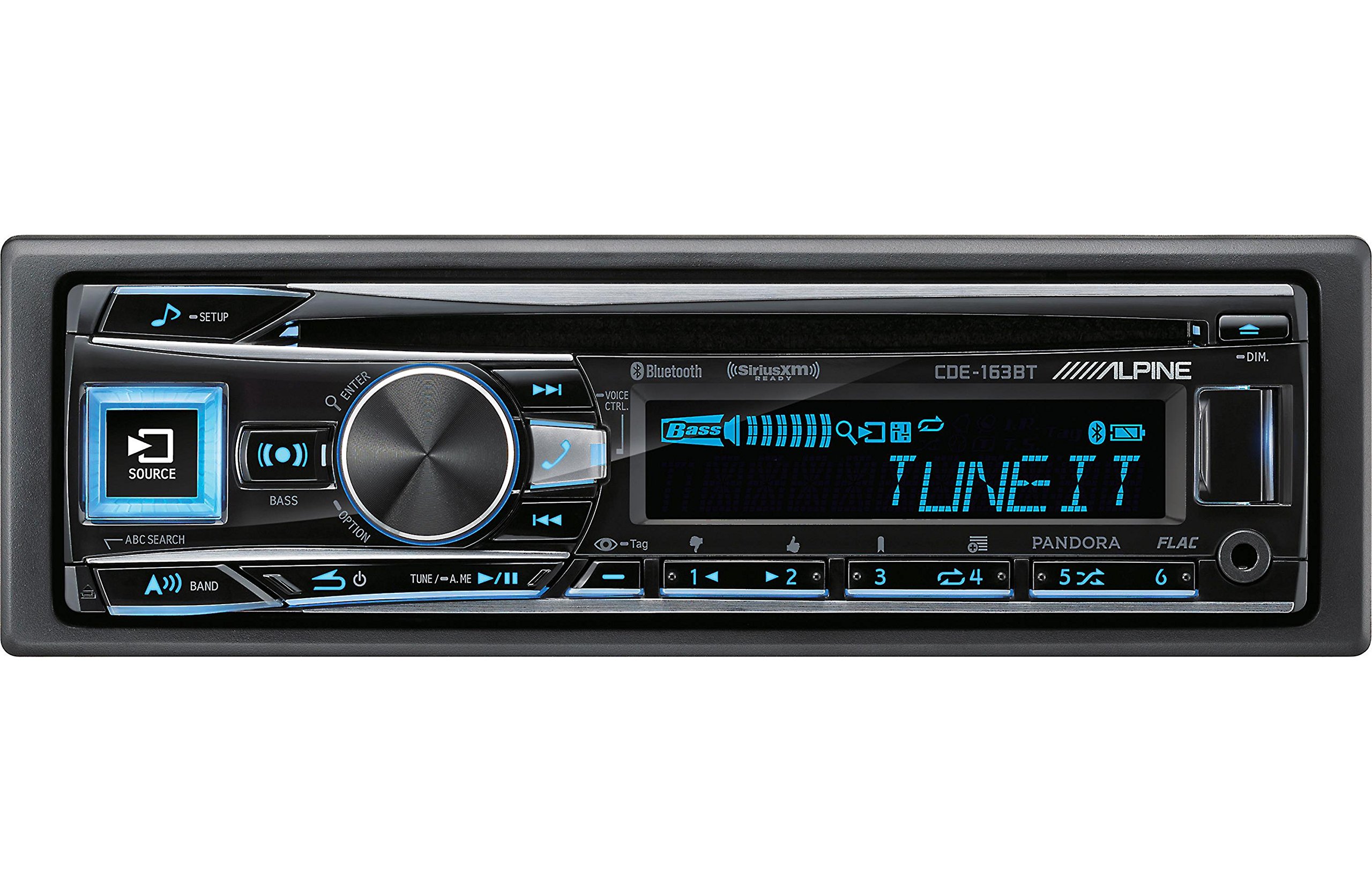
Figure 2.3.1: Front panel of the Alpine CDE-163BT receiver. This image displays the main controls, including the large rotary knob, source button, setup button, and display screen showing "TUNEIT" and "Bass" indicators.
3. Operasie
3.1 Voorpaneelkontroles oorview
Familiarize yourself with the main controls on the front panel:
Figuur 3.1.1: Gedetailleerd view of the Alpine CDE-163BT front panel. Key controls include the SOURCE button (left, illuminated), SETUP button (top left), large central rotary knob for volume and selection, BASS/OPTION button, VOICE CTRL button, and various preset/track skip buttons along the bottom.
- BRON-knoppie: Selects the audio source (CD, Tuner, USB, Bluetooth Audio, AUX).
- SETUP-knoppie: Accesses the main setup menu for system adjustments.
- Rotary Knob (Volume/ENTER): Turns to adjust volume. Press to confirm selections in menus.
- BASS/OPTION Button: Provides quick access to bass settings or other options depending on the current mode.
- VOICE CTRL Button: Activates voice control features on connected smartphones.
- BAND-knoppie: Switches between FM1, FM2, FM3, and AM bands in tuner mode.
- TUNE/A.ME/II Buttons: Used for manual tuning, auto memory, and play/pause functions.
- Track Skip/Preset Buttons (1-6): Used for skipping tracks or selecting radio presets.
- DIM-knoppie: Pas die helderheid van die skerm aan.
3.2 Aan/Af en Bronkeuse
- Om die eenheid te draai ON, press any button (e.g., SOURCE or the Rotary Knob).
- Om die eenheid te draai AF, press and hold the power button (often integrated with the TUNE/A.ME button).
- Druk die BRON button repeatedly to cycle through available audio sources: CD, Tuner, USB, Bluetooth Audio, AUX.
3.3 Volumebeheer
Draai die groot sentrale Draaiknop kloksgewys om volume te verhoog en antikloksgewys om volume te verlaag.
3.4 Oudio-instellings
Druk die BASS/OPTION button or navigate through the SETUP menu to adjust audio settings such as Bass, Treble, Balance (left/right), and Fader (front/rear). Use the Rotary Knob to adjust values and press it to confirm.
3.5 Radio Operation (FM/AM Tuner)
- Select "Tuner" as the source using the BRON knoppie.
- Druk die BAND knoppie om tussen FM1-, FM2-, FM3- en AM-bande te wissel.
- Handmatige instelling: Druk die STEM buttons (◀ / ▶) to manually tune frequencies.
- Soekstemming: Druk en hou die STEM knoppies om outomaties die volgende sterk stasie te soek.
- Vooraf ingestelde stasies: To store a station, tune to the desired frequency, then press and hold one of the numbered preset buttons (1-6) until you hear a beep. To recall a preset, simply press the corresponding numbered button.
3.6 CD-weergawe
- Insert a CD into the disc slot. The unit will automatically switch to CD source and begin playback.
- Use the ◀ / ▶ buttons to skip tracks.
- Druk die TUNE/A.ME/II button for Play/Pause.
- Druk die ABC SEARCH button to search for tracks by name.
3.7 Bluetooth-konnektiwiteit
The CDE-163BT features built-in Bluetooth for hands-free calling and audio streaming.
3.7.1 Koppel 'n Bluetooth-toestel
- Maak seker dat Bluetooth op jou mobiele toestel geaktiveer is.
- On the CDE-163BT, go to the SETUP menu and select "Bluetooth Setup".
- Choose "Pairing" or "Device Search".
- On your mobile device, search for available Bluetooth devices and select "Alpine CDE-163BT".
- Confirm the pairing code if prompted. Once paired, the Bluetooth icon on the receiver's display will illuminate.
3.7.2 Handvrye oproepe
- Wanneer 'n oproep inkom, sal die eenheid die oproeper-ID vertoon. Druk die ENTER button (Rotary Knob) to answer.
- Om 'n oproep te beëindig, druk die ENTER knoppie weer.
- Use the supplied microphone for clear communication.
- Druk die VOICE CTRL button to activate your smartphone's voice assistant.
3.7.3 Bluetooth-klankstroom
- Select "Bluetooth Audio" as the source.
- Start playback on your paired mobile device. Audio will stream through the receiver.
- Use the ◀ / ▶ buttons on the receiver to skip tracks.
3.8 USB-terugspeel
- Connect a USB storage device (e.g., USB flash drive) to the USB port.
- Select "USB" as the source. The unit will automatically detect and begin playing compatible audio files (including FLAC format).
- Use the ◀ / ▶ buttons to skip tracks.
- The unit supports various audio formats.
3.9 Pandora and SiriusXM Ready
- Pandora: Connect your iPhone or Android smartphone via USB or Bluetooth and launch the Pandora app. Select Pandora as the source on the receiver to control the app.
- SiriusXM: This unit is SiriusXM Ready. An optional SiriusXM Connect Vehicle Tuner and subscription are required for satellite radio reception. Connect the tuner and select SiriusXM as the source.
3.10 Vertooninstellings
- Druk die DIM button to adjust the display brightness.
- Access the SETUP menu to customize display colors for buttons and the screen.
4. Onderhoud
4.1 Skoonmaak van die eenheid
Wipe the front panel with a soft, dry cloth. For stubborn stains, dampen the cloth lightly with water. Avoid using harsh chemicals, abrasive cleaners, or solvents as they can damage the finish.
4.2 Skyfversorging
Handle CDs by their edges. Keep discs clean and free of scratches. If a disc is dirty, wipe it gently from the center outwards with a soft, lint-free cloth. Do not use solvents or abrasive cleaners on discs.
5. Probleemoplossing
If you experience issues with your CDE-163BT, refer to the table below for common problems and solutions.
| Probleem | Moontlike oorsaak | Oplossing |
|---|---|---|
| Geen krag nie | Verkeerde bedrading; Deurgeblaasde sekering; Voertuigontsteking af. | Check power connections; Replace fuse; Turn vehicle ignition on. |
| Geen klank nie | Volume te laag; Stilte geaktiveer; Verkeerde luidsprekerbedrading; Amplewendiger af. | Increase volume; Deactivate mute; Check speaker connections; Check ampverligter krag. |
| Bluetooth verbind nie | Device not in pairing mode; Bluetooth off on phone; Interference. | Ensure phone Bluetooth is on and discoverable; Re-attempt pairing; Move closer to unit. |
| CD skips or won't play | Dirty or scratched disc; Disc inserted incorrectly. | Clean disc; Insert disc correctly; Try a different disc. |
| USB-toestel nie herken nie | Onversoenbare formaat; Beskadigde USB-toestel; Los verbinding. | Verseker files are compatible; Try a different USB device; Reconnect USB device. |
If the problem persists after attempting these solutions, please contact Alpine customer support.
6. Spesifikasies
Below are the technical specifications for the Alpine CDE-163BT Advanced Bluetooth CD Receiver:
- Modelnommer: 79380
- Produk afmetings: 5 x 11 x 10 duim
- Item gewig: 4.05 pond (4.1 pond)
- Draadlose kommunikasietegnologie: Bluetooth
- Verbindingstegnologieë: Bluetooth
- Spesiale kenmerke: Built-In Bluetooth, FM Tuner
- Ander vertoonkenmerke: Draadloos
- Kleur: SWART
- Vervaardiger: Alpiene
- Verbindingstegnologie: Bluetooth
- Versoenbare toestelle: Slimfoon
- Connector Tipe: 3.5 mm-aansluiting, USB
- Klankuitsetmodus: Mono, stereo
- Surround Sound Channel-konfigurasie: 4 Kanaal
- Wattage: 200 watt
- Eerste datum beskikbaar: 19 Januarie 2016
7. Waarborg en Kliëntediens
7.1 Waarborginligting
Alpine products are manufactured to the highest quality standards. This product is covered by a limited warranty. Please refer to the separate warranty card included with your purchase for specific terms, conditions, and duration of coverage. Retain your proof of purchase for warranty claims.
7.2 Kliëntediens
For technical assistance, troubleshooting beyond this manual, or warranty service, please contact Alpine customer support:
- Webwebwerf: Besoek die amptelike Alpine webwebwerf vir ondersteuningshulpbronne, algemene vrae en kontakvorms.
- Telefoon: Verwys na die Alpine website or your warranty card for regional customer service phone numbers.
- Gemagtigde dienssentrums: For repairs, locate an authorized Alpine service center through the official webwebwerf.
When contacting support, please have your product model number (CDE-163BT) and serial number ready.