
Inleiding
The Master & Dynamic MW60 Wireless Bluetooth Foldable Headphones are designed to deliver a high-quality audio experience with effective sound isolation. They feature 45mm neodymium drivers for clear audio reproduction across various music genres. Equipped with Bluetooth 4.1, these headphones offer wireless connectivity and up to 16 hours of battery life. Constructed with lightweight stainless steel and aluminum, and featuring leather ear pads, the MW60 headphones are designed for comfort and durability, with a foldable design for portability.
Wat is in die boks
- Master & Dynamic MW60 Wireless Headphones
- Oudiokabel (3.5 mm)
- Klankadapter
- Mikro-USB na USB-laaikabel
- Carry Case for Headphones
- Carry Pouch for Accessories
Produk verbyview
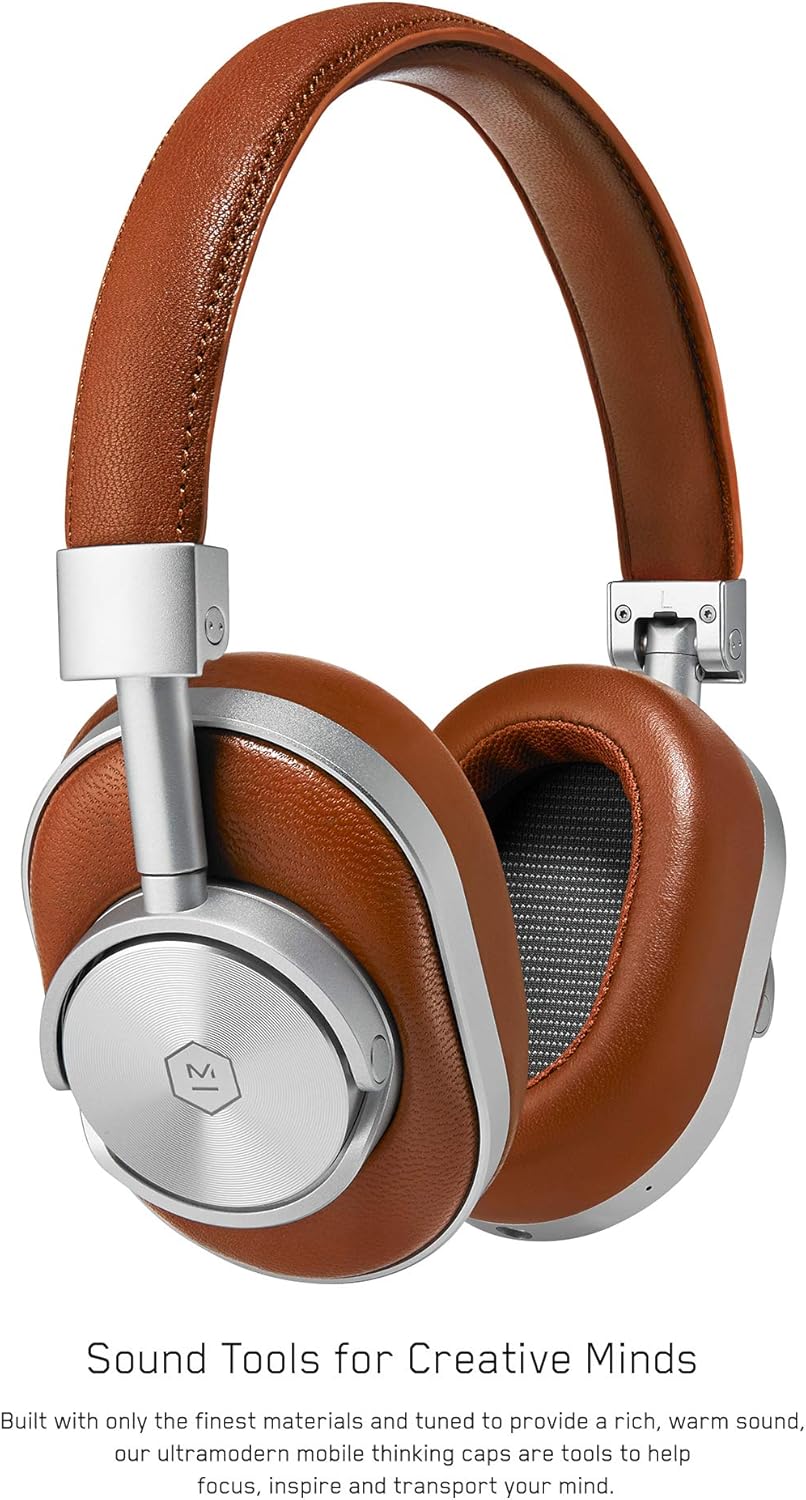
Figuur 1: Voorkant view of the Master & Dynamic MW60 Wireless Headphones. This image displays the over-ear design with silver metal accents and brown leather earcups and headband.

Figuur 2: Close-up of the right earcup showing the control buttons and ports. Visible controls include volume up/down, a multi-function button, and the power/pairing switch. A 3.5mm audio jack and micro USB charging port are also present.
Kontroles en poorte
- Power/Pairing Switch: Located on the earcup, used to turn the headphones on/off and initiate Bluetooth pairing.
- Multifunksie-knoppie: Controls playback (play/pause), call management, and voice assistant activation.
- Volume op / af knoppies: Adjusts audio volume. Can also be used for track skipping (hold for next/previous track).
- 3.5 mm oudio-aansluiting: Vir bedrade verbinding met behulp van die ingeslote klankkabel.
- Mikro -USB -poort: Vir die laai van die interne battery.
- Mikrofoon: Geïntegreerd vir handvrye oproepe.
Opstelling
Laai die oorfone
- Connect the Micro USB end of the charging cable to the Micro USB port on the headphone earcup.
- Koppel die USB-A-punt van die laaikabel aan 'n aangedrewe USB-poort (bv. rekenaar, muuradapter).
- Die aanwyserliggie sal die laaistatus aandui. 'n Volle lading neem gewoonlik ongeveer 2 uur.
Bluetooth-koppeling
- Maak seker dat die oorfone volledig gelaai is.
- Slide the Power/Pairing switch to the ON position.
- To enter pairing mode, slide and hold the Power/Pairing switch to the far right (pairing icon) until the indicator light begins to flash.
- Aktiveer Bluetooth op jou toestel (slimfoon, tablet, rekenaar) en soek vir beskikbare toestelle.
- Select "MW60" from the list of detected devices.
- Once paired, the indicator light will turn solid blue or white, depending on the model.
Bedryfsinstruksies
Basiese funksies
- Krag aan/af: Slide the Power/Pairing switch to the ON or OFF position.
- Speel/pouse: Druk een keer op die Multifunksie-knoppie.
- Volumebeheer: Druk die Volume Op (+) of Volume Af (-) knoppies.
- Volgende snit: Druk en hou die Volume Op (+) knoppie.
- Vorige snit: Druk en hou die Volume Verlaag (-) knoppie.
Belbestuur
- Beantwoord/beëindig oproep: Druk een keer op die Multifunksie-knoppie.
- Verwerp oproep: Druk en hou die Multi-funksie knoppie.
- Aktiveer stemassistent: Dubbeldruk die multifunksieknoppie.
Kabelverbinding
To use the headphones with a wired connection, plug the included 3.5mm audio cable into the audio jack on the earcup and the other end into your audio source. The headphones will automatically switch to wired mode, conserving battery life.
Onderhoud
Skoonmaak
- Vee die oorfone af met 'n sagte, droë lap.
- Moenie harde chemikalieë of skuurmateriaal gebruik nie.
- For leather parts, use a specialized leather cleaner if necessary, following product instructions.
Berging

Figuur 3: The MW60 headphones folded into a compact form, demonstrating their portability and ease of storage in the included carry case.
- When not in use, fold the headphones and store them in the provided carry case to protect them from dust and damage.
- Vermy berging in uiterste temperature of hoë humiditeit.
Probleemoplossing
| Probleem | Moontlike Oplossing |
|---|---|
| Oorfone skakel nie aan nie | Ensure the headphones are fully charged. Connect to a power source using the Micro USB cable. |
| Kan nie via Bluetooth koppel nie | Ensure headphones are in pairing mode (flashing indicator light). Turn off and on Bluetooth on your device. Try forgetting the device on your phone and re-pairing. Ensure no other devices are actively connected. |
| Intermittent audio or connection drops | Ensure your device is within the Bluetooth range. Avoid physical obstructions between the headphones and your device. Minimize interference from other wireless devices. |
| Geen klank in bedrade modus nie | Ensure the 3.5mm audio cable is securely connected to both the headphones and the audio source. Check the volume levels on both the headphones and the audio source. |
| Earcups detach easily | Ensure earcups are properly aligned and securely attached to the magnetic mounts. |
Spesifikasies
| Kenmerk | Detail |
|---|---|
| Model Naam | MW60S2 |
| Verbindingstegnologie | Draadloos (Bluetooth 4.1) |
| Tipe oudiobestuurder | 45mm Neodymium Dynamic Drivers |
| Batterylewe | Tot 16 uur |
| Materiaal | Aluminum, Stainless Steel, Leather |
| Item gewig | 3 pond (ongeveer 1.36 kg) |
| Produk afmetings | 10 x 3.75 x 8 duim (25.4 x 9.5 x 20.3 cm) |
| Impedansie | 32 ohm |
| Geraasbeheer | Klankisolasie (Passief) |
| Koptelefoonaansluiting | 3.5 mm-aansluiting |
Waarborg en Ondersteuning
Warranty information for your Master & Dynamic MW60 Wireless Headphones is typically provided with your purchase. Please refer to the documentation included in your product packaging for specific warranty terms and conditions.
For technical support, service, or further inquiries, please contact Master & Dynamic customer service directly. Contact details can usually be found on the manufacturer's official webwebwerf of in jou produkdokumentasie.


