
1. Inleiding
The Imada ESL-200 is a handheld digital LED stroboscope designed for precise measurement of rotating, reciprocating, and linear motion. It is suitable for applications in production, quality control, and preventive maintenance. This unit features a bright, long-lasting LED light source, a wide measuring range, adjustable flash duration for sharper images, and selectable units (FPM or Hz).
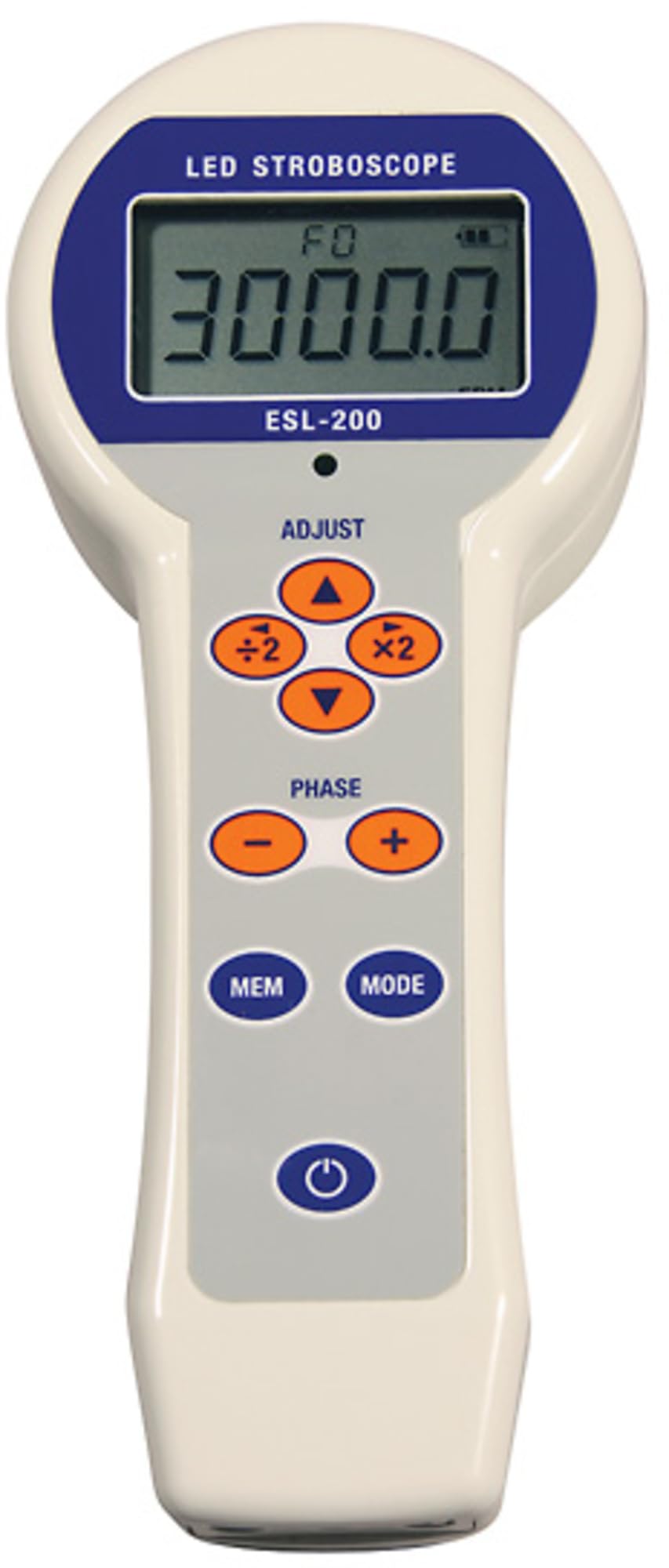
'n Voorkant view of the Imada ESL-200 Handheld Digital LED Stroboscope, showing its digital display and control buttons.
2. Veiligheidsinligting
- Oogbeskerming: Avoid direct exposure to the stroboscope's flashing light, as it can cause discomfort or temporary vision impairment. Do not stare directly into the light source.
- Bedryfsomgewing: Use the device in a well-lit area to minimize the effect of the flashing light. Avoid use in explosive or hazardous environments unless specifically rated for such conditions.
- Kragbron: Use only the specified battery type and ensure correct polarity during installation. Do not mix old and new batteries or different battery types.
- Onderhoud: Moenie probeer om die toestel oop te maak of te herstel nie. Verwys alle diens na gekwalifiseerde personeel.
- Trip Hazard: When using with a tripod, ensure the setup is stable to prevent tipping.
3. Pakketinhoud
Verifieer dat alle items teenwoordig is tydens uitpak:
- Imada ESL-200 Handheld Digital LED Stroboscope
- Gebruikershandleiding
- Carrying Case (if included with specific model variant)
- Batteries (not included, purchase separately)
4. Produkkenmerke
- LEDs produce an extremely bright, long-lasting light source.
- Push-button operation with x2 and /2 buttons allowing for quick adjustments of flash rates.
- Stores up to nine flash rates for both FPM (Flashes Per Minute) and Hz (Hertz) for quick retests.
- Highly stable, drift-free operation provides precision accuracy.
- Rugged aluminum housing withstands challenging industrial environments.
5. Opstelling
5.1 Battery installasie
- Vind die batteryklepdeksel op die toestel.
- Open the cover and insert the required batteries (not included) according to the polarity markings (+/-).
- Sluit die deksel van die batterykas veilig.
5.2 Driepootmontering
The ESL-200 features a 1/4"-20 UNC thread on its base, allowing for mounting on a standard camera tripod. This provides stability for extended use or precise positioning.
- Attach the stroboscope to a compatible tripod by screwing the tripod's mounting screw into the thread on the stroboscope's base.
- Ensure the stroboscope is securely fastened to prevent accidental detachment.
6. Bedryfsinstruksies
6.1 Aan-/afskakel
- Om die toestel aan te skakel, druk die KRAG knoppie. Die digitale skerm sal verlig.
- Druk en hou die. In om uit te skakel KRAG knoppie totdat die skerm afskakel.
6.2 Adjusting Flash Rate
The flash rate can be adjusted in either Flashes Per Minute (FPM) or Hertz (Hz).
- Gebruik die UP en AF arrow buttons to incrementally increase or decrease the flash rate.
- For rapid adjustments, press the x2 button to double the current flash rate or the /2 button to halve it.
- To switch between FPM and Hz units, press the EENHEID knoppie.
6.3 Storing Flash Rates
The ESL-200 can store up to nine frequently used flash rates for quick recall.
- To store a flash rate, adjust to the desired rate, then press and hold the WINKEL button. Select a memory location (1-9) using the arrow buttons and press WINKEL weer om te bevestig.
- To recall a stored flash rate, press the HERROEP button, select the desired memory location, and press HERROEP weer.
6.4 Adjusting Flash Duration
The adjustable flash duration feature allows for sharper images of fast-moving objects.
- Consult the device's on-screen menu or dedicated button (if available) to access flash duration settings.
- Increase or decrease the flash duration as needed to achieve the clearest image of the target.
7. Onderhoud
7.1 Skoonmaak
- Wipe the exterior of the stroboscope with a soft, dry cloth.
- Do not use abrasive cleaners, solvents, or harsh chemicals, as these can damage the housing or display.
- Keep the LED light source clean and free of dust for optimal performance.
7.2 Berging
- Wanneer dit nie vir lang tye gebruik word nie, verwyder die batterye om lekkasie te voorkom.
- Store the stroboscope in its carrying case (if applicable) in a cool, dry place, away from direct sunlight, extreme temperatures, and high humidity.
8. Probleemoplossing
| Probleem | Moontlike oorsaak | Oplossing |
|---|---|---|
| Toestel skakel nie aan nie. | Dooie of verkeerd geïnstalleerde batterye. | Vervang batterye met vars batterye en maak seker dat die polariteit korrek is. |
| Onakkurate of onstabiele lesings. | Incorrect flash rate setting, improper distance to target, or ambient light interference. | Adjust flash rate to synchronize with target motion. Ensure appropriate distance and minimize external light sources. Use tripod for stability. |
| Die skerm is dof of flikker. | Lae batterykrag. | Vervang batterye. |
9. Spesifikasies
- Model: ESL-200
- Vertoon: 5-syfer LCD
- Ligbron: LED
- Flitsreeks: 12 to 150,000 FPM (Flashes Per Minute) / RPM
- Eenhede: Selectable FPM or Hz
- Flitsduur: Verstelbaar
- Geheue: Stores up to 9 flash rates
- Behuising: Rugged aluminum
- Kragbron: Battery-aangedrewe (Batterye nie ingesluit nie)
- Montering: 1/4"-20 UNC Tripod Thread
- Produk afmetings: Ongeveer 11 cm L x 9.75 cm B x 3.5 cm H
- Item gewig: Ongeveer 1.6 onse
10. Waarborg en Ondersteuning
10.1 Waarborg
The Imada ESL-200 Handheld Digital LED Stroboscope is covered by a 1-Year Universal Guarantee vanaf die aankoopdatum. Hierdie waarborg dek defekte in materiaal en vakmanskap onder normale gebruik.
10.2 Tegniese Ondersteuning
For technical assistance, troubleshooting, or warranty claims, please contact Imada customer service. Refer to the Imada official webwebwerf vir die mees onlangse kontakinligting.